reaching ftp thru winscp but erroring in ssis ftp task connection
-
Stan, so glad you got it to work. Regarding the fireAgain reference, I think the AI script "learned" from something that didn't clearly indicate where it was getting that value, probably because it is a configured variable rather than declared in the script in whatever source it purloined. Whether you want it to be true or false would depend on your situation, but true should be fine for you; this describes its usage pretty well.
I'll certainly agree that a DLL approach "feels" cleaner. What I found was that deployment to production and other environments with anything that needed to be in the GAC became something I couldn't easily solve in the silo'd set of teams where this code was running. So I just didn't bother. It was one less handoff that had to be coordinated, defended, and smoothly replicated across environments, and this included to other developers.
There are many reasons why you might not need the private key element. That's why in my verson it was configured as a variable and set on a per-job basis -- if it's empty, it's not needed.
Happy for you, and hope things continue to go well!
Edit - forgot to answer this:
i looked closer at AI's script and believe that remote path has something to do with the ftp path. From what i'm seeing, it starts with a pattern that looks like username@remote host ip. There may be more that follows after a colon but i have to muddle thru this.
Yes, this will be username@host:port. You'll see something like that in the "open" statement (in red) in the sample script I posted earlier. It's quite possible that you can then append the name of a file to GET in the same command, I really don't remember.
But I'm kind of surprised because it seems like those things would be separated out, including the port number, as SessionOptions if you are using the WinSCP DLL. I guess I'm confused now. I only see partial AI scripts in your posts.
-
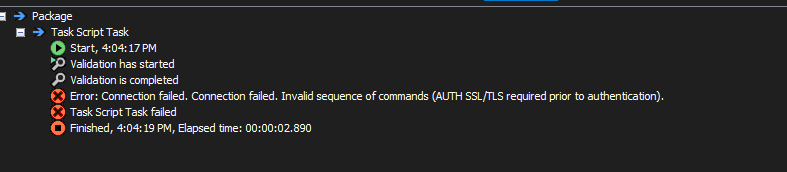
no luck so far. im checking with the site owner. when i go to my host files thru winscp, i choose FTP as the protocol. so i chose FTP as the attribute of the protocol parameter in the c# sessionoptions object. And dont even try to set sshhostkeyfingerprint. But when i run, i get the below error. I'm asking the site owner if he knows of an sshhostkeyfingerprint. Maybe this is sftp?

-
Stan, I can't say, and I hate to sound like a broken record but one of the advantages of using an EXE and a command line interface is that you can run *exactly* the same code within the script task as you do on the command line <s>. So I am going to ask you whether, when you go "thru winscp", whether you have tried using a command line version instead of the GUI and whether you got it to work. Even if you want to continue using the DLL, at least using the command line with its limited switches and tools, you may diagnosis the combination of options that you need to use to get it to work with the DLL as well.
-
thx Lisa, i've only tried the winscp gui thus far. i will try what you suggest soon. and you dont sound like a broken record.
-
i believe i am past the hard part of this.
in the winscp client you can view the certificate fingerprintS by rt clicking the host name (user@url) and choosing "Server / Protocol information".
But like everything else in this space, you are now encouraged but going down the wrong path.
Apparently in some protocols, these fingerprints can be used to build a .net sshhostkeyfingerprint manually.
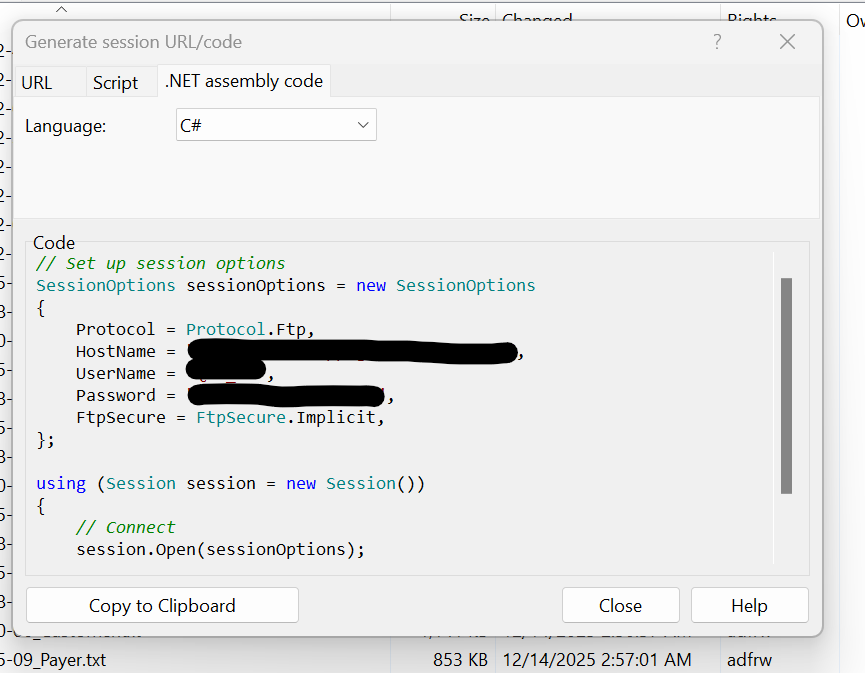
either way, winscp does for you what is necessary if instead you pick "Generate session URL/Code->.NET assembly code". Because i am not SFTP etc, winscp generated for me the code you see below without an sshhostkeyfingerprint but with an ftpsecure attribute. i assume i would have gotten an sshhostkeyfingerprint built had i been sftp etc.
i replaced instantiation of SessionOptions in my ssis c# script with what you see below, built, and now im into more manageable errors like missing files.
i'm going to mark one of Lisa's posts as an answer. And give a thumbs up to Steve's.
-
Congratulations! I don't feel I need to be marked as answering; you did all the hard work yourself.
If there is a lesson to be learned here, though, it is that AI-generated code is a long way from being as knowledgeable about the requirements of a particular code resource like WinSCP's dlls as the generated code from the tool (and the vendors) itself! And it might waste as much of your time as it saves to use AI-generated code as a starting point.
-
If WinSCP can connect to your FTP site but the SSIS FTP Task won’t, it’s usually because the built in SSIS FTP Task is very limited and doesn’t handle all FTP/FTPS variations well — even if your credentials and settings work in WinSCP. In the thread, people suggested trying a command line FTP test from the SSIS server to confirm connectivity, but the more reliable solution many use is to bypass the SSIS FTP Task entirely and either call an external FTP tool from a Script Task (like WinSCP or NcFTP) or write your own script using .NET FTP libraries. That lets you use the same working FTP settings you know work in WinSCP, and avoid the SSIS task’s connectivity limitations.
-
i just learned that if u highlight a file in winscp, rt click and choose download, ...basically following the directions at https://stackoverflow.com/questions/45726100/code-to-download-file-from-ftp-with-winscp-net-assembly-does-not-connect-but-i , winscp will generate even the put or get command in .net for you.
in my case i learned the hard way that i want getfiles , not putfiles.
Viewing 8 posts - 16 through 23 (of 23 total)
You must be logged in to reply to this topic. Login to reply