reaching ftp thru winscp but erroring in ssis ftp task connection
-
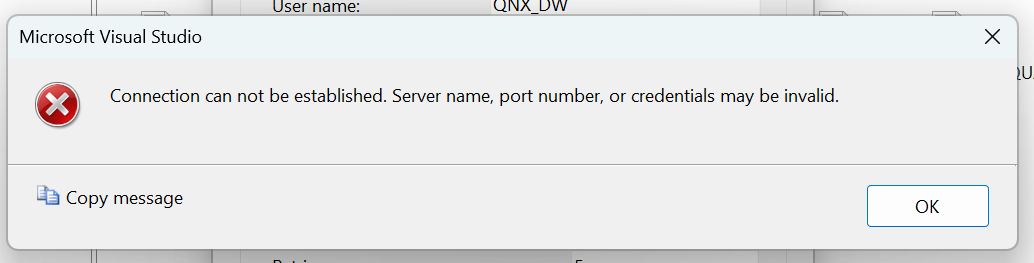
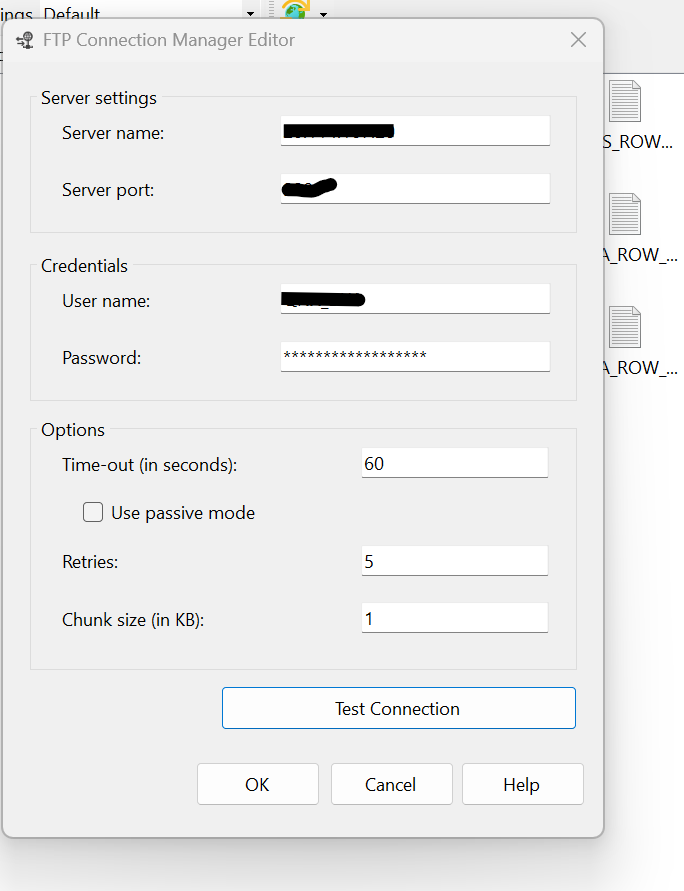
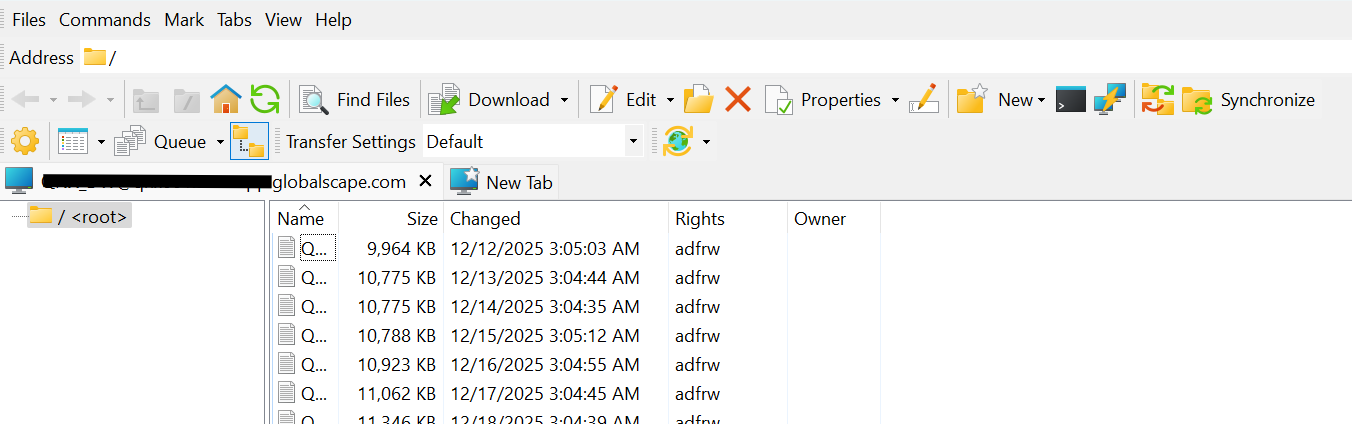
Hi, below i show various results trying to reach our ftp site (a globalscape product) from both winscp and ssis's ftp task as a certain user on a certain port. as far as i know, in winscp i choose FTP as the protocol even though its more appropriately FTPS (not sftp). in ssis i tried every combo of passive and non passive flipping between the url and ip address and attempting a connection with the parameters otherwise being the same as what was provided in winscp. in ssis i was running as my admin but in winscp as my regular id. But it seems to me that should be irrelevant when the ftp user and pswd are provided in each client anyway. can the community suggest a course of action? i'll post the images in 3 separate posts. i was able to ping the ftp "url" / "host name" and used the returned ip address when experimenting in ssis with ip in place of host name in server name box of ftp connector.
-

-
-
-
Have you tried a CLI call from an Execute Process task to http://ftp.exe or telnet.exe to verify from that machine things are working? Maybe wireshark the SSIS package to determine what's being sent?
-
This is probably not what you want to hear but I've done a lot of FTP'ing from SSIS and I never had much luck with the FTP task. Instead, I use a script task and call out to some capable FTP binary.
I have a very old package cleverly called FTP . dtsx, so I was able to find it quickly -- in the code below you'll see that I am shelling out to an NcFTP executable although now I would probably just use native .NET functionality -- but I would still definitely use a script task to do the work:
Partial Public Class ScriptMain
  Inherits Microsoft.SqlServer.Dts.Tasks.ScriptTask.VSTARTScriptObjectModelBase

  Enum ScriptResults
    Success = Microsoft.SqlServer.Dts.Runtime.DTSExecResult.Success
    Failure = Microsoft.SqlServer.Dts.Runtime.DTSExecResult.Failure
  End Enum

  Public Sub Main()

    Dim InputFilePath, FTPTargetLocation, FTPTargetP, FTPTargetPort, FTPTargetPath, FTPTargetU As String, exePath As String
    InputFilePath = Dts.Variables("InputFilePath").Value.ToString()
    FTPTargetLocation = Dts.Variables("FTPTargetLocation").Value.ToString()
    FTPTargetP = Dts.Variables("FTPTargetP").Value.ToString()
    FTPTargetPath = Dts.Variables("FTPTargetPath").Value.ToString().Trim()
    FTPTargetU = Dts.Variables("FTPTargetU").Value.ToString()
    FTPTargetPort = Dts.Variables("FTPTargetPort").Value.ToString()
    exePath = Dts.Variables("$Package::PathForNcFTP").Value.ToString().Trim()

    Dim WshShell,  WshShellExec As Object

    If Not FTPTargetPath.StartsWith("/") Then
      FTPTargetPath = "/" & FTPTargetPath
    End If

    Dim sOutput, exitcode, ExecPath, ExecStr As String
    ExecPath = "cmd.exe"

    ' remove -A flag
    ExecStr = " /c " & IO.Path.Combine(exePath, "ncftpput") & "  -u " + FTPTargetU + " -p " + FTPTargetP + " -P " + FTPTargetPort + " " + FTPTargetLocation + " " + FTPTargetPath + " " + InputFilePath

    ' Create Wsh Object
    WshShell = CreateObject("Wscript.Shell")
    Try
      WshShellExec = WshShell.Exec(ExecPath + ExecStr)
      sOutput = WshShellExec.StdErr.ReadAll
      exitcode = WshShellExec.ExitCode.ToString
    Catch ex As Exception
      exitcode = "2"
      sOutput = ExecPath + " execute failed! error message:" + ex.Message.ToString()
    End Try

    WshShell = Nothing

    If sOutput.ToUpper().Contains("UTIME FAILED") Then
      exitcode = "0"
      sOutput = ""
    End If

    If exitcode = "0" And String.IsNullOrEmpty(sOutput) Then
      Dts.TaskResult = ScriptResults.Success
    Else
      Dts.Events.FireError(exitcode, "", sOutput, "", 0)
    End If

  End Sub

End Class -
thx lisa and steve. simply reducing the number of rabbit holes like you guys have done is invaluable.
before i go the code route, i may try toggling one of those ssis encryption/security settings.
But that's about as far as i 'll go. I'll post back here how i fare.
-
setting the protection level to "dont save" didnt at least allow me to "test the connection". nor did following that up with the "passive" check box. i'm moving on to a code based approach within ssis.
-
2 challenges so far. I'll post my progress here. I'm using vs2022.
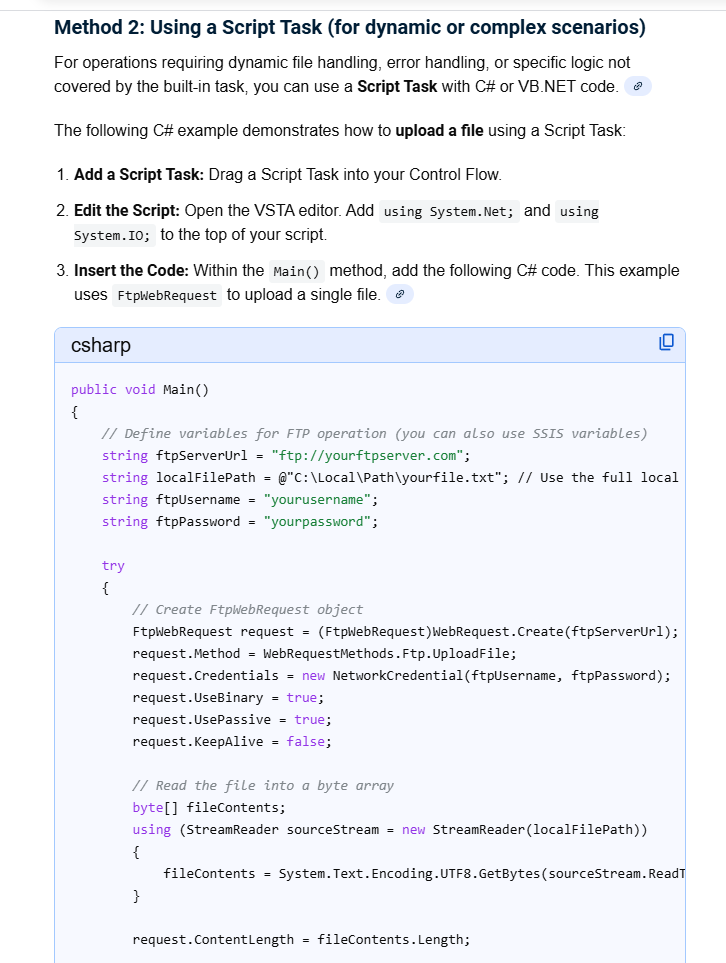
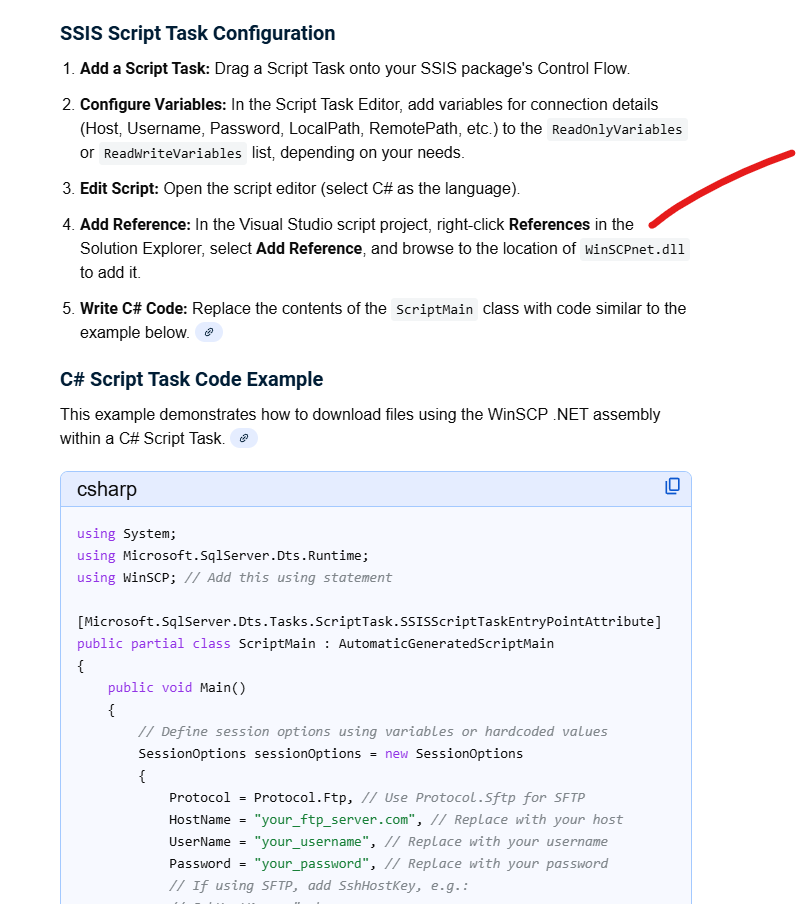
if i use the more generic approach shown by AI in my first image (posted separately) , i get build errors on a data type mismatch (converting to int) for dts.taskresult and the fireAgain reference you see below.
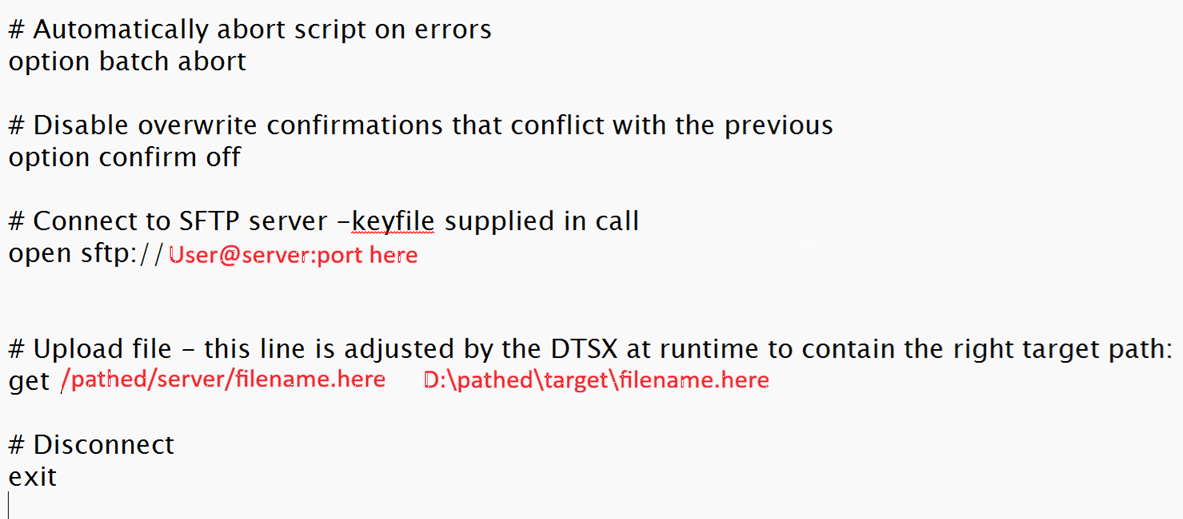
if i go down the path of what AI shows in the 2nd image (posted separately) where a more winscp path is desired, i cannot find that dll when i go to add it as a reference when editing the script (under admin or regular acct)...even though i just installed winscp on my pc.
// Get the response (optional, for verification)
using (FtpWebResponse response = (FtpWebResponse)request.GetResponse())
{
Dts.Events.FireInformation(0, "FTP Upload", $"File Uploaded. Status: {response.StatusDescription}", "", 0, ref fireAgain);
}
-
generic AI script recommendation...this is part of it...
-
ai approach going down the winscp path
-
winscp's items need to be in GAC for that reference to be added. been years but i'll try to go down that path.
-
i believe i added the winscpnet dll to gac locally issuing the gacutil command from the vs developer command prompt. I understand i'll need to do the same later on the server.
i couldnt find the dll when trying to add the dll as a reference in ssis (edit script) but seemed to get this to happen by hitting the browse option in the add reference menu and navigating to where (directory) my winscp install and dll went and highlighting the dll.
i tried building the script. the errors related to data type in dts.taskresult WENT AWAY but again , the script refers to that fireAgain parameter (of dts.events.fireinformation) and that is my only build error now.
i am concerned about a few things:
- the Ai script includes an sshhostkeyfingerprint which im sure is important but not in my case. So i fear some failures coming related to that.
- there is a string var called remotePath which i hope doesnt interfere right now with trying to load files locally. Later im guessing it will be how i designate a share but who knows.
Can the community comment on that fireAgain reference? what is it? do i need to add a using namespace to accommodate it?
-
winscp's items need to be in GAC for that reference to be added. been years but i'll try to go down that path.
This may be why (considering the environments I was in) I used an executable instead, where I could locate the executable however I wanted.
Below is a slightly later example, using WinSCP instead of NcFTP. The _WinSCPScript variable contains the name and (at this point in the package) location of a WinSCP script text file, which I adjusted for each run.
Note: this approach, and the package, is pretty generic, and allows for both GET and PUT actions, but if I had to worry about parallel execution I would have created a separate, temporary, WinSCP script text file for each run and cleaned it up afterwards. You'd replace the Adjust... sub you see here and you'd also want to decide how your version of the Archive... sub would work for your needs.
I'll also caveat that I wrote this for SQL 2012 a long time ago, so you may want to adjust for C# instead of VB script since both are available now,
Other than that, I think the approach would work for you. Here's an example of a GET script:
Partial Public Class ScriptMain
Inherits Microsoft.SqlServer.Dts.Tasks.ScriptTask.VSTARTScriptObjectModelBase

Enum ScriptResults
Success = Microsoft.SqlServer.Dts.Runtime.DTSExecResult.Success
Failure = Microsoft.SqlServer.Dts.Runtime.DTSExecResult.Failure
End Enum

    Private _WinSCPScript As String, _FTPFileName As String, _ProcessLog As String, _SFTPVerb As String

    Public Sub Main()

        ' User::pArchiveLifeInDays, User::ArchivePath,User::CompressionUtility,User::CompressionP,
        ' User::FTPFileName,User::SFTPVerb, User::WinSCP,User::WinSCPLogName,User::WinSCPScriptName

        _WinSCPScript = Dts.Variables("pWinSCPScriptName").Value.ToString()
        _FTPFileName = Dts.Variables("pFTPFileName").Value.ToString()
        _ProcessLog = Dts.Variables("pProcessLogName").Value.ToString()
        _SFTPVerb = Dts.Variables("pSFTPVerb").Value.ToString().Trim().ToUpper()

        If Not (_SFTPVerb = "PUT" OrElse _SFTPVerb = "GET") Then
            Throw New Exception("PUT or GET verb expected for WinSCP action.")
            Dts.TaskResult = ScriptResults.Failure
        End If

        ' first we need to prepare the script with the properly pathed filename for this run
        AdjustWinSCPScript()

        ' then FTP
        ExecWinSCP()

        ' if successful so far, archive unless turned off
        If CInt(Dts.Variables("User::pArchiveLifeInDays").Value) > -2 Then
            ArchiveFTPFile()
        End If

        Dts.TaskResult = ScriptResults.Success
    End Sub


    Private Sub DoCmd(ByVal execString As String, Optional ByVal readStdErr As Boolean = False)
        Dim WshShell, WshShellExec As Object
        Dim sOutput, sExitcode As String, sCmd As String

        sCmd = "cmd.exe /c "

        WshShell = CreateObject("Wscript.Shell")
        Try
            WshShellExec = WshShell.Exec(sCmd & execString)
            If readStdErr Then
                sOutput = WshShellExec.StdErr.ReadAll
            Else
                sOutput = WshShellExec.StdOut.ReadAll
            End If
            sExitcode = WshShellExec.ExitCode.ToString
        Catch ex As Exception
            sExitcode = "9999"
            sOutput = "Execute failed! error message:" + ex.Message.ToString()
        End Try

        WshShell = Nothing


        If Not String.IsNullOrEmpty(_ProcessLog) Then
            System.IO.File.AppendAllText(_ProcessLog, _
                                         "Exec: " & execString & vbCrLf & _
                                         "ExitCode:  " & sExitcode.ToString() & vbCrLf & _
                                         sOutput & vbCrLf & "----------" & vbCrLf)
        End If

        If sExitcode <> "0" Then
            Dts.Events.FireError(sExitcode, "", sOutput, "", 0)
        End If

    End Sub

    Private Sub ExecWinSCP()

        Dim sWinSCPLog As String, sKeyFile As String

        sWinSCPLog = Dts.Variables("pWinSCPLogName").Value.ToString()
        sKeyFile = Dts.Variables("pKeyFileName").Value.ToString()

        Dim sbExec As New System.Text.StringBuilder()

        sbExec.Append(Chr(34) & Dts.Variables("pWinSCP").Value.ToString() & Chr(34) & Space(1))
        If Not String.IsNullOrEmpty(sWinSCPLog) Then
            sbExec.Append(" /log=" & sWinSCPLog)
        End If
        If Not String.IsNullOrEmpty(sKeyFile) Then
            sbExec.Append(" /privatekey=" & sKeyFile & Space(1))
        End If
        ' this part is required:
        sbExec.Append(" -script=" & _WinSCPScript)
        DoCmd(sbExec.ToString())

    End Sub

    Private Sub ArchiveFTPFile()
        If File.Exists(_FTPFileName) Then
            ' derive an archive file name and a command
            Dim sbExec As New System.Text.StringBuilder(), p As String = Dts.Variables("pCompressionP").Value.ToString().Trim()
            sbExec.Append(Dts.Variables("pCompressionUtility").Value.ToString() & " a ")

            sbExec.Append(Chr(34) & _
            Path.Combine(Dts.Variables("pArchivePath").Value.ToString(), _
                         Now.ToString("yyyyMMddHHmmss") & "_" & _
                         Path.GetFileNameWithoutExtension(_FTPFileName) & ".zip") & _
                         Chr(34))
            sbExec.Append(Space(1) & Chr(34) & _FTPFileName & Chr(34))
            If Not String.IsNullOrEmpty(p) Then
                sbExec.Append(" -p" & p & " ")
            End If
            sbExec.Append(" -y -w" & Chr(34) & Dts.Variables("pWorkPath").Value.ToString() & Chr(34))
            DoCmd(sbExec.ToString())
        End If

    End Sub

    Private Sub AdjustWinSCPScript()

        Dim lines() As String = File.ReadAllLines(_WinSCPScript), parts() As String, pIndex As Integer = 0, done As Boolean = False
        Dim sb As New System.Text.StringBuilder()
        Dim IsGet As Boolean = (_SFTPVerb = "GET")
        For Each l As String In lines
            If l.Trim().ToUpper().StartsWith(_SFTPVerb & Space(1)) Then
                ' adjust this line
                parts = l.Trim().Split(" ")
                If IsGet Then
                    For i As Integer = 0 To parts.Length - 1
                        If i < parts.Length - 1 Then
                            sb.Append(parts(i) & Space(1))
                        Else
                            sb.Append(_FTPFileName)
                        End If
                    Next
                Else
                    sb.Append(_SFTPVerb.ToLower() & " " & _FTPFileName & " ")
                    sb.Append(parts(parts.Length - 1))
                End If
                sb.Append(vbCrLf)
            Else
                sb.Append(l & vbCrLf)
            End If
        Next

        File.WriteAllText(_WinSCPScript, sb.ToString())

    End Sub

End Class -
thank you Lisa. I got the AI script for leveraging WinScp's .net extensibility to build. You inspired me.
The fireAgain reference is , i guess, meant to be a reference to a c# bool variable. not sure why. But i added it and the darn thing built. i'll figure that out later.
i asked a c# person to look over my shoulder. at first we thought fireAgain needed to be a passed dts var of type bool but that didnt. work. the line added to the script looked like this...
bool fireAgain = true;
i'll study your example for adding smarts to my script. for now we commented out the sshhostkeyfingerprint setting. i understand why you made your solution based on an .exe but i'm going to stay on this path with the dll for the time being.
i looked closer at AI's script and believe that remote path has something to do with the ftp path. From what i'm seeing, it starts with a pattern that looks like username@remote host ip. There may be more that follows after a colon but i have to muddle thru this.
Viewing 15 posts - 1 through 15 (of 23 total)
You must be logged in to reply to this topic. Login to reply