

(This post starts a three-part series on how AI is changing the way we build solutions in Microsoft Fabric. First, we’ll explore how the new unified Copilot in Fabric and Project Osmos help build and transform data, moving from AI assistance toward agentic execution. The second post will look at building reports and analytical applications, comparing Copilot on the Power BI report canvas with Modern Report Builder. The third post will focus on using AI to build semantic models, ontologies, and Fabric Data Agents—the pieces that define what the data means and help people ask useful questions about it.)
Microsoft Fabric has included Copilot experiences for several years, helping users write code, create reports, build data pipelines, and work with other Fabric items. These experiences have been useful, but they have also been spread across the product. Depending on what you were doing, Copilot could look and behave differently, and it did not always carry the context of your work from one Fabric experience to another.
At FabCon, Microsoft introduced the new unified Copilot in Fabric, describing it as a single AI companion for the complete data lifecycle. You may also hear people refer to the emerging experience as Fabric Creator Copilot, Unified Creator Copilot, or Unified Copilot UX, particularly in preview. However, the name used in the keynote was Copilot in Fabric, so I will refer to the new experience as the unified Copilot in Fabric throughout this post.
Instead of treating Copilot as a collection of separate assistants, Microsoft is moving toward a shared, context-aware experience that can help across the Fabric data lifecycle. The practical benefit is simple: you spend less time explaining the same thing again and more time continuing the work. Anyone who has copied the same project description into three different Copilot windows will understand why this matters.
The unified Copilot in Fabric also provides a natural home for the next generation of agentic Fabric capabilities. One of the most important examples is the Fabric data engineering agent, still identified in Microsoft documentation by its project name, Project Osmos. This is not simply another chat assistant that returns a suggestion and waits for you to do the rest. It is designed to take responsibility for a bounded data-engineering outcome, carry out the work, validate the results, and return something you can review.
That shift from assistance to execution is the real story here.
The Problem With Today’s Copilot Experiences
The current Copilot experiences in Fabric are generally tied to a particular activity or workload. A report author might use Copilot to create a report page, while a data engineer might use it to generate Spark code in a notebook. A data integration developer can use Copilot in Data Factory to help create transformations or pipelines. Each experience can save time, but the larger workflow still depends on the user moving between tools and carrying the context along.
That becomes noticeable when a project crosses workload boundaries, which most real projects eventually do. Building a data solution may involve inspecting source systems, creating a lakehouse, writing transformations, documenting business rules, validating data quality, and publishing trusted outputs. If every Copilot conversation begins with another explanation of the architecture, the business goal, and what has already been completed, then some of the benefit is lost (and your prompts start looking suspiciously like project documentation).
The new unified Copilot in Fabric is intended to reduce that fragmentation. Instead of thinking, “Which Copilot do I need for this screen?” you begin with the outcome you are trying to achieve. Copilot can then connect that request to the appropriate Fabric workload, skill, or specialized agent.
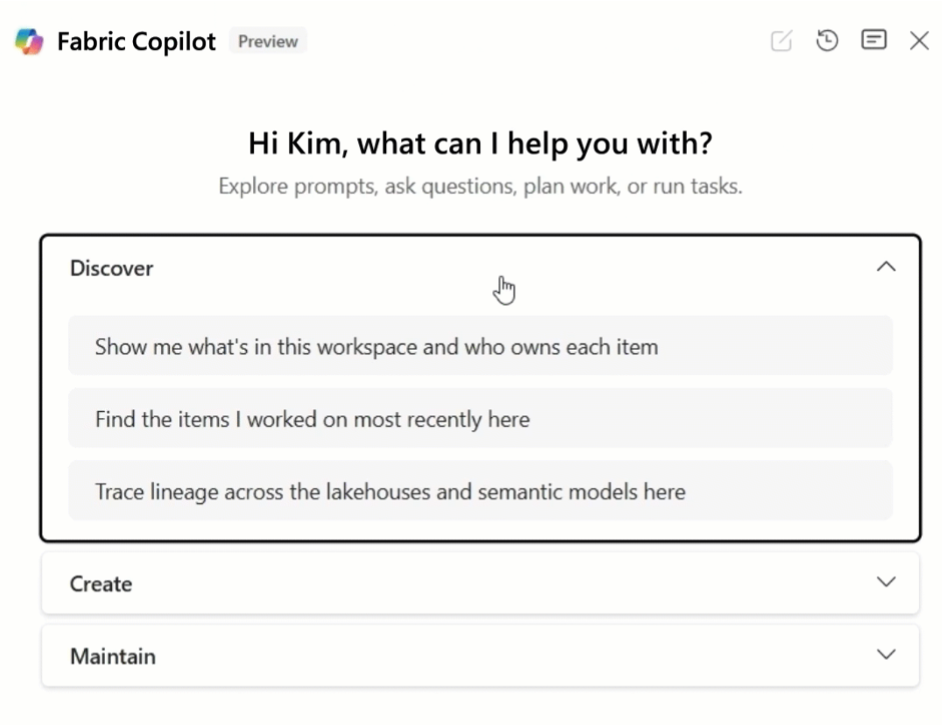
For a look at the experiences available across Fabric today, see Microsoft’s Overview of Copilot in Fabric. Administrators can also review the capacity, tenant, and workspace requirements in Enable and configure Copilot in Microsoft Fabric. To see a demo of the new unified Copilot in Fabric in action, check out the FabCon keynote at around the 54th minute.
What the Unified Copilot in Fabric Changes
The biggest change is not that there is another chat pane. We already have plenty of chat panes. The important change is that Copilot becomes more aware of the Fabric context, including the workspace, the item you are using, and the activity you are performing.
Imagine that you are building a new analytics solution. You may begin in a lakehouse, inspect several tables, open a notebook, and create a transformation. Later, you may move to a semantic model or report. A unified Copilot experience can preserve more of the thread across those activities, making the interaction feel less like a series of disconnected questions and more like an ongoing working session.
This also changes how Fabric skills and agents can be presented. Rather than requiring users to know every workload, command, or feature name in advance, the unified Copilot can interpret the requested outcome and connect it to the right specialized capability. You describe what you want to accomplish, while Copilot helps determine what part of Fabric can perform the work.
One of those specialized capabilities can be an agent, and that distinction is important. A traditional Copilot usually assists you with the next step, while an agent can pursue a broader outcome across multiple steps. Understanding that difference makes Project Osmos much easier to explain.
From Copilot to Agents
Traditional Copilot experiences are mostly reactive. You ask for something, Copilot responds, and you decide what to do next. That pattern works well for focused activities such as generating code, explaining an error, creating a visual, or summarizing a model. It is assistance delivered one prompt at a time.
Agentic AI goes further because it can pursue an outcome across multiple steps. An agent may inspect the environment, create a plan, perform actions, validate progress, recover from errors, and request guidance when a decision requires human judgment. You still define the goal and boundaries, but the agent carries more of the execution.
This does not mean human oversight disappears. In data engineering, that would be a terrible idea because changes to schemas, transformations, and production data can have lasting consequences. The better model is human-steered autonomy: you define the outcome, permissions, rules, and validation criteria, while the agent performs the work within those boundaries.
That is where Project Osmos comes in.
What Is Project Osmos?
Microsoft describes the Fabric data engineering agent, also known as Project Osmos, as an autonomous capability that can carry out persistent data-engineering tasks in Fabric. You describe the complete outcome you want and select a Fabric lakehouse to host the task and provide its default working environment. Within the instructions, permissions, and operating boundaries you approve, Osmos can inspect authorized data, create and test Spark notebooks, perform transformations, write Delta tables, and validate the results.
The distinction between a task and a conversation matters here. A normal Copilot interaction may generate a notebook cell in a few seconds. An Osmos task can keep running in Fabric after the local client disconnects because it is operating as a managed unit of data-engineering work rather than as a transient chat response.
This is closer to delegating a bounded project than asking for a code sample. You are not saying, “Write a PySpark expression that converts this column.” You are saying, “Create a validated Silver layer from these source tables, preserve the approved business rules, document the transformations, and show me any records that could not be reconciled.”
That is a much higher bar. Microsoft provides the technical overview in What is the Fabric data engineering agent, Project Osmos?.
At first, the unified Copilot in Fabric and Project Osmos can sound like two names for the same capability. They are closely related, but they serve different roles. The unified Copilot is the experience through which you describe what you want to accomplish across Fabric, while Project Osmos is a specialized data-engineering agent designed to carry out a complex, persistent task.
Think of the unified Copilot as the front door and Osmos as one of the specialists it can bring into the work. You may begin by describing an outcome through Copilot, such as building a medallion architecture from several source systems. When the request requires sustained data-engineering work, Osmos can take responsibility for planning, creating and testing the transformations, producing the necessary artifacts, and validating the results. The following table shows how those responsibilities differ and where the two experiences fit together.
The Unified Copilot in Fabric and Project Osmos
| The unified Copilot in Fabric | Project Osmos | |
|---|---|---|
| What it is | A unified Copilot experience across Fabric | A specialized autonomous data-engineering capability |
| Where the user interacts | Within the Fabric experience | Through supported coding-agent and Fabric surfaces |
| Scope | A common AI-assisted creation experience across Fabric workloads | Complex, persistent, outcome-oriented data-engineering tasks |
| Medallion architecture | The user can describe the overall outcome through Copilot | Osmos can perform the data-engineering work underneath |
| Primary role | Front door, context, and orchestration experience | Data-engineering specialist |
| Typical request | “Help me create this Fabric solution” | “Implement and validate this data-engineering outcome” |
| Execution style | Conversational, contextual, and cross-workload | Persistent planning, execution, testing, and validation |
| Outputs | Can coordinate work across Fabric items and capabilities | Notebooks, transformations, Delta tables, validation results, and other data-engineering artifacts |
| Human responsibility | Define the goal, supply context, and make business decisions | Set technical guardrails, review consequential changes, and approve the result |
The relationship can be pictured like this:
The unified Copilot in Fabric
?
Understands the requested outcome and connects it to the appropriate capability
?
Project Osmos / Fabric data engineering agent
?
Plans, executes, validates, and refines the data-engineering task
?
Fabric Spark + OneLake / Lakehouse
?
Produces notebooks, transformations, Delta tables, and validation evidence
?
Project Osmos reports progress, requests input when needed, and returns the completed results
?
The unified Copilot presents the results so the user can review, respond, and provide additional direction
This layered architecture explains why you may interact with Copilot in the Fabric interface while a specialized agent performs the deeper data-engineering work underneath. The unified Copilot provides the shared experience and connects the request to the appropriate capability. Osmos handles the planning, execution, and validation required for a persistent data-engineering task.
A Practical Example: Building a Medallion Architecture
Suppose an organization wants to create a medallion architecture in Fabric. Raw customer, order, and product data should be preserved in Bronze, cleaned and standardized in Silver, and organized into business-ready tables in Gold. Today, a data engineer typically profiles the source data, defines the schemas and business rules, writes the transformation code, tests the results, investigates rejected records, and documents the design.
With Project Osmos, the engineer can describe that complete outcome in plain language and submit it as one managed task. The request should identify the data sources, required transformations, expected outputs, write boundaries, and the evidence Osmos must provide to demonstrate that the result is correct. You are not expected to break the project into dozens of implementation prompts because planning and sequencing the work are part of what Osmos handles.
Here is an example:
Use Project Osmos to build a medallion architecture in the Fabric workspace Sales Analytics and the lakehouse SalesLakehouse. Read the customer, order, order-line, and product files under Files/landing, but do not modify or delete the original files.
Create Bronze Delta tables that preserve the source data and include ingestion timestamps and source-file names. In Silver, standardize data types, remove duplicate customers and products using their business keys, reject orders without a valid customer, quarantine malformed records, and join order lines to the corresponding orders and products.
Create Gold tables for daily sales, customer sales, product performance, and monthly revenue by customer segment. Save separate notebooks for loading Bronze, transforming Silver, and building Gold, and design them so they can be safely rerun without creating duplicate records.
Run the notebooks in the correct order. Validate row counts between layers, business-key uniqueness, referential integrity, null customer and product identifiers, rejected-record counts, and source-to-Gold revenue totals. Do not promote the Gold tables unless the validation checks pass, and provide a summary of the resulting tables, notebooks, rejected records, and validation results.
This prompt is much more useful than simply saying, “Build me a medallion architecture.” It tells Osmos what success looks like while leaving the implementation details, sequencing, notebook creation, and testing to the agent. The engineer still reviews the task settings before execution, including which resources are read-only or writable, whether output should be staged before promotion, how reruns should behave, and whether schema changes are allowed.
The human role still matters because someone must decide which business rules are correct, what should happen to uncertain or invalid records, and whether the validated result is safe to promote. Osmos can perform much of the inspection, implementation, execution, and testing, but the engineer defines the boundaries and remains accountable for the outcome. The repetitive work is delegated without delegating the important decisions along with it.
Microsoft’s public quickstart uses a small retail medallion architecture as its first example. You can follow that scenario in Get started with the Fabric data engineering agent. For more guidance on writing a complete project outcome, protecting existing data, selecting a safe write pattern, and making reruns predictable, see Best practices for the Fabric data engineering agent.
To see Project Osmos in action, watch this Project Osmos demonstration shared by Andrzej Strzala on LinkedIn.
Assistance vs. Delegation
The medallion example also makes the difference between assistance and delegation easier to see. With the existing Copilot experience in a Fabric notebook, you might ask Copilot to write a transformation, explain a piece of Spark code, or help troubleshoot an error. Copilot helps you perform a specific part of the work, but you remain responsible for organizing the overall project.
With Osmos, the unit of delegation becomes the project outcome. You describe the Bronze, Silver, and Gold layers, identify the sources, explain the transformation rules, define the outputs, and specify how success should be validated. Osmos can then treat that as one managed task rather than as a series of unrelated prompts.
The difference is not simply that Osmos writes more code. It plans, executes, tests, and validates the work against the target data. Microsoft’s documentation describes persistent task state, managed Fabric execution, operational guardrails, progress tracking, and integrated validation as core parts of the capability.
The simple way to say it is this:
- Copilot helps the data engineer do the work.
- Project Osmos lets the data engineer delegate a bounded data-engineering outcome.
That does not remove the engineer from the process. It changes where the engineer spends time.
What This Means for Data Engineers
Whenever automation improves, someone asks whether the technology will replace the people doing the work. I have heard that question through several generations of data platforms, and the answer is usually more complicated than either the optimists or pessimists suggest. The tools change the work, but they do not remove the need for judgment.
The value of a data engineer increasingly comes from knowing what should be built, why it matters, how it should be governed, and whether the result can be trusted. Those responsibilities become more important when an agent can generate and execute changes quickly. Faster execution is helpful only if the team has clear standards, sound architecture, and meaningful validation.
Data engineers will also need to become better at defining outcomes and writing effective prompts. This does not mean becoming skilled at finding clever phrases that somehow unlock the agent. It means learning to communicate engineering requirements clearly: identify the goal, point to the correct sources, explain the transformation rules, define the expected outputs, establish the agent’s boundaries, and specify how success should be validated. A vague project outcome produces vague work, just as a vague project request produces a vague project. Microsoft’s best-practices guidance recommends defining the goal, sources, transformations, outputs, validation criteria, and important constraints. Writing a strong prompt for an agent is therefore becoming another form of technical specification, and data engineers who can translate business requirements into precise, testable instructions will be in a much better position to use these tools effectively. That is good advice for working with an agent, but it is also suspiciously similar to good data engineering in general.
In other words, the job moves upward. Less time may be spent writing repetitive transformation code, while more time is spent on architecture, semantics, governance, data quality, business alignment, and clearly describing the outcome an agent should deliver. Prompt writing will become part of the engineering workflow, but it will not replace engineering knowledge. You still need enough technical and business understanding to recognize when the prompt is incomplete, the assumptions are wrong, or the resulting data cannot be trusted. Those are not always the easiest parts of data engineering, but they are usually the parts that matter most.
What This Means for Organizations
For organizations, the immediate opportunity is not to automate every data-engineering project. A better starting point is to choose bounded work with clear inputs, rules, and validation criteria. Examples might include creating a standardized Silver layer, converting a set of legacy transformations, reconciling two customer datasets, or optimizing a group of Delta tables.
Teams should also decide where human review is mandatory. Schema changes, destructive operations, production deployment, and transformations involving sensitive data are obvious candidates. The agent may perform much of the work, but responsibility still belongs to the people and processes governing the environment.
This is also why Fabric is a logical place for agentic data engineering. The agent works close to the data, compute, permissions, notebooks, and lakehouse assets involved in the project. It can create durable Fabric artifacts rather than returning an isolated block of code that someone must manually move into the platform.
The first pilots should be measurable and reversible. Choose a task where the expected output is understood, define where the agent can write, preserve important artifacts, and require evidence of success. Evaluate data quality, maintainability, review effort, and the agent’s ability to explain what it changed, not just how quickly it completed the task.
Where the Unified Copilot in Fabric Fits
The unified Copilot in Fabric is the front door. It is intended to provide a common conversational experience through which users can describe what they want, work with Fabric capabilities, launch longer-running tasks, and follow their progress. Project Osmos is one of the specialized capabilities that can operate behind that experience.
This distinction helps make sense of Microsoft’s direction. The unified Copilot is not necessarily one enormous agent that performs every Fabric job equally well. It is the shared experience that understands the context and connects the user with the appropriate capability. Some requests may be handled immediately, while others may become persistent tasks managed by a specialized agent.
That is a more practical model than pretending one assistant can do everything. Different workloads require different tools, permissions, validation methods, and execution patterns. The unified experience gives the user one starting point without removing the specialization needed behind it.
The current public Osmos quickstart uses supported command-line clients as the entry point, including GitHub Copilot CLI, Claude Code, and Codex. The broader unified Copilot experience is the Fabric-native direction shown at FabCon. It is worth separating those two statements because the product direction and the currently documented onboarding path are related, but they are not identical today.
Current Status and Expectations
Project Osmos is currently documented as a preview capability. Microsoft states that preview features can have limited capabilities, may only be available in selected regions, are not intended for production use, and are not covered by a service-level agreement. Organizations should evaluate it accordingly rather than treating a successful demonstration as automatic production approval (a rule that applies to most impressive demos, not just this one).
The documented entry path currently uses the Skills for Fabric collection through GitHub Copilot CLI, Claude Code, or Codex. The user creates a managed task associated with a Fabric lakehouse and monitors its progress in Fabric. The public documentation explains the lakehouse, permission, capacity, tenant-setting, and local-client prerequisites.
The new unified Copilot in Fabric was presented at FabCon as a private-preview experience. Because its availability and exact integration points are still evolving, discussions should distinguish the direction shown in demonstrations from the capabilities described in current public documentation.
That distinction does not make the new experience less interesting. It simply keeps the conversation honest. Microsoft has announced where the Copilot experience is heading, while Project Osmos already has public preview documentation and a hands-on quickstart that customers can use to understand the agentic data-engineering model.
Resources and Demos
To see a demo of the new unified Copilot in Fabric in action, check out the FabCon keynote at around the 54th minute (note in the demo Copilot is calling Osmos behind the scenes). To see Project Osmos in action, watch this Project Osmos demonstration shared by Andrzej Strzala on LinkedIn.
The best place to see the announcement behind this post is the official FabCon and SQLCon Europe 2026 keynote, “The Data Foundation for AI”. The keynote provides the broader context for Microsoft’s direction across Fabric, Copilot, agents, applications, and the data foundation beneath them. This is where Microsoft publicly presented the move toward a new, unified Copilot experience in Fabric, rather than a collection of disconnected workload-specific assistants.
Microsoft also published a detailed FabCon and SQLCon 2026 announcement blog. It connects the conference announcements to the larger Microsoft strategy around Copilot, agents, Fabric Apps, Power BI agentic application creation, and governed enterprise data. If you want the official written companion to the keynote, this is the best place to start.
For a broader summary of the conference announcements, including the new unified Copilot in Fabric, Project Osmos, Modern Report Builder, Fabric IQ, and related Power BI features, see my FabCon and SQLCon Barcelona 2026 announcement roundup. That post provides the larger product context for the more focused discussion in this article.
The best public way to understand and try Project Osmos is Microsoft’s Project Osmos quickstart and medallion architecture walkthrough. It walks through installing the skill, creating a retail medallion architecture task, reviewing the operating settings, and monitoring the task in Fabric. The quickstart uses the currently documented entry points, including GitHub Copilot CLI, Claude Code, and Codex.
For a shorter explanation of what the agent does and the scenarios it supports, use the Project Osmos product overview. The documented examples include table integration, lakehouse modernization, medallion architecture, data-quality remediation, performance improvement, and migration assistance.
For governance and safe-use guidance, read Best practices for the Fabric data engineering agent. The guidance explains how to define a complete project outcome, establish read and write boundaries, protect existing artifacts, make reruns predictable, and require measurable evidence of success.
Administrators should also review the broader Copilot in Fabric overview and Copilot configuration requirements. These pages describe the existing Copilot experiences, capacity requirements, tenant settings, and workspace access controls. They should not be confused with dedicated documentation for the new unified Copilot experience, which Microsoft has presented as a private-preview direction.
Microsoft also documents Project Osmos capacity consumption. Language-model usage is converted into Fabric capacity units, and the associated usage appears in the Fabric Capacity Metrics app under the Project Osmos operation for the task’s lakehouse.
Final Thoughts
The new unified Copilot in Fabric represents a shift from scattered AI assistance toward a more consistent way of working across Fabric. Project Osmos takes that shift further by moving from answering questions to carrying out complex, persistent data-engineering work. Together, they point toward a future in which we describe outcomes, establish guardrails, and let specialized agents handle more of the execution.
That does not make architecture, governance, or engineering judgment less important. It makes them more important because an agent can act on a weak decision much faster than a person can. The organizations that benefit most will not be the ones that automate everything first. They will be the ones that know which decisions belong to people, which tasks can safely be delegated, and how to verify the difference.
The promise is not that data engineering becomes effortless. The promise is that skilled people can spend less time pushing every button themselves and more time deciding what is worth building. That is a much more interesting future, and probably a more realistic one too.
In my next post, I’ll look at another example of this shift: how Modern Report Builder differs from the existing Copilot on the Power BI report canvas, and why the distinction between building a report and building an analytical application matters.
The post The New Unified Copilot in Fabric and Project Osmos: From AI Assistance to Agentic Data Engineering first appeared on James Serra's Blog.