

Recently I ran across some code that used a lot of QUOTENAME() calls. A colleague was having some trouble with the code, but what struck me was that I hadn’t often delved into the details of QUOTENAME and how it can be used in different ways. I’d always just passed in a string as a single parameter.
This post looks at a few details of how this function works.
Another post for me that is simple and hopefully serves as an example for people trying to get blogging as #SQLNewBloggers.
QUOTENAME
The idea behind QUOTENAME() is that you pass in a string that might not be properly formatted to be an indentifier. QUOTENAME() returns the string with enclosing characters that ensure the string works in your code as a literal.
Here’s an example. If I have a string that is “Steve Jones”, I’ve quoted the string with double quotes. If I wanted to create a table with this string, I’d do this:
CREATE TABLE dbo.[Steve Jones] (id int);
I’ve explicitly put brackets around the string, which is what we commonly do in SQL Server if we have some reserved word or space we want in the object name.
NOTE: I am not recommending this, just showing this as an example.
If I were doing this in code, and maybe I wanted to dynamically create this table, I’d do this:
DECLARE @n nvarchar(20) = N'Steve Jones';
DECLARE @s nVARCHAR(100)

SELECT @s = 'create table dbo.' + QUOTENAME(@n) + '(id int)'

EXEC(@s)
When QUOTENAME runs, by default, it will surround the string with brackets. You can see this in the results below.
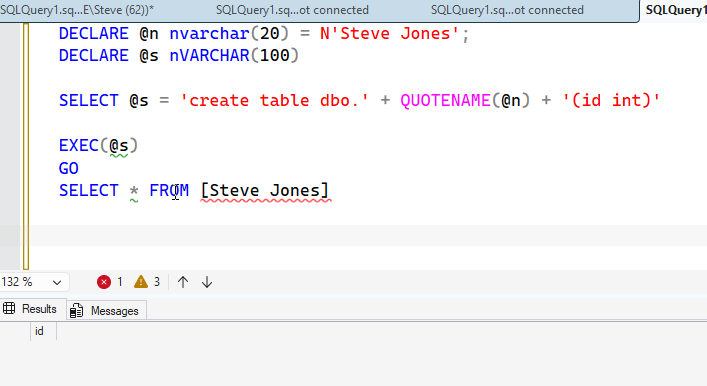
This is a valid identifier, and we end up with a table that has a space in it’s name, which I abhor. But it works.
A Second Parameter
While this is how I’ve used QUOTENAME in the past, usually to clean up strings that might be reserved words, like name, there actually is an optional second parameter. The syntax for QUOTENAME is:
QUOTENAME ( string, [ character])
where
- string – the string that you need to quote
- character – a single character that represents the delimiters to be used to surround the string.
One might think that any character can be used, but that’s not true. Only a few characters are supported. The list is:
- brackets, [], which is the default
- braces, {}
- single quotes, ‘
- double quotes, “
- angle brackets, <>
That’s it. Anything else produces not an error but a NULL, as shown here:
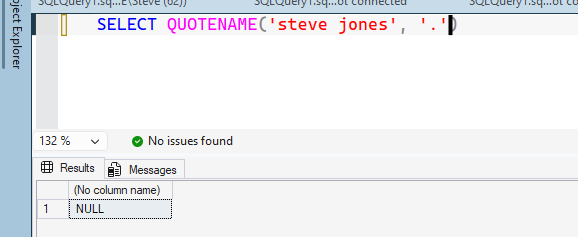
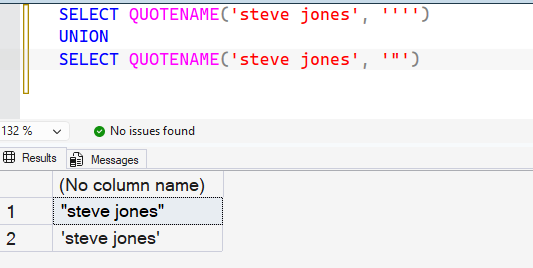
What’s interesting is that the parameter is a single character, but the function works out what the matching character should be. For single and double quotes, this is easy. The same character is used, as you can see below. Note the single quote is escaped.
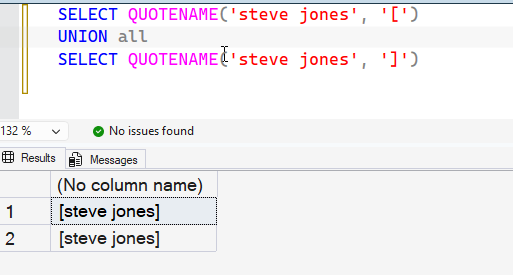
For brackets, if I use either the left or right bracket, the result has a left bracket on the left side and a right bracket on the right side. You can see that below.
Same thing for braces.
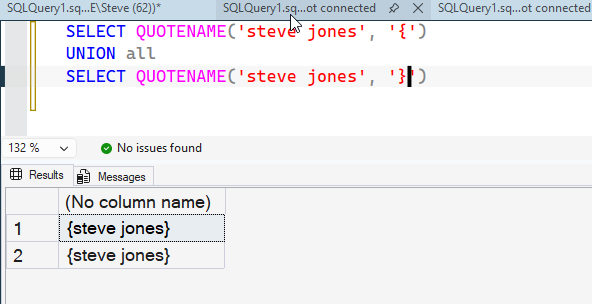
And angle brackets.
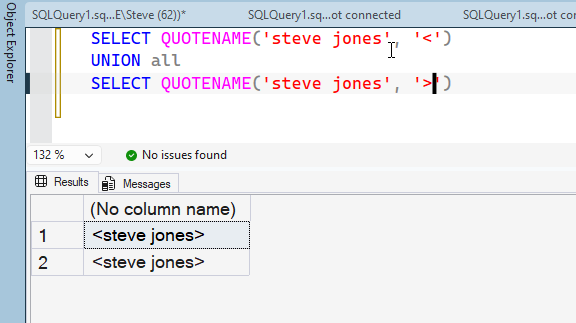
What’s what I’d expect, but it’s nice to know it works. This limits flexibility for the function, and if I were designing it, I might make the second parameter two characters that represent the left and right enclosures. Or make a separate parameter for each. That would allow me to do something like:
SELECT QUOTENAME(‘Steve Jones’, ‘_>’ )
and get
_Steve Jones>
I could have run with a space at the beginning and a comma or period at the end, helping me clean up text. 
SQL New Blogger
This is a quick post that I actually spent about 10 minutes on during a flight. I had run into this while answering a friend and reading the docs, so I left a quick sentence as a reminder and then fleshed out this post. I spent another 10 minutes once I landed (and got plugged in) capturing the screen shots.
This is a good example of showing how I dug into a feature of SQL Server, I understand how it works, show how it can be used, and how I might have wished it would be used.
You could do this in a half hour at a coffee shop and start knowing that you can learn a few things and maybe show how you’d evaluate if this was needed in AI generated code, some of which you might see in the very near future.