

Can you use your GPUs when running a local model under Ollama? You can, and it really depends on how you run Ollama and what your hardware is.
Ollama supports NVidia and AMD GPUs with some exceptions. You can read about their hardware support here. There are drivers required from the vendors, and configuration, but it can help with performance.
Of course, GPUs aren’t cheap.
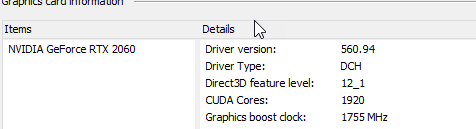
I have an NVidia GeorForce RTX 2060, which is listed as being supported with a compute capability of 7.5. I need a driver version of 550+. I’m supported with driver version 560.94.
However, I need NVidia CUDA drivers installed for this to work. Those don’t really install on Windows, so I have to install them in the WSL subsystem, with the Linux install guide for this to work on my system. I don’t use Docker, I have Rancher for reasons …, so I haven’t done this so far.
If you use Docker Desktop, there is native support for GPUs.
On Macs, there is native support.
If you are looking to run local models seriously, you’ll likely want either a dedicated machine, or you will go the Docker Desktop route as an individual. In an org, you might pick a dedicated server and allow multiple users to connect and get answers in a secure, controlled way.