

To solve a complex business problem, one needs to break the process into smaller, solvable steps. Today, we are going to revisit the Modern Data Platform for Fabric Warehouse. Our first problem to solve is an incremental data load pattern from a relational database management system (RDBMS) into the Fabric Warehouse. The solution builds upon the framework created in the past three articles on the Fabric Modern Data Platform. How can we use data pipelines to land incremental copies of data into raw zone tables?
Business Problem
Our manager has asked us to create data pipelines to copy tables from the Adventure Works LT database located in Azure SQL into a Warehouse in Microsoft Fabric. Last time, we used a metadata design to reduce the amount of code needed to accomplish the task. However, any incremental load pattern starts with a full load of the data. Only changes are moved over to staging and hardened into the raw schema (bronze quality layer).
Overall Design
The diagram below shows the final architectural design. Today, we are focusing on the incremental pipelines that use a metadata driven design pattern.
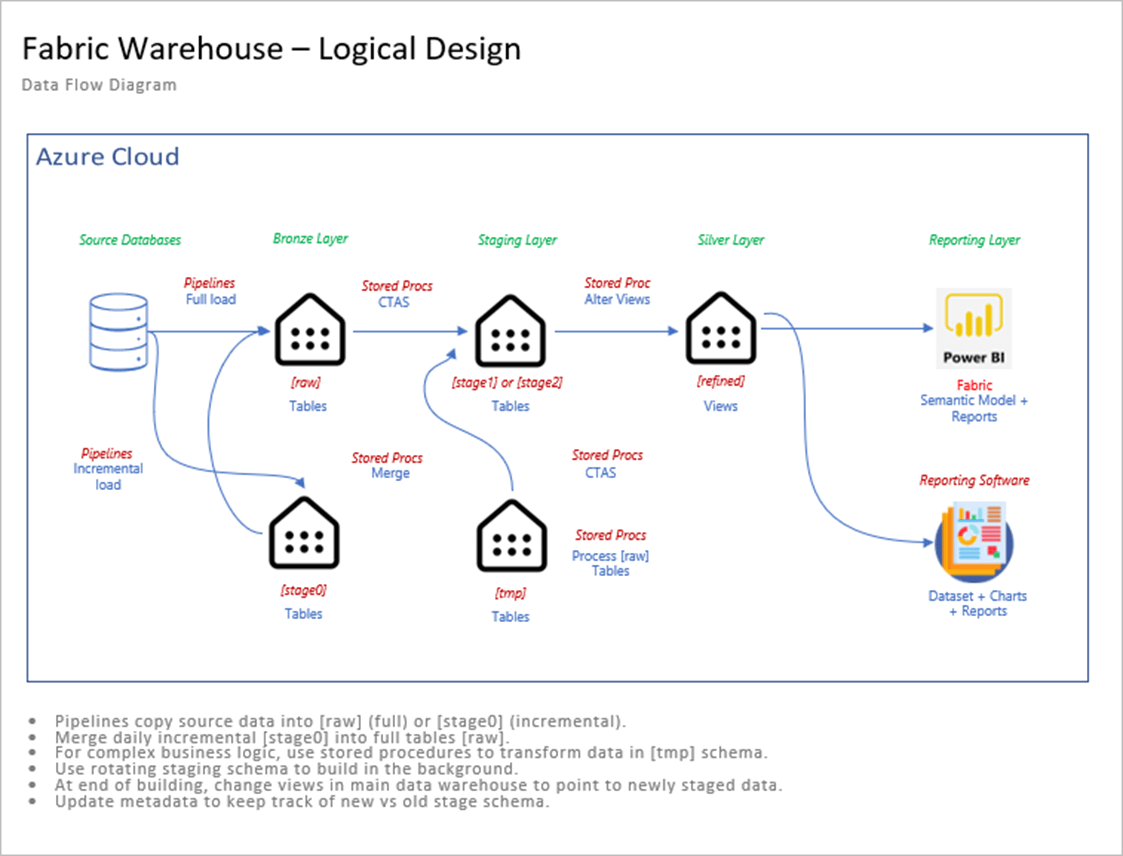
We can use schemas in the Fabric Warehouse to delineate the data quality. Please see the table below for a description of each schema.
| Schema Name | Description |
| meta | The metadata tables are used to control the data pipelines. |
| raw | A complete copy of the data. |
| stage0 | Contains the most recent incremental data. |
| stage1 | Copy of raw table at point in time x. |
| stage2 | Copy of raw table at point in time y. |
| refined | Views that point to a given stage. |
| tmp | Business logic and data aggregation. |
The schema, named stage zero, contains the most recent incremental copy of the data. The design leverages the Change Tracking feature that introduced in SQL Server 2019 to determine which incremental rows to copy to stage zero. Just recently, the MERGE statement was introduced as supported syntax for the Fabric Warehouse. We will write our own since I started the framework article several months ago. We will need stored procedures to do the following: merge rows from stage zero to raw table, aggregate data (optional) in the tmp schema , create a point in time copy of the raw and tmp tables in stage one or stage two, and update the views in the refined schema to point to the right staging schema.
The use of views allows the warehouse developer to load and aggregate data without impacting the end users. The data becomes available once the definition of the view is changed to the latest staging schema.
Change Tracking
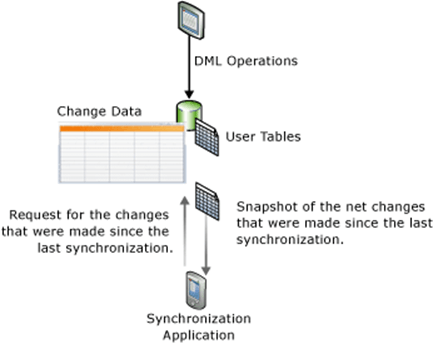
This feature tracks whether a row has changed and what is the current value of the row. It does not tell you the intermediate changes that might have occurred. This new feature can be used to keep the Fabric Warehouse (application) in synchronization with the SQL Server Database. Please see image below for details.
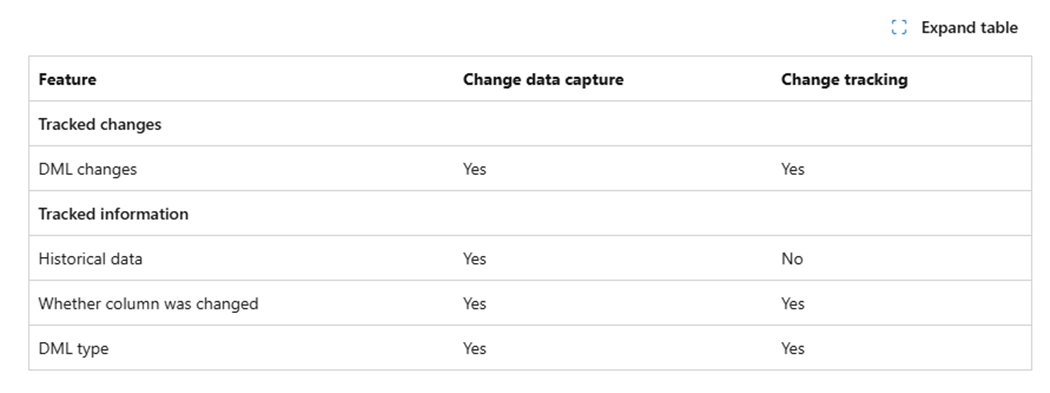
The image below show the difference between Change Data Capture and Change Tracking. If you have been paying attention to the new SQL Server 2025 features, the Change Event Streaming feature sends records changes are JSON documents to Azure Event Hub. This is great for features like Fabric Mirroring.
The first step is to enable change tracking at the database level. The T-SQL snippet below turns on this feature for the Adventure Works LT 2012 database. Only 7 days of changes will be retained with an auto cleanup function being enabled.
--
--  1 - Enable change tracking at database level
--

-- switch database
USE [master];
GO

-- turn on tracking
ALTER DATABASE AdventureWorksLT2012
SET CHANGE_TRACKING = ON
(CHANGE_RETENTION = 7 DAYS, AUTO_CLEANUP = ON);
GO
The second step is to enable change tracking at the table level.
--
--  2 - Enable change tracking at table level
--

-- switch database
USE [AdventureWorksLT2012];
GO

-- alter table 1
ALTER TABLE SalesLT.SalesOrderDetail
ENABLE CHANGE_TRACKING
WITH (TRACK_COLUMNS_UPDATED = ON);
GO

-- alter table 2
ALTER TABLE SalesLT.SalesOrderHeader
ENABLE CHANGE_TRACKING
WITH (TRACK_COLUMNS_UPDATED = ON);
GO
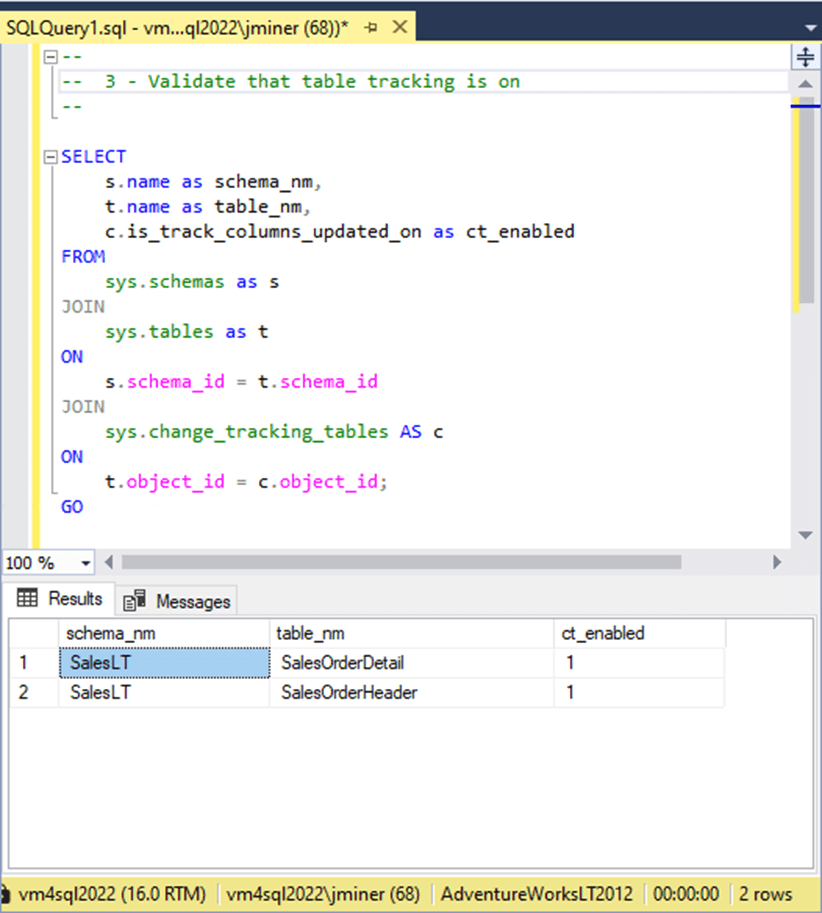
We can join the following tables to determine if change tracking is enabled for a given table: sys.schemas, sys.tables, and sys.change_tracking_tables. See the screenshot below that shows we are now tracking changes for Sale Order Header and Sales Order Detail tables.
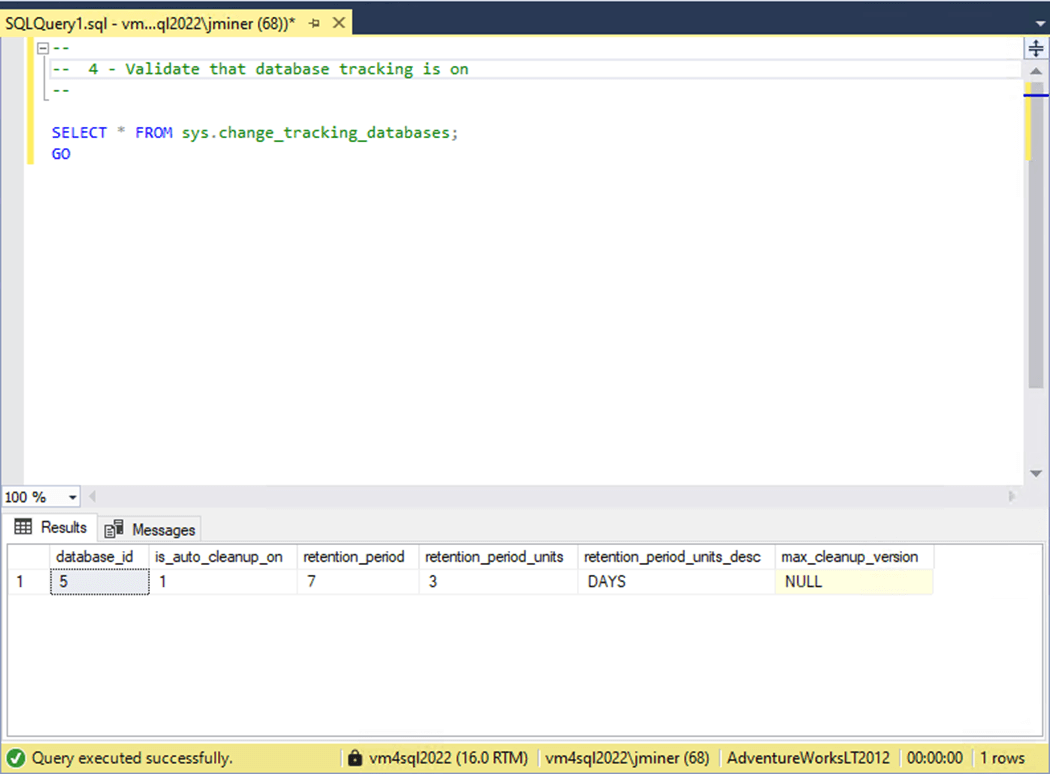
We can query the sys.change_tracking_databases system table to find out the details. We could increase the retention period if the business use case requires more time.
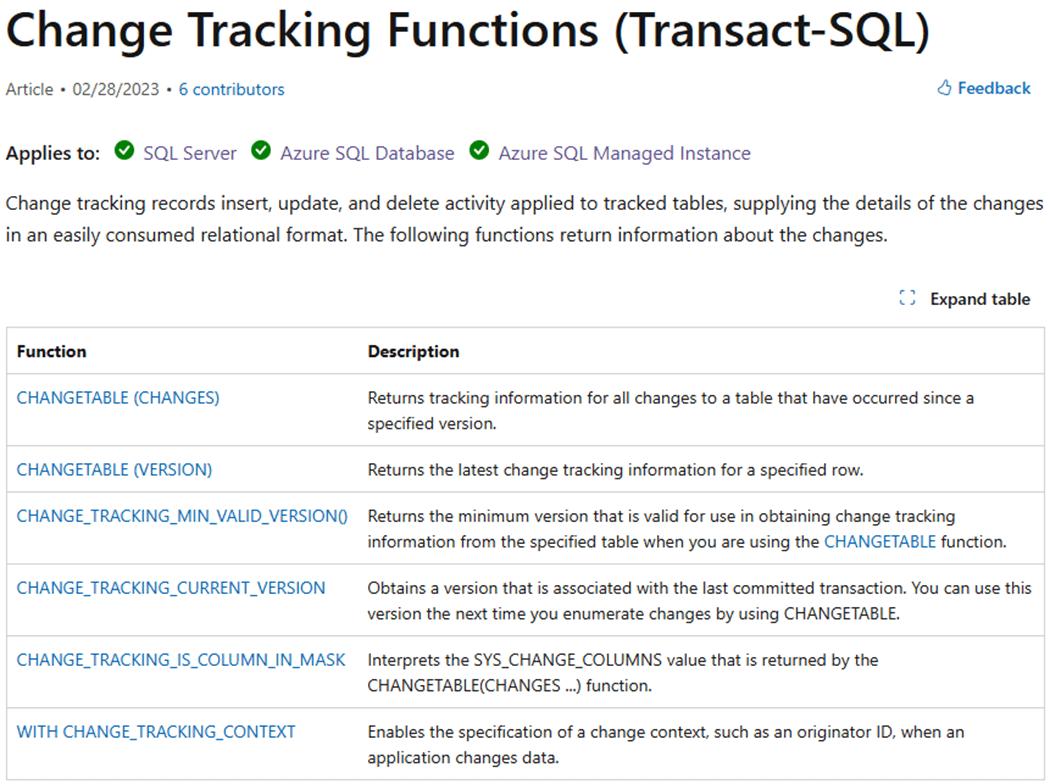
There are a number of functions we can use when crafting a solution. It is important to know the prior and current version of a table. That way, we can copy over the records we need into the appropriate staging table.
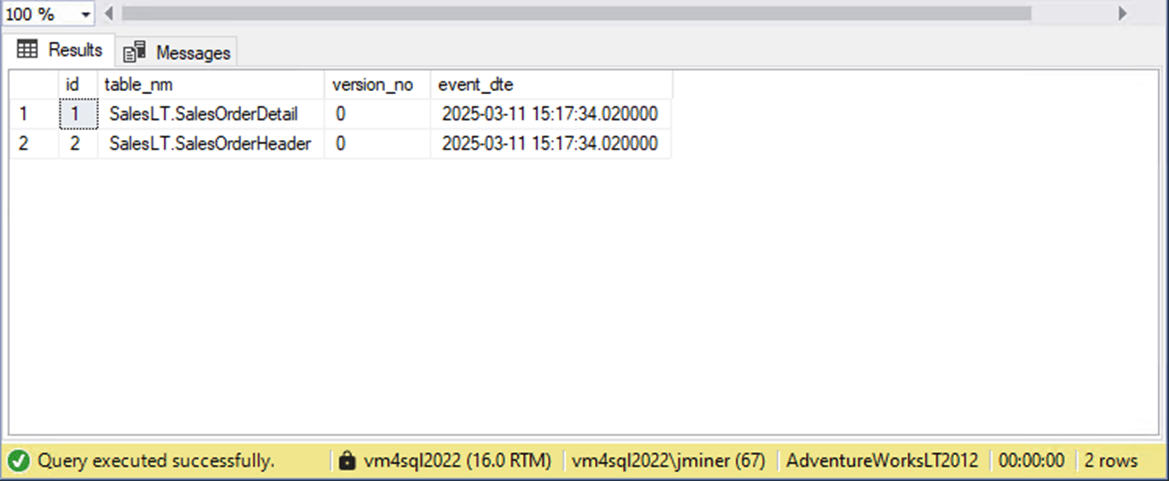
The code below creates a local table in the source database, named dbo.TrackTableChanges. It populates this table with the current versions of the Header and Detail tables.
--
--  7 - Create + populate custom table
--

-- drop existing
DROP TABLE IF EXISTS dbo.TrackTableChanges;
GO

-- create table
CREATE TABLE dbo.TrackTableChanges
(
    id int IDENTITY(1, 1) NOT NULL,
    table_nm varchar(128),
    version_no bigint,
    event_dte datetime2(6)
);
GO

-- add data
INSERT INTO dbo.TrackTableChanges
(
    table_nm,
    version_no,
    event_dte
)
SELECT
    'SalesLT.SalesOrderDetail',
    CHANGE_TRACKING_MIN_VALID_VERSION(OBJECT_ID('SalesLt.SalesOrderDetail')),
    GETDATE()
UNION
SELECT
    'SalesLT.SalesOrderHeader',
    CHANGE_TRACKING_MIN_VALID_VERSION(OBJECT_ID('SalesLt.SalesOrderHeader')),
    GETDATE()
GO

-- show versions
SELECT * FROM dbo.TrackTableChanges
GO
The image below shows zero as the current change tracking version. Like I said, the images for this article were taken a while back.
To disable change tracking, we reverse our steps. First, we disable change tracking at the table level.
--
--  5 - Disable change tracking at table level
--

-- switch database
USE [AdventureWorksLT2012];
GO

-- alter table 1
ALTER TABLE SalesLT.SalesOrderDetail
DISABLE CHANGE_TRACKING;
GO

-- alter table 2
ALTER TABLE SalesLT.SalesOrderHeader
DISABLE CHANGE_TRACKING;
GO
Second, we disable change tracking at the database level.
--
--  6 - Disable change tracking at database level
--

-- switch database
USE [master];
GO

-- turn off tracking
ALTER DATABASE AdventureWorksLT2012
SET CHANGE_TRACKING = OFF;
GO
Please do not disable tracking at any level since it is pivotal part of our incremental load solution. Before the Change Tracking feature, we would have to have some type of stored watermark to figure out what records were changed. For instance, if we had a last modified date column in the source table, we could just use the most recent date in our control table to find all modified or new records. It is impossible to find deleted records unless they are marked as deleted. We can use the SYS_CHANGE_OPERATION column of the CHANGETABLE table value function to determine if the record was Inserted, Updated, or Deleted. In short, this feature is better than anything that you can write yourself.
Create Test Rows
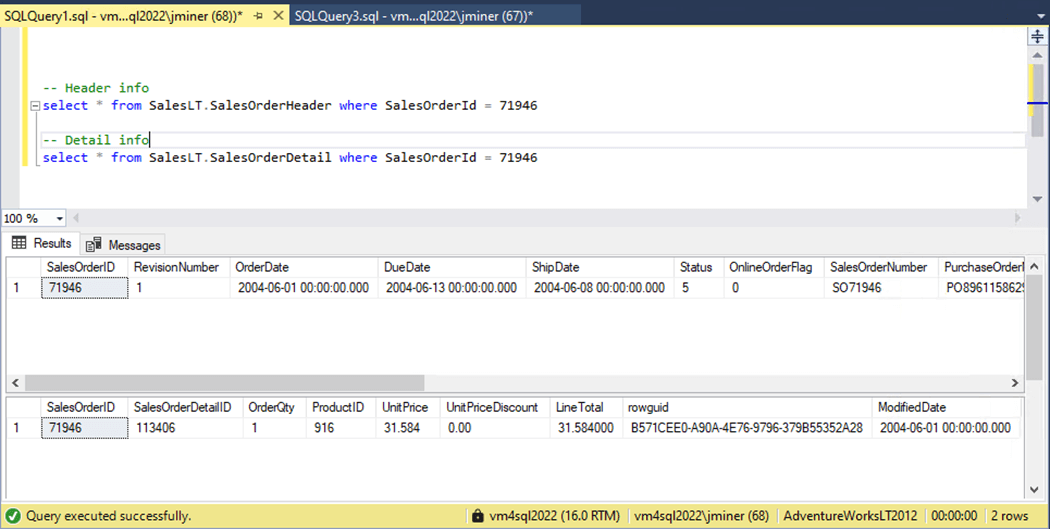
At the end of the article, a zip file will have all the code shown in the article. We need to find a matching pair of header and detail records. The image below shows the last record by sales order id.
This data can be inserted into a temporary table, modified to have current values, and re-inserted into the appropriate tables. The image below shows one new record per table.
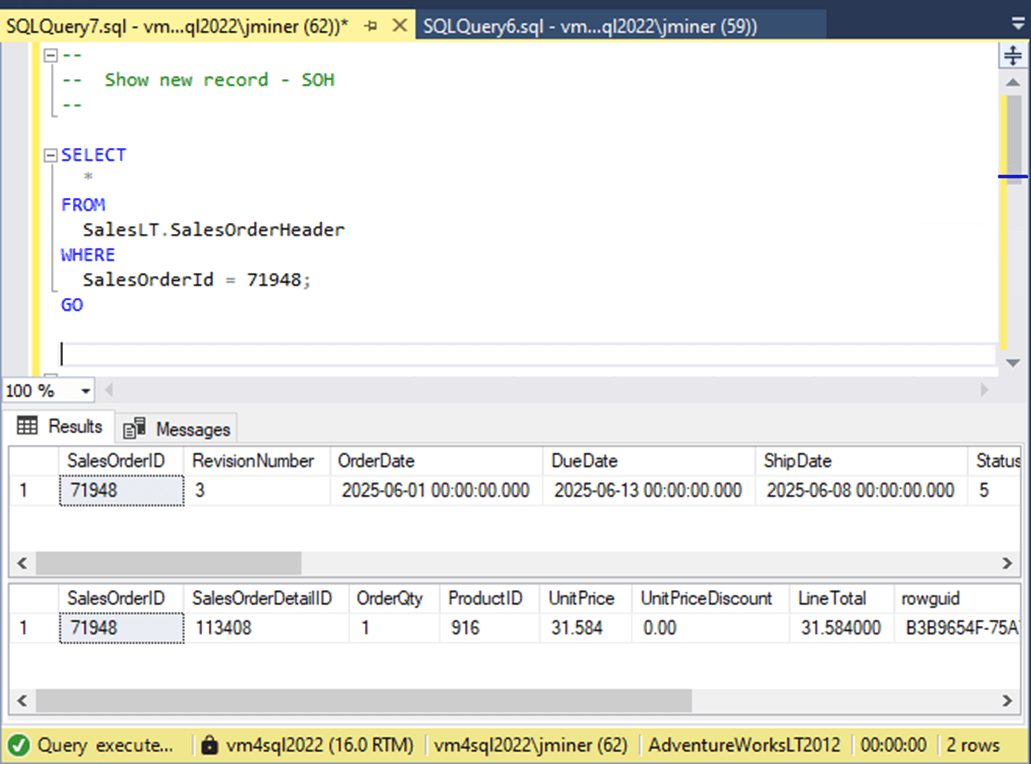
For the copy activity to be successful, we need to execute the following algorithm.
| Code Step | Description |
| 1 | Grab old tracking version from custom table. |
| 2 | Grab new tracking version for header or detail table. |
| 3 | Use CHANGETABLE() function to return changed data. |
| 4 | If result set is not empty, add new version to custom table. |
The T-SQL code to implement the algorithm is seen below.
--
--  S.O.H. - Code for data pipeline source
--

-- Ignore counts
SET NOCOUNT ON

-- Local variable
DECLARE @CT_OLD BIGINT;
DECLARE @CT_NEW BIGINT;


-- 1 - Saved tracking version (old)
SELECT TOP 1 @CT_OLD = [version_no]
FROM [dbo].[TrackTableChanges]
WHERE [table_nm] = 'SalesLT.SalesOrderHeader'
ORDER BY [event_dte] DESC;


-- 2 - Current tracking version (new)
SELECT @CT_NEW = CHANGE_TRACKING_CURRENT_VERSION();


-- 3 - Grab table changes
SELECT
    D.*,
    C.SYS_CHANGE_OPERATION,
    C.SYS_CHANGE_VERSION
FROM
    SalesLT.SalesOrderHeader AS D
RIGHT OUTER JOIN
    CHANGETABLE(CHANGES SalesLT.SalesOrderHeader, @CT_OLD) AS C
ON
    D.[SalesOrderID] = C.[SalesOrderID]
WHERE
    C.SYS_CHANGE_VERSION <= @CT_NEW;


-- 4 - Update local tracking table?
IF (@@ROWCOUNT > 0)
BEGIN
    INSERT INTO [dbo].[TrackTableChanges]
    (
        table_nm,
        version_no,
        event_dte
    )
    VALUES
    (
        'SalesLT.SalesOrderHeader',
        @CT_NEW,
GETDATE()
    );
END
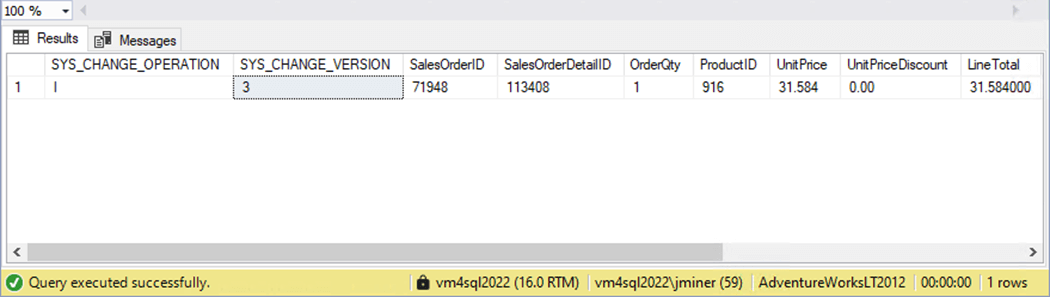
If we execute the script right now, we obtain the following output. There are additional columns from the system function that can be returned. The operation flag and change version seemed the most important to me.
Now that we have T-SQL to use for an incremental copy, we need to update the metadata for these two new steps.
Update Metadata
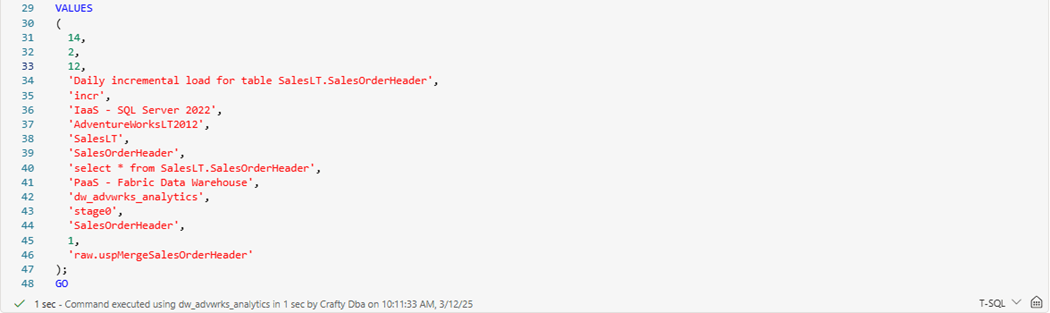
We want to make a copy of the insert statement in the Fabric T-SQL notebook. Change the row id, step number, comment, and target schema. Many of these entries are for commenting since locations might be hard coded in the activity. However, stage zero is the new target schema, and a merge stored procedure will be called to move the incremental updates into raw tables. This logic all depends upon a primary key.
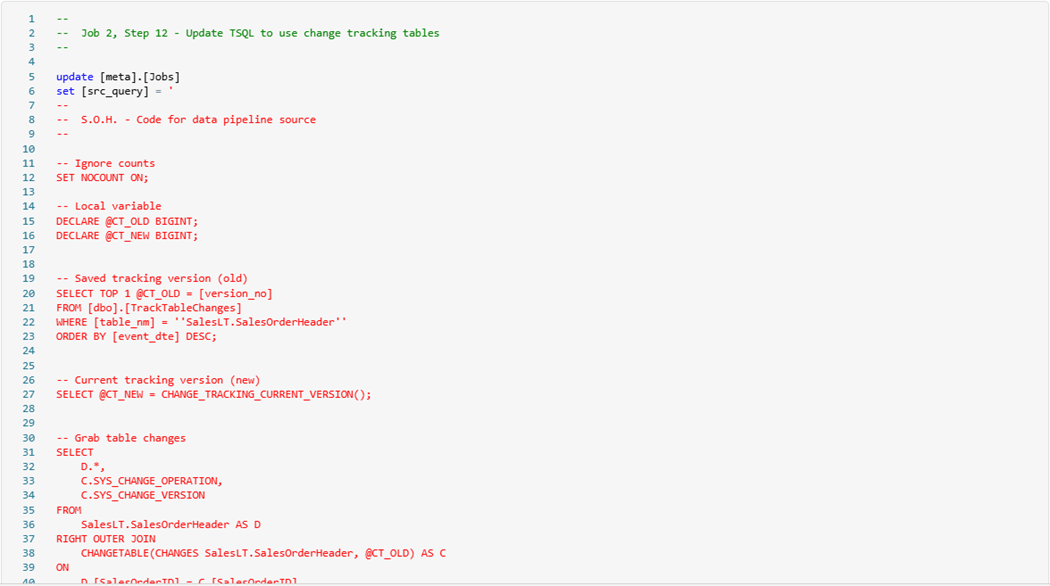
Since the T-SQL code is a multi-line statement, I choose to update the source query after the initial entry.
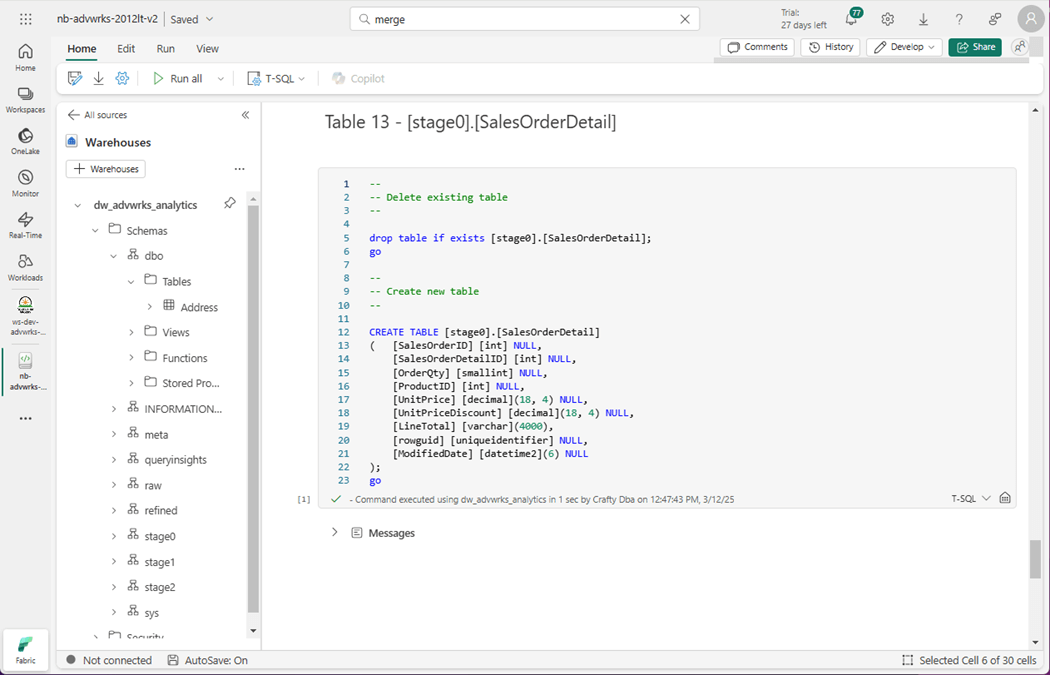
Currently, the source is the complex T-SQL query, and the destination is a table in stage zero. Those tables do not exist at this time. Let us create them right now. The image below shows the Sales Order Detail table being built.
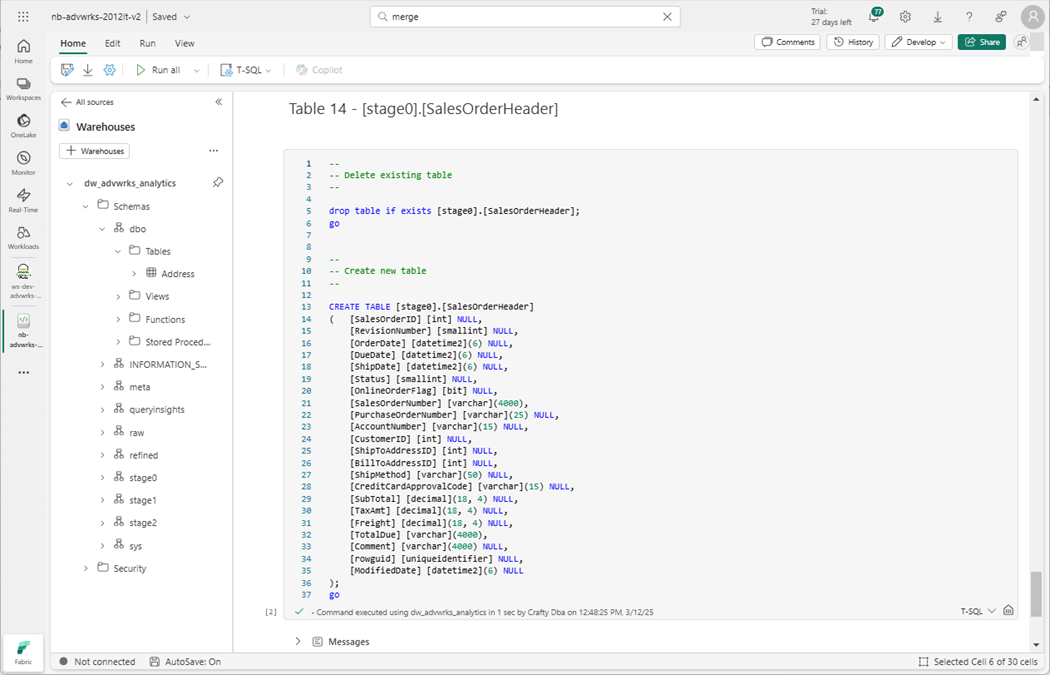
The Sales Order Header table will be created after this cell is executed.
The next step is to create a stored procedure that will merge table data from stage zero to raw schema.
Using Agentic AI
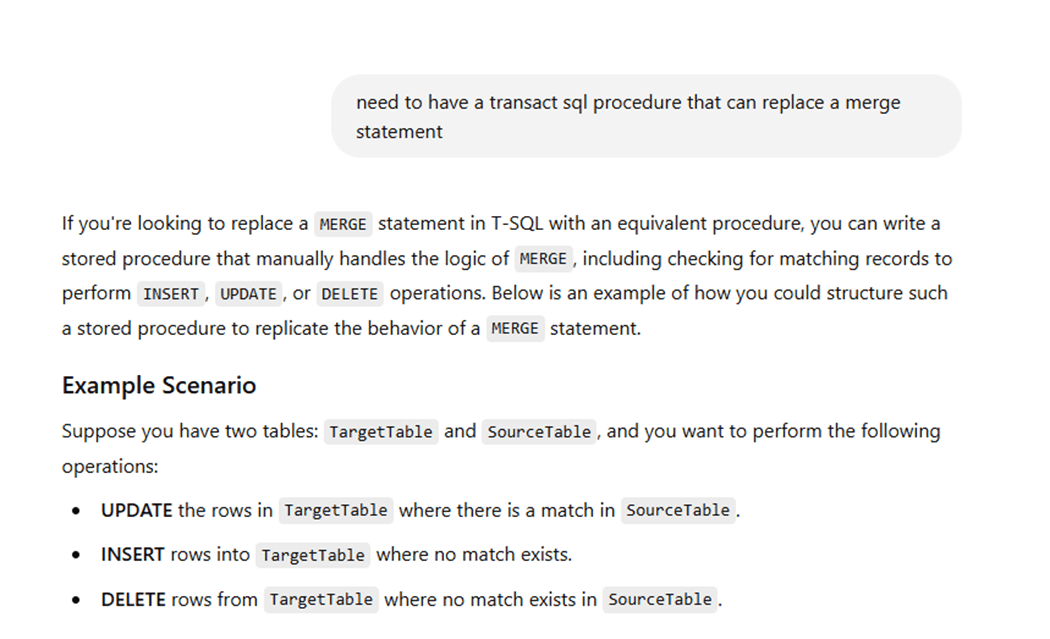
If you are not developing with VS Code with GitHub Co-Pilot integration, you should look into buying a license. However, you can ask questions to ChatGPT on line as an alternative. Just remember to never share confidential information with these learning algorithms. The image below shows my first prompt and output that runs two pages. The first part of the output describes how a merge statement can be replaced with three separate code blocks for inserting, updating, and deleting.
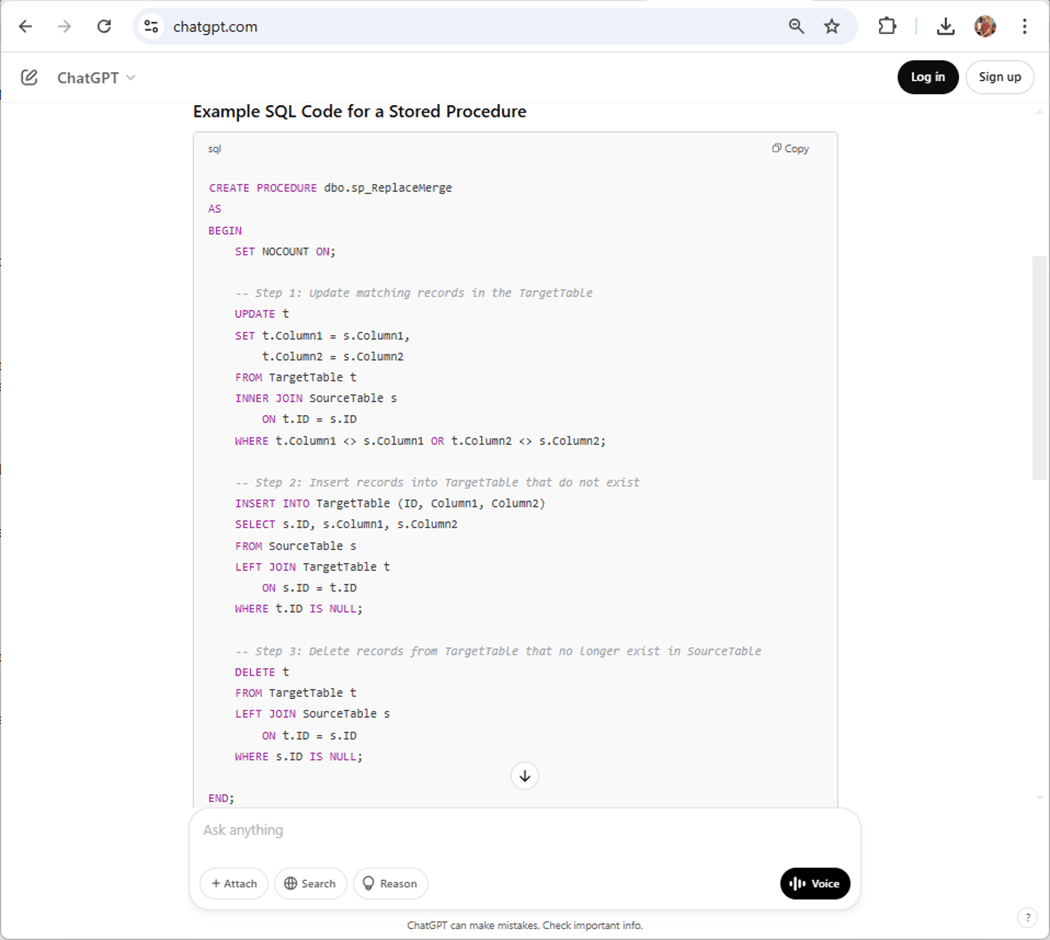
The second part of the output gives us a template stored procedure. Just change the names of the Source and Target tables.
You can download the zip file and look at the final stored procedures. The final steps to enable incremental loading are to modify the pipelines.
Data Pipelines
The image below shows the name of the pipeline has been changed to pl_data_load_step since it oversees both full and incremental loads. The only difference is the full copy lands data in the raw schema and the incremental copy lands data into the stage zero schema.
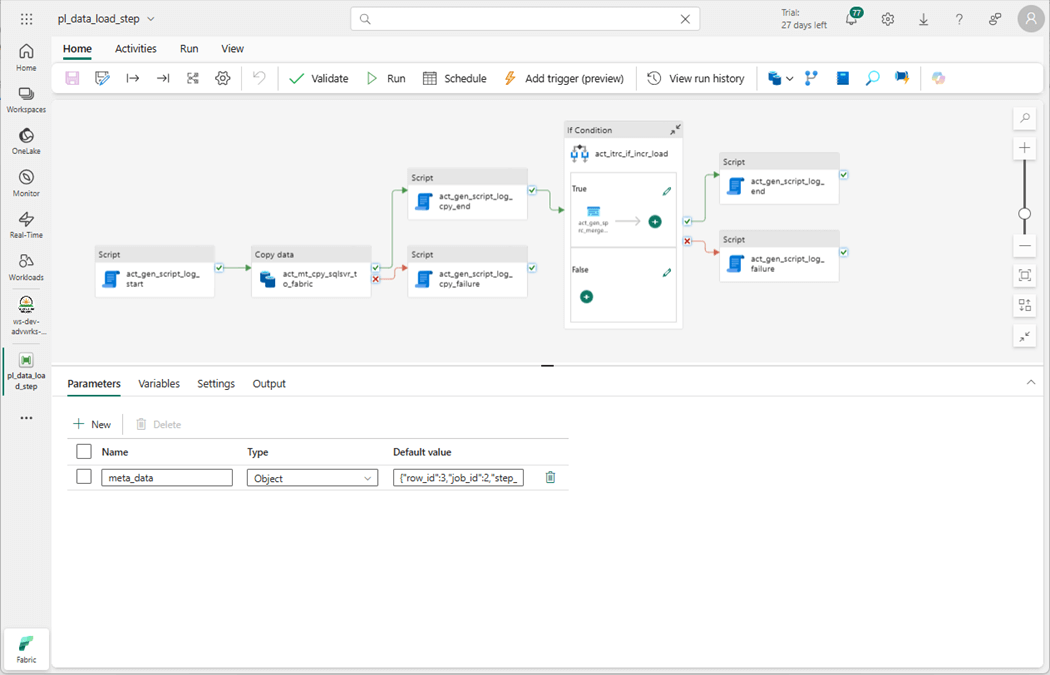
Every incremental load pattern starts with a full load. Within job number two, steps nine and ten perform a full load pattern for the two sales tables. After the first daily execution, disable those steps. Steps eleven and twelve have the correct metadata for an incremental load on those same tables. Please enable those steps to go forward.
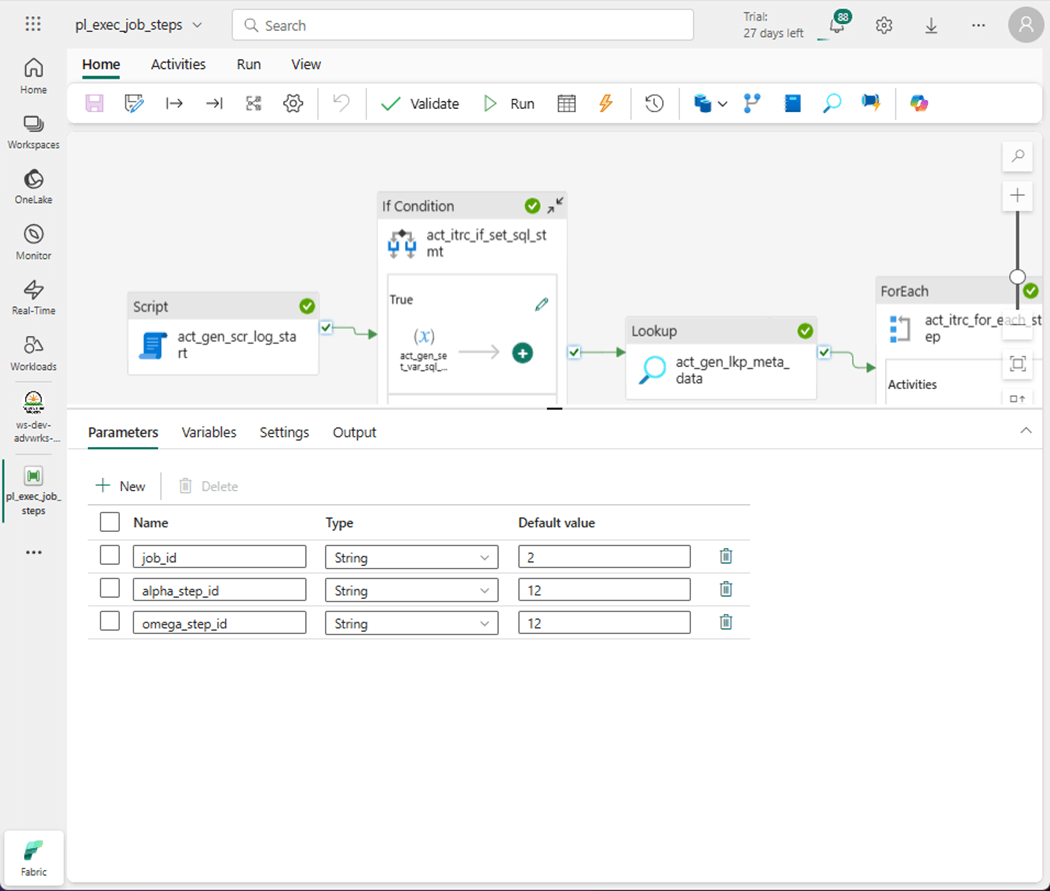
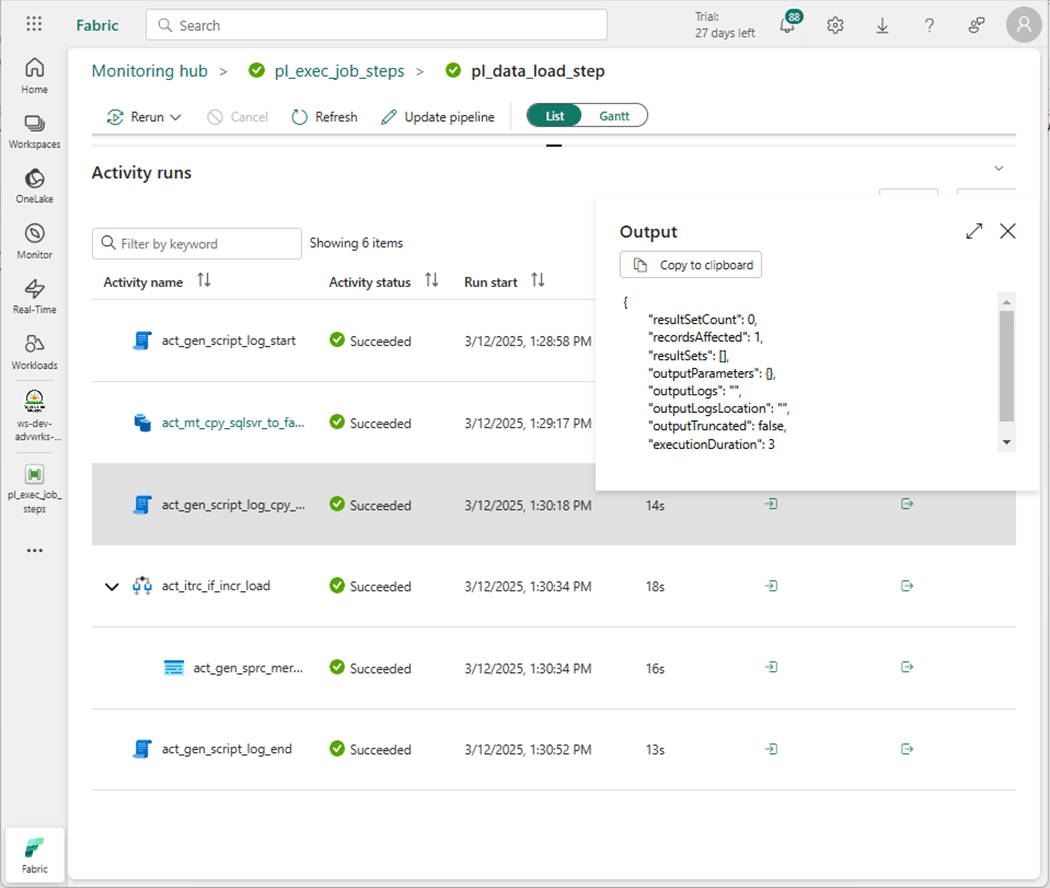
The image below shows step 12 of job number 2 being executed. We are expecting one changed row to show up in our stage zero table.
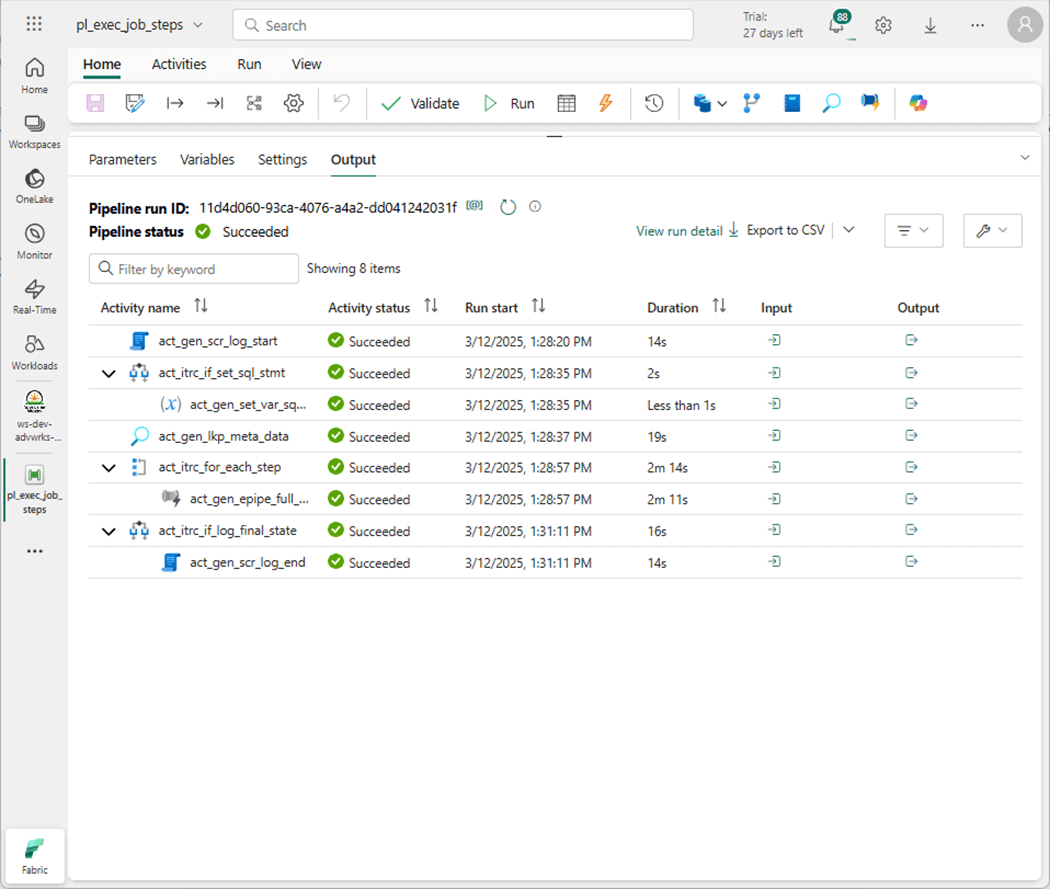
If we peer into the output of the copy activity, we can see one record was moved.
The last step is to look at the final orchestration pipeline. There details of the three pipeline jobs are shown below: job 1 – move table data from dbo schema, job 2 – full copy table data from Sales LT schema, job 3 – incremental copy table data from Sales LT schema, and don’t forget to refresh the next staging schema and updates the refined views. Finally, the table that tracks changes is updated to reflect what the current stage is set to. All these tasks are packaged into an orchestration data pipeline, named pl_shed_daily_load.
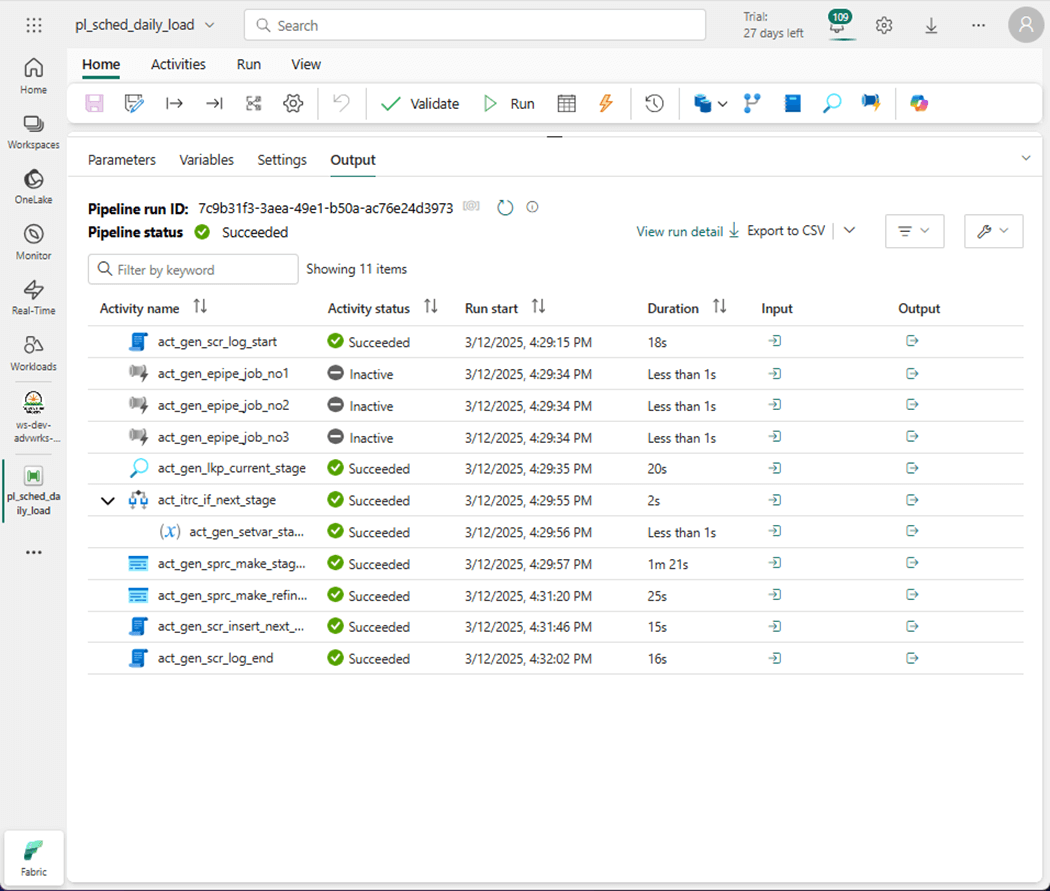
In the next sections, let us dive into the T-SQL code that is needed for dynamically creating tables in the chosen staging schema and updating the views.
Dynamic T-SQL Code
To create a view that has dynamic T-SQL statements, we first need to have a list of datasets. This can be achieved by creating a reference table shown below.
--
-- Delete existing table
--

DROP TABLE IF EXISTS [meta].[DataSets];
GO

--
-- Create new table
--

CREATE TABLE [meta].[DataSets]
(
    [dataset_id] [int] NULL,
    [schema_nm] [varchar](128) NULL,
    [table_nm] [varchar](128) NULL,
    [key_fields] [varchar](1024) NULL
);
GO
The next step is to fill the table with data using a T-SQL query seen below.
--
--  Add first batch of data
--

-- delete existing data
TRUNCATE TABLE [meta].[DataSets];
GO

-- add new data
INSERT INTO [meta].[DataSets]
SELECT
   row_number() over (order by (dst_table) ) as dataset_id,
   j.dst_schema as schema_nm,
   j.dst_table as table_nm,
   NULL as key_fields
FROM meta.Jobs AS j
WHERE j.dst_schema = 'raw'
ORDER BY j.dst_table;
GO
The output from a simple select statement is seen below. If we did have any aggregate tables, they would be entered as [tmp]..
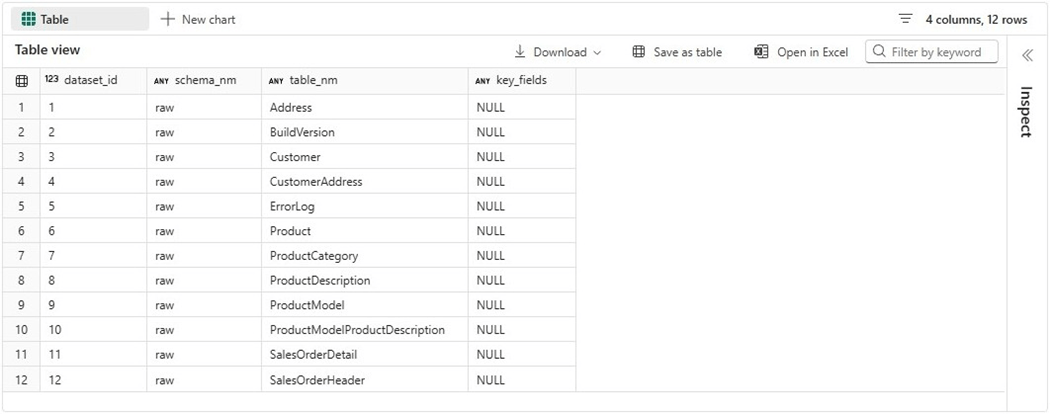
Given this information, we can create a view that has three dynamic statements: drop staging table, create staging table, replace/alter view.
--
--  Drop the view
--

DROP VIEW IF EXISTS [meta].[uvwCode4Staging];
GO

--
--  Create the view
--

CREATE OR ALTER VIEW [meta].[uvwCode4Staging]
AS
SELECT
    [dataset_id],
    [schema_nm] + '.' + [table_nm] as [full_table_nm],
    'DROP TABLE IF EXISTS [token].[' + [table_nm] + '];' as [del_stmt],
    'CREATE TABLE [token].[' + [table_nm] + '] AS '  +
    'SELECT * FROM [raw].[' + [table_nm] + '];' as [add_stmt],
    'CREATE OR ALTER VIEW [refined].[' + [table_nm] + '] AS '  +
    'SELECT * FROM [token].[' + [table_nm] + '];' as [upd_stmt]
FROM
    [meta].[DataSets];
GO
We should validate the output of the view using a SELECT statement.
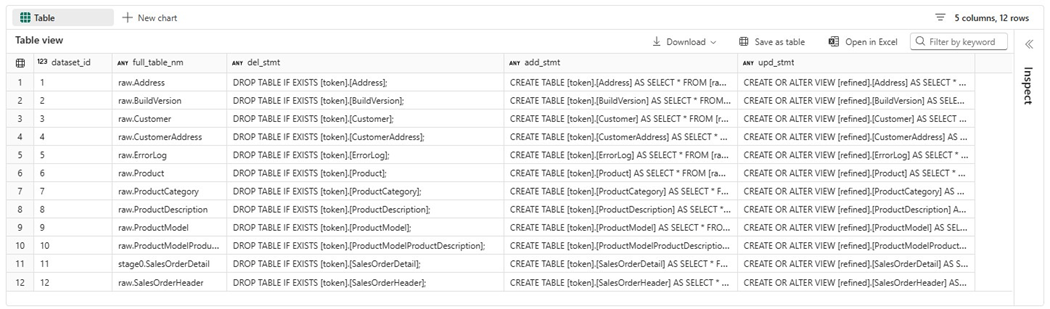
Please note, we do not know what the schema is right now. Thus, the stored procedure we create will execute the following statements: find the next stage number and execute both TABLE related T-SQL statements. The insertion of a new record in the control table at completion will be done with an TSQL activity. We should create and populate the controls table now.
--
-- Delete existing table
--

DROP TABLE IF EXISTS [meta].[Controls];
GO

--
-- Create new table
--

CREATE TABLE [meta].[Controls]
(
    [control_key] [varchar](128) NULL,
    [control_value] [varchar](128) NULL,
    [last_modified] [datetime2](6) NULL
);
GO

--
--  Add first record
--

INSERT INTO [meta].[Controls]
(
    [control_key],
    [control_value],
    [last_modified]
)
VALUES ('stage', '1', GETDATE());
GO
The delta file format may return with an error if parallelism is occurring and more than one process tries to update a record. A better solution is always to insert a new record. To find the next stage, we can use the following view.
--
--  Drop the view
--

DROP VIEW IF EXISTS [meta].[uvwControlTable];
GO

--
--  Create the view
--

CREATE OR ALTER VIEW [meta].[uvwControlTable]
AS
SELECT *
FROM
(
    SELECT
        ROW_NUMBER() OVER (PARTITION BY control_key ORDER BY last_modified DESC) as row_no,
        *
    FROM [meta].[Controls]
) AS D
WHERE D.row_no = 1;
GO
The easiest way to validate the view is to write a simple query.
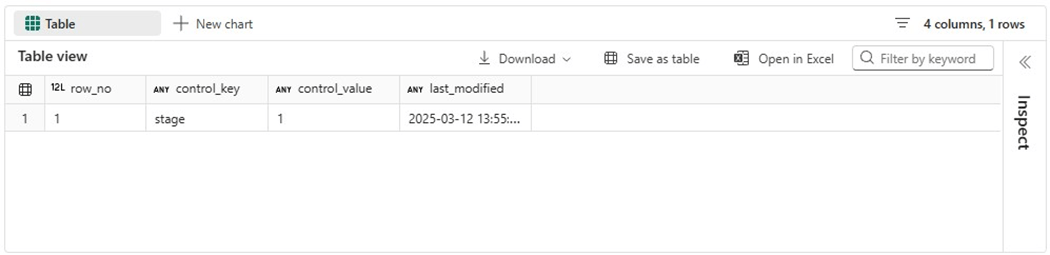
To wrap up this section, we need two stored procedures. The first stored procedure shown below is called uspMakeStagingTables. It uses a while loop to process the records in the view. Thus, we need to know how many rows. An improvement would be adding a row number to the view and using max/min functions to dynamically figure out these values.
--
--  Del Procedure
--

DROP PROCEDURE IF EXISTS uspMakeStagingTables;
GO

--
--  Add Procedure
--

CREATE OR ALTER PROCEDURE uspMakeStagingTables
    @VAR_STAGE INT = 1,
    @VAR_ALPHA INT = 1,
    @VAR_OMEGA INT = 12
AS
BEGIN

    -- While loop control
    DECLARE @VAR_CNT INT = @VAR_ALPHA;
    DECLARE @VAR_MAX INT = @VAR_OMEGA;

    -- Variables
    DECLARE @VAR_SCHEMA VARCHAR(32);
    DECLARE @VAR_TABLE VARCHAR(128);
    DECLARE @VAR_FAIL VARCHAR(1024);
    DECLARE @VAR_MSG VARCHAR(128);

    -- Del + Add statements
    DECLARE @VAR_STMT1 NVARCHAR(4000);
    DECLARE @VAR_STMT2 NVARCHAR(4000);

    -- Dynamic schema name
    SELECT @VAR_SCHEMA = 'stage' + TRIM(STR(@VAR_STAGE));

    -- For each table
    WHILE (@VAR_CNT <= @VAR_MAX)
    BEGIN

        -- Grab code
        SELECT
            @VAR_TABLE = [full_table_nm],
            @VAR_STMT1 = CAST(REPLACE([del_stmt], 'token', @VAR_SCHEMA) AS NVARCHAR(4000)),
            @VAR_STMT2 = CAST(REPLACE([add_stmt], 'token', @VAR_SCHEMA) AS NVARCHAR(4000))
        FROM
            [meta].[uvwCode4Staging]
        WHERE
            [dataset_id] = @VAR_CNT;

        -- log start
        INSERT INTO [meta].[Logs]
        (
            job_id,
            step_id,
            program_name,
            step_description,
            action_type,
            additional_info,
            action_timestamp
        )
        VALUES
        (
            -1,
            @VAR_CNT,
            'uspMakeStagingTables',
            're-create table - ' +  REPLACE(@VAR_TABLE, 'raw', @VAR_SCHEMA),
            'start tsql',
            'none',
            GetDate()
        );

        -- No failure yet
        SELECT @VAR_FAIL = 'none'

        -- Del + Add table
        BEGIN TRY

            -- Exec DEL code
            EXEC sp_executesql @VAR_STMT1;

            -- Exec ADD code
            EXEC sp_executesql @VAR_STMT2;

        END TRY

        BEGIN CATCH
            SELECT @VAR_FAIL = 'Error Num : ' + STR(ERROR_NUMBER()) + ', Error Msg: ' +  ERROR_MESSAGE();
        END CATCH

        -- log end
        INSERT INTO [meta].[Logs]
        (
            job_id,
            step_id,
            program_name,
            step_description,
            action_type,
            additional_info,
            action_timestamp
        )
        VALUES
        (
            -1,
            @VAR_CNT,
            'uspMakeStagingTables',
            're-create table - ' +  REPLACE(@VAR_TABLE, 'raw', @VAR_SCHEMA),
            'end tsql',
            @VAR_FAIL,
            GetDate()
        );

        -- Increment counter
        SELECT @VAR_CNT = @VAR_CNT + 1;

    END;

END;
GO
The second stored procedure shown below is called uspRefreshRefinedViews.
--
--  Del Procedure
--

DROP PROCEDURE IF EXISTS uspRefreshRefinedViews;
GO

--
--  Add Procedure
--

CREATE OR ALTER PROCEDURE uspRefreshRefinedViews
    @VAR_STAGE INT = 1,
    @VAR_ALPHA INT = 1,
    @VAR_OMEGA INT = 64
AS
BEGIN

    -- While loop control
    DECLARE @VAR_CNT INT = @VAR_ALPHA;
    DECLARE @VAR_MAX INT = @VAR_OMEGA;

    -- Variables
    DECLARE @VAR_SCHEMA VARCHAR(32);
    DECLARE @VAR_TABLE VARCHAR(128);
    DECLARE @VAR_FAIL VARCHAR(1024);
    DECLARE @VAR_MSG VARCHAR(128);

    -- Del + Add statements
    DECLARE @VAR_STMT1 NVARCHAR(4000);

    -- Dynamic schema name
    SELECT @VAR_SCHEMA = 'stage' + TRIM(STR(@VAR_STAGE));

    -- For each table
    WHILE (@VAR_CNT <= @VAR_MAX)
    BEGIN

        -- Grab code
        SELECT
            @VAR_TABLE = [full_table_nm],
            @VAR_STMT1 = CAST(REPLACE([upd_stmt], 'token', @VAR_SCHEMA) AS NVARCHAR(4000))
        FROM
            [meta].[uvwCode4Staging]
        WHERE
            [dataset_id] = @VAR_CNT;

        -- log start
        INSERT INTO [meta].[Logs]
        (
            job_id,
            step_id,
            program_name,
            step_description,
            action_type,
            additional_info,
            action_timestamp
        )
        VALUES
        (
            -2,
            @VAR_CNT,
            'uspRefreshRefinedViews',
            're-create view - ' + @VAR_TABLE,
            'start tsql',
            'none',
            GetDate()
        );

        -- No failure yet
        SELECT @VAR_FAIL = 'none'

        -- Upd Views
        BEGIN TRY

            -- Exec UPD code
            EXEC sp_executesql @VAR_STMT1;

        END TRY

        BEGIN CATCH
            SELECT @VAR_FAIL = 'Error Num : ' + STR(ERROR_NUMBER()) + ', Error Msg: ' +  ERROR_MESSAGE();
        END CATCH

        -- log end
        INSERT INTO [meta].[Logs]
        (
            job_id,
            step_id,
            program_name,
            step_description,
            action_type,
            additional_info,
            action_timestamp
        )
        VALUES
        (
            -2,
            @VAR_CNT,
            'uspRefreshRefinedViews',
            're-create view - ' +  @VAR_TABLE,
            'end tsql',
            @VAR_FAIL,
            GetDate()
        );

        -- Increment counter
        SELECT @VAR_CNT = @VAR_CNT + 1;
    END;

END;
GO
Please note that logging is especially important. Both the data pipelines and stored procedures are using the same logging table.
Unit Testing
It is important to test each component when creating modules that are part of a solution. Once all the components are created, we want to test the solution as a complete unit of work.
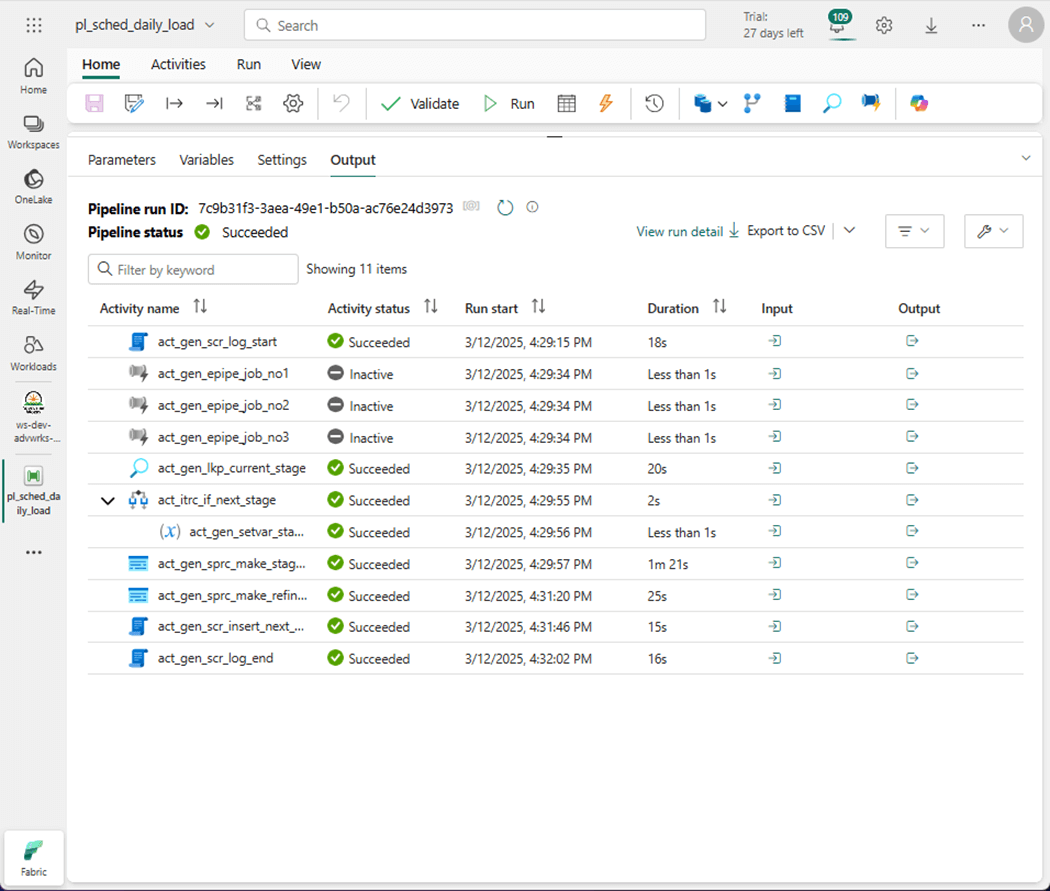
I was so pleased to see that deactivating an activity was added to data pipelines. This includes both Fabric, Synapse and Azure versions. This means that copy jobs can be disabled while we evaluate our staging and refreshing code.
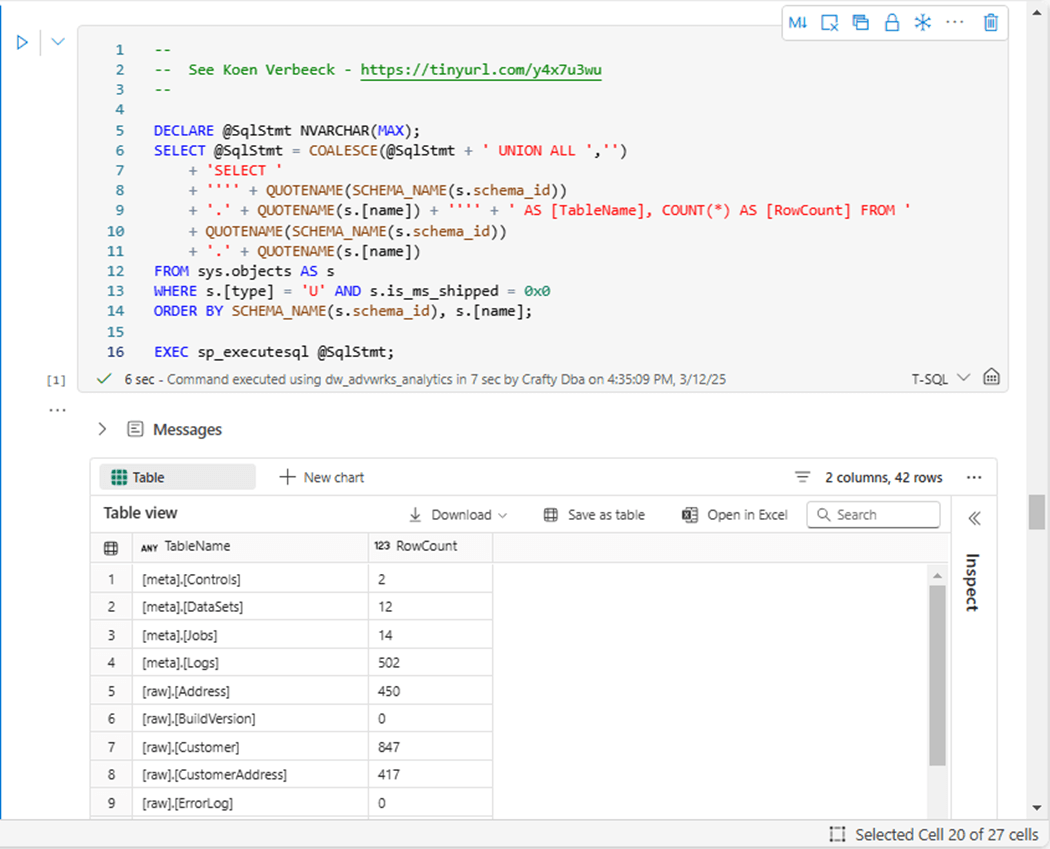
Many features that are part of the core SQL Server engine do not exist in Fabric. One of them is the extended database table property to get the cardinality (row count) of a table. A work around shown above lists each fully qualified table name and the total number of records in a table. Record counts are one way to validate that the incremental load is working.
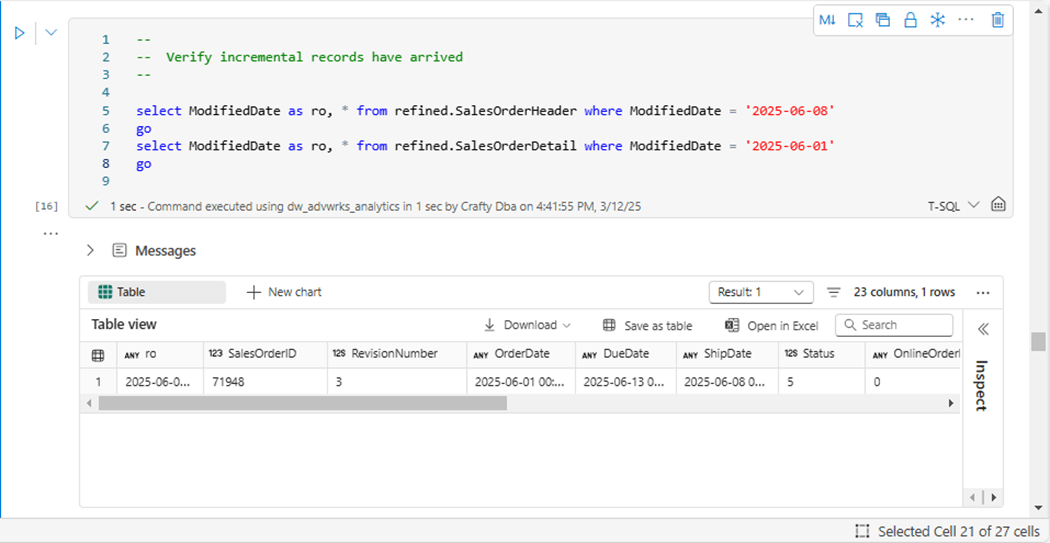
Another way to validate our code is to find the new records in the refined views. The above image shows the sales order header record, and the below image shows the sales order detail record.
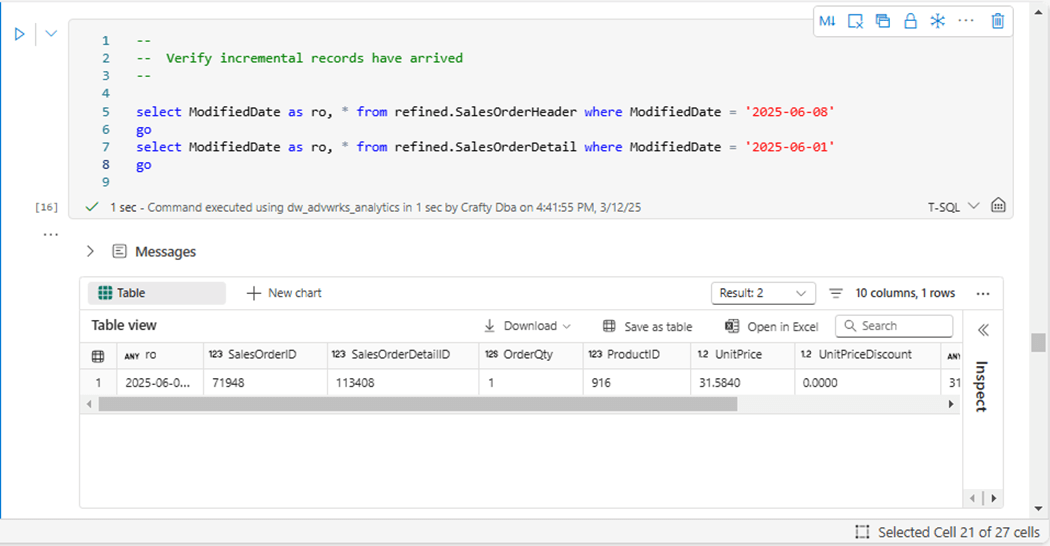
We now have a complete meta data driven framework to copy data from cloud or on premises databases into Fabric.
Summary
Before mirroring was introduced to Microsoft Fabric, one would have to write pipelines to move data. Many times, a developer would write a single pipeline for a single table. If the solution requires one thousand tables, we must create one thousand pipelines. This is a total maintenance nightmare!
A better solution is to write code that manages both full and incremental copies. The later load pattern requires a merge so that the raw (bronze quality) tables are in synch between source and target (Fabric). The framework just focused on SQL Server as the source database system. However, given the right drivers, any relational database management system can be used.
One down fall with loading data warehouses is the fact that the data might not be available if it is being refreshed. The framework that was used today has two stage zones: stage one and stage two. The current used stage flip flops between the two. That means, we can load data in an unused stage while the refined (silver quality) views point to a given time or stage. Once data is loaded into raw, we can restage the data in the unused schema, update the refined views, and insert a record into the control table.
If we refer to lambda architecture, this process would be considered batch. We can increase the schedule of the daily job to provide more updates per day. The full process is limited to how fast data can be copied from the source into the target. Increasing the parallelism of executing pipelines and/or fabric capacity can reduce the total load time. This in turn allows for more executions per day if required by the business line. In short, this framework is great for use cases that mirroring does not cover.
Enclosed is the code bundle for this article.