

DuckDB was originally developed by Mark Raasveldt and Hannes Mühleisen at CWI in the Netherlands. The project co-founders designed the open-source column-oriented Relational Database Management System as an in-process OLAP solution.
The database is special amongst database management systems because it does not have any external dependencies and can be built with just a C++ compiler. The vectorized query processing engine runs in the same processing space as the host. This fact eliminates the transfer of data between the client and server when processing.
This Python library is already installed on any given Fabric Python engine.
Business Problem
Our manager has asked us to explore how DuckDB can be used as a cloud warehouse called Mother Duck, for on-premises data exploration within a Jupyter notebook, or within the Fabric data engineering environment using Python notebooks. We will cover all three usages of the database engine within this article.
Solution Matrix
Since DuckDB can be used in many different ways, I created the following solution matrix for the three examples we are going to cover today.
| Name | Object | Usage | Comments |
| Mother Duck | Ducklings | SQL Language | Cloud Warehouse Offering. |
| Jupyter Notebook | Database File | Python Language | Persistent database file. |
| Jupyter Notebook | In Memory | Python Language | Close equates to drop action. |
| Jupyter Notebook | Magic Command | SQL Language | Bind magic command to database file. |
| Python Notebook | Database File | Python Language | Persistent database file. |
| Python Notebook | In Memory | Python Language | Close equates to drop action. |
| Python Notebook | Magic Command | TSQL Language | Uses SQL Analytic endpoint for data access. |
We are going to be writing code in either SQL or Python Languages. Because this open-source library is compact and requires no dependencies, it can be used with other languages to create analytic applications for various hardware devices. The screen shot below shows the languages supported by the library.
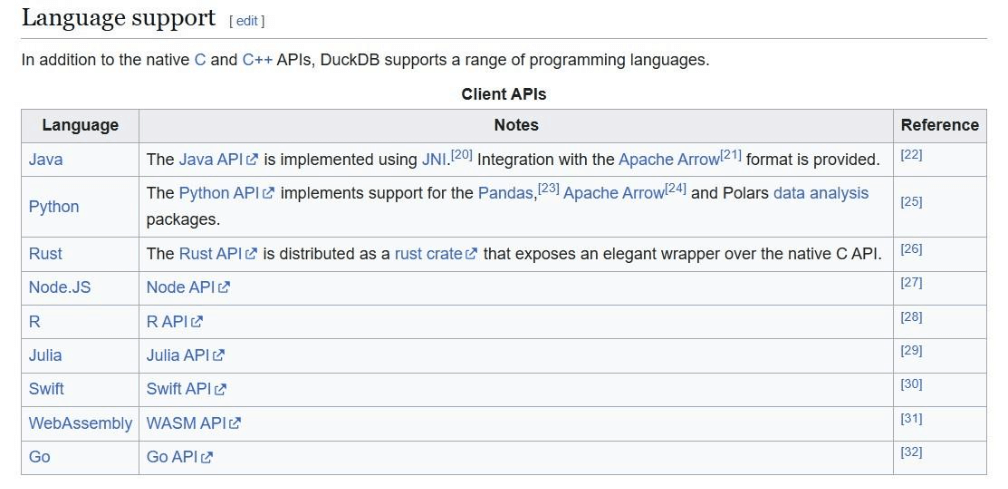
To recap, DuckDB is a column store database with a vector processing engine that is written in C++. Its speed and compact nature makes it attractive for small to medium size data tasks.
Mother Duck
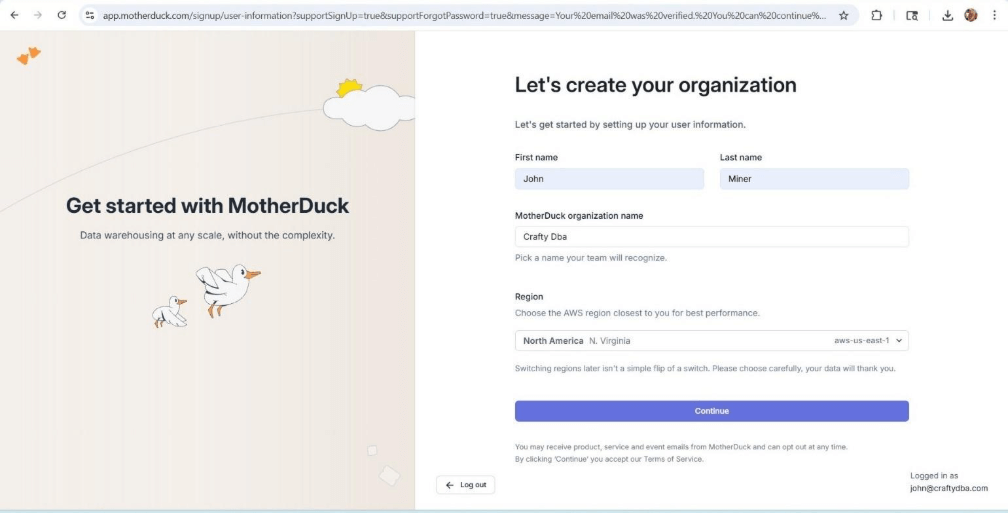
You can create a free MotherDuck account which will last for 21 days. The screen shows the Warehouse service is running in the North Virginia data center of AWS. The only other AWS offering is in Frankfurt Germany.
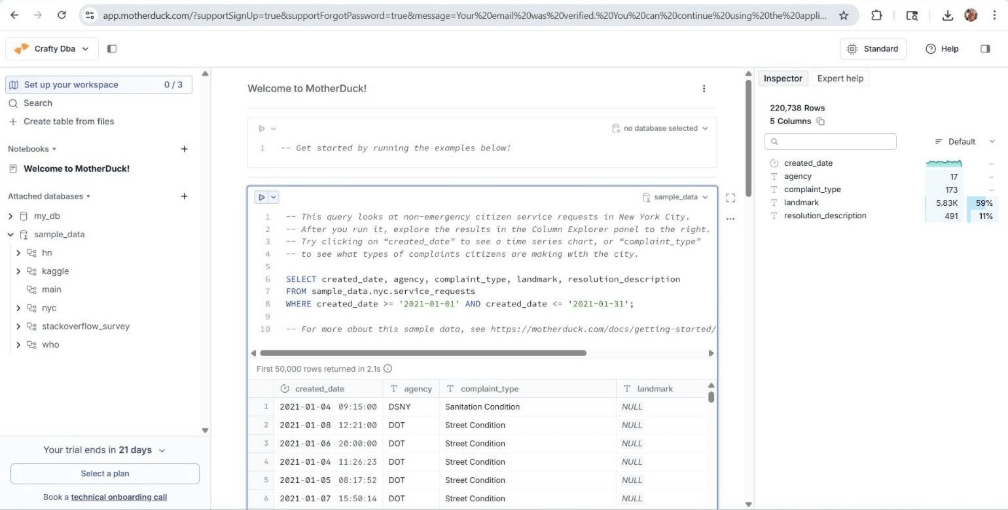
The cloud offering has several built-in sample ducklings. Please see the left panel of the image below. The center window has a sample query for the NYC city database for 311 service requests. We can see both the query output as well as a data profile of the output.
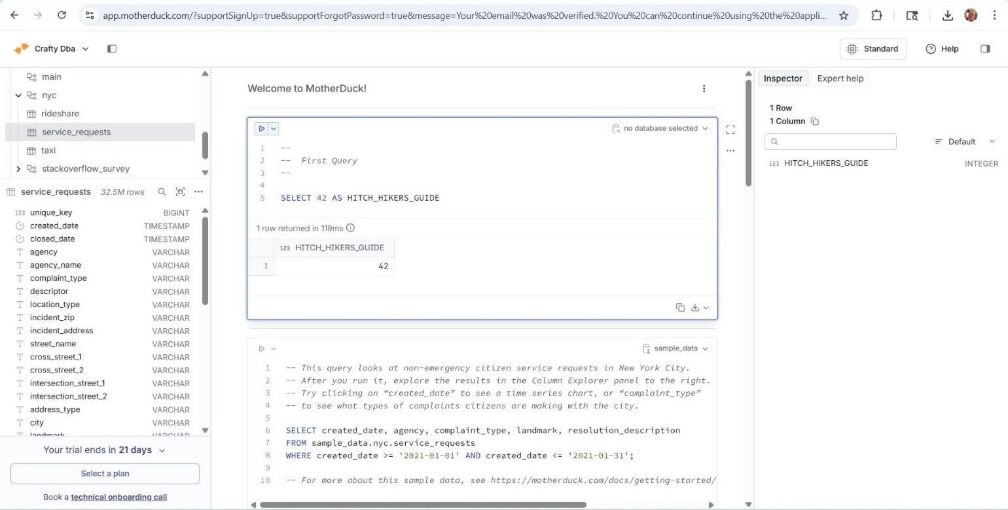
“Hitch Hikers Guide to the Universe” was forty-two of course. The image below shows the details of the service requests table in the NYC database. The middle and right panes show the details of our static query.
What is a duckling? The in-cloud warehouse offering allows each user to have a read-only processing space (duckling) to query the warehouse. This isolates the users when executing queries.
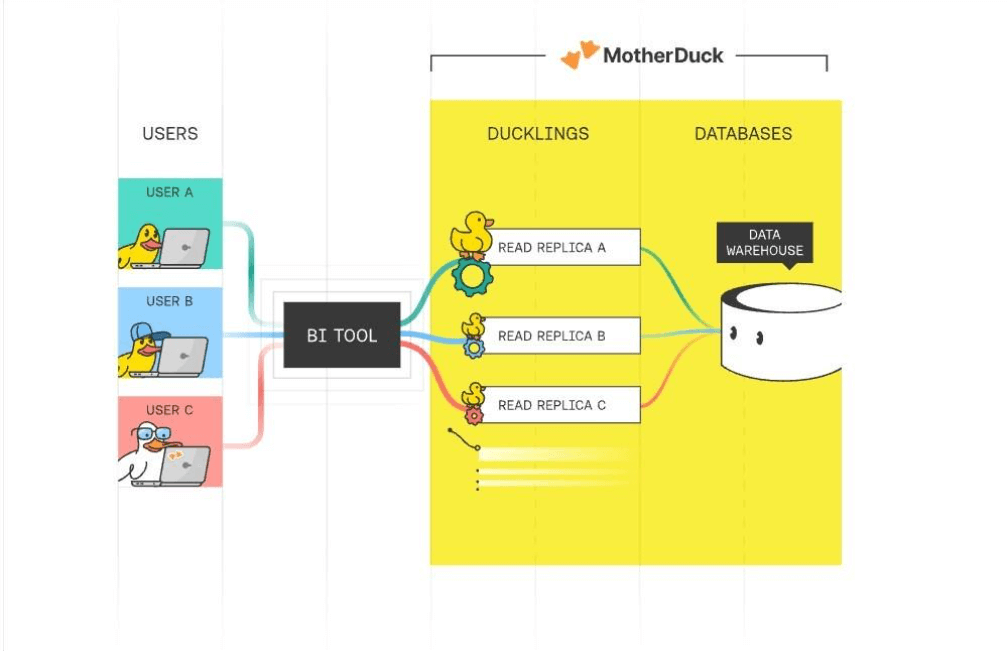
How does data get into the cloud service? DuckDB has written functions to read in popular file formats from all major cloud services. Other tools like Fivetran (ingestion), dbt (transformation), airflow (scheduling) and Power BI (reporting) work nicely with the cloud warehouse.
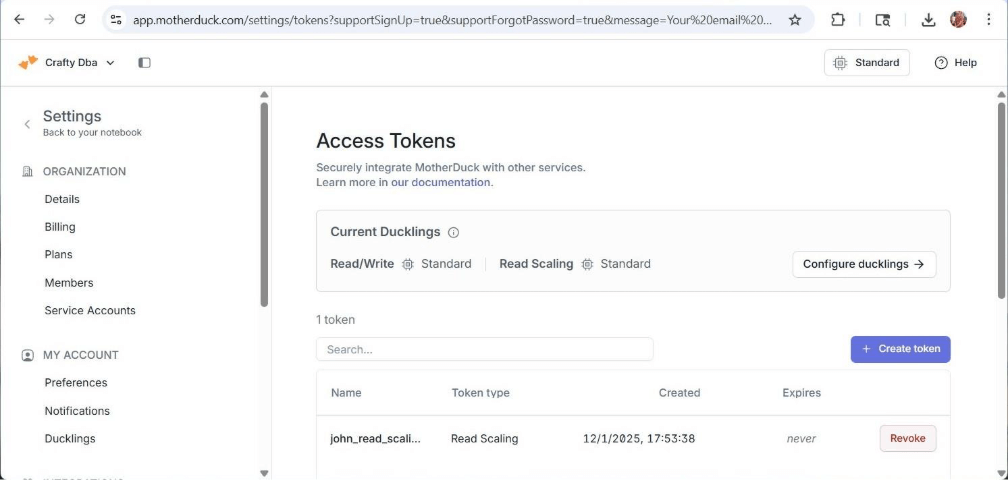
The business might require a data engineer to connect to MotherDuck and work with the data locally. How can we accomplish this task? We need to create an access token from the settings menu. Once we have this token, we can read from or write data to the cloud. In the next section, we will start with exploring DuckDB with Anaconda Jupyter Notebooks.
Jupyter Notebooks
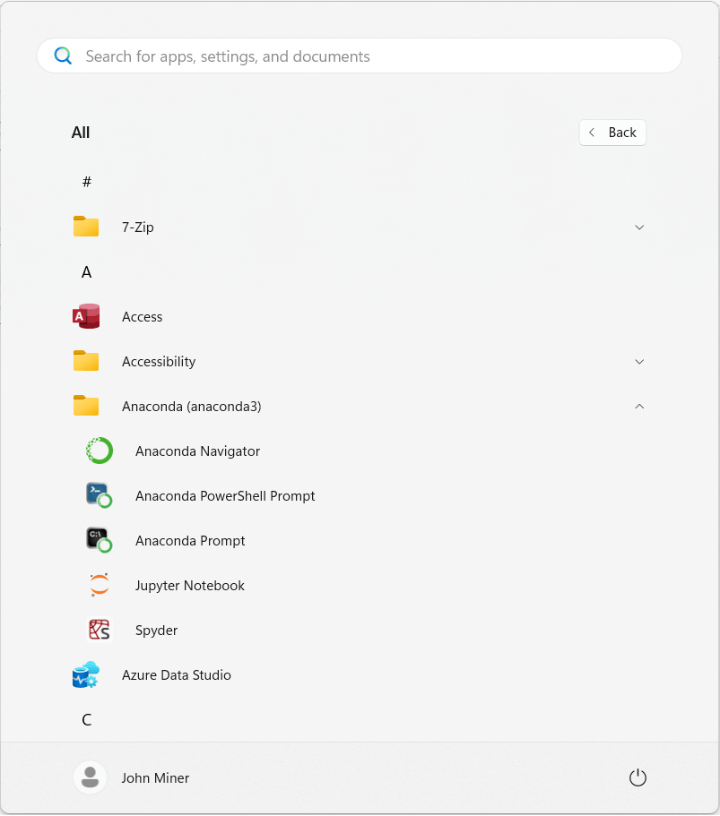
I really enjoy installing Anaconda since the Python engine, the Spyder editor and the Jupyter Notebook environment are deployed using one install package. The image shows the shortcuts for my Anaconda installation.
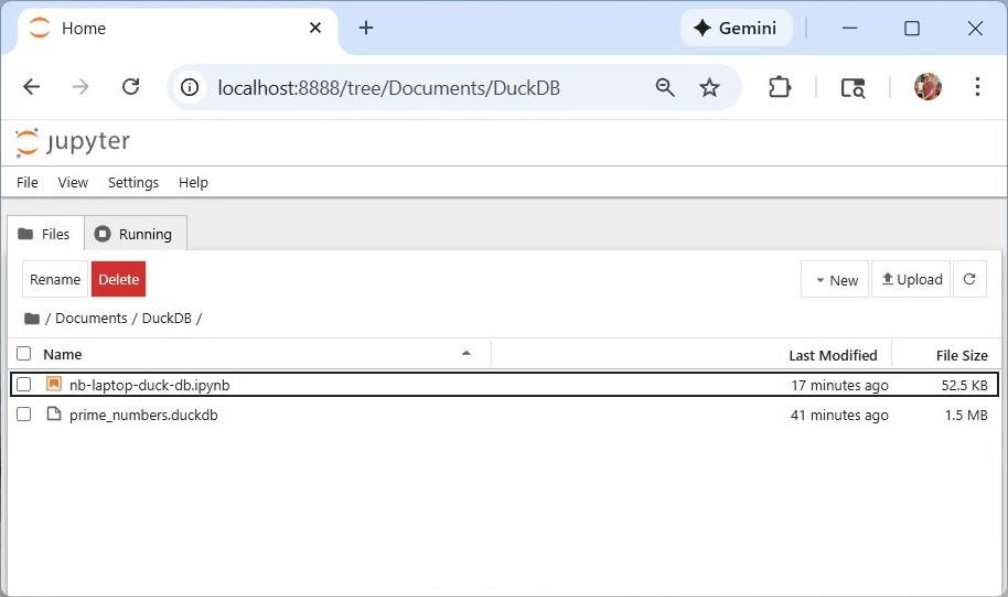
A command shell will open with the Jupyter Notebook processing running in the background. The default web browser will load with the development environment. Under the documents folder, I created a DuckDB folder for this code exploration. It contains both an interactive Python notebook as well as a DuckDB database file.
There are a bunch of libraries that need to be installed within our local kernel. Both duckdb and pandas libraries are required for data engineering. The rest are used for plotting and SQL extension for DuckDB.
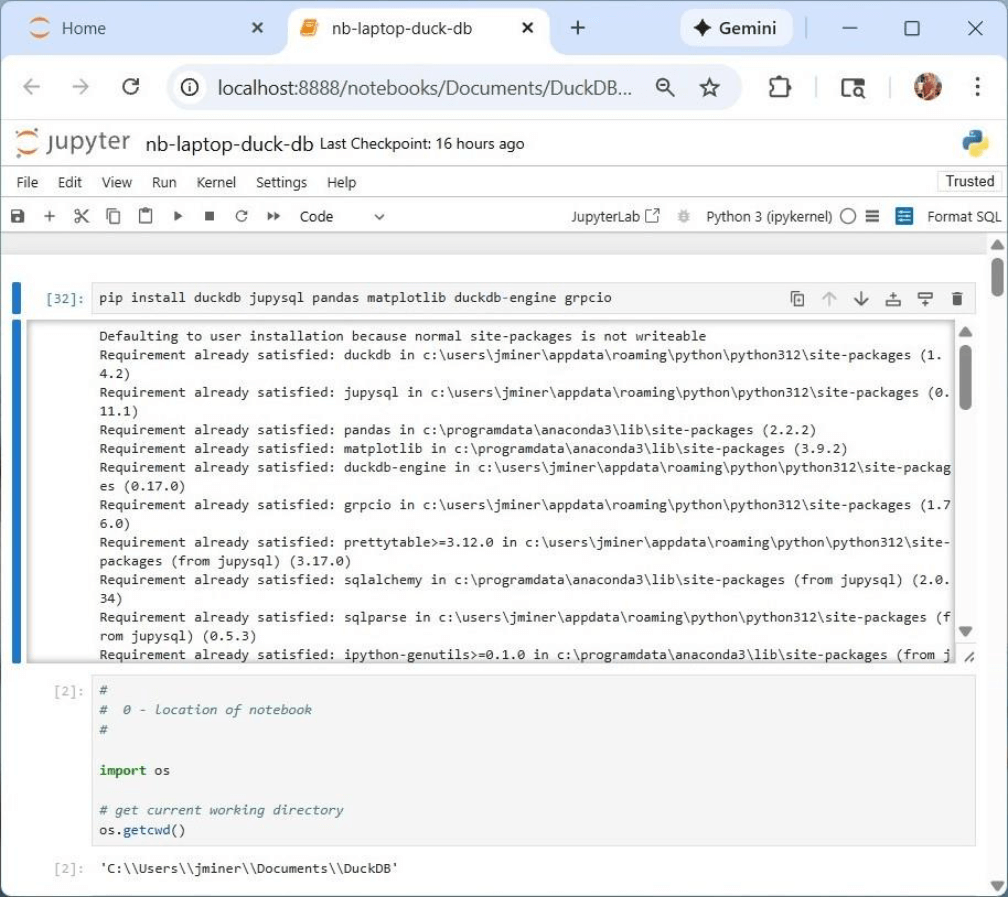
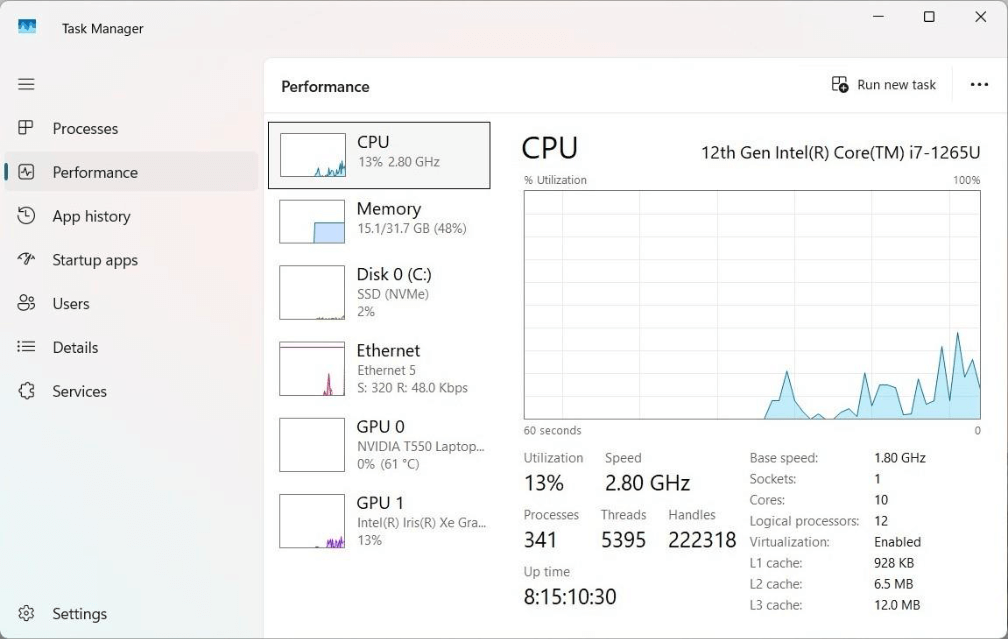
Because this environment is running locally, we need to know where files are stored. The second cell has code to find the working directory for Jupyter notebooks. At this point, I do not know if breaking a problem into pieces (parallel execution) will run faster than one process (serial execution)? We can use the performance section of the task manager to see how many computing cores we have to work with.
The pip command can be used to install the required libraries for DuckDB.
Storing Prime Numbers
This section will be dedicated to creating functions to calculate and store the prime numbers from 1 to 5 million. I went through three iterations of the code. Keeping a connection open to the database is required for in-memory databases. Once the connection is closed, the in-memory database is dropped. On the other hand, packaging operations so that a database file is opened, the action is performed, and the database is closed results in modular code.
The duckdb_drop_file removes a local database if it exists and ignores in memory databases. Default parameters are used to make sure the function works.
#
#  1 - Remove duckdb database file
#

import os

# define function
def duckdb_drop_file(path=":memory:", debug=False):

    # no file for in memory databases
    if path == ":memory:":
        return

    # if database file exists, delete file
    if os.path.exists(path):
        try:
            os.remove(path)
            if (debug):
                print(f"File '{path}' deleted successfully.")

        except OSError as e:
            if (debug):
                print(f"Error deleting file '{path}': {e}")
            pass

    # report missing file
    else:
        if (debug):
            print(f"File '{path}' does not exist.")
Actions against the database can be classified into two categories: execute a non-query statement or execute a query and return the result set. The function named duckdb_exec_nonquery uses the expanded syntax for opening, executing, committing, and closing the database connection. The developer will use this function with the CREATE TABLE or INSERT INTO SQL statements.
#
#  2 - Execute non query against duckdb
#

import duckdb
import pandas as pd

# define function
def duckdb_exec_nonquery(path=":memory:", stmt="select 42 as magic_number", debug=False):

    try:

        # Create/open persistent database
        conn = duckdb.connect(database=path)

        # Execute sql statement
        conn.execute(stmt)

        # Commit changes to database
        conn.commit()

        # Close the connection
        conn.close()

        if (debug):
            print(f"Executed statement '{stmt}' against '{path}' successfully.")

    except Exception as e:

        if (debug):
            print(f"Error executing '{stat}' against '{path}': {e}")
        pass
The python function named duckdb_exec_query executes a SELECT statement and returns a pandas dataframe. Since the query is a parameter, we can even you common table expressions (CTE) or subqueries in our SQL statement.
#
#  3 - Execute query statement against duckdb
#

import duckdb
import pandas as pd

# define function
def duckdb_exec_query(path=":memory:", stmt="select 42 as magic_number", debug=False):

    try:

        # Open persistent database
        with duckdb.connect(database=path) as conn:

            # Execute a SQL query
            qry_result = conn.sql(stmt)

            # Convert object 2 Pandas DataFrame
            df_result = qry_result.to_df()

        if (debug):
            print(f"Executed statement '{stmt}' against '{path}' successfully.")

    except Exception as e:

        # empty result set
        df_result = pd.DataFrame()

        if (debug):
            print(f"Error executing '{stat}' against '{path}': {e}")
        pass

    # return results
    return df_result
Now that we have ways to read and write data using ANSI SQL, we need to focus on how to determine if a single number is prime and how to inspect a range of numbers for primes. The function below is called is_prime. It uses the Sieve of Eratosthenes to find prime numbers.
#
#  4 – Is the candidate prime?
#

import math

# define function
def is_prime(candidate):

    # not a prime
    if (candidate == 1):
        return 0

    # prime number
    if (candidate == 2):
        return 1

    # look for divisor
    max_num = int(math.sqrt(candidate)) + 1
    for i in range(2, max_num):

        # not a prime
        if (candidate % i) == 0:
            return 0

    # must be a prime number
    return 1
The function below is called store_primes. Give a range from alpha to omega, it finds all primes numbers and stores them into a panda’s dataframe.
#
#  5 – For a given range, store prime numbers in a dataframe
#

from datetime import datetime

# define function
def store_primes(alpha, omega):

    # empty list
    lst_primes = []

    # for each candidate, is it a prime number?
    for j in range(alpha, omega):
        if is_prime(j):
            lst_primes.append({f'my_value': j, 'my_time': datetime.now().strftime("%Y-%m-%d %H:%M:%S.%f")})

    # convert to dataframe
    df_primes = pd.DataFrame(lst_primes)

    # return list size
    return df_primes
We now have components to write a single thread, multi-threaded and in-memory database proof of concept code to find and store prime numbers.
Various Solutions
I suggest the reader to look at all three solutions (batches) to the prime number problem. The code below is the most complex since it uses threads to break the problem into ten pieces, one for each core on my laptop. When using an in-memory database, the connection has to be keep open into all processing is done. The results need to be saved or lost forever.
#
#  8 - Save prime numbers (mutli threaded - 72.12 secs)
#

from concurrent.futures import ThreadPoolExecutor

if (batch == 2):

    # show time
    print(f"started - {datetime.now()}")

    # Remove db file
    path = "prime_numbers2.duckdb"
    duckdb_drop_file(path, True)

    # Create db table
    stmt = """
    create table if not exists tbl_primes
    (
        my_value integer,
        my_time timestamp default now()
    );
    """
    duckdb_exec_nonquery(path, stmt, True)

    # arguement lists
    lst_arg1 = []
    lst_arg2 = []

    # starting values
    alpha = 4
    omega = 500000

    # process counts
    total = 0
    cnt = 0

    # break process into 10 pieces
    for k in range(1, 11):

        # add to lists
        lst_arg1.append(alpha)
        lst_arg2.append(omega)

        # increment counters
        alpha = omega
        omega = omega + 500000

    # show args ?
    debug = False
    if (debug):
        print(lst_arg1)
        print(lst_arg2)

    # show time
    print(f"calculate prime numbers - {datetime.now()}")

    # execute in parallel
    with ThreadPoolExecutor(max_workers=10) as executor:
        frames = executor.map(store_primes, lst_arg1, lst_arg2)

    # show time
    print(f"store prime numbers - {datetime.now()}")

    # for each data frame
    for frame in frames:

        # adjust counts
        total = total + len(frame)
        cnt = cnt + 1

        # show counts by frame
        print(f"thread {cnt} - number of primes found {len(frame)}")

        # insert into table
        with duckdb.connect(database=path) as conn:
            conn.sql("insert into tbl_primes select * from frame")


    # show total sum of counts
    print(f"Total number of primes from 1 to 5M are {total}")

    # show time
    print(f"finished - {datetime.now()}")
The following pseudo code describes how the above program works.
- Open or create the database.
- Create the prime numbers table.
- For each thread (ten), create two lists for each search range: lower bound and upper bound.
- Use map function to execute store primes function in parallel.
- For each panda’s dataframe in the output, save the data to the prime numbers table.
- Show the total number of prime numbers.
The output from the function is shown below without the timestamps.
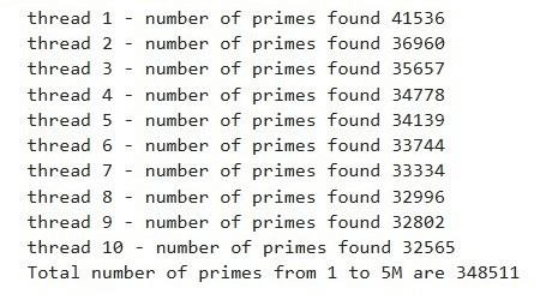
The table below shows the execution times. We only save six seconds by executing the process in parallel and save an additional five seconds by not persisting the file to storage.
| Process Type | Start Time (HH:MM:SS) | End Time (HH:MM:SS) | End Time (MM:SS) |
| Single Threaded (File) | 10:37:25 | 10:36:05 | 01:20.0 |
| Multi-Threaded (File) | 10:50:31 | 10:49:17 | 01:14.0 |
| Single Threaded (Memory) | 10:57:29 | 10:56:20 | 01:09.0 |
In a nutshell, the columnar database is extremely fast.
SQL Magic Command
We can bind the SQL magic command to both local and remote databases. There are two cells that we need to execute for this to happen. The first cell below sets configuration properties.
#
#  Configure session
#

%config SqlMagic.autopandas = True
%config SqlMagic.feedback = False
%config SqlMagic.displaycon = False
The second cell connects the SQL extension to a local database.
#
#  load the sql extension
#

%load_ext sql
conn = duckdb.connect(database='prime_numbers.duckdb')
%sql conn --alias duckdb
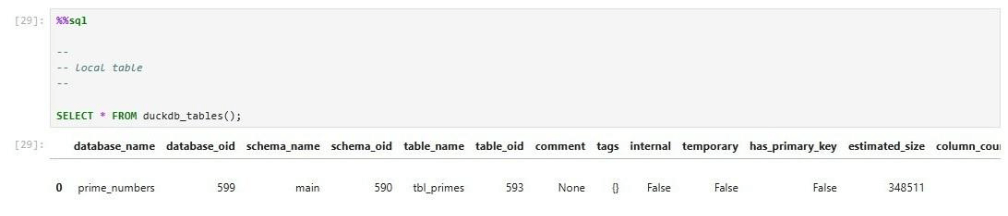
We can see there are a total of 347,511 records in the table.
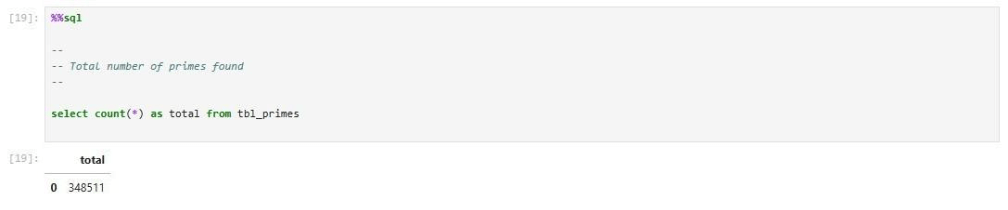
We can union two derived tables into one table showing the first and last five records within the prime numbers table.
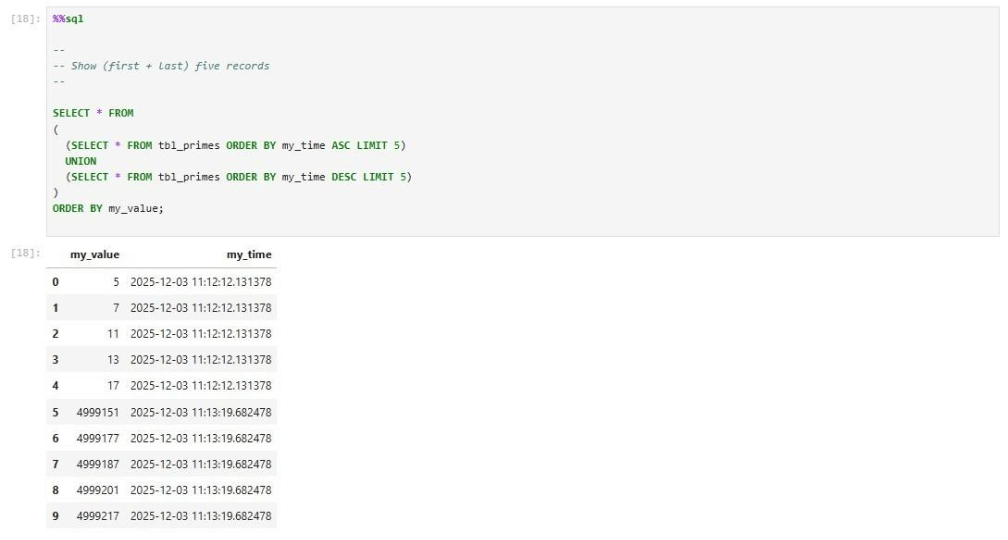
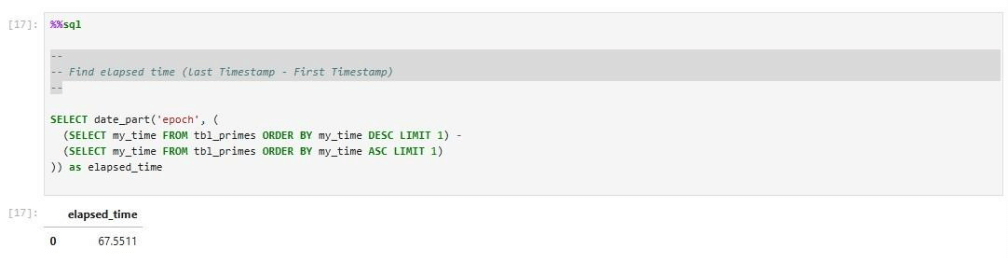
The DuckDB library was built with C++. It is not surprising that the data is stored in UNIX format. The SQL statement subtracts the last and first entry times to find the total computing time.
Many databases have their own system views. The duckdb_tables view returns tables defined in the database.
We can create a configuration dictionary with the MotherDuck token to query in-cloud databases. The code below creates the python dictionary.
#
#  Mother Duck API Token
#

token = "<your token>"
config = {"motherduck_token": token}
print(config)
We can create a configuration dictionary with the MotherDuck token to query in-cloud databases. The code below creates the python dictionary.
#
#  load the sql extension
#

import duckdb
import pandas as pd

%reload_ext sql
conn = duckdb.connect(database='md:_share/sample_data/23b0d623-1361-421d-ae77-62d701d471e6', config=config)
%sql conn --alias duckdb
Selecting from the system view shows the following sample databases are available to me.
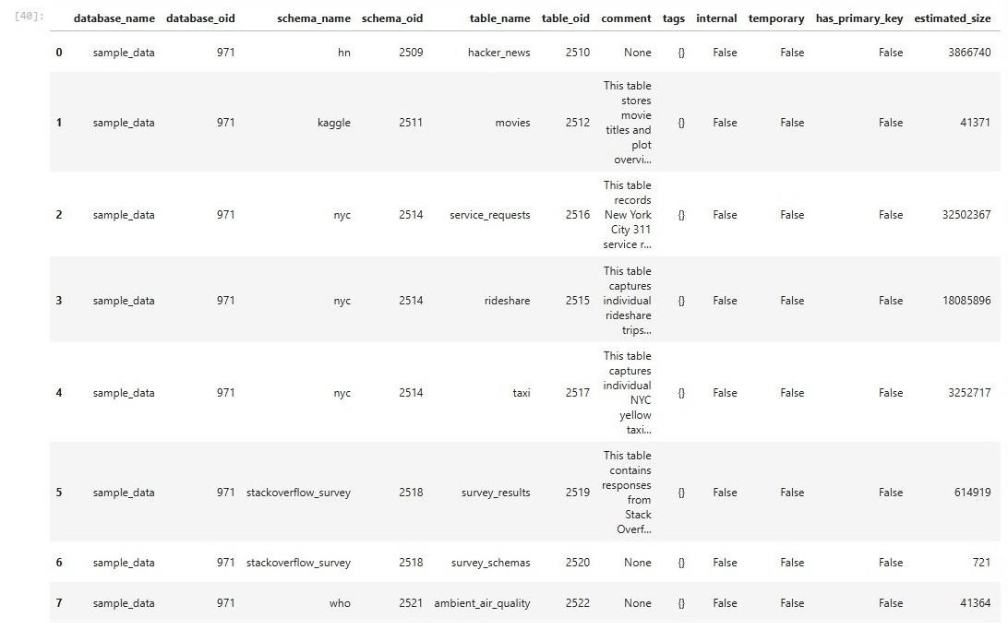
We can execute the same sample query against the 311 database that we did with the in-cloud service. The same number of rows is shown below in the result set.
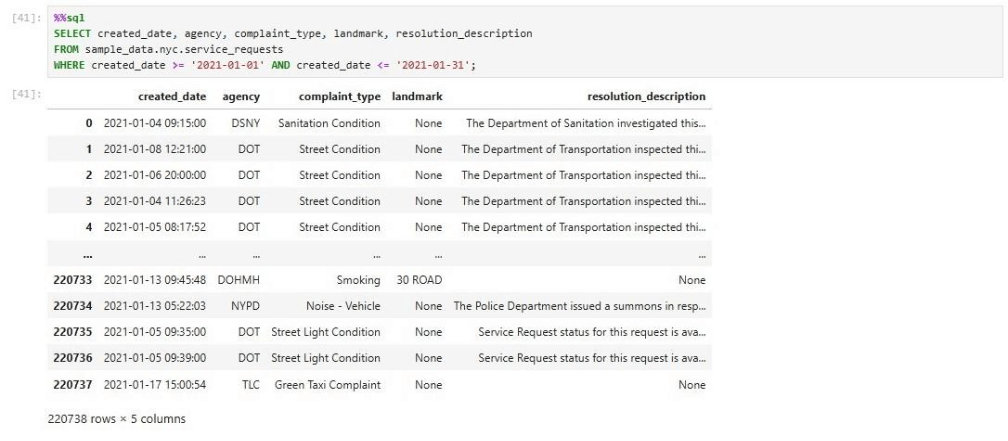
When dealing with DuckDB databases, we can bind both local and remote databases to the SQL extension. Thus, any SQL magic commands are executed against the target database, and the results are returned to the Jupyter Notebook. Next, we are going to look at data processing using Fabric Python Notebooks.
Fabric Data Engineering
There are two ways to use DuckDB with Fabric Python Notebooks. We can read data into panda’s dataframes. Transform the data using methods and store the data using the delta format. Another way is to load the data into an in-memory database, transform the data, save the output as a panda’s dataframe, and store the data as a delta table. Let us explore these design patterns in this section.
#
#  2 - Read all the stock data (65 s)
#

#  add libs
import duckdb
import pandas

# file locations
path = '/lakehouse/default/Files/stocks/**/*.CSV'

# fetch data
pdf1 = duckdb.read_csv(path, ignore_errors=True).fetchdf()
The above code uses the read_csv function to read all files into a panda’s data frame. With the polar’s library, we had to use the glob library to file all files recursively and then process them. This functionality is built into DuckDB. Please see the documentation supported file formats and cloud storage. The code below renames default column names and filters out records that have zeros.
#
#  4 - Show pandas data
#

# remove bad data
pdf2 = pdf1[pdf1['volume'] != 0]

# fix column names
pdf2.columns = pdf2.columns.str.replace('symbol', 'st_symbol')
pdf2.columns = pdf2.columns.str.replace('date', 'st_date')
pdf2.columns = pdf2.columns.str.replace('open', 'st_open')
pdf2.columns = pdf2.columns.str.replace('high', 'st_high')
pdf2.columns = pdf2.columns.str.replace('low', 'st_low')
pdf2.columns = pdf2.columns.str.replace('close', 'st_close')
pdf2.columns = pdf2.columns.str.replace('adjclose', 'st_adjclose')
pdf2.columns = pdf2.columns.str.replace('volume', 'st_volume')

# remove index
pdf3 = pdf2.reset_index(drop=True)

# show the data
pdf3
The code below uses the fully qualified ADLS path and delta lake library to generate the duckdb_stocks table.
#
#  5 - Save stock data as delta table (4s)
#

# add libs
from deltalake import write_deltalake

# must be adls path
path = "abfss://e3479596-f0f8-497f-bcd3-5428116fa0ea@onelake.dfs.fabric.microsoft.com/926ebf54-5952-4ed7-a406-f81a7e1d6c42/Tables/bronze/duckdb_stocks"

# over write
write_deltalake(path, pdf3, mode='overwrite')
The image shows the resulting some of the data stored in the table.
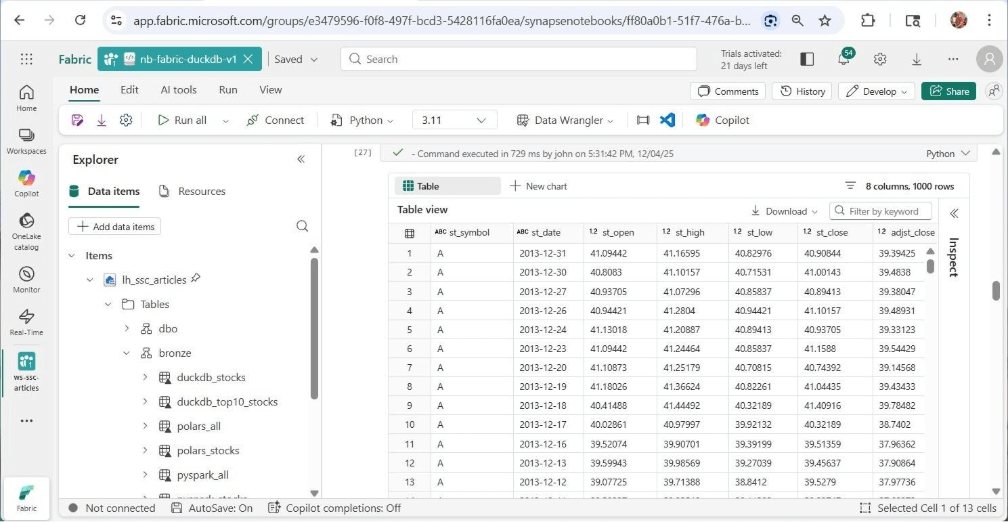
A business leader has asked us to filter the data for the top 10 S&P stocks. This request has one stock that was not on the list between the years 2013 and 2017. Instead of using dataframe methods, we are going to use the in-memory database with SQL queries. The read_csv_auto function can be used within a CTAS statement to return the file as at table for processing.
#
#  6 - Create in memory table from csv files
#

import duckdb

# Connect to DuckDB (in-memory database)
con = duckdb.connect(database=':memory:')

# file locations
path = '/lakehouse/default/Files/stocks/**/*.CSV'

stmt = f"""
create table stocks as
select
  symbol as st_symbol ,
  date as st_date ,
  open as st_open ,
  high as st_high ,
  low as st_low ,
  close as st_close ,
  adjclose as st_adjclose ,
  volume as st_volume
from read_csv_auto('{path}');
"""

# Create a table from a CSV file
con.execute(stmt)

# Verify the data
con.table("stocks").show()
Filtering for both non-zero records and the top ten stocks will be done with the in-memory connection. The last step is the write the results to the delta table.
#
#
#  7 - Save data for top 10 companies in 2025
#

# please note tesla was not on the list until 2020

# add libs
from deltalake import write_deltalake

# make sql stmt
stmt = """
select *
from stocks
where st_volume != 0 and
st_symbol in
(
  'NVDA',
  'AAPL',
  'MSFT',
  'AMZN',
  'GOOGL',
  'GOOG',
  'AVGO',
  'FB',
  'TSLA',
  'BRK-B'
)
"""

# get dataframe
pdf4 = con.execute(stmt).fetchdf()

# remove index
pdf5 = pdf4.reset_index(drop=True)

# must be adls path
path = "abfss://e3479596-f0f8-497f-bcd3-5428116fa0ea@onelake.dfs.fabric.microsoft.com/926ebf54-5952-4ed7-a406-f81a7e1d6c42/Tables/bronze/duckdb_top10_stocks"

# over write
write_deltalake(path, pdf4, mode='overwrite')

# Close the connection
con.close()
That was not hard to use DuckDB to read files, process rows, and write records to a delta table.
Unexpected Output
If we drag the table name to a cell, Fabric generates code to return the first one thousand rows. This seems to work flawlessly.
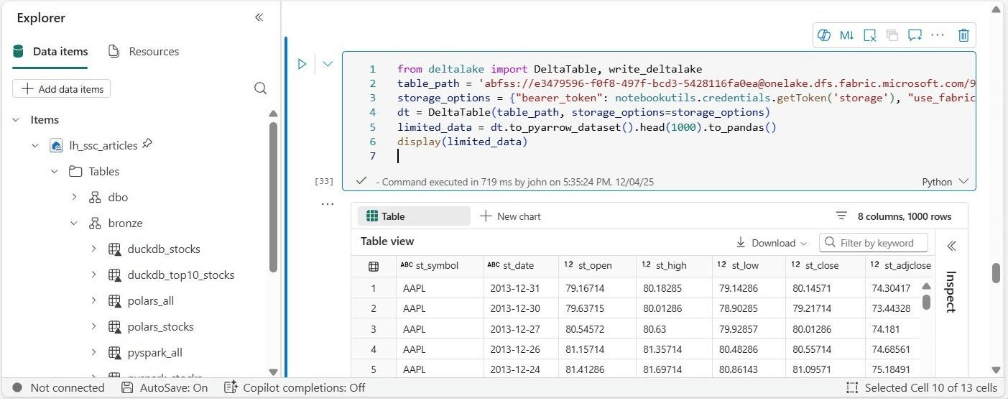
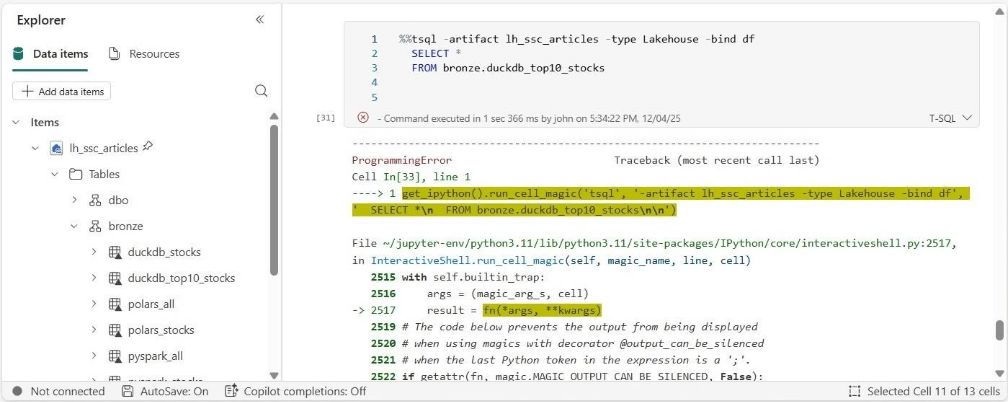
If we choose to use the delta_scan function from DuckDB, we generate an error from the Delta Kernel.
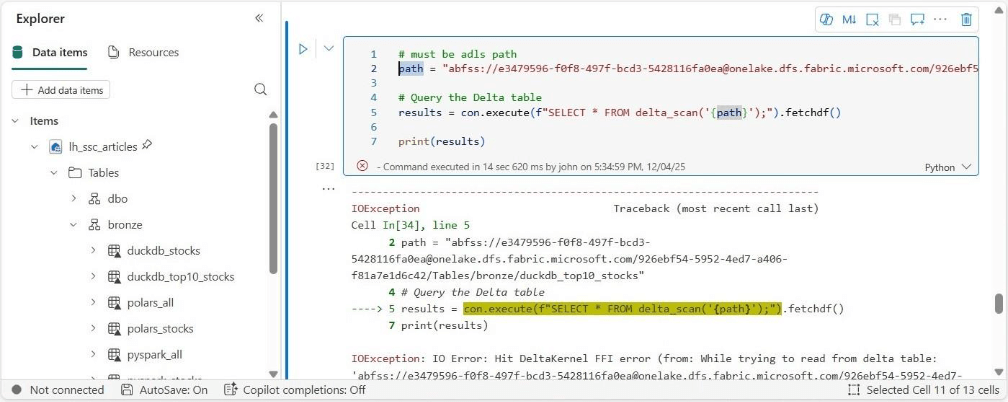
Let’s try using the TSQL magic command that is available in Fabric Python Notebooks. This function uses the SQL endpoint but generates an error also.
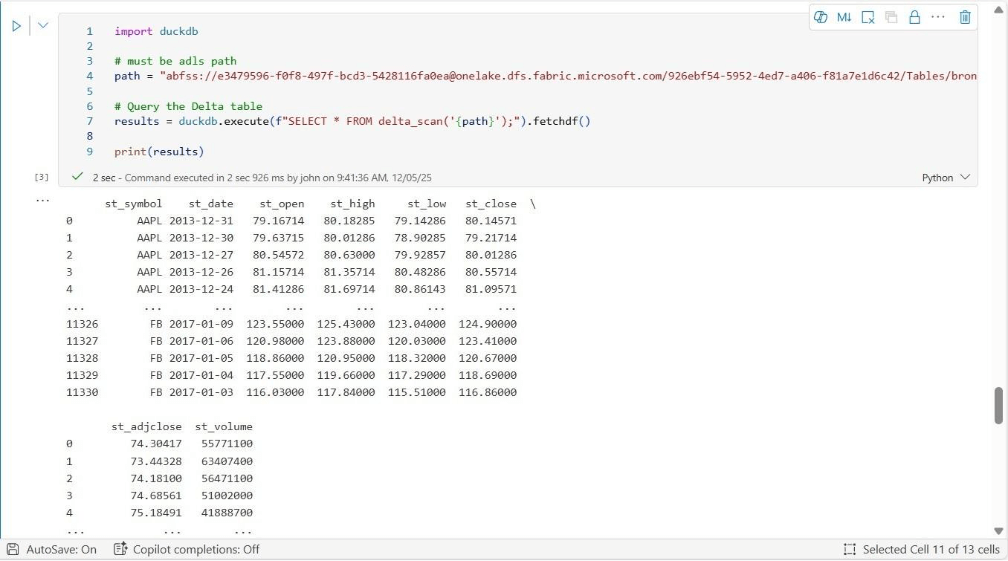
Here is the real twist in the story. I waited a day to re-test the same functionality. Both commands successfully completed this time. The output below is using the DuckDB library.
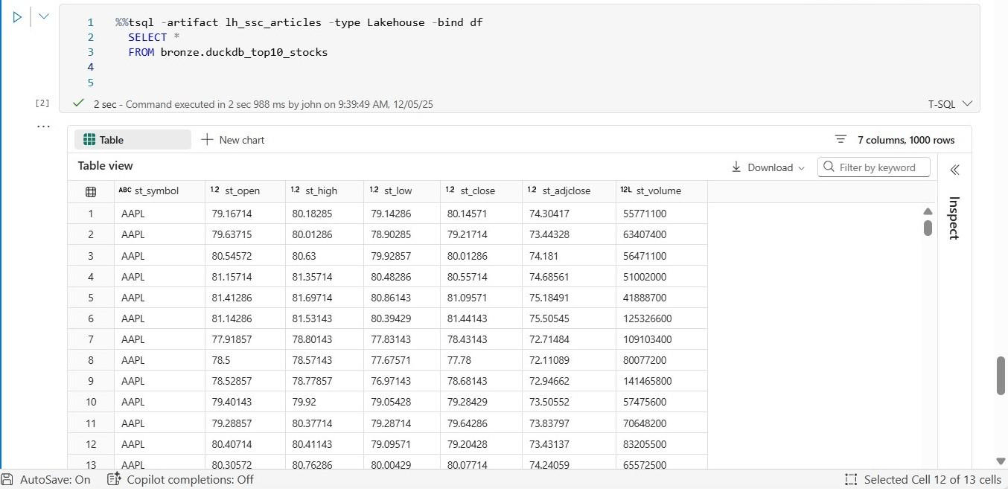
The output below is using the TSQL magic command.
I will be opening a ticket with the Fabric Product group to discuss this intermittent issue.
Summary
DuckDB is a column store database with a vector processing engine. Its speed and compact nature makes it attractive for embedded applications as well as ad-hoc analysis. Today, we first looked at MotherDuck which is a data warehouse service running in the AWS cloud. This service is attractive for those companies who want to collate their data into a single repository. Databases and tables created in this service can be read from both on-premises and on cloud.
Our second exploration of the DuckDB library was with Anaconda implementation of Jupyter notebooks. We examined both physical (file) and virtual (memory) databases. The prime numbers problem can be solved faster by parallel execution of the program. Every time we connect to the database, we must open a file which is expensive in terms of time. Of course, it was not surprising that the in-memory database had the fastest execution time.
While writing code is fun, as a data analysis we want to just run queries against tables. This can be accomplished with the SQL extension for Jupyter notebooks. This allows the magic command to be bound to a database which can be local (file) or remote (cloud). I did not cover the full syntax of the DuckDB language. However, system functions do exist to examine metadata entries of the catalog. Jupyter notebooks are a great solution for Data Scientist and Data Analysis who need access to the data.
The third and final exploration of the DuckDB library was centered around Fabric Notebooks. The built in library functions allow consumption of data regardless of its location. Since Fabric Python notebooks have this library already installed, it is important to understand how it can be used. Data can be ingested into dataframes, processed using various methods, and subsequently stored in OneLake as delta tables. Another design pattern is to read the data into an in-memory database and manipulate the data with ANSI SQL. Of course, the final storage location is a table in the Fabric Lakehouse.
Regardless of how you use DuckDB, developers with a Python and SQL background will be right at home. I suggest you add DuckDB to your tool belt when solving data engineering and/or data warehousing projects. Enclosed is a zip file with the notebook code that was shown in this article.