

The pandas library was started by Wes McKinney when he worked at ARQ Capital Management in 2008. It was a straightforward way to read data from flat files into in-memory dataframes. It took a decade to produce a better replacement to pandas.
Polars is an open-source software library for data manipulation. The first release of the software was by Ritchie Vink in 2020. Polars is built with an OLAP query engine implemented in Rust using Apache Arrow Columnar Format as the in-memory model. This Python library is already installed in any given Fabric Python engine.
Many companies are looking to use serverless computing for faster Spark Cluster start times. Usually, these clusters are very restrictive when it comes to installing JAR files. How can we retrieve data from SQL Server when we cannot install the driver? Microsoft has released the new python library that includes the driver as built in code. This means no drivers are required for the library to work.
Business Problem
Our manager has asked us to explore using the Polars dataframe within Fabric Python Notebooks. This new library should show considerable speed improvements to the existing Pandas dataframes that are currently being used. Additionally, we want to include the new python driver named “mssql python” in our proof-of-concept notebook.
Configuring the Session
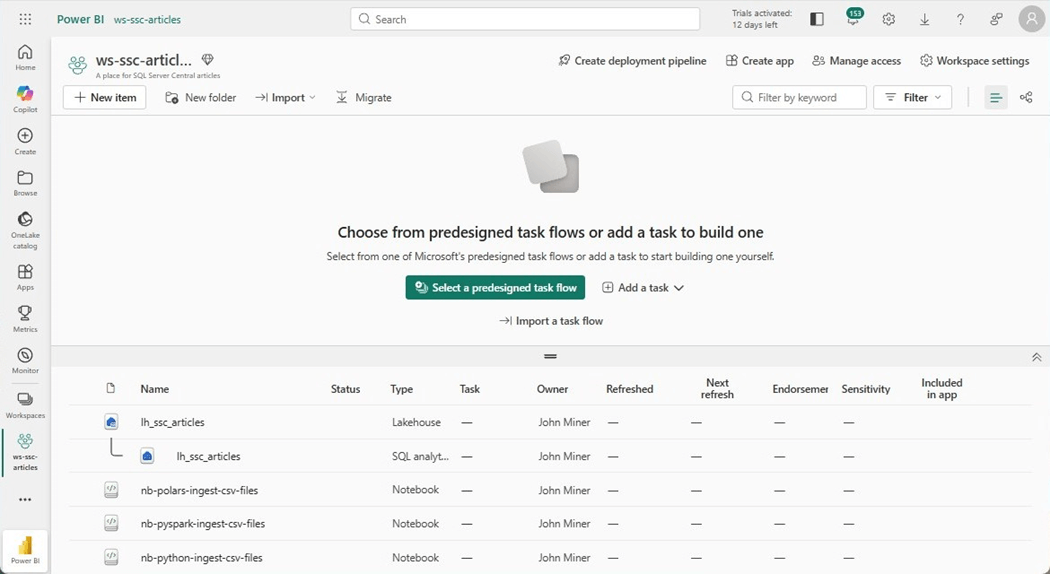
Today, we are going to work on a new notebook named “nb-polars-ingest-csv-files.” The image below shows the objects in our workspace. Please note, the data will be stored in a lakehouse named “lh_ssc_articles” which has its own SQL Analytical endpoint.
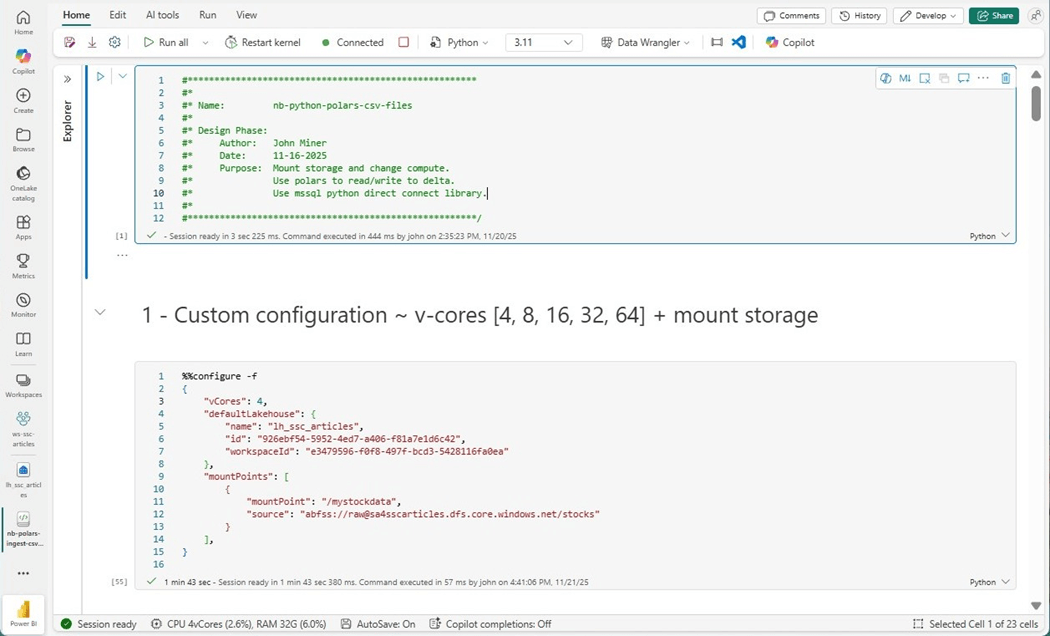
If you weed through the documentation on MS Learn, you will find that we can create a custom configuration for our notebook. That means we can increase the core count and memory size of our notebook session if needed. If you do not want to use Fabric shortcuts, we can specify a mount point for the session within the configuration. Just remember, the session runs under a Microsoft Entra ID. That user account must have RBAC rights to the storage container. Everything comes at an expense. Since this node size is not part of the starter pools, it takes longer to load the session.
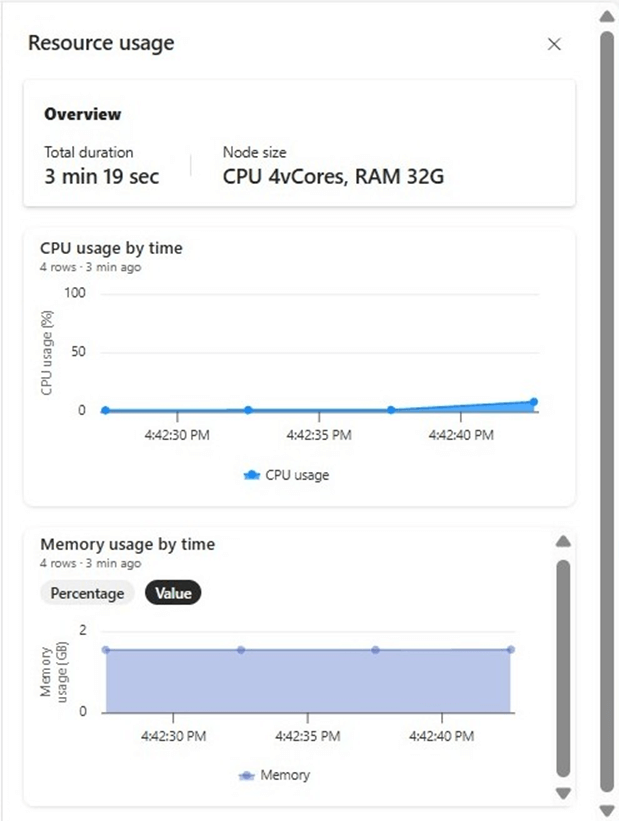
Double clicking the computing information at the bottom of the notebook brings up the usage screen. We can keep an eye on how the computing cores and memory are used by our notebook over time.
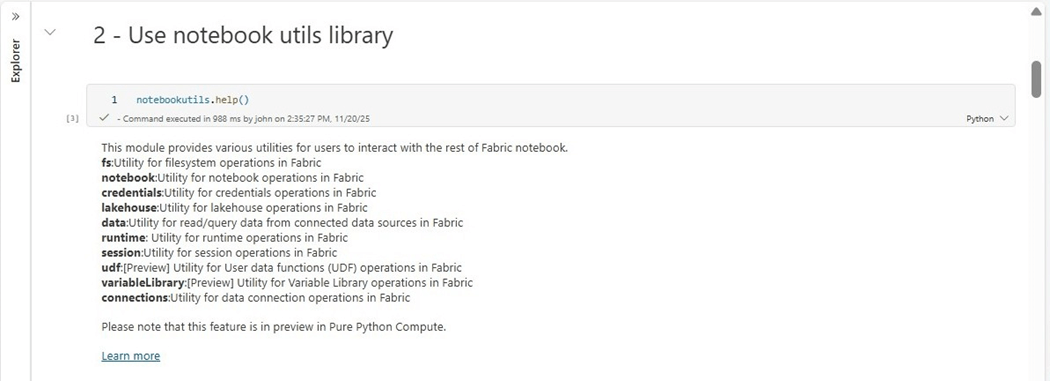
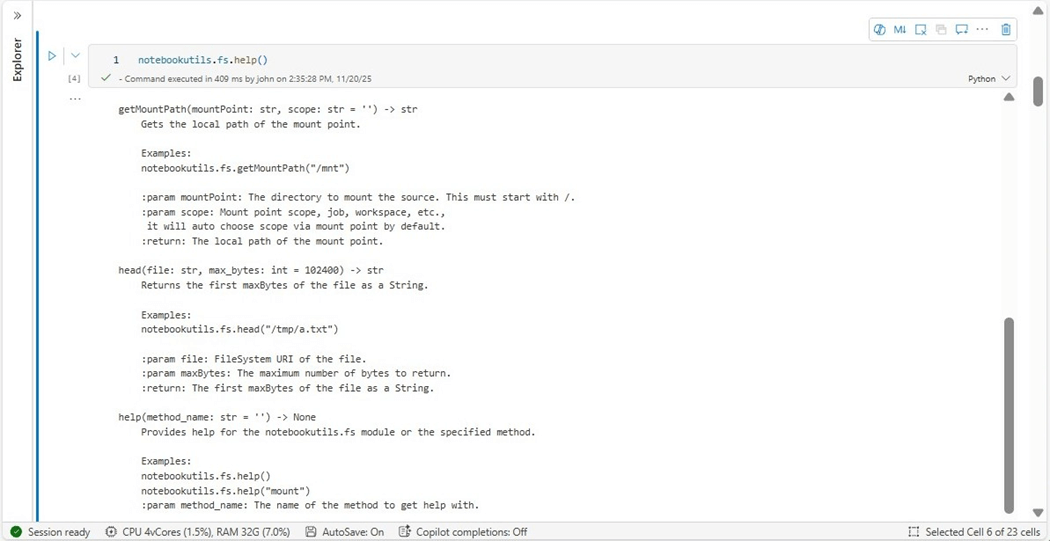
Now that the session is active, where did our Azure Data Lake Storage get mounted to? Microsoft has introduce a set of utilities called notebookutls. We can use the help method to list the different classes in the library. There are many features that we will explore in the future. For now, we need to focus on file system operations.
From my experience with the mssparkutils library, we know that the getMountPath method will return the API path for the stock file folders.
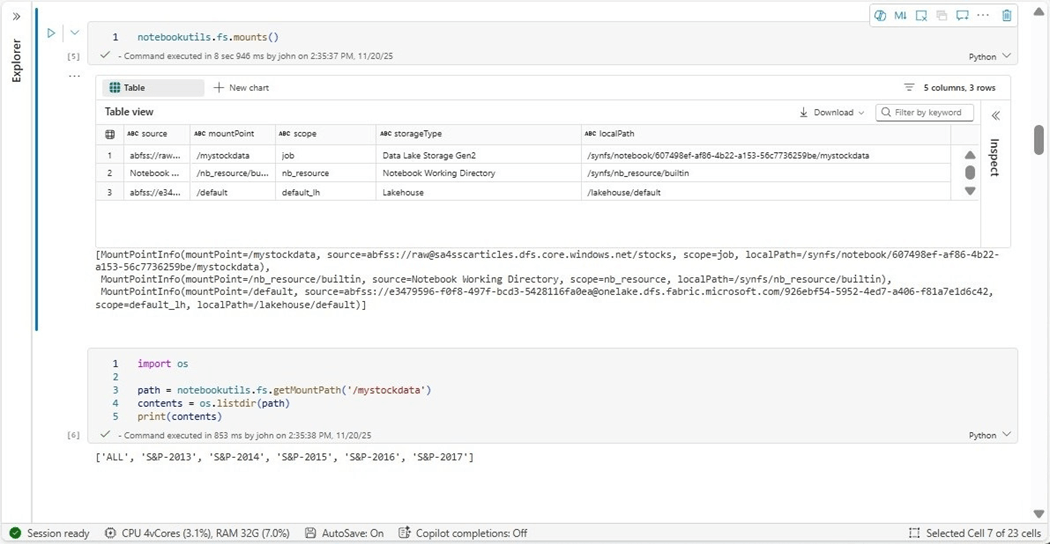
The cells below shows the sample use of the mounts method in cell five. A more complex usage is shown in cell six in which the folders in the stock directory are listed.
If you want to change the size of the Fabric Python Notebook session, use the configuration command. Just remember creating custom size and mounting storage takes an additional minute or two. The new notebookutils library is useful when working with the file system, calling other notebooks and many other tasks.
Polars Library
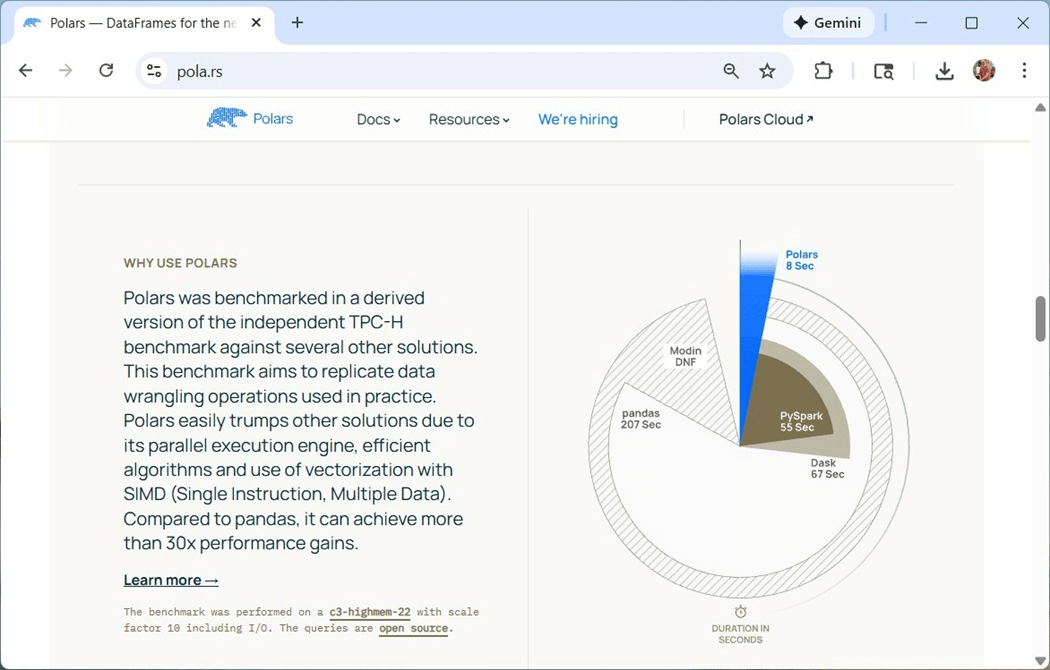
If we peek at the website for this library, we can see how it boasts superior performance over PySpark and Pandas when dealing with the TPC-H benchmark dataset. There are some limitations that we will talk about during this section.
Call the read_cvs method to read in a single file into a Polars dataframe.
#
#  1 – read one file
#

import polars as pl
path = notebookutils.fs.getMountPath('/mystockdata') + '/S&P-2013/A-FY2013.CSV'
df = pl.read_csv(path, has_header=True)
print(df)
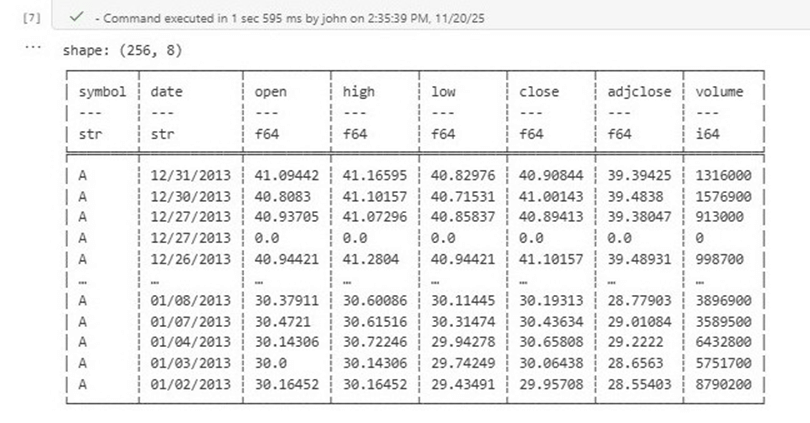
The image below shows sample stock data from 2013 for the company named Agilent Technologies Inc. There were 256 days of trading in the year 2013 and it took 1.5 seconds to load the data.
The last time we wrote a python function to read in a folder that contains CSV files, we used the pathlib library and the rglob method to retrieve a list of files. For each file in the list, we read the data into a Pandas dataframe and concatenated the results. The polars library already contains this functionality. The scan_csv file is a lazy function that finds all the files. The collect method forces the statement to execute.
#
#  2 - create function to read files for given folder
#

import polars as pl

def read_csv_files(path: str, custom_schema: dict) -> pl.DataFrame:

    # read into one frame
    df = pl.scan_csv(path, schema=custom_schema, has_header=True).collect()

    # found files
    if ~ df.is_empty():
        return df

    # no files found
    else:
        return pl.DataFrame()
The code below is the complete program to read all the files into a polars dataframe. We are using a schema so that we do not need to infer the data types. Additionally, the scan_csv method does not recursively read folders; Therefore, we need to call our custom function named read_csv_files five times, one time for each of the five years of stock data (folders).
#
#  3 - execute the function (execution time = 48 s)
#

import os
import polars as pl

# get path
path1 = notebookutils.fs.getMountPath('/mystockdata')

# list folders
contents1 = os.listdir(path1)

# make schema
schema1 = {
    "symbol": pl.String,
    "date": pl.String,
    "open": pl.Float64,
    "high": pl.Float64,
    "low": pl.Float64,
    "close": pl.Float64,
    "adjclose": pl.Float64,
    "volume": pl.Int64,
}

# make array by year
frames = []

# for each folder
for item1 in contents1:
    if (item1 != 'ALL'):

        # show progress
        print(f"processing folder {item1}")

        # full path
        path2 = path1 + '/' + item1 + '/*.CSV'

        # read files
        df1 = read_csv_files(path2, schema1)

        # append to array
        frames.append(df1)

df2 = pl.concat(frames, how="vertical")
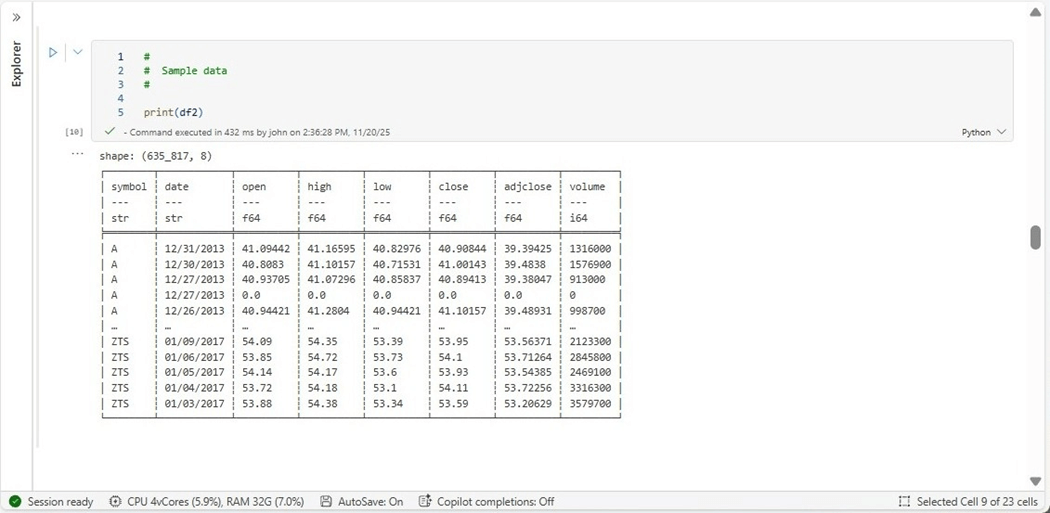
The image below shows that 635,817 records are contained in the Polars dataframe. The look and feel of the output from the print statement is different than Pandas.
The final operation is to write the Polars dataframe to a Delta table in our Fabric Lakehouse. There is a to_pandas method that we can use to convert the dataframe into the correct format for the deltalake library.
#
# 4 - write delta lake table (5 sec)
#

from deltalake import write_deltalake

# must be adls path
path = "abfss://e3479596-f0f8-497f-bcd3-5428116fa0ea@onelake.dfs.fabric.microsoft.com/926ebf54-5952-4ed7-a406-f81a7e1d6c42/Tables/bronze/polars_stocks"

# over write
write_deltalake(path, df2.to_pandas(), mode='overwrite')
To complete our testing, we need to read in a single large file and record the timings. This time, I will use the shortcut that is defined for the lakehouse.
#
# 5 - read a single file (3 sec)
#

import polars as pl
path ='/lakehouse/default/Files/stocks/ALL/SNP-5YEARS.CSV'
df = pl.read_csv(path, separator='\t', has_header=True)
print(df)
The last task is to write to a delta table in the Fabric Lakehouse. If we look hard enough at the documentation, there is a write_delta method that is part of the polars library. I am guessing that the code converts the polars to a pandas data frame before writing to the delta lake since we have the exact execution time.
#
# 7 - write delta lake table (3 sec)
#

path ='abfss://e3479596-f0f8-497f-bcd3-5428116fa0ea@onelake.dfs.fabric.microsoft.com/926ebf54-5952-4ed7-a406-f81a7e1d6c42/Tables/bronze/polars_all'
df.write_delta(path, mode='overwrite')
In short, using the Polars library is easy to use. Many of the methods and parameters have new names or functionality. Please read the documentation for a full understanding of this new dataframe type.
Pandas vs Polars
The website shows a significant difference in timings between Pandas and Polars dataframes. However, my use case showed a 50 percent increase in speed on average.
| Notebook | File Count | Time Seconds | Action
|
| Pandas | 2533 | 110 | Read CSV files into pandas dataframe |
| Pandas | 2533 | 7 | Overwrite delta table |
| Pandas | 1 | 5 | Read CSV files into pandas dataframe |
| Pandas | 1 | 3 | Overwrite delta table |
| Polars | 2533 | 48 | Read CSV files into polars dataframe |
| Polars | 2533 | 5 | Overwrite delta table |
| Polars | 1 | 3 | Read CSV files into pandas dataframe |
| Polars | 1 | 3 | Overwrite delta table |
Just remember that disk space is slower than memory. Also, most storage in Fabric (Azure) is remote. That means there is at least one router hop between the computing memory and the disk space. I am curious if the performance shown on the website was done with local storage. I would have to repeat these tests on a laptop to find out.
MSSQL Python Library
The function named “read_sql_table” takes three parameters: the connection string to the database, the query to execute, and a list of columns to cast to string. We will talk about the reason for casting later one when we encounter some errors.
#
# 8 - write function to read from azure sql server + return polars df
#

# Required libraries
import mssql_python
import polars as pl

def read_sql_table(conn: str, qry: str, cast: list) -> pl.DataFrame:

    # make connection
    cn = mssql_python.connect(conn)

    # create cursor
    cursor = cn.cursor()

    # execute query
    cursor.execute(qry)

    # Get col names
    cols = [column[0] for column in cursor.description]

    # Empty data frame
    frames = []

    # Fetch first row
    row = cursor.fetchone()

    # while there is data
    while (row):

        # convert row to list
        data = []
        for i in range(len(cols)):
            if (cols in cast):
                data.append(str(row))
            else:
                data.append(row)

        # append list to lsit
        frames.append(data)

        # Fetch next row
        row = cursor.fetchone()

    # Convert to polars df
    df = pl.from_records(frames, schema=cols, infer_schema_length=250, orient="row")

    # Close connection
    cn.close()

    # return the results
    return df
This new self-contained library from Microsoft is not installed in the Fabric Python environment. Please use the pip command to install the library right now. The connection is using standard security for SQL Server. We are going to retrieve the Address table from the SalesLT database.
 #
# 8 - write funtion to read from azure sql server + return polars df
#

# Connection information
ci = ""
ci = ci + "server=<your server>.database.windows.net;"
ci = ci + "database=<your database>;"
ci = ci + "uid=<your user>;"
ci = ci + "pwd=<your password>;"

# call function
df = read_sql_table(ci, "select * from SalesLT.Address", [])

# show results
df
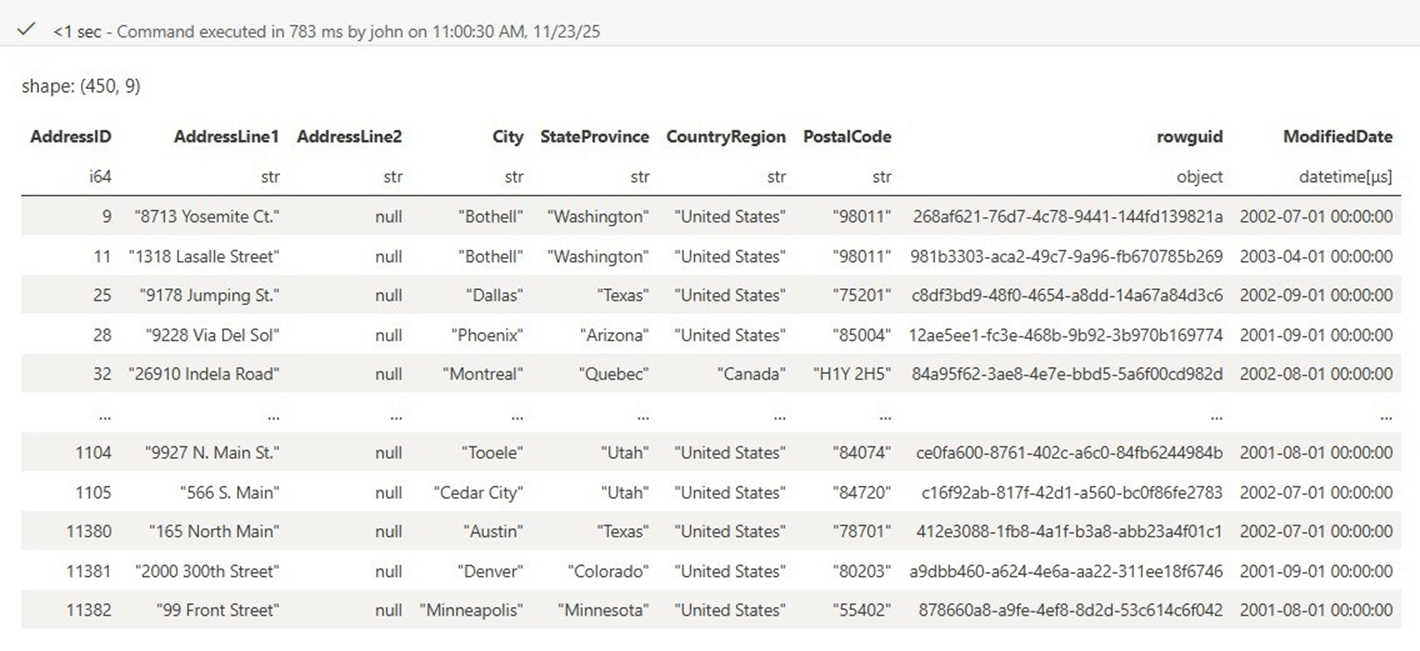
The rowguid column is being returned as an object. I wonder if that will be a problem.
The code below has two ways to write to the lakehouse catalog. The first is using the delta lake library and the second is using the polars library.
#
# 9 - write delta lake table (3 sec)
#

from deltalake import write_deltalake

# must be adls path
path = "abfss://e3479596-f0f8-497f-bcd3-5428116fa0ea@onelake.dfs.fabric.microsoft.com/926ebf54-5952-4ed7-a406-f81a7e1d6c42/Tables/bronze/saleslt_address"

# use delta lib, convert to pandase before saving
write_deltalake(path, df.to_pandas(), mode='overwrite')

# use polar library, write file
# df.write_delta(path, mode='overwrite')
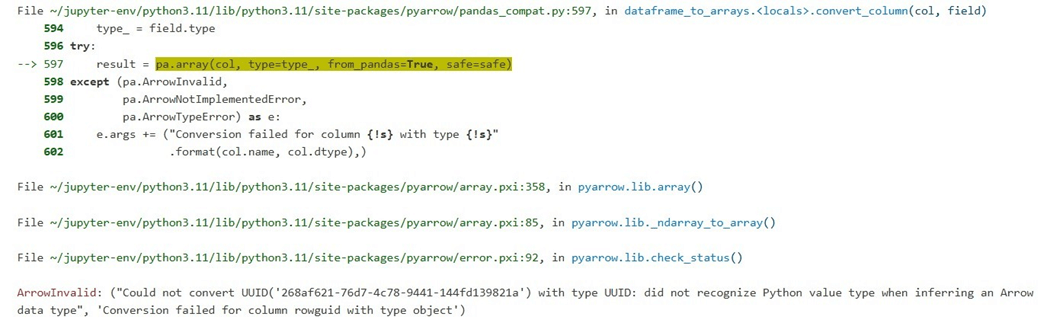
The delta lake library is smart enough to know that the UUID data type is supported by Python, but the Arrow format does not have a corresponding data type.
The polars library returns an ambiguous error about unwrapping a missing value.
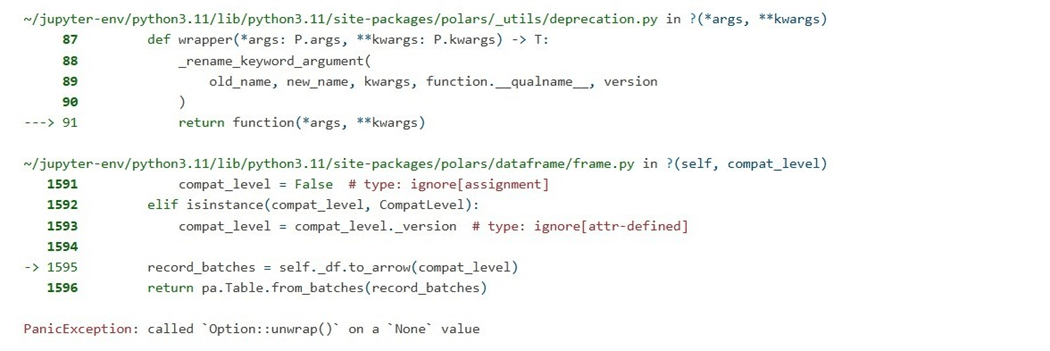
There are two ways to fix this error. First, we can cast the data type in the SQL Query. I caution this design pattern with tables that have a vast number of columns. There is a character limit to the query string which can be exceeded easily. Another way is to look at the columns during processing and cast ones that are in the list. Thus, replace the empty list [] with the column name [‘rowguid’].
The output below shows the offending column is now a string.
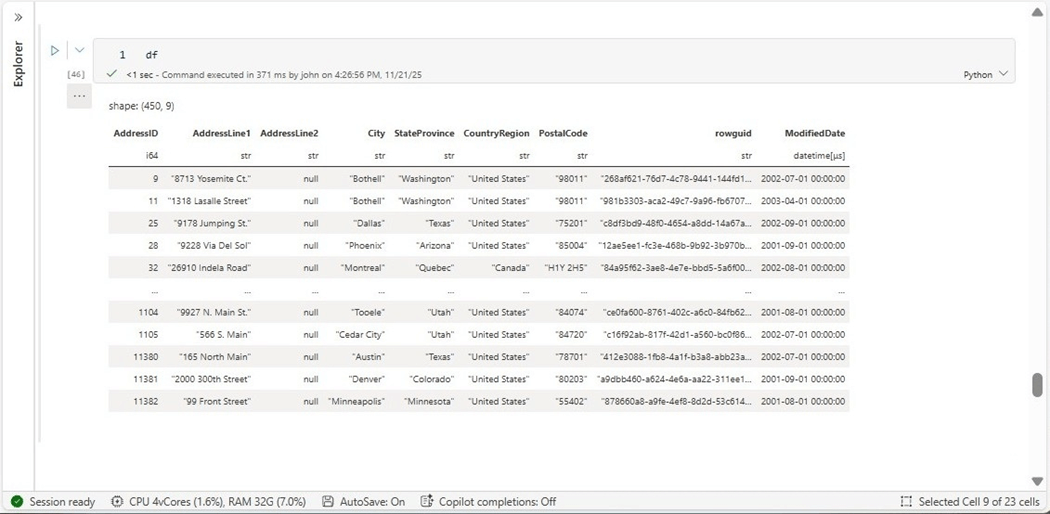
Now that we have the information loaded in delta tables, how can we transform the data easily between on medallion zone to another?
Transforming Data
Microsoft has introduced a new magic command (T-SQL) to solve this issue. It takes the artifact name and type as inputs and binds the results to a dataframe variable of your choice. The image below shows the first ten rows of the address table.
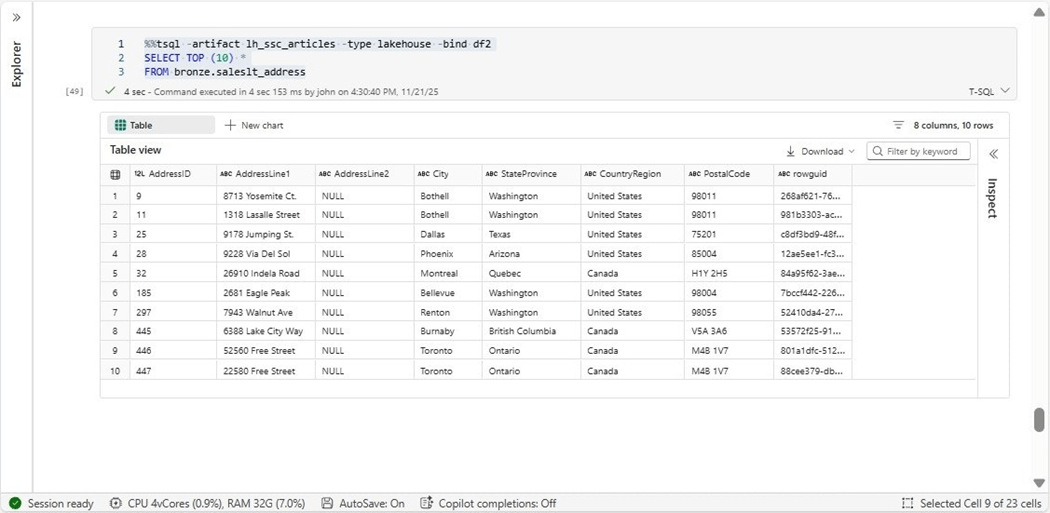
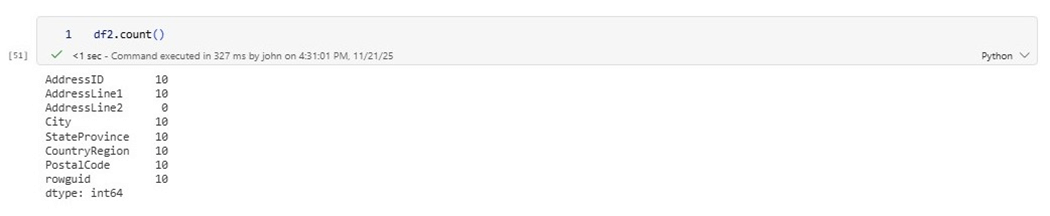
We can verify that this resulting dataframe has ten results.
The last test of this new feature is to aggregate some data for the gold layer.
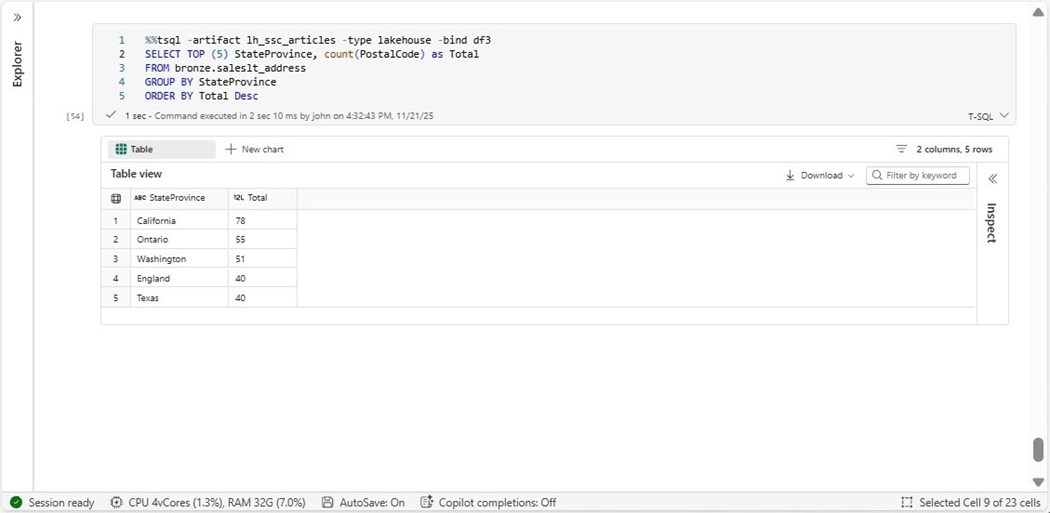
I really like this magic command since it queries the SQL Analytic endpoint of the Lakehouse and/or Warehouse. Since we already know how to overwrite a delta table, we have a complete and easy solution to extract and transform data using TSQL.
Summary
Polars is an open-source software library for data manipulation. In today’s article we did a comparison between the Pandas and Polars libraries. While the website boasts incredible speed over other libraries, we saw about a 50 percent increase in Fabric. This is mainly due to the fact that the remote storage is consuming the majority of the processing time. I will still use Polars as my favorite tool in the future.
The all-in-one python library for MS SQL Server is key for serverless computing that does not allow for the installation of drivers. This new library from Microsoft has to be used with some caution. Data types returned from the library might not be compatible with formats such as arrow. The easiest way to fix this issue is to cast the data to a string. The example I created today uses standard security but there are many different security protocols one can use.
The new T-SQL magic command that has been introduced for Python Notebooks makes the retrieval of data stored in the lakehouse and/or warehouse very easy to accomplish. A simple selection of all columns can be used in a simple query or more complex query aggregation silver data from the gold layer can be written. I did try to execute a data definition statement in my testing of the lakehouse, but it failed as expected.
Finally, the Fabric Python environment can be configured to use more resources and mount external storage. Since this computing change takes some time, it is not as fast as the default two virtual cores starter session. However, if you are processing a lot of data over many cells, it might be worth the startup time.
In short, Fabric Python Notebooks are great for companies who want to do data engineering on a budget. Next time, I would like to explore the last library that Microsoft boasts about, Duck DB. We will see if this library lives up to the hype.
Enclosed is the code bundle for this article.