

I have been working in various computer languages for a long time and encoding binary data is something that's been needed since we first needed to transfer data to another computer.
This is part of a series on how the T-SQL language is evolving in SQL Server 2025.
Note: some of these changes are already available in the various Azure SQL products.
The Encoding Functions: BASE64_ENCODE and BASE64_DECODE
There are two new functions that have been added to the T-SQL language: BASE64_ENCODE, BASE64_DECODE. These are functions that are opposites of one another, similar to encryption functions. One function reverses the efforts of the other, and they are designed to be used together.
BASE64_ENCODE( varbinary expression, [url_safe])
This function takes as binary string as input. Optionally, we can ask for a URL safe expression, meaning one that can be transferred as a parameter in a URL. There are slight encoding differences with an RFC 4648 table used for one or the other. Check the docs if you need those details. The main thing is that the non-url safe expressions might include padding. The url_safe defaults to 0 (not safe). Anything other than 0 is url safe.
The return types are:
- varchar(8000) is the varbinary(n) has n <= 6000
- varchar(max) if varbinary(n) with n>6000
- varchar(max) if varbinary(max)
- null if the expression is null
The reversing function syntax is:
BASE64_DECODE(varchar expression)
Again, the two RFC tables apply. Check the docs for BASE64_DECODE if you need them. The return types are:
- varbinary(8000) if varchar(n)
- varbinary(max) if varchar(max)
- null if expression is null
Let's look at a few examples of how this can be used to encode data.
Encoding Examples
These are fairly simple functions, but let's look at a few things. First, let's setup a basic table and some data. I used Prompt AI to help me generate the data.
CREATE TABLE BinaryData
(
    BinaryDataID INT NOT NULL
        CONSTRAINT BinaryDataPK PRIMARY KEY,
    Emoji VARBINARY(16),
    UserPic VARBINARY(MAX),
    BinaryTexet VARBINARY(250)
)
GO
 Insert sample data with emoji code, random images and text values
INSERT INTO BinaryData
(
    BinaryDataID,
    Emoji,
    UserPic,
    BinaryTexet
)
VALUES
-- Row 1: Smiley face emoji, small sample image, and "Hello World" text
(   1, CAST(0x3DD83DDE as VARBINARY(16)),                                                                                                                                                                                                                                                                                                                                                                         -- Smiley face emoji UTF-8 bytes
    CAST(0x89504E470D0A1A0A0000000D49484452000000100000001008060000001FF3FF6100000006624B474400FF00FF00FFA0BDA793000000097048597300000B1300000B1301009A9C180000000774494D4507D30A0C0B1E1204B68D5C0000004A4944415438CB63FCFFFF3F032500C662300CB66218E08B8FE18318822CFC4F11E0240B51E4324E16A24B6205868B85502C64A4D80BA24320D632304E0C9B5010523A1E01F0300D2250C6CADF87780000000049454E44AE426082 as VARBINARY(MAX)), -- Simple PNG image
    CONVERT(VARBINARY(250), 'Hello World')),

-- Row 2: Heart emoji, different sample image, and "Binary Data Test" text
(   2, CAST(0xF09F9294 as VARBINARY(16)),                                                                                                                                                                                 -- Heart emoji UTF-8 bytes
    CAST(0x474946383961140014009100000000FFFFFF0000002C00000000140014000005078048048242838A08246AAAE9CAE6B2BEDE8F0284564B37618B1636B553AB86B96E1C7BC7DB27A45885288055A25781D6903E2A3B7DB6BB073F42003B as VARBINARY(MAX)), -- Simple GIF image
    CONVERT(VARBINARY(250), 'Binary Data Test')),

-- Row 3: Thumbs up emoji, another sample image, and "SQL Server" text
(   3, CAST(0xF09F918D as VARBINARY(16)),                                                                                               -- Thumbs up emoji UTF-8 bytes
    CAST(0x424D38000000000000360000280000000100000001000001001800000000000038000000000000000000000000000000000000FF as VARBINARY(MAX)), -- Tiny BMP image
    CONVERT(VARBINARY(250), 'SQL Server')),

-- Row 4: Star emoji, sample image, and "Microsoft T-SQL" text
(   4, CAST(0xE2AD90 as VARBINARY(16)),                                                                                                                                                                                                                                                                   -- Star emoji UTF-8 bytes
    CAST(0xFFD8FFE000104A4649460001010100000000000000FFDB004300FFFFFFFFFFFFFFFFFFFFFFFFFFFFFFFFFFFFFFFFFFFFFFFFFFFFFFFFFFFFFFFFFFFFFFFFFFFFFFFFFFFFFFFFFFFFFFFFFFFFFFFFFFFFFFFFFFFFFFFFFFC2000B080001000101011100FFC40014100100000000000000000000000000000000FFDA0008010100013F00FFD9 as VARBINARY(MAX)), -- Simple JPEG image
    CONVERT(VARBINARY(250), 'Microsoft T-SQL')),

-- Row 5: Rocket emoji, sample image, and "Sample Binary Data" text
(   5, CAST(0xF09F9A80 as VARBINARY(16)),                                                                                                                                                                                                                                                                                                            -- Rocket emoji UTF-8 bytes
    CAST(0x89504E470D0A1A0A0000000D4948445200000010000000100403000000EDDDE25200000015504C54450000000000FF00FF0000FFFF00FFFFFF0000FFFFFFFFFF4AF20B580000000174524E530040E6D866000000097048597300000EC400000EC401952B0E1B0000001C4944415408D763F8CFC0FFC0F0074FCECFD87F0683A4A4E893536200003A880219A7FB66C0000000049454E44AE426082 as VARBINARY(MAX)), -- Another PNG image
    CONVERT(VARBINARY(250), 'Sample Binary Data'));
GO
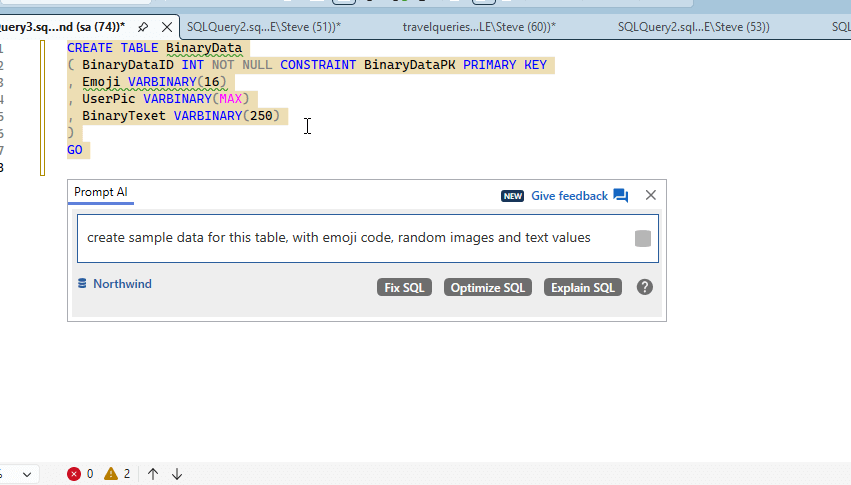
For completeness, here is my prompt to Prompt (I'm never getting used to that).
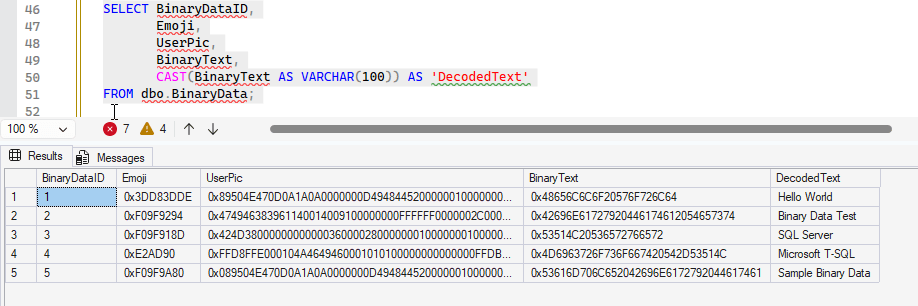
I have some data. While I didn't check the Emoji or UserPic columns, I did cast out the Binary Text.
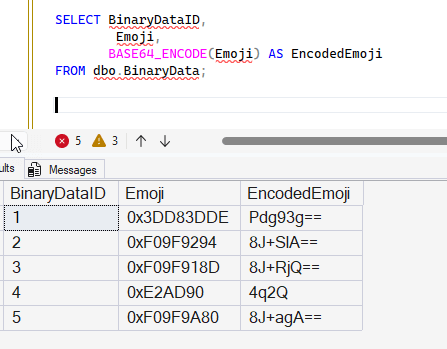
Now, suppose I need to pass some of these values into another system. I can easily encode them for use as shown, taking the emoji column as an example.
SELECT BinaryDataID,
        Emoji,
       BASE64_ENCODE(Emoji) AS EncodedEmoji
FROM dbo.BinaryData;
This produces the binary output in the Emoji column, but notice the EncodedEmoji column. Here I have characters, not binary data.
I'll add the URL safe parameter and include the text values. I'll also use a few different values for url_safe. Here's the code:
select BinaryDataID
     , Emoji
     , base64_encode(Emoji) as EncodedEmoji
     , base64_encode(Emoji,1) as EncodedEmojiSafe
     , binaryText
     , base64_encode(BinaryText) as BinaryTextEncoded
     , base64_encode(BinaryText,7) as BinaryTextEncodedSafe
from dbo.BinaryData;
And the results show that some of the URL safe values are the same, like for ID 1. For ID 2 and 3, there appears to be some padding with the non URL safe values. Note that I have a parameter of 1 and 7, both if which enable URL safe results.
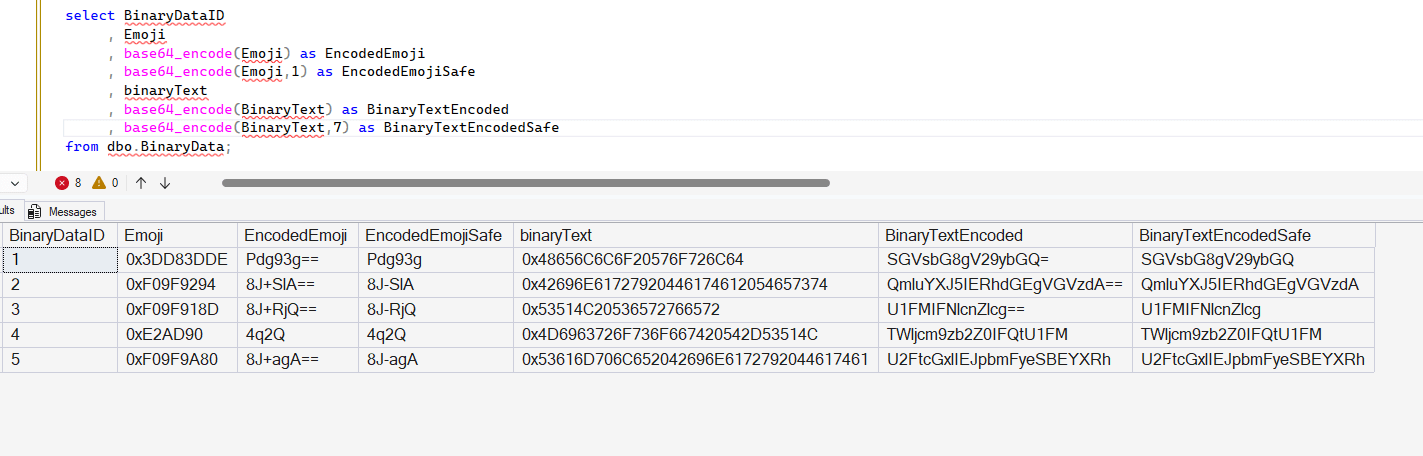
I don't know this is significant, but if your application will be sending these across http/https in some way, you might add the URL safe values.
What about reversing the encoding? Let's do that. I'll first show the emoji column encoded and decoded to save space. Here is the code, notice the BASE64_DECODE is wrapping the same code from columns 3 and 4 to get the last two.
select BinaryDataID
     , Emoji
     , base64_encode(Emoji) as EncodedEmoji
     , base64_encode(Emoji,1) as EncodedEmojiSafe
     , base64_decode(base64_encode(Emoji)) as DecodedEmoji
     , base64_decode(base64_encode(Emoji,1)) as DecodedEmojiSafe
from dbo.BinaryData;
The results show that column 2 is the same as 5 and 6. The values are decoded after being encoded.
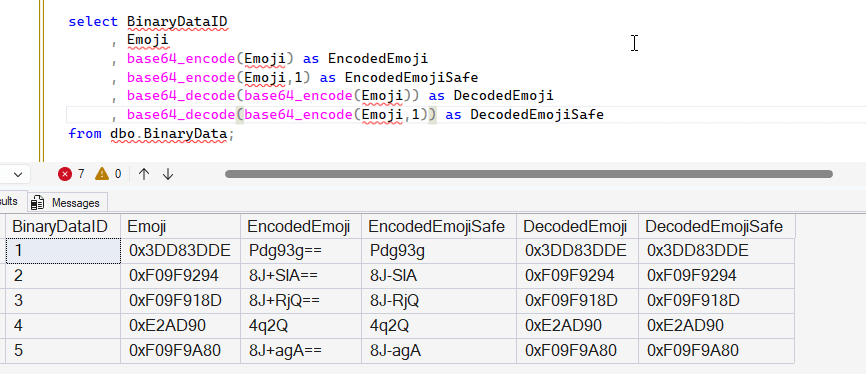
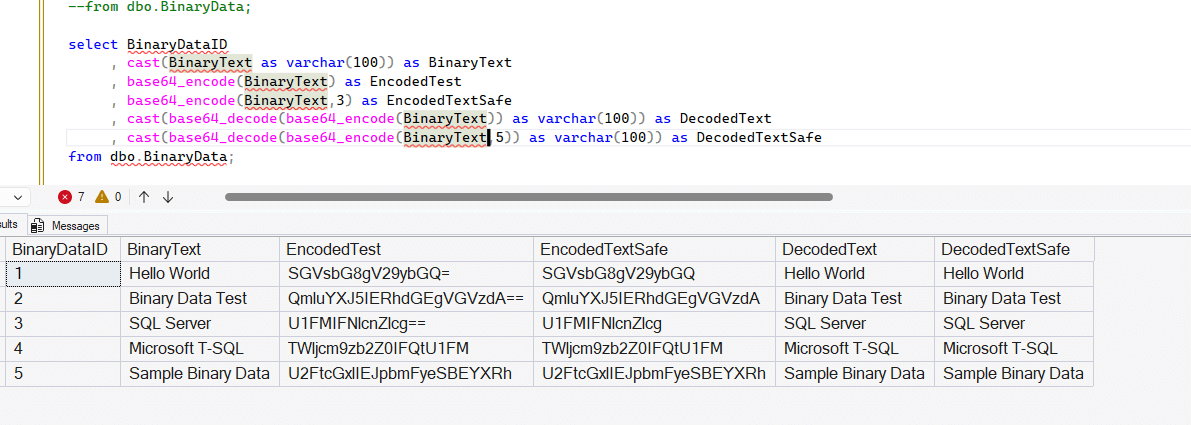
This is expected as these functions reverse each other. Let's look at a similar example with text. I'll show the CASTed binary data text, then encode it in columns 3 and 4, with the decoded and CAST text in columns 5 and 6. It works.
Summary
The need to send binary data over channels that support only character data is something a few people encounter. I haven't needed this in a long time, but I bet some of you run into this. Or more importantly, you might get an app that needs to add this capability to data in a database. Certainly .NET, Java, etc. can do this, but perhaps you want to simplify this and produce results at scale, and these functions help.
I don't know this is a great use of CPU on a database server, and I'd likely try to get this implemented in an app, but having it in the database means you get consistent results from the functions. I supposed different languages/libraries might implement this differently, so having a consistent set of data could be important.
However, I'd just store the encoded values in the db if I needed that. 😉
