

Ever have the need to create a CSV list in SQL Server? Not sure how? Starting in SQL Server 2017 we get a new native function to do exactly that. Specify a delimiter and you get a delimited list.
SQL 2016 brought us a native function for parsing a CSV to table (String_Split). It seems odd that there wouldn’t be a native function to create a CSV list until 2017. None the less, here it is:
STRING_AGG
Using the STRING_AGG function is really simple. Here’s how:
STRING_AGG([Column], ‘delimiter’)
Example:
SELECT STRING_AGG(name, ‘,’) FROM SYS.DATABASES

What I like about this is that the current methods, such as a CTE often end up adding an extra comma at the end of the string that needs to be trimmed and are much slower than the native function.
Here’s a CTE for comparison:
;WITH dbname (database_id, Name) AS
(
SELECT 1, CAST(” AS NVARCHAR(MAX))
UNION ALL
SELECT B.database_id + 1, B.Name + A.Name + ‘, ‘
FROM (SELECT database_id, Name FROM sys.databases WHERE Name <> ”) AINNER JOIN dbname B ON A.database_id = B.database_id
)
SELECT SUBSTRING(Name, 1, LEN(Name) -1) as name FROM (SELECT TOP 1 Name FROM dbname ORDER BY Name DESC) q
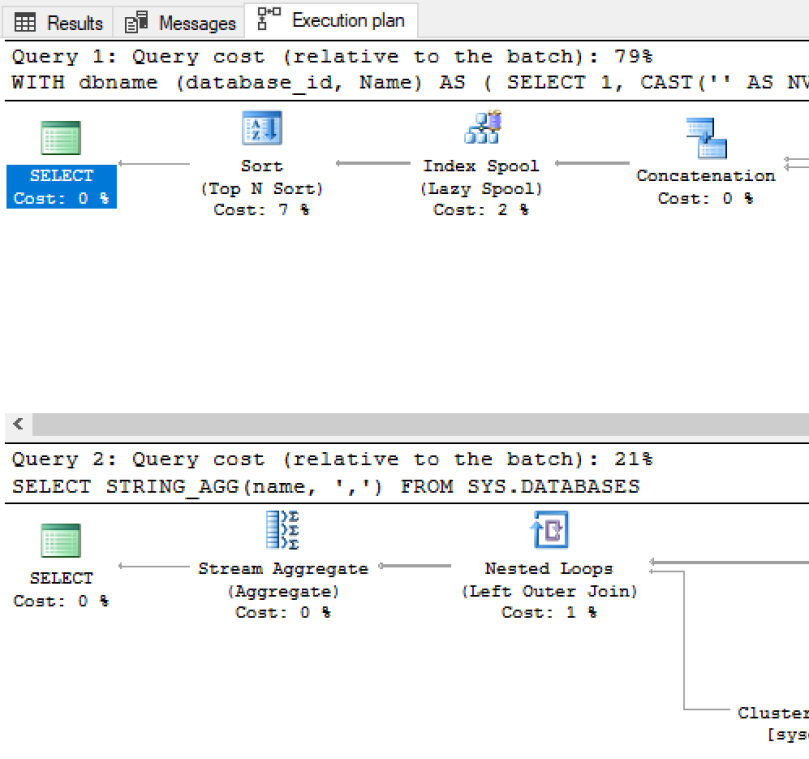
As you can see the native command has much less cost than the CTE:
I look forward to SQL Server 2017 and all the new features it will bring.

