

I have, in the past had the need to rename a server, either because the server has been named incorrectly or because it has been created as a clone from an image. There is a documented process which I have used in the past to rename SQL Server once the server itself has been renamed. The script which I use is below;
-- Get current servername
SELECT @@SERVERNAME;
-- Drop current servername
sp_dropserver 'ServerB\INST01';
GO
-- Add new servername
sp_addserver 'ServerA\INST01', LOCAL;
GO
-- Restart SQL Server services
-- Check the change
SELECT @@SERVERNAME;
NOTE - There are the usual precautions to take here, never do this on a production system, test the solution first and carry out regression on any applications which connect to SQL Server.
I have used this process with default instances on SQL Server 2005 and 2008 without any issues, this is mainly because the servers I have renamed where development / UAT / production servers that were still being built. I have not however had to do this for a named instance.
Today I came across the need to again use this process but this time on a named instance and it came to light in a different way. I was subscribing to a transactional publication on a server from ServerA\INST01 when I got the below error;
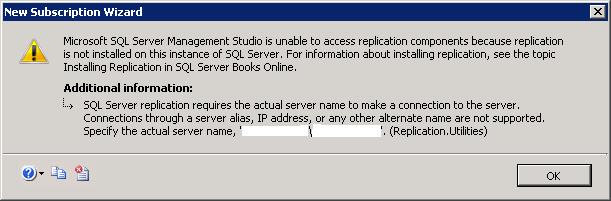
At first I thought it was because of the named instance so I created an alias of ServerA pointing to ServerA\INST01 but again got the same error. Looking at the error more closely the server name was in fact ServerB\INST01. I checked the server name in server manager and it was ServerA, I checked VMWare and the server name was ServerA??? Next I connected to ServerA\INST01 using SSMS and ran the below;
-- Get current servername
SELECT @@SERVERNAME;
The result was ServerB\INST01.
Following the process above allowed me to rename SQL Server and create my subscription, problem solved.
Enjoy!
Chris

