Forum Replies Created
Viewing 15 posts - 226 through 240 (of 397 total)
-
RE: Migrated DB to 2016, having ODBC Access problem
'databasetest' is a user setup for testing. They have a network login using that name and a password as they are in our active directory. To login to SQL Server,...
-
RE: Migrated DB to 2016, having ODBC Access problem
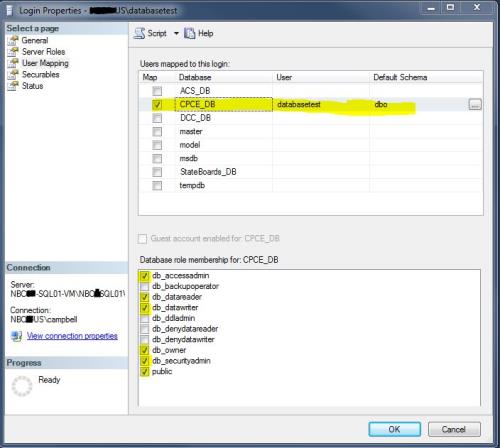
Here's right-clicked on the User on the Security>Logins node:

-
RE: Migrated DB to 2016, having ODBC Access problem
When in Access using the LTM it will take me as far as seeing the system tables for the database but not the data tables.
-
RE: Migrated DB to 2016, having ODBC Access problem
I'm using or rather allowing Windows Authentication for each user. I'm using Access 2010. I have checked my test user and they have read/write privileges to the database. The user...
-
RE: Migrated DB to 2016, having ODBC Access problem
Here's what's in the MSysObjects Connect field: DSN=CPCE_Copy;Description=CPCE_Copy;Trusted_Connection=Yes;APP=Microsoft Office 2010;DATABASE=CPCE_DB;
-
RE: Access users can't use SQL 2016 (?)
I installed SSMS on the client PC and the database and put the Access database on the desktop. Opened it and went into the Linked Table Manager and created a...
-
RE: Access users can't use SQL 2016 (?)
Do you mean reinstalling SSMS on the host server, client PC, or my admin PC?
-
RE: Access users can't use SQL 2016 (?)
I installed SSMS on the client machine and I can access the SQL Server database from there. Just not able to get Access to open with the ODBC tables visible...
-
RE: Access users can't use SQL 2016 (?)
If the question is - can I ping from the user's PC the server that hosts my SQL Server Instance containing the needed database? - the answer is yes I...
-
RE: Access users can't use SQL 2016 (?)
Do you mean pinging from the user's pc? What would be the best way to do this?
-
RE: Access users can't use SQL 2016 (?)
In my registry I have this for the database in question:
Description CE_DB
Driver C:\Windows\SysWOW64\SQLNCLI11.DLL
Server NBCP-SQL01-VM\NBCSQL01VMSo I changed my .reg file to read:
-
RE: Access users can't use SQL 2016 (?)
From Access when I was creating my ODBC connections I believe I chose SQL Server Native Client 11.0. Is there a way to tell for sure short of creating a...
-
RE: Access users can't use SQL 2016 (?)
System DSNs persistently fail when I try to create them.
-
RE: Access users can't use SQL 2016 (?)
In Access it is a User DSN with Integrated Windows Authentication which with the registry files has worked fine in SQL2005.
-
RE: Access users can't use SQL 2016 (?)
For the users to open Access they have to have a .reg file imported to their machine that looks like this:
Windows Registry Editor Version 5.00[HKEY_LOCAL_MACHINE\SOFTWARE\Wow6432Node\ODBC\ODBC.INI\CE_DB]
"Driver"="C:\\Windows\\system32\\sqlsrv32.dll"
"Server"="NBCP-SQL01-VM\NBCSQL01VM"
Viewing 15 posts - 226 through 240 (of 397 total)