Visual Studio Data Tools 2017 - TFS lock icons missing and other issues
-
Hi all
We've just installed a test instance of Microsoft SQL Server Data Tools for Visual Studio 2017 (Version 15.3.5) and come across a few bugs.
I've had a Google and I can't see a solution as yet.Hoping someone on here can shed some light on them.
Firstly, we've managed to attach the instance to TFS for source control but, when we open a project, we get the following errors:-
"The source control provider associated with this solution could not be found. The project will be treated as not under source control. Do you want to permanently remove source control bindings from the project?"
This gives Yes/No/Help buttons.If we select No (we don't want to remove anything from source control), we get the following:-
"The project file xxx is not bound to source control, but the solution contains source control binding information for it. Do you want to open the project using source control binding information from the solution or open it as unbound and fix the solution file?"
This give the following options:-
Use solution binding
Remove solution binding
Help
(There's also a box for "Apply this selection to all project being opened now).We select "Use solution binding" and the solution opens.
We've found this this is a false error as we can make changes, check them in and they apply to the solution if someone else does a Get Latest on the same solution.
Any help on sorting this would be appreciated.
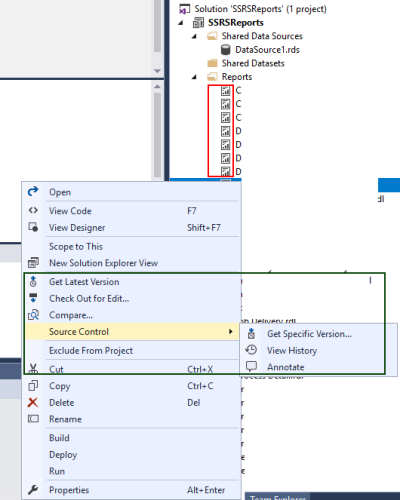
Secondly, we are missing the blue padlock icons, red ticks, etc. for source control.
I'm assuming this is connected to the first issue, but if it's different, we'd appreciate any help on this one as well. -
Facing same issue while using VS 2017 as a part of SSDT 2017. I am able to perform all source control actions and same is getting reflected in source control explorer too, but as seen in RED box, lock icon is not there in front of files.

-
I had this same issue, and I solved the problem by uninstalling SSDT 2017 (after first uninstalling the Integration Services Projects, Analysis Services Projects, and Reporting Services Projects extensions, which may have been overkill), and installing Visual Studio Community (free software) with only SQL Server Data Tools selected as the functional parts included, and then re-installing SSDT 2017 and selecting only Integration Services when asked which functionality I wanted it to provide. Now it works like a charm with TFS.?
-
Thanks Mark.
I'm not sure we can do that as it's for a business. -
I know what you mean, and I was hesitant to use Community edition too, as I am working for a government entity, but after reading the license terms I was pretty sure that I was covered, at least under the conditions that I would use the software (merely to facilitate my being able to create and edit SSIS packages and store them on TFS). You may be able to use it within the bounds of the license too - check it out.
-
Hi Mark
I work for my local NHS Trust.
I'll dig out the licence terms (unless you have a handy link?) and have a look. -
I just so happen to have a handy link, my good man! Here it is - https://www.visualstudio.com/license-terms/mlt553321/ .
-
Thanks Mark - I'll pass this to our licencing people and see what they say.
-
You're welcome!
Viewing 9 posts - 1 through 9 (of 9 total)
You must be logged in to reply to this topic. Login to reply