Script Task execution error with HTTP request
-
I have a script task that tries to execute a HTTP request, which seems to work in isolation - when manually clicking on the URL, it will perform the action successfully.
The problem is that when executing the whole task it produced this error :
[HTTP Request Error] Error: An error occurred while sending the request.
Error: The script returned a failure result.
Could anyone assist and help work the problem?
I'm using Visual Studio Pro 2019 with C#2019 Script Language, .Net Framework 4.7.
Below is the full code. Thank you.
#region Namespaces
using System;
using System.Data;
using Microsoft.SqlServer.Dts.Runtime;
using System.Windows.Forms;
using System.Net.Http;
using System.Threading.Tasks;
#endregion


namespace ST_eb53a97982444b89964d7d24c32bd5ba
{
    /// <summary>
    /// ScriptMain is the entry point class of the script.  Do not change the name, attributes,
    /// or parent of this class.
    /// </summary>
[Microsoft.SqlServer.Dts.Tasks.ScriptTask.SSISScriptTaskEntryPointAttribute]
public partial class ScriptMain : Microsoft.SqlServer.Dts.Tasks.ScriptTask.VSTARTScriptObjectModelBase
{
        #region Help:  Using Integration Services variables and parameters in a script
        /* To use a variable in this script, first ensure that the variable has been added to
         * either the list contained in the ReadOnlyVariables property or the list contained in
         * the ReadWriteVariables property of this script task, according to whether or not your
         * code needs to write to the variable.  To add the variable, save this script, close this instance of
         * Visual Studio, and update the ReadOnlyVariables and
         * ReadWriteVariables properties in the Script Transformation Editor window.
         * To use a parameter in this script, follow the same steps. Parameters are always read-only.
         *
         * Example of reading from a variable:
         *  DateTime startTime = (DateTime) Dts.Variables["System::StartTime"].Value;
         *
         * Example of writing to a variable:
         *  Dts.Variables["User::myStringVariable"].Value = "new value";
         *
         * Example of reading from a package parameter:
         *  int batchId = (int) Dts.Variables["$Package::batchId"].Value;
         *
         * Example of reading from a project parameter:
         *  int batchId = (int) Dts.Variables["$Project::batchId"].Value;
         *
         * Example of reading from a sensitive project parameter:
         *  int batchId = (int) Dts.Variables["$Project::batchId"].GetSensitiveValue();
         * */


        #endregion


        #region Help:  Firing Integration Services events from a script
        /* This script task can fire events for logging purposes.
         *
         * Example of firing an error event:
         *  Dts.Events.FireError(18, "Process Values", "Bad value", "", 0);
         *
         * Example of firing an information event:
         *  Dts.Events.FireInformation(3, "Process Values", "Processing has started", "", 0, ref fireAgain)
         *
         * Example of firing a warning event:
         *  Dts.Events.FireWarning(14, "Process Values", "No values received for input", "", 0);
         * */
        #endregion


        #region Help:  Using Integration Services connection managers in a script
        /* Some types of connection managers can be used in this script task.  See the topic
         * "Working with Connection Managers Programatically" for details.
         *
         * Example of using an ADO.Net connection manager:
         *  object rawConnection = Dts.Connections["Sales DB"].AcquireConnection(Dts.Transaction);
         *  SqlConnection myADONETConnection = (SqlConnection)rawConnection;
         *  //Use the connection in some code here, then release the connection
         *  Dts.Connections["Sales DB"].ReleaseConnection(rawConnection);
         *
         * Example of using a File connection manager
         *  object rawConnection = Dts.Connections["Prices.zip"].AcquireConnection(Dts.Transaction);
         *  string filePath = (string)rawConnection;
         *  //Use the connection in some code here, then release the connection
         *  Dts.Connections["Prices.zip"].ReleaseConnection(rawConnection);
         * */
        #endregion


/// <summary>
        /// This method is called when this script task executes in the control flow.
        /// Before returning from this method, set the value of Dts.TaskResult to indicate success or failure.
        /// To open Help, press F1.
        /// </summary>
public void Main()
{
            // TODO: Add your code here
            try
            {
                // Call the async method and wait for result
                string response = MakeHttpRequest().GetAwaiter().GetResult();


                Dts.TaskResult = (int)ScriptResults.Success;
            }
            catch (Exception ex)
            {
                Dts.Events.FireError(0, "HTTP Request Error", ex.Message, string.Empty, 0);
                Dts.TaskResult = (int)ScriptResults.Failure;
            }
        }
     private async Task<string> MakeHttpRequest()
{
    using (HttpClient client = new HttpClient())
    {
        // Set base address or full URL
        string url = "https://88b272437715eede88141dd674f873.ac.environment.api.powerplatform.com:443/powerautomate/automations/direct/workflows/cfe02122c439490fa6dadce1fba9bc63/triggers/manual/paths/invoke?api-version=1&sp=%2Ftriggers%2Fmanual%2Frun&sv=1.0&sig=WQMiT8ZAcrScFaqwaPADRFxrq1moI9MysV7Vgg16hv0";


        // Optional: Add headers
        client.DefaultRequestHeaders.Add("Accept", "application/json");


        // Send GET request
        HttpResponseMessage response = await client.GetAsync(url);
        response.EnsureSuccessStatusCode();


        // Read response content
        return await response.Content.ReadAsStringAsync();
    }
}


#region ScriptResults declaration
/// <summary>
/// This enum provides a convenient shorthand within the scope of this class for setting the
/// result of the script.
///
/// This code was generated automatically.
/// </summary>
enum ScriptResults
        {
            Success = Microsoft.SqlServer.Dts.Runtime.DTSExecResult.Success,
            Failure = Microsoft.SqlServer.Dts.Runtime.DTSExecResult.Failure
        };
        #endregion


}
} -
Run the script in debug mode to determine the line which causes the error and to dig deeper into the details of the error.
-
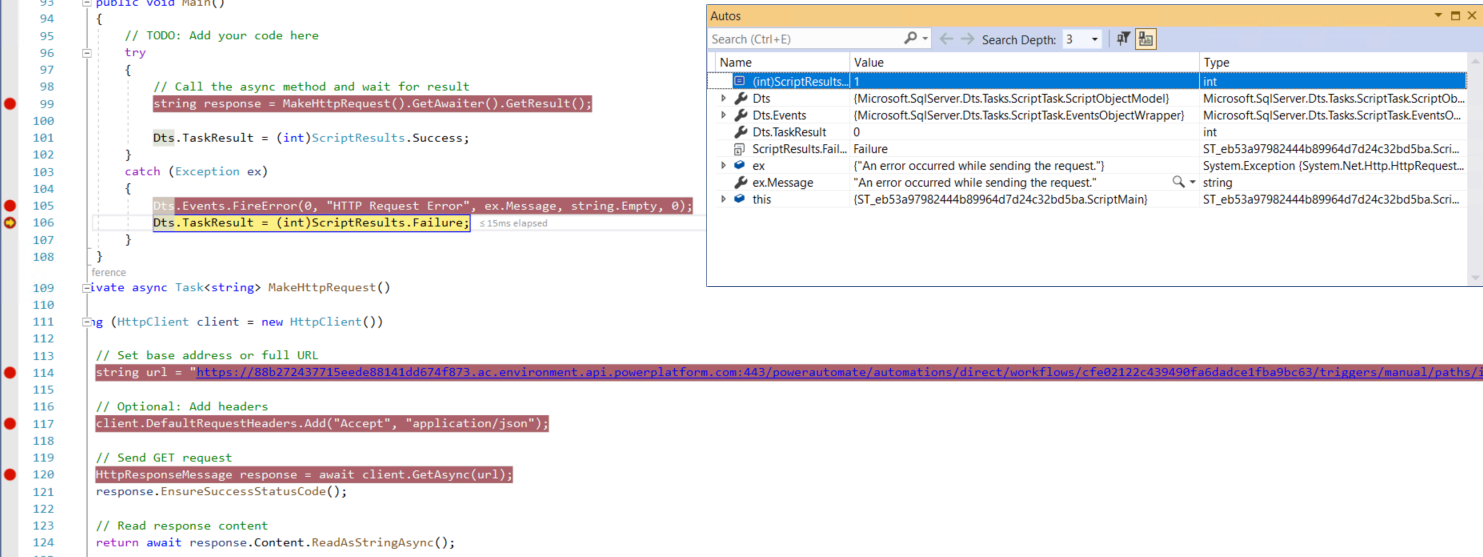
Thank you Phil, does debugging mode mean setting breakpoints?
I've set breakpoints on various lines, but I don't know what to look for. Can you further advise?
See image attached.

-
When you run the script task, you should be able to step through the code, line by line (you only need one breakpoint at the start to make this process work). After processing pauses at the first breakpoint, hit F10 to advance line by line. When you get to the line with an error, processing will terminate with an error message.
-
Most of the time, that’s due to missing or incorrect credentials, authentication requirements on the remote service, or network/firewall issues blocking the request. Make sure your script sets the correct credentials for the web request, and that the account running the package especially when run via SQL Agent has access to the URL. Also check for any firewall or proxy settings on the server that might be preventing outbound HTTP calls. Once the credentials and network access are correct, the Script Task should execute without errors.
-
It seems like you only catch the general errors. Try to add a catch for web related error before the general catch.
Something like this:
catch (WebException wex) // Catch all web related errors...
{

// Raise the error as a SSIS exception...
// https://msdn.microsoft.com/en-us/library/bb934605(v=sql.120).aspx
Dts.Events.FireError(0, "Network or web server related error", wex.Message + "\r" + wex.StackTrace, String.Empty, 0);
}
If nothing else this should provide you with better logs, I should think.
-
The error returned was "The request was aborted: Could not create SSL/TLS secure channel"
So added TLS 1.2 which seems to have worked.
Viewing 7 posts - 1 through 7 (of 7 total)
You must be logged in to reply to this topic. Login to reply