Performance Regression After Upgrading from SQL Server 2016 to 2022
-
Bonjour à tous,
La semaine dernière, nous avons effectué une mise à niveau de notre instance SQL Server, en passant de SQL Server 2016 à SQL Server 2022. Au début, tout s'est bien passé et nous avons défini le niveau de compatibilité de la base de données à 160 comme recommandé.
Cependant, peu après la mise à niveau, nous avons commencé à recevoir des plaintes concernant une dégradation significative des performances de l'instance. Les procédures stockées qui s'exécutaient normalement en quelques secondes prenaient soudainement des heures, voire ne se terminaient jamais.
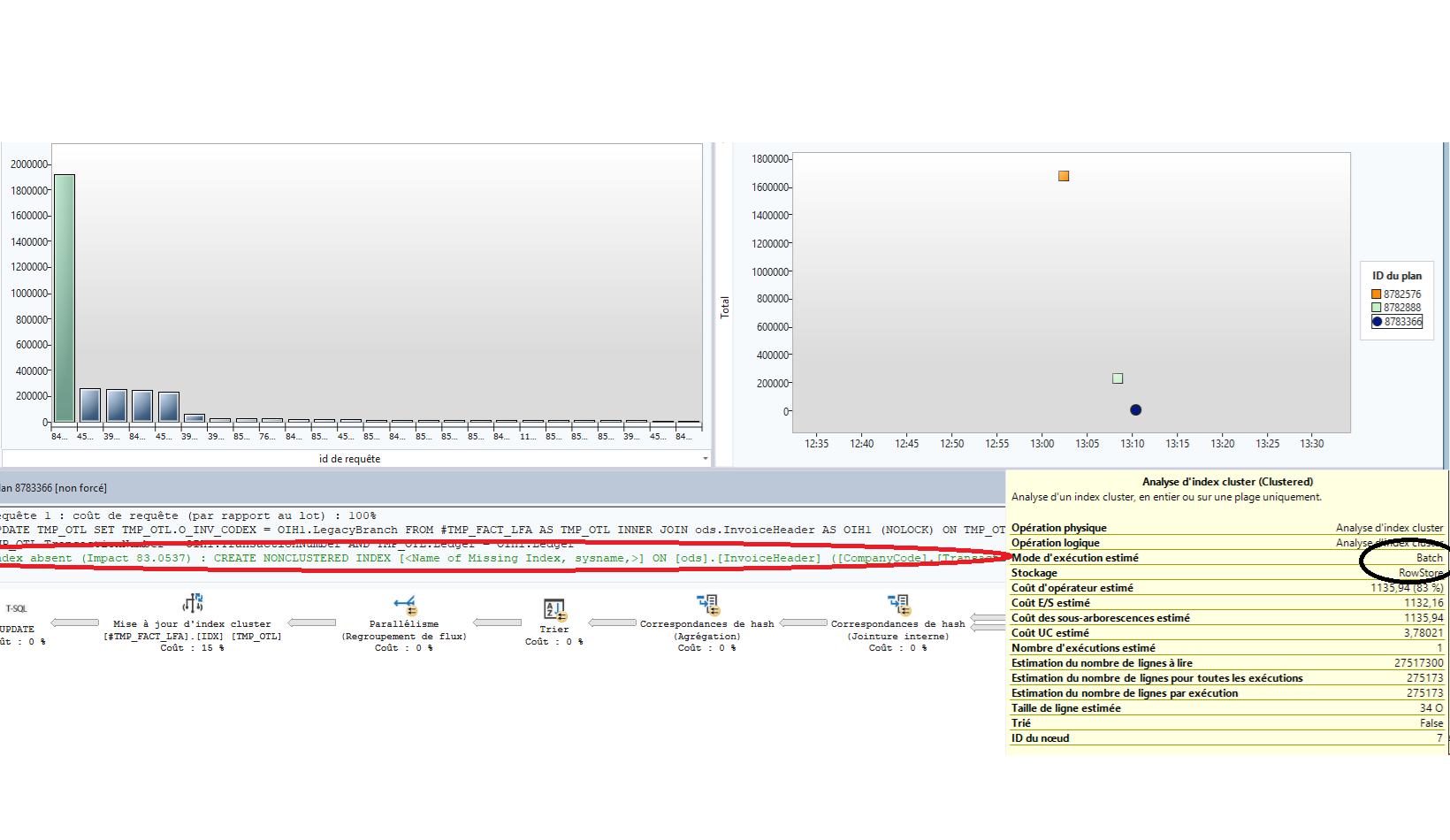
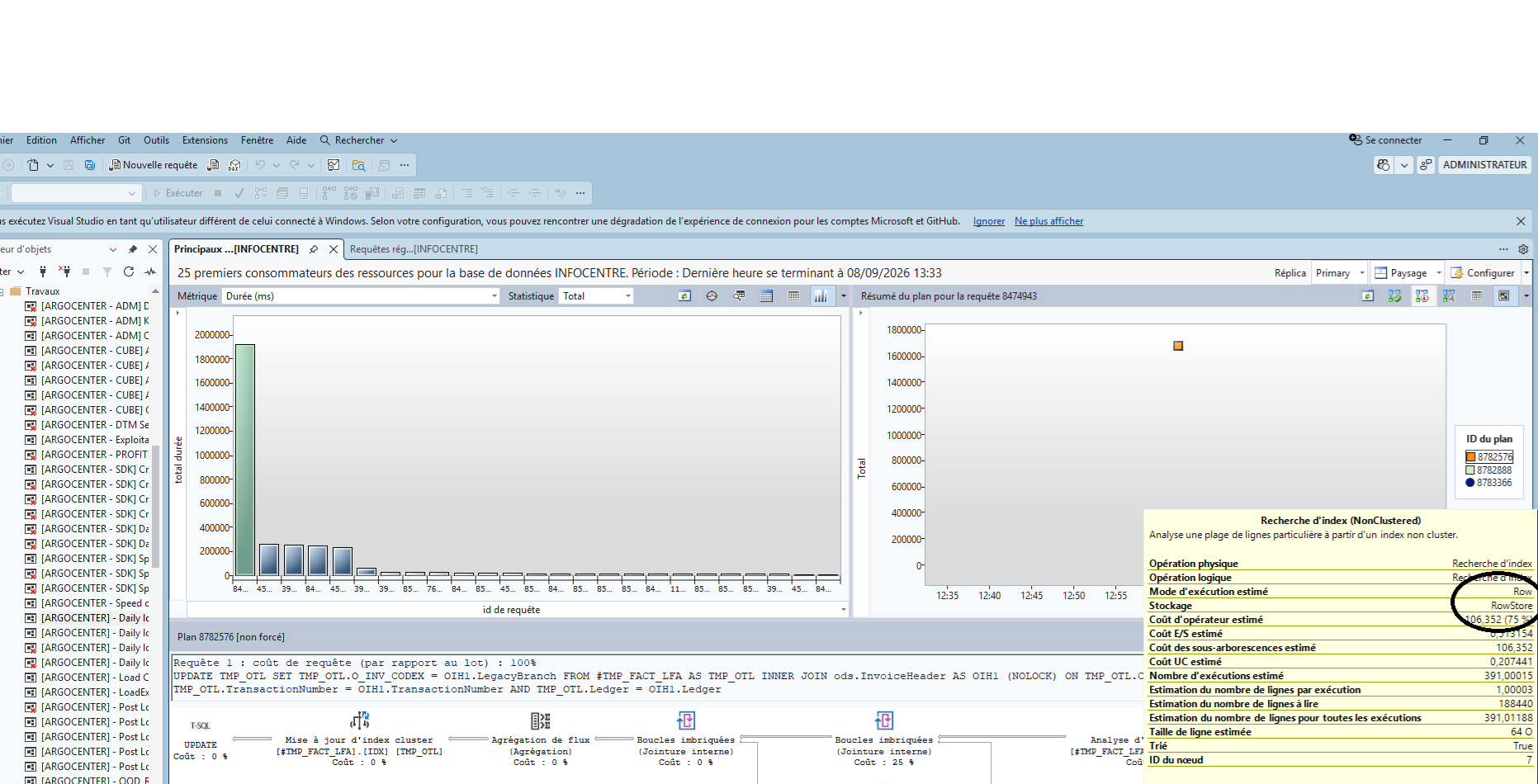
En consultant le Query Store, j'ai constaté que plusieurs plans d'exécution étaient passés du mode batch au mode ligne, notamment lors des opérations de recherche d'index. En mode batch, SQL Server a suggéré des index, que j'ai appliqués.
Mais après avoir ajouté les index recommandés, j'ai observé de nouvelles régressions sur d'autres requêtes, avec le même schéma qui se répétait :
La requête passe en mode batch.
SQL Server recommande l'ajout d'un autre index.
Après son ajout, une autre régression apparaît ailleurs.
J'ai l'impression d'être coincé dans une boucle sans fin de recommandations d'index, où chaque correction déclenche une nouvelle régression sur une requête différente.
Quelqu'un a-t-il déjà rencontré ce problème après la mise à niveau vers SQL Server 2022 ? Vos témoignages et commentaires seraient les bienvenus.
Merci d'avance.

-
Bonjour, le majeur du forum parle Anglais.
- If you recently migrated, have you kept compatibility to SQL 2016? (that should revert mostly to the sql 2016 query plans)
- Don't blindly implement those recommended indexes
- Can you compare the plans between SQL 2016 and 2022?
-
I'd stop adding indexes for now, because the indexes are probably what's keeping this cycle going. Creating an index on a table invalidates the cached plans for every query that touches that table. All of those queries recompile with a new access path available and with whatever parameter values come in next, and under 160 some of them come out a lot worse. So the next regression isn't necessarily caused by the index you just added. The index is just what forced the recompile. On top of that, missing index suggestions only look at the one query they came from. They don't consider your existing indexes, the other queries on that table, or the write cost.
Going from 130 to 160 also changes more than batch mode. You get a newer cardinality estimator model, plus scalar UDF inlining, table variable deferred compilation and parameter sensitive plan optimization, among others. Batch mode on rowstore may just be the part you can see in the plans and not the actual cause.
First thing I would do is stabilize. The fastest way is to set the database back to 130. The engine stays on 2022, it takes effect right away (I'd still do it in a quiet period since it clears the plan cache for that database), and you can raise it again when you're ready.
ALTER DATABASE [YourDB] SET COMPATIBILITY_LEVEL = 130;
If you want to stay on 160, you already have the before and after plans in Query Store, so you can force the good plan for the worst queries from the Regressed Queries report or with sp_query_store_force_plan. 2022 also has Query Store hints, which let you attach a hint to a statement inside a stored procedure without changing the code:
 EXEC sys.sp_query_store_set_hints
@query_id = 1234,
@query_hints = N'OPTION(USE HINT(''DISALLOW_BATCH_MODE''))';
To test the batch mode theory for the whole database without leaving 160:
To test the batch mode theory for the whole database without leaving 160:
ALTER DATABASE SCOPED CONFIGURATION SET BATCH_MODE_ON_ROWSTORE = OFF;
If that fixes it, you have your answer. If it doesn't, open a good plan and a bad plan and check CardinalityEstimationModelVersion on the root operator. If the good one says 130 and the bad one says 160, it's the estimator, and a Query Store hint with USE HINT('QUERY_OPTIMIZER_COMPATIBILITY_LEVEL_130') will handle those queries one at a time. And if statistics weren't updated after the upgrade, I'd do that too.
Once things are stable, redo the compat change the way Microsoft documents it for upgrades. Leave the database on 130 with Query Store capturing for a week or two so you have a clean baseline, then switch to 160 and work through the Regressed Queries report one query at a time. If you're on Enterprise, turning on FORCE_LAST_GOOD_PLAN (automatic tuning) will take care of some of that for you.
Last thing, go back through the indexes you added from the suggestions. Chances are several of them overlap with each other or with indexes you already had, and every one of them adds overhead to inserts and updates.
Hope this helps.
Ysaias Portes | Forward Thinkers Consulting
sp_SQLFlightRecorder — open-source SQL Server diagnostic recorder | forwardthinkersconsulting.com
Viewing 3 posts - 1 through 3 (of 3 total)
You must be logged in to reply to this topic. Login to reply