Improving update statistics process for 6 big tables
-
Recently I was asked to investigate the update statistics process on a particular database. It is taking longer and longer and interfering with other jobs that occur at a later stage.
I investigate what tables are getting updated and there are 3 really big table (and their audits, giving a total of 6) that are very big. There are then lots of other smaller tables (which don't really take long)
Basically I am going to isolate the 6 really big tables from the other smaller tables. The smaller tables weekly update statistics process runs fine (even "with fullscan") - it does not take long.
I want to develop a separate update statistics process for the big 6 tables with a schedule of perhaps late Friday so it can run over (or perhaps the Fridays of bank holiday weekends perhaps as it gives an extra day if the process takes a long time).
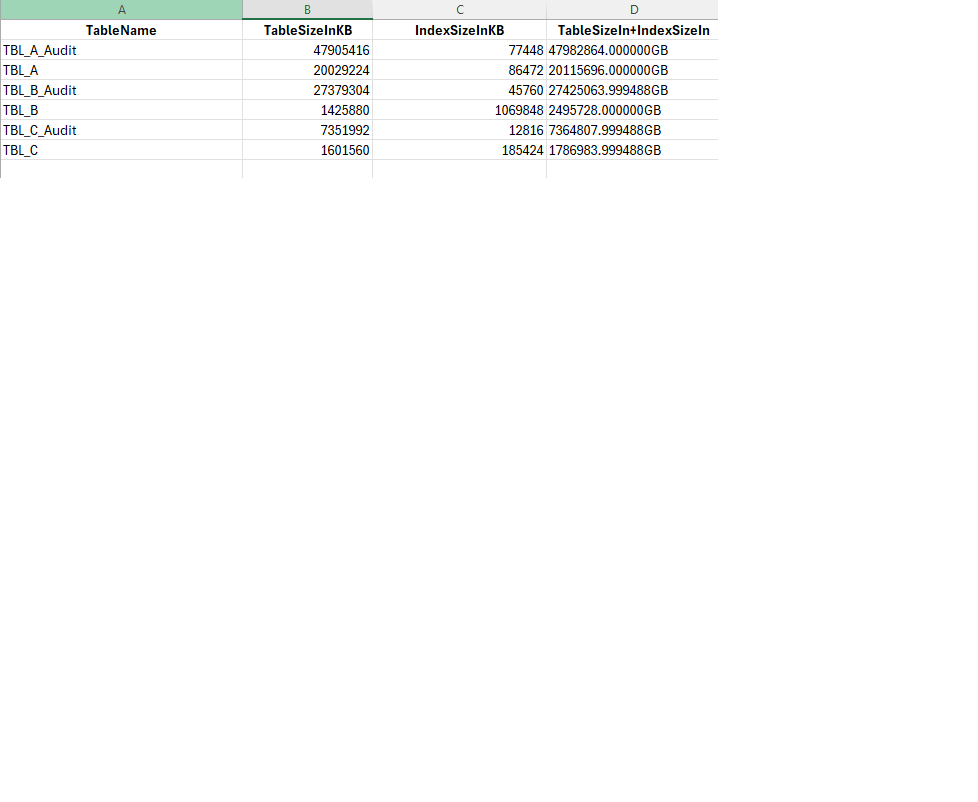
I have some facts & figures on them below. They all have "with fullscan" on them but 1 of them (the biggest) has a sample of 50% and also has some sort of pre-existing "alter index" command there...
I would like to do something more intelligent on these tables as regards the sampling rate and hence am looking for any advice that you may be able to offer. The tables are increasing in size over time and hence the sampeling rate may have to be dynamically calculated. I would also like to record the times.
Tall order I know but would be most appreciative for any advice/guidance/suggestions/code sample that you may be able to offer. Please note I'm not a DBA just a developer but with a pretty decent level of SQL...
Table/Index/Total Size Below:

Pre-existing “tbl_A_audit” commands
ALTER INDEX [PK_TBL_A_Audit] ON [dbo].[TBL_A_Audit] REBUILD PARTITION = ALL WITH (PAD_INDEX = OFF, STATISTICS_NORECOMPUTE = OFF, SORT_IN_TEMPDB = OFF, ONLINE = OFF, ALLOW_ROW_LOCKS = ON, ALLOW_PAGE_LOCKS = ON)
UPDATE STATISTICS [dbo].[TBL_A_Audit]
WITH SAMPLE 50 PERCENT
-
The bad news, there's no magic formula anyone can provide to give you a perfect answer. You're going to need to experiment with this to figure things out. Sorry.
First things first, sure, we can talk about sample size, however, more important, I think, is getting an understanding of how fast this data is changing. That's the issue. The volume is more than automatic statistics maintenance can keep up with (assuming you're still running auto update stats) since performance degrades, no doubt due to out of date statistics. That means, more than sweating sample size, although we need to sweat that as well in order to tune the performance of the updates, we need to determine how often we need to run the updates. Instead of one day a week for statistics updates, I'd suggest more. Maybe daily. Maybe more (if the system can do it). The issue truly is, you're going to have to experiment, a lot, to get to an acceptable place. However, you may also have to do this repeatedly as the load and performance changes over time.
So, I'd start with capturing the volume of change. Compare that to the automatic statistics update rate of change and see why it's not running. OR, if it's not running, then go straight to, you need to run statistics updates more, so figure out how much more. Try two a week to start, minimal stuff. Go from there. Then, later, when we've narrowed down how quickly our statistics are going out of date and we have an answer for how much we need to get them updated, we can also tune that process by adjusting the sampling rate.
Is that helpful at all?
"The credit belongs to the man who is actually in the arena, whose face is marred by dust and sweat and blood"
- Theodore RooseveltAuthor of:
SQL Server Execution Plans
SQL Server Query Performance Tuning -
Hi, thanks for the steer Grant. Monitoring growth could prove to be very useful. I can kind of answer it now from previous experience. We have a spike of input for about 7 days before the 20th of each month (ie from about the 13th to the 20th). On the 20th we run a calculation/process and require all resources. This takes several hours. Then we have a quiet period after the 20th (with most users accessing reports) and not much input but this picks up again gradually for the 20th of the next month. It's cyclic basically...
I have heard about "Asynchronous Auto Stats Update" and setting the "trace flag 2371" option on which I believe will update the statistics automatically but very reluctant to do this as we need to keep the 20th of each month free (and the week before) from any processes that may slow thing up...as it could be updating stats during worktimes. That's the big concern that I was asked to be very conscious of...
Perhaps I should have been clearer in my initial post. Currently we run the update statistics manually every Friday at 9pm (basically it's a job (with that schedule) that calls a maintenance plan).
However, even that is getting longer and longer and hence starting to interfere. Hence the idea with segregating the "big 6" and improving the process around them. For example, one idea I though of was updating the stats of these tables on the Fri of bank holiday weekends only. That way, the process has more time (ie extra day) to run but I suspect that may be too infrequent (due to uneven distribution of bank holidays etc...)
Hence, its probably better to just improve the "big-6" update statistics in some way and run earlier Friday evenings. For the other smaller tables I could run midweek, provided it's does not coincide to the 20th...
Any other suggestions/improvements just let me know...Cheers & thanks, Jelly
-
Since you are updating manually, I'd break it down a lot more. And, probably run it more often. The key is, how many changes to the data leads to performance degradation. Because that's what's happening. The optimizer doesn't have good statistics, so it makes guesses. Sometimes, they're right. Sometimes, they're wrong. When they're wrong, performance goes. The only answer is more up to date statistics. Instead of a big bang on the updates, break 'em up over the week so you can pick & choose. 6 big tables, one each day maybe... still think the answer here is more frequent updates though. Async can help, certainly, but it makes the updates run a lot longer, so... And 2371 isn't a worry since, if you're on 2019, I think that's now the default (or was that on 2022?), but also because you've turned off auto update entirely. Then, sampling is just a way to tweak performance some (it's not a panacea), sampling less reduces the processing time, but also accuracy.
"The credit belongs to the man who is actually in the arena, whose face is marred by dust and sweat and blood"
- Theodore RooseveltAuthor of:
SQL Server Execution Plans
SQL Server Query Performance Tuning -
Also, how much data is time-sensitive. In other words, how often does last month or last year data change. If only "current" data is updating, you can partition the data, and update the stats once for the older data. Then only update stats for the current data which should be quicker. That is the theory ....
-
I had a somewhat similar issue, in my case, i created a table [dbo].[DBAStatistics_SpecialTreatment] that had the table, sample rate, and which day of the week it would be executed on, so each of your six tables might update stats on a separate day, instead of all together. that table also had limits like the minimum number of modified rows, so i don't process a table that, for me, did not need to be redone(like if i ran the job twice in one day)
a query that produced an array of tables that needed statistics to be updated EXCEPT the table name was used in a job for all normal tables, and a different job basically said do statistics for items in my DBAStatistics_SpecialTreatment where TheDayofweek = DATEPART(dw,getdate())
so the big tables were processed on a spread out schedule to prevent the maintenance window from bleeding into when the business starts to run their daily process/loads.
Lowell
--help us help you! If you post a question, make sure you include a CREATE TABLE... statement and INSERT INTO... statement into that table to give the volunteers here representative data. with your description of the problem, we can provide a tested, verifiable solution to your question! asking the question the right way gets you a tested answer the fastest way possible! -
Loweel, thanks for sharing. I really like this idea. Not only does it give me visibility on various settings (and hence I can optimise to a certain extent going forward) it may also assist in creating a buffer around the 20th...Thanks, J.
-
I hope this helps.
my control table was in master. I think i can rustle up my whole old solution if you need it.
CREATE TABLE [dbo].[DBAStatistics_SpecialTreatment] (
[DatabaseName]            VARCHAR(128)                                                   NULL,
[QualifiedObjectName]     AS quotename([SchemaName]) + '.' + quotename([TableName]),
[SchemaName]              VARCHAR(128)                                                   NULL,
[TableName]               VARCHAR(128)                                                   NULL,
[MinModifiedRows]         INT                                                            NULL,
[MinPercentModifiedRows]  DECIMAL(5,2)                                                   NULL,
[DesiredSampleRate]       DECIMAL(5,2)                                                   NULL,
[Schedule]                VARCHAR(30)                                                    NULL, --ie Monday,Friday
CONSTRAINT [UQ_DatabaseName_QualifiedObjectName] UNIQUE ([DatabaseName],[QualifiedObjectName]),
CONSTRAINT [CHK_Schedule] CHECK ([Schedule] IN('Monday','Tuesday','Wednesday','Thursday','Friday','Saturday','Sunday')) )
Lowell
--help us help you! If you post a question, make sure you include a CREATE TABLE... statement and INSERT INTO... statement into that table to give the volunteers here representative data. with your description of the problem, we can provide a tested, verifiable solution to your question! asking the question the right way gets you a tested answer the fastest way possible! -
Hi Lowell, thanks a million. Very useful. I take it that you use the table to generate some dynamic SLQ and then run it. Could you indicate what that update statistics sql would look like (as I'm not totally familiar with the syntax only on basic level). You table implies it could have more parameters that I usually use...
Thanks a million in advance...J
Viewing 9 posts - 1 through 9 (of 9 total)
You must be logged in to reply to this topic. Login to reply