Developer edition cannot be connected from other computers
-
I installed a new SQL server 2025 Enterprise developer edition for our development environment. this is our first 2025 instance. I can connect to the server and database using a SSMS installed locally on the server, but cannot connect to it use my laptop in same network.
I enabled the TCP/IP protocol in the SQL server network configuration but still cannot connect from my laptop. My laptop can connect to other 2022 SQL servers on same network without an issue.
I checked with AI, it says I need to add inbound rule for windows defender firewall, but I remember I never need to do this before in previous version. I wonder if this is a feature of Enterprise developer edition?
If so what process we need to do, any online microsoft doc about this?
Thanks,
-
It's a regular firewall config to allow access from outside.
This forum is funny with links so search for "Configure the Windows Firewall to allow SQL Server access" an ms learn article
-
Here's a blog: https://www.sqlservercentral.com/blogs/command-line-to-configure-windows-firewall-for-sql-server-access
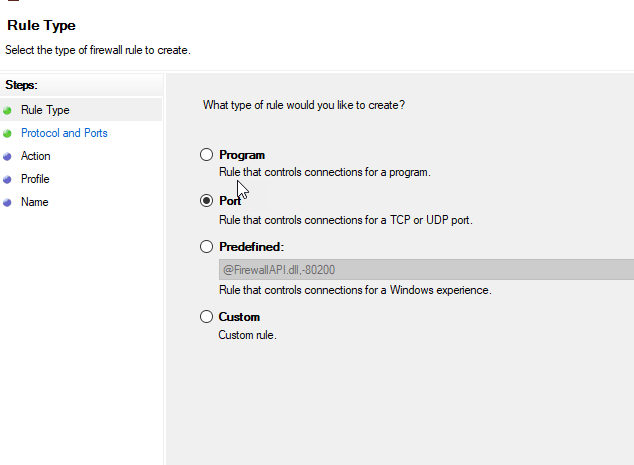
Essentially, on your machine, open firewall settings, add a new inbound rule (from remote computer to this sql server instance.
I usually add a port rule, not a program one

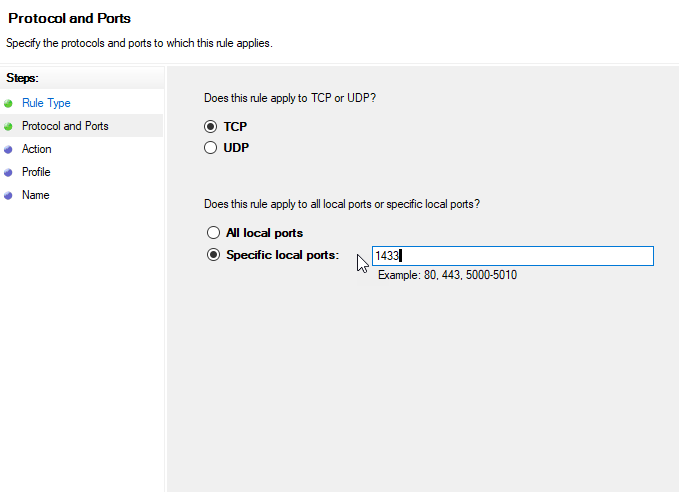
Then 1433 is the TCP port for SQL Server TDS streams
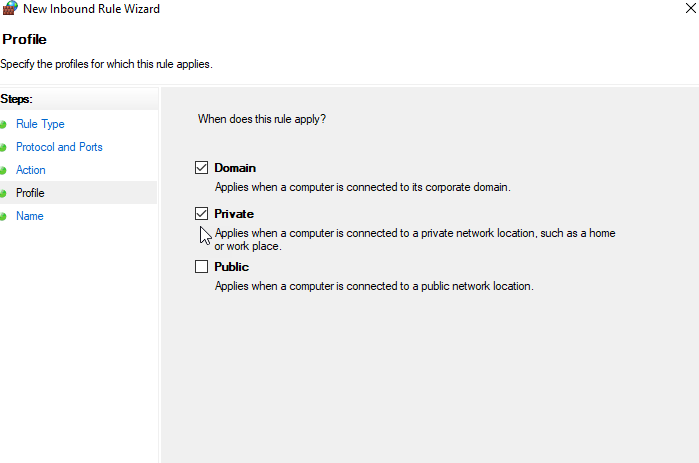
I limit to domain /private, not public.
-
Thanks all!
Checked with our infrastructure team that previously we did not need to do this, but for Windows 2025 we have set up strict firewall rules, added domain fire wall. and now we will have to do manually to add those rules into firewall. Add those, it works now.
Thanks
Viewing 4 posts - 1 through 4 (of 4 total)
You must be logged in to reply to this topic. Login to reply