

Fabric deployment pipelines look like they solve CI/CD for Fabric content, especially for people who prefer a GUI over writing code to handle deployments, but the implementation has enough structural gaps that they fall apart for several real deployment workflows. Even when they do work, the UI isn’t always intuitive.
Every piece of active software carries a backlog of feature requests and known limitations, and deployment pipelines get new capabilities on a regular basis. Everything below reflects how deployment pipelines behave as of August 2026. Some of it may have changed by the time you’re reading this, so check Microsoft’s docs for the current state before you plan around any of these.
The List
- The required permissions are not obvious, and you can’t see all the permissions in one place. Pipeline access and workspace access are managed completely separately, and you need both to do anything. A deployment pipeline has exactly one role, Admin. There’s no Member or Contributor tier the way a workspace has, and Pipeline Admin by itself only lets you view, share, edit, or delete the pipeline. It grants no access to workspace content. To actually deploy, you separately need at least Contributor on both the source and target workspace for that stage. And to create or edit a deployment rule specifically, there’s a third requirement stacked on top of those two: you have to own the item you’re setting the deployment rule for. So permission to do anything meaningful is checked across three different places: pipeline role, workspace role, and item ownership. There’s no single view that shows you all three at once.
- Deployment rules require a deployment before you can set them. You can’t set a deployment rule (a parameter override, a connection string swap, anything) until after an item has already been deployed once through the pipeline. That means the very first deployment always carries whatever configuration existed in the source workspace, with no way to redirect it. You deploy, then go set the deployment rule, then deploy again for the deployment rule to actually take effect. If you care about Dev connection strings and config never touching Test or Prod, that first pass is exactly the wrong behavior.
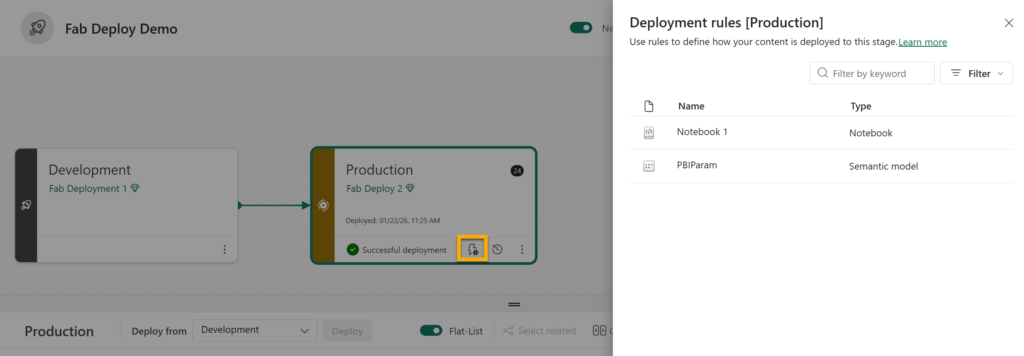
- The deployment rules UI is hard to find, and you can’t see more than one deployment rule at a time. Setting a deployment rule isn’t self-explanatory. The deployment rules interface isn’t easy to find in the first place. There’s no view that shows you all the deployment rules configured across a stage at once, either; you have to go into each item individually to see its deployment rules.
- Paginated report connections can’t always be overridden by a deployment rule. Data source deployment rules do exist for them, but only when the connection is a non-Power-Query-Online type, a direct connection string, like SQL Server or Oracle, rather than a standard Fabric “Get Data” connection. If a paginated report’s data source is PQO-based, there’s no deployment rule that can override it; you’re stuck manually repointing it in each stage. And even when a deployment rule does apply, deploying a paginated report with a data source deployment rule attached means you can no longer open that report in Power BI Report Builder afterward.
- Variable libraries don’t work the same way across item types, and semantic models don’t support them at all. They’re Fabric’s newer mechanism for handling environment-specific configuration, and they do eliminate the need to hardcode values directly into a deployment rule. You reference a variable instead of typing a literal per environment, but how that reference actually resolves differs by item type. Pipelines reference the variable directly and pick up whatever value is active in that workspace at runtime. Most other item types need a deployment rule tied to the variable to pick up a change; the value only updates when you deploy, not just because the active value set changed. A variable library also isn’t written once and magically available everywhere. It’s scoped to a single workspace, and it deploys through the pipeline like any other item, carrying every value set along with it to every stage. Changing a variable’s structure (adding, deleting, or renaming a variable or a value set) doesn’t take effect anywhere until you deploy the library through the pipeline again. The only thing that’s actually local to each stage, untouched by deployment, is which value set is marked active there. And that’s assuming your item type is even eligible. Semantic models simply aren’t supported for variable libraries at all. The supported list covers pipelines, notebooks, dataflows (gen 2), copy jobs, lakehouse shortcuts, user data functions, and plan items.
- Pairing breaks if you manually create a folder in the target, or if you have to delete and recreate a corrupted item. Deployment pipelines track whether an item in one stage is “paired” with its counterpart in the next stage, and pairing is what determines whether a deployment overwrites that item or creates a duplicate copy alongside it. If you manually create a folder in the target workspace ahead of time and then try to deploy items from the source into a matching folder, deployment fails. Folders count as part of an item’s path for pairing purposes, and a folder created directly in the target, rather than by the pipeline itself, was never paired to begin with. The fix is to delete the folder you created manually and let the pipeline create it during deployment instead. The same underlying problem shows up when an item gets corrupted: deleting and recreating it makes it a new item as far as pairing is concerned, so it comes back unpaired even with the identical name. You’re stuck manually re-syncing it — deleting the counterpart in the target stage and redeploying, or unassigning and reassigning the workspace — rather than the pipeline just picking the connection back up. And it doesn’t stop at the item itself — anything that referenced it breaks too. A report connected to it or a shortcut pointing at it held a reference to the old item’s identity, and that identity is gone. They don’t automatically find their way to the replacement; you have to manually reconnect every one of those references on top of re-syncing the pairing itself.
- A workspace can only belong to one pipeline, in either direction. It’s a strict one-to-one relationship. Each pipeline stage holds exactly one workspace, so multiple development workspaces can’t all feed into a single shared target. It runs the other way too: a shared or common-code workspace can only be a stage in one deployment pipeline at a time, so it can’t feed into more than one downstream chain of workspaces.
- Deployment pipelines only work at the whole-item level for lakehouses and warehouses, and several sub-items get no support at all. There’s no option to deploy just one table’s schema and leave the rest alone; it’s the entire lakehouse or warehouse, or nothing. If you need that kind of granularity, you can work with the SQL database project directly or write your own scripts, but either way that happens outside the deployment pipeline itself. The SQL analytics endpoint that sits over a lakehouse is a step further than that. Microsoft’s documentation confirms Git integration and deployment pipelines both exclude the SQL analytics endpoint item entirely. Any views or stored procedures you build directly on it aren’t tracked and aren’t deployed; you have to recreate them by hand in every stage. The same gap shows up with mirrored databases: Microsoft’s CI/CD documentation for mirrored databases states that only the mirrored database item itself is tracked in Git, while the SQL analytics endpoint and any views you’ve created are excluded.
- No post-deployment actions. There’s no hook to run a script or action automatically after a deployment completes, nothing like a predeploy/postdeploy step the way Azure DevOps or GitHub Actions offer. If you need to trigger a notebook, refresh a semantic model, or run any cleanup step right after content lands in a stage, that has to be a separate step triggered outside the pipeline.
- No approvals or gated pipeline executions. There’s no way to require sign-off before a deployment proceeds. No pre-deployment approval, no required reviewer, no gate that pauses the pipeline until someone signs off. This means all reviews and all communication about items for deployment happen outside the deployment pipeline interface entirely, with nothing tying that conversation back to the actual deployment event.
Alternatives
None of this means you’re stuck with deployment pipelines as they are. There are a few different ways to work around most of what’s above.
- Script around the GUI, keep the pipeline. Fabric exposes APIs for most of what deployment pipelines do, so you can drive the same underlying pipeline programmatically instead of clicking through the UI, including creating the pipeline, assigning workspaces, and deploying stage content. That removes a lot of the pain that’s specific to the interface itself, since you’re never actually opening that screen. Two things still won’t get fixed this way. Deployment rules seem to have no REST API at all, so you’re still setting those up by hand no matter how much of the rest you script. And pipeline access still requires someone to explicitly share the pipeline with each person, which is a separate action from assigning any workspace role and has no API either; the only automatic path to Pipeline Admin is being the person who created the pipeline in the first place.
- Wrap it in another CI/CD tool. If what you actually want is approvals, gates, or a post-deployment script, and you’re fine keeping deployment pipelines for the item movement itself, you can put a tool like Azure DevOps around it. The external tool handles the approval gate and the post-deployment step, and calls the Fabric deployment pipeline API as one stage in its own pipeline.
- Skip deployment pipelines entirely. You can script the whole deployment yourself against the Fabric APIs, with no deployment pipeline object involved at all. And you don’t have to write that from scratch. fabric-cicd is a Microsoft-maintained Python library built for exactly this. It deploys Fabric items from a Git repo into a workspace, so you don’t have to build and maintain that integration yourself. That’s actually how I started doing my own deployments: writing that scripting logic in Fabric notebooks. Eventually I wanted a UI on top of it instead of editing notebook parameters (to be more user-friendly for my clients), so I built a Fabric app using Rayfin, Microsoft’s managed backend-as-a-service SDK for building apps on Fabric. This Fabric API approach isn’t limited to notebooks or a custom app. The same scripting logic can just as easily become an AI skill, letting an agent handle your deployments for you.
None of these options are free. Deployment pipelines as they are remain the simplest choice if you want to stay low-code, but every gap in this post is still your problem. Put Azure DevOps or GitHub Actions around them instead, and you get real gates and post-deployment automation, at the cost of a second system to maintain and an integration point between it and Fabric. The most flexible path is building your own scripts, app, or AI skill. But now you own the build and the upkeep, and even that has a ceiling, since the public Fabric APIs have their own gaps. Which trade-off makes sense depends on the benefits realized and how much of that effort your team wants to take on.
What gaps in deployment pipeline functionality have affected you the most? And if you’ve moved to an alternative, which one, and how’s it working out? I’d love to hear about it in the comments.
The post 10 Things I Hate About Fabric Deployment Pipelines— And Some Alternatives first appeared on Data Savvy.