

As part of my running the SQL Saturday charitable foundation, I get sponsorship money from vendors. Primarily Microsoft and AMD, but I hope to change that in the future. In any case, I recently got a payment notification that my invoice had been paid.
I knew I had a few invoices outstanding, so I wasn’t sure what was included. MS tries to bundle payments, but I don’t get an email for each one. For this one, I didn’t see an email, so I suspected I’d put the wrong one in or typo’d it.
The Usual Process
When I get payments, I have to reconcile those in my General Ledger, recording the amount and allocating to the events. I then send out payments to the event organizers and record those.
This is a mostly manual process, but since I sometimes submit multiple invoices at once, I have to figure out what was paid. I could submit 3 invoices and get 1, 2, or 3 payments. Microsoft Finance usually bundles things, but since I can have a lot of events in flight, I need to know where money gets allocated.
In this case, I didn’t see an email and didn’t want to log into the invoice system and start finding the various invoices paid and clicking through details. Instead, I logged into the bank to verify the amount and I saw a memo. It was something like this (I’ve changed a bunch of data in here.
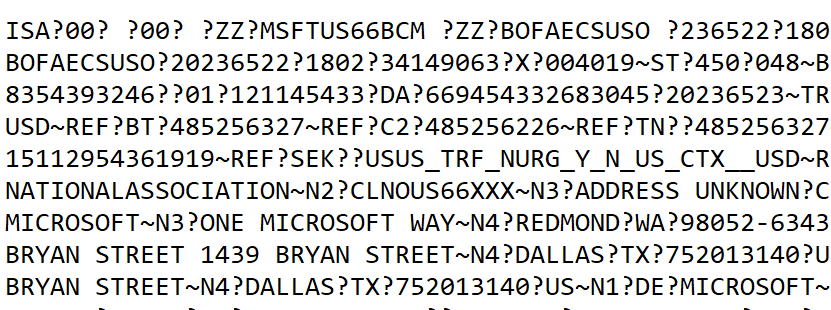
I thought it would be obvious which invoices were paid, but I couldn’t quickly figure this out. I decided to turn to AI.
AI to the Rescue
First, I knew I had a “no training” AI plan with Claude, so I wasn’t concerned about data release here.
I had this prompt and then pasted in the data: “can you help me separate this by ? and make sense of what is included?”
The result was interesting, and useful. It labeled this task as EDI 820 parsing, so apparently this is EDI format. The last time I worked with EDI is was XML based, but perhaps this is the new way of doing things.
The results were great. I got a summary, none of which I needed, but good to know this was easily recognized and parsed.
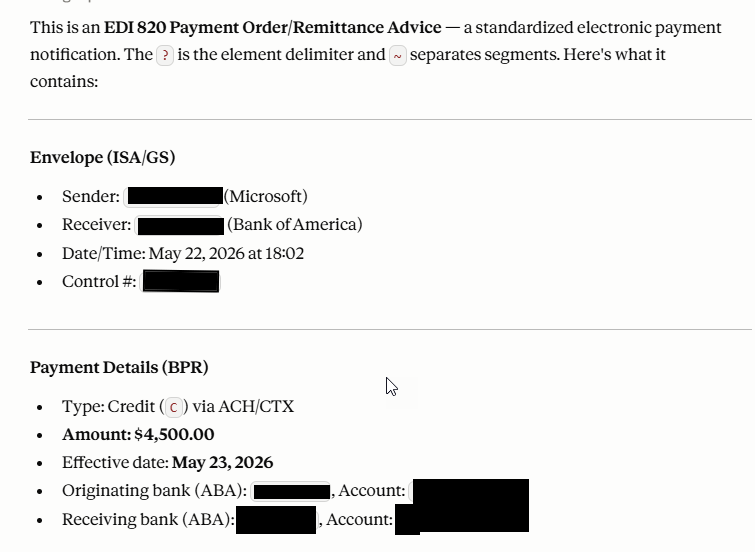
The really interesting part was below some of the acronym descriptions, where my invoices were found.
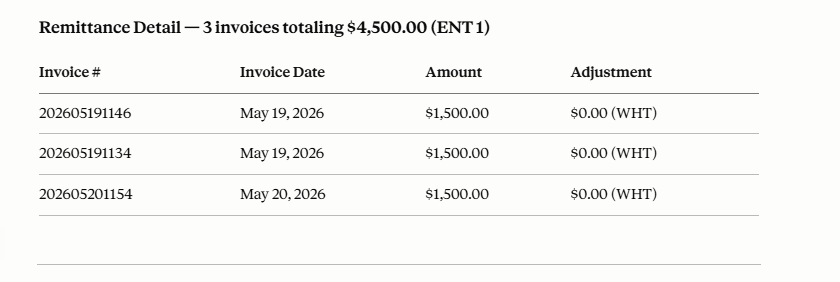
I knew this would be certain events, but wanted to double check the numbers. When I put in an invoice number, I use the date and event. Here I got 3 of my events (1146, 1154, 1134) paid from a day where I invoiced 5 events. This let me quickly enter my GL and also know to whom I was sending money.
A cool time saving AI trick. Rather than 10-15 minutes to reconcile things, AI gave me answers in seconds and I had fixed the GL in a couple of minutes, allocating the funds to events.
Of course, I needed to ensure data security with my plan and I verified these were events where I had planned to send money. Still me as the expert reviewing things and making decisions, but way easier than trying to sort out invoice numbers from a bunch of EDI text.