

Data build tool (dbt) is an open-source command line tool that helps analysts and engineers transform data within their warehouses. It already assumes that data is extracted and loaded into raw tables. The dbt core framework is written in Python with the translations defined as a combination of SQL scripts, Jinga Template Language, and YAML files. The real power comes from the fact that adapters have been written for many different target database management systems. The use of macros allows the developer to code for SQL syntax that might not be standard between database systems. How can we transform an existing OLTP data model into one designed for OLAP reporting tools?
Business Problem
Our manager has heard about the chinook sample database that is Popular with SQL Lite. The manager wants the team to export how to use dbt. Today, we are going to convert the normal form data model into a dimensional model for reporting. For this proof-of-concept, Azure SQL Database will serve as the target database, utilizing the serverless SKU. Many of the features supplied by the dbt framework will be tried during our exploration. At the end of the article, the analyst and/or engineer will have a good understanding of the dbt framework.
Materializations + Tests
These two concepts are extremely important when creating a dbt project. The dbt seed and dbt snapshot commands allow the developer to create physical tables in the target database. Seeds are great for populating static data that is used in lookups (dimensions). For instance, which Genre is associated with a particular album? Over time, dimensional data changes. For instance, we had Opera as a Genre for 5 years but decided to reclassify the name as “Italian Opera” since other country specific Operas have been added to the Music catalog. Thus, we need to keep track of slowly changing dimensions type 2 (SCD2). That is where snapshots come into play.
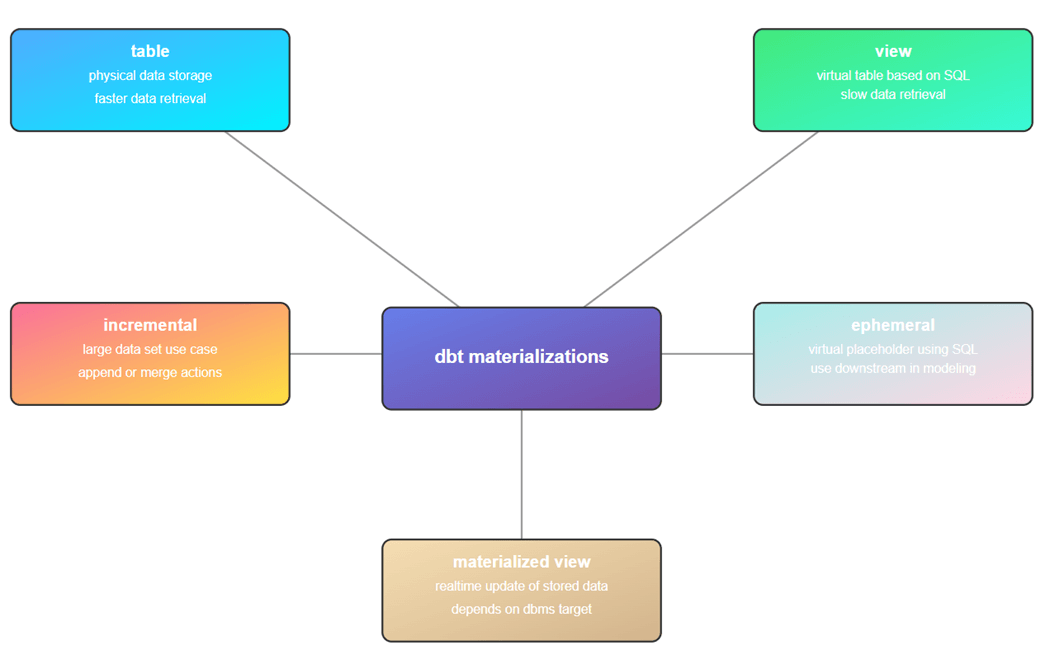
Incremental tables are used when we have large datasets. A timestamp is used to determine what source data is new compared to the existing target data. We can either append or merge the new data into the target table. Sometimes, we want to add a table but just do not have time to fully define it. Ephemeral tables allows the developer to use a SQL statement as a placeholder for a table to be built in the future. Finally, materialized views allow the developer to store a complex view in storage. This feature of course depends upon the target database supporting this type of view.
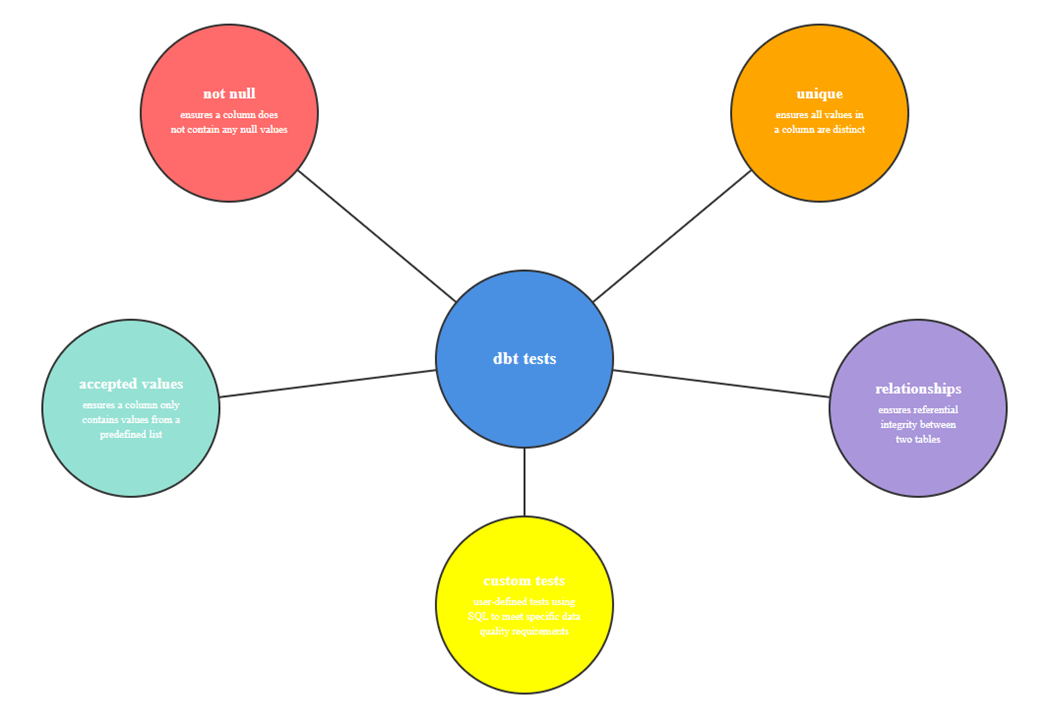
Equally important is testing the data quality at each stage of processing. We define data tests using either the YAML or standalone SQL scripts. The dbt test command executes those tests for validity. The following data tests can be executed: not null, unique, accepted values, and relationships.
To wrap this topic up, custom tests allow the developer to define business rules. For example, an invoice must have a positive balance. Or the sales manager does not want to manage small invoices. Thus, any sale under five dollars should be flagged to be reviewed with the sales employee as an exception.
Configure + Test
I am assuming that Visual Studio Code has been installed with a current version of Python. The latest ODBC driver for SQL Server and the dbt-core package for Python should be deployed in your environment. Now, we must install the SQL Server adapter for dbt using the following command from a terminal window in VS Code.
pip install dbt-sqlserver
Switching between different target databases in dbt is easy. We need to have the correct ODBC driver, the correct dbt adapter, and a profiles.yml file that is designed for the target database. The image below shows the nodes that have been defined for an Azure SQL Database. The default schema is named data.
chinook:
  target: dev
  outputs:
    dev:
      type: sqlserver
      driver: 'ODBC Driver 18 for SQL Server'
      server: svr4tips2030.database.windows.net
      port: 1433
      database: ChinookDbms
      schema: data
      user: <your user>
      password: <your password>
      encrypt: true
      trust_cert: true
The dbt debug command can be used to validate the connection.
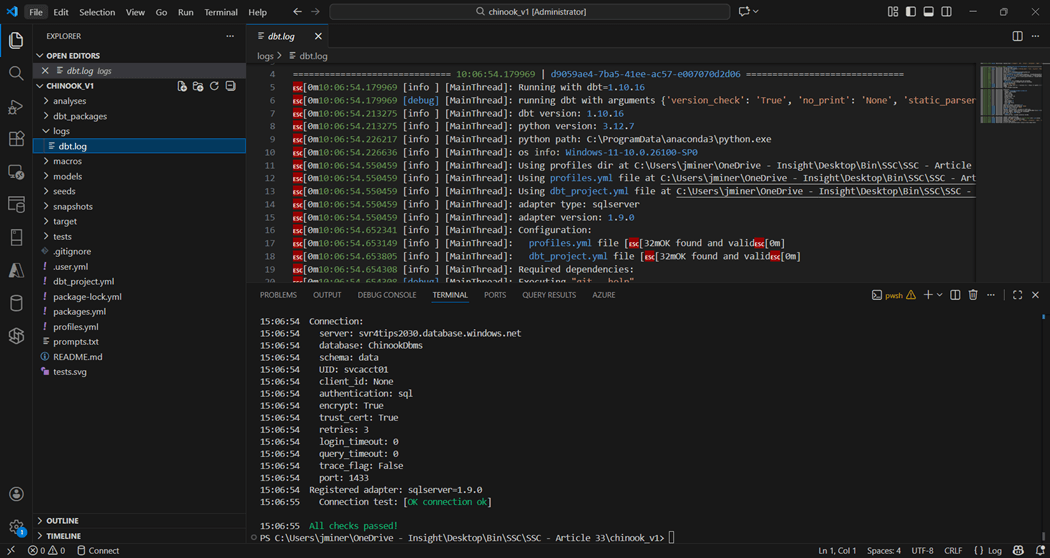
Please note the sub-folders in the above project. Each one has a special purpose in a dbt project. The dbt.log file exists in the logs sub-folder. This is an important file since it shows the developer any errors that occurred during execution.
Raw Schema
A quick search of the internet for an entity relationship diagram shows that SQLITE uses the Chinook database in examples. We need data in raw tables to use the database build tool (dbt).
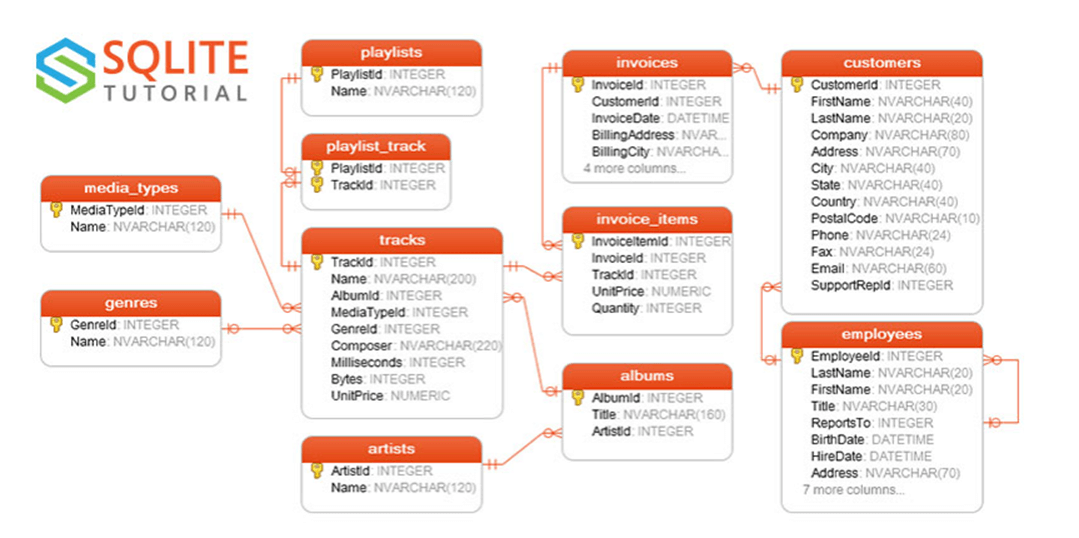
The completed dbt_project.yml file is shown below. The seeds section of the document shows the schema postfix is defined as raw. Any table created with the dbt seed command will be under the data_raw schema.
#
# Project + profile names
#

name: 'chinook'
version: '1.0.0'
profile: 'chinook'

#
#  Configure resource paths
#

model-paths: ["models"]
analysis-paths: ["analyses"]
test-paths: ["tests"]
seed-paths: ["seeds"]
macro-paths: ["macros"]
snapshot-paths: ["snapshots"]


#
#  Which directories to clean
#

clean-targets:
  - "target"


#
#  Configure seeds
#

seeds:
  chinook:
    schema: raw


#
#  Configure models
#

models:
  chinook:

    # Default schema and materialization for all models
    +schema: analytics
    +materialized: view

    # Subdirectories override defaults
    stage:
      +schema: stage
      +materialized: view

    loads:
      +schema: loads
      +materialized: table
      as_columnstore: false

    marts:
      +schema: marts
      +materialized: table
      as_columnstore: false


#
#  Configure snapshots
#

snapshots:
  chinook:
    +as_columnstore: false


#
#  Configure dispatch for macro resolution
#

dispatch:
  - macro_namespace: dbt_utils
    search_order: ['tsql_utils', 'dbt_utils']
  - macro_namespace: dbt_date
    search_order: ['tsql_utils', 'dbt_date']
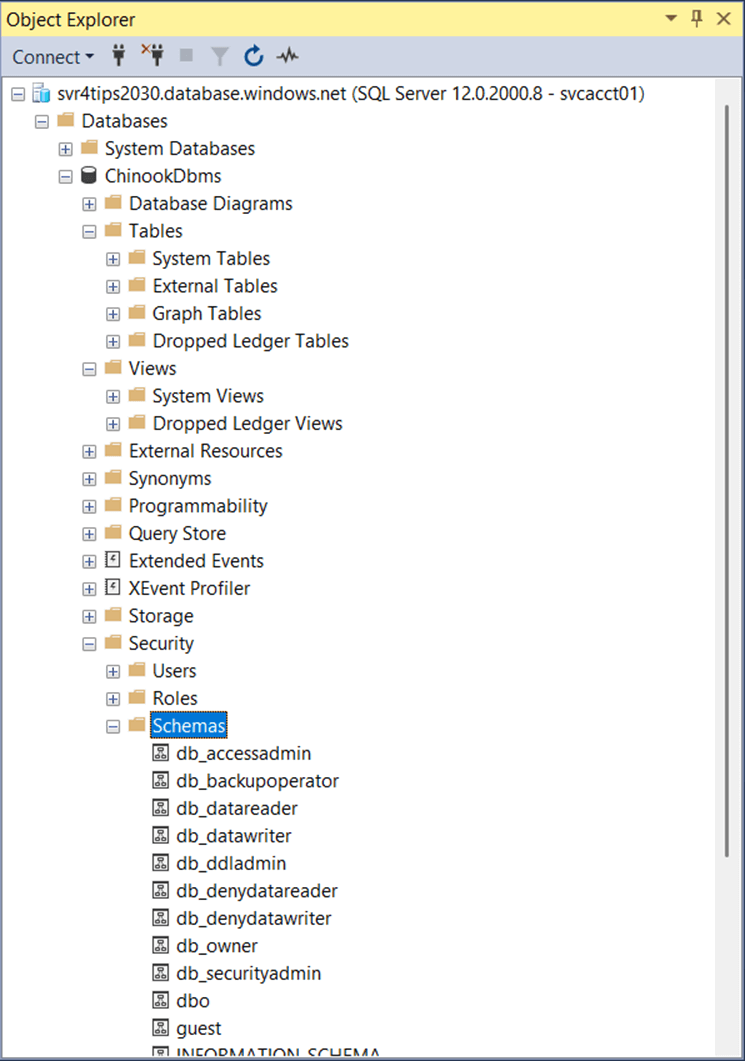
Taking a quick look at the target database using SSMS, we can see there are no tables, views, or schemas at this time. Thus, we have an empty database.
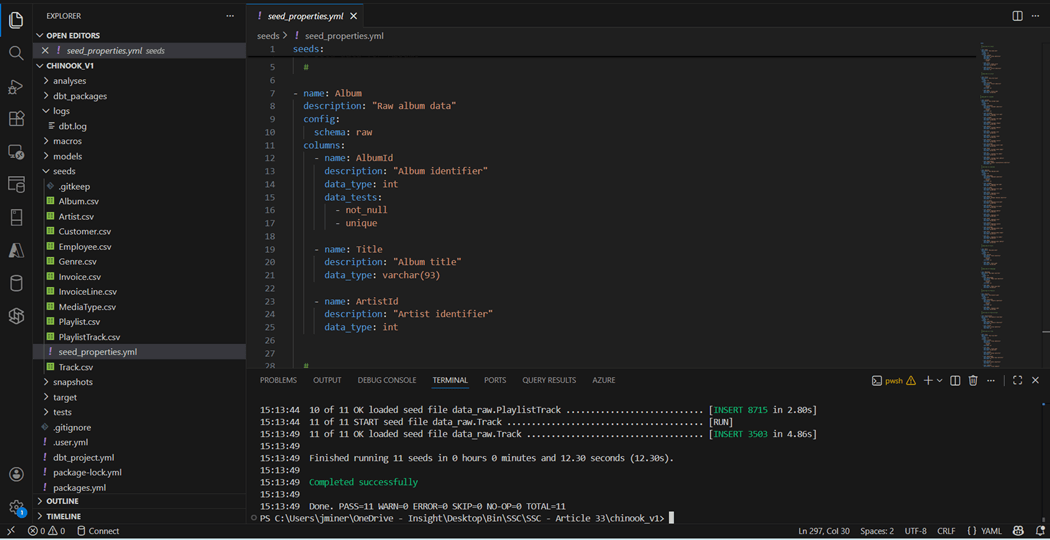
The comma separated values files shown in the seeds directory come from a prior article. The properties.yml file allows the data modeler to defined each table that is being seeded. I used the convention of the directory name followed by the YAML file type. Columns have names, descriptions, and data types. Optionally, we can add data tests to validate the data. A similar file named schemas.yml can be created for each model.
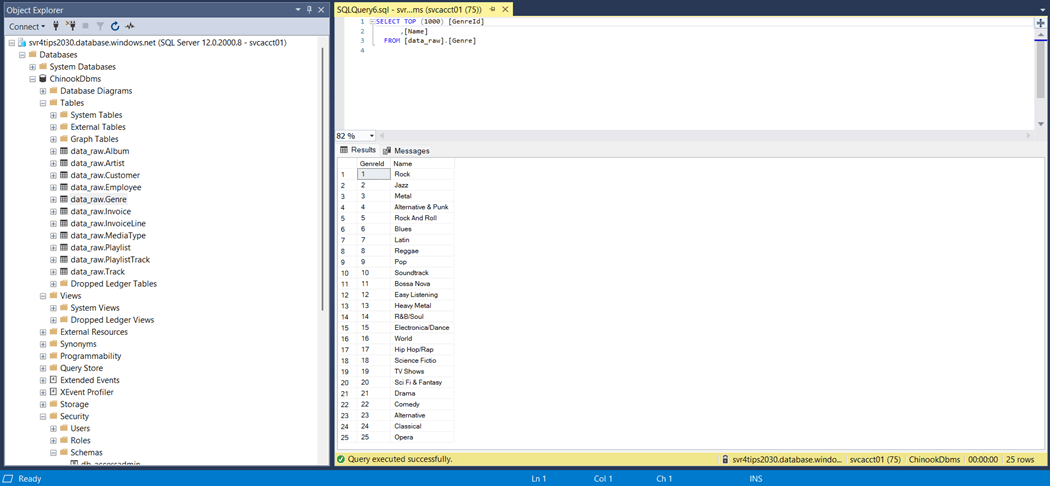
If we execute the dbt seed command, we will build and deploy the CSV files to the Azure SQL database.
Let us wrap up the section by covering the how dbt uses DAGs. Directed Acyclic Graphs are visual representations of data model relationships, dependencies, and lineage. While a file name can be duplicated under different directories, this will prevent the designer from deploying an object by name. If the seed and models/stage directories had a file named Artist, we cannot resolve to the correct object by name.
Stage Schema
The dbt framework is quite extensible. Any model sub-folder (schema name) can be used to group together a bunch of tables and/or views. However, the following names have become common place: raw, stage, intermediate, and mart.
The sources.yml file in the models root directory defines the location of the source tables. What is inconsistent with the YAML is the fact that schema refers to the fully qualified name, not the post-fix part.
sources:
  - name: Chinook
    database: ChinookDbms
    schema: data_raw
    tables:
      - name: Album
      - name: Artist
      - name: Customer
      - name: Employee
      - name: Genre
      - name: Invoice
      - name: InvoiceLine
      - name: MediaType
      - name: Playlist
      - name: PlaylistTrack
      - name: Track
Since we will not be querying the stage objects directly, I have decided to deploy stage objects as views. Please see the models node in the dbt_project.yml file from the above definition.
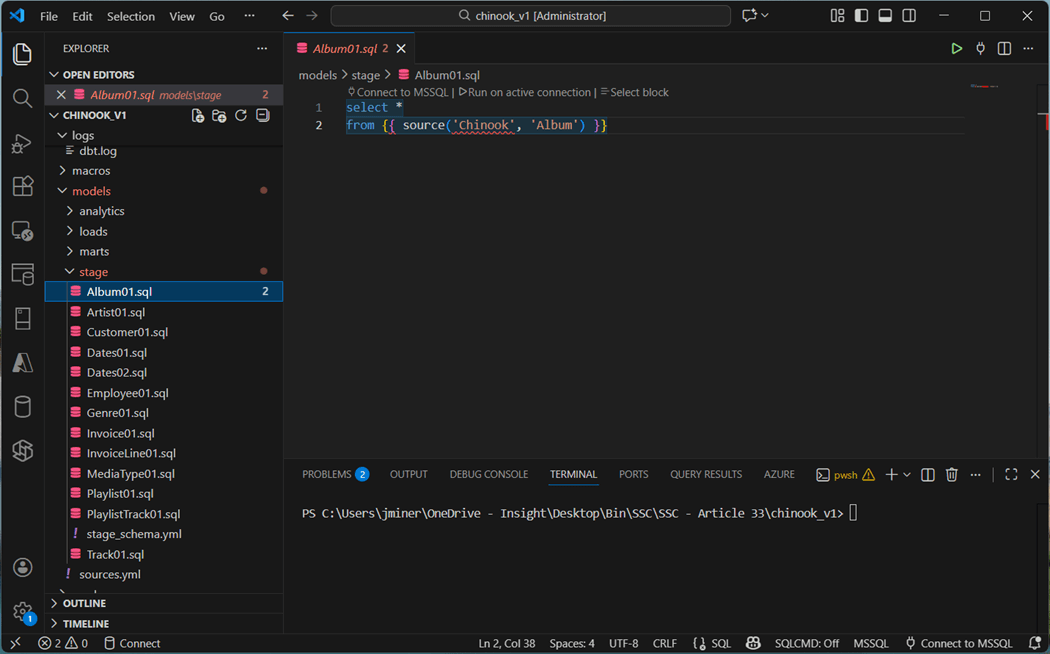
We can now use the source function to refer to the Album table. This Jinja syntax will be compiled to the fully qualified when deployed. Most of the SQL scripts are defined this way. However, there are some exceptions. For instance, the Dates01 object is an ephemeral table.
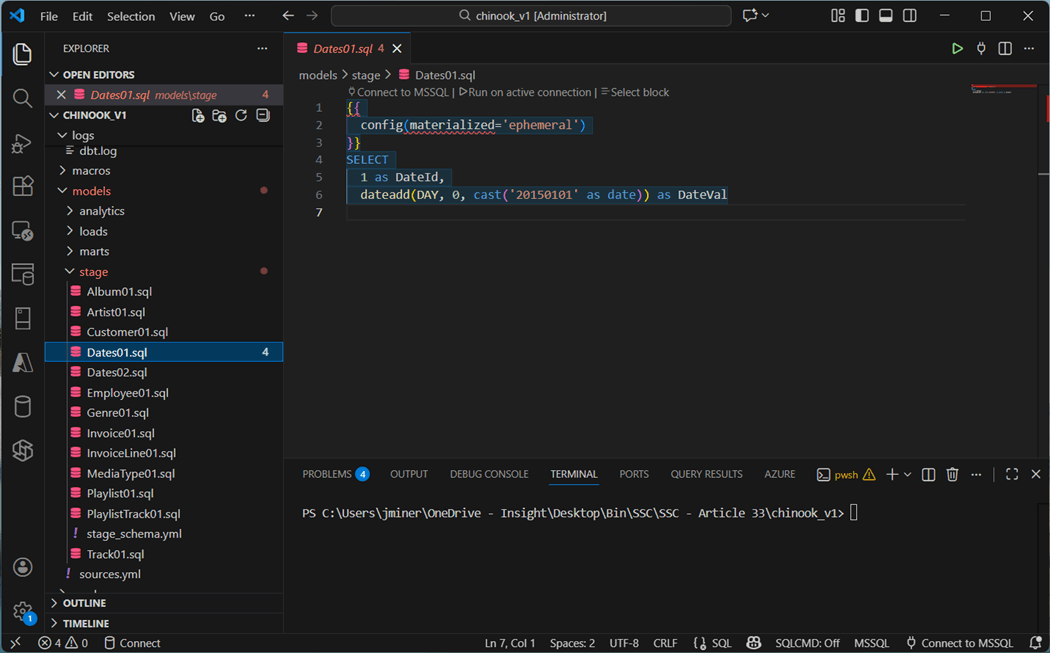
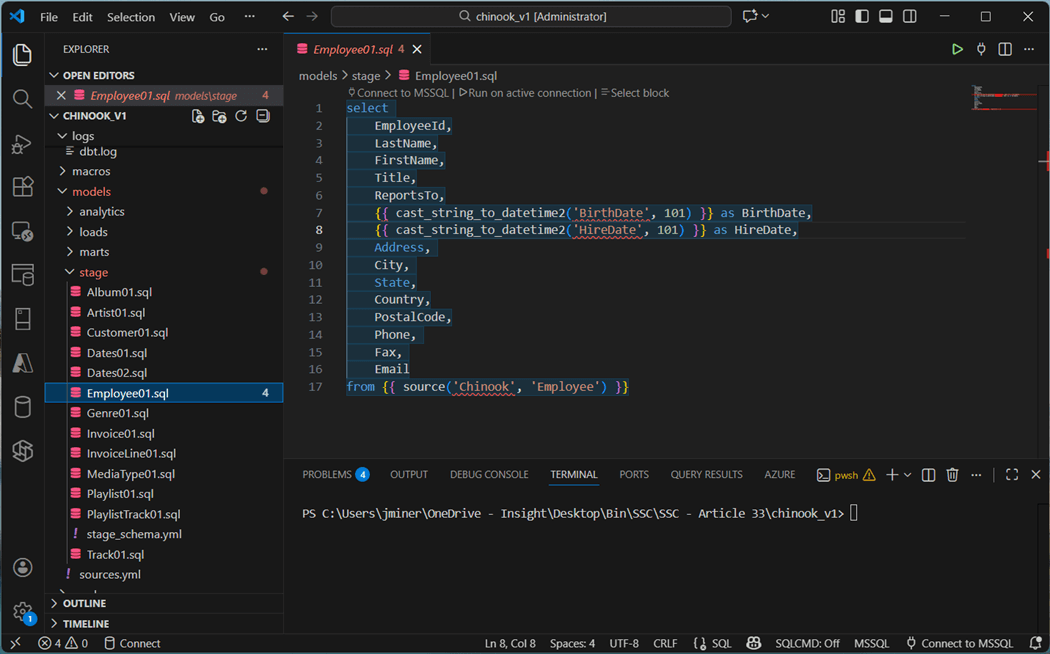
Staging is the perfect place to transform data before storing as a table. The Employee raw table has two dates that are in string format. We can use the TSQL convert function. However, the deployment would fail when the target is a Snowflake database. A better solution is to use macros in which the correct syntax is coded for a given target. Prebuilt macros are stored in published packages. We will talk about them later. The Invoice table has a similar date issue with column named InvoiceDate.
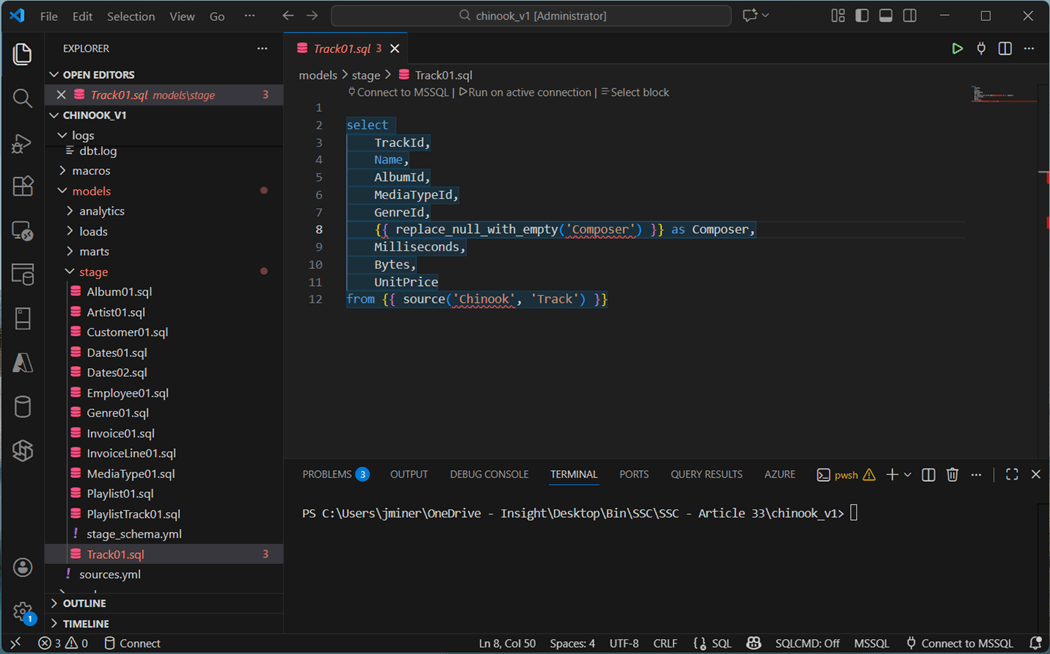
The Composer column in the Track table contains null values. This will cause issues with snapshots using check logic. Replacing the null with an empty string prevents this error.
I skipped over the Dates02.sql file on purpose. We will come back to this definition that creates a date table using prebuilt packages.
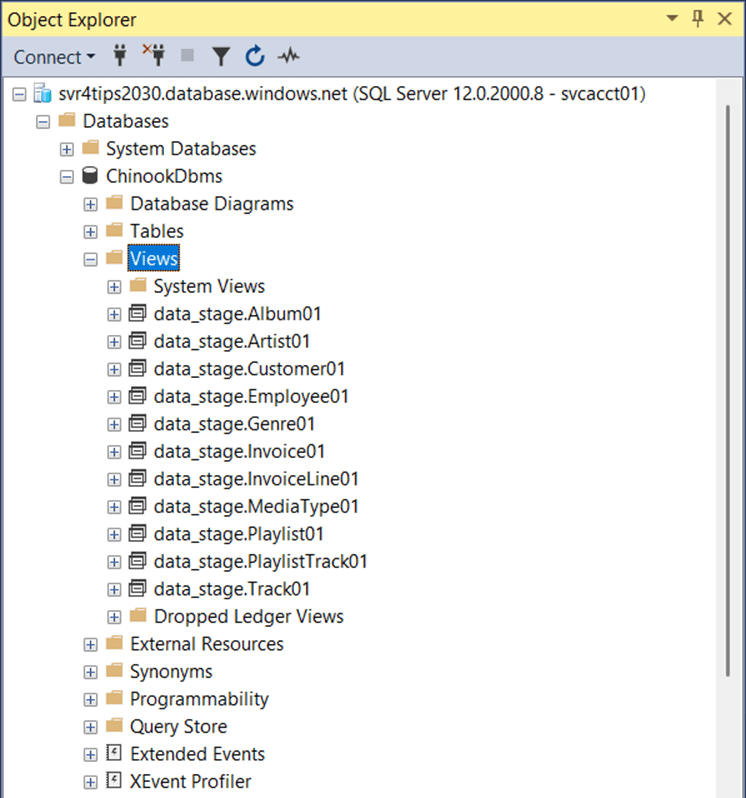
If we run the “dbt run -s stage” command in the terminal window, eleven different views will be created. Remember, ephemeral tables can be referenced downstream but cannot be queried since they never materialize.
Snap Schema
There are two ways to define snapshots using the dbt framework. There is the timestamp and check strategies. Tools like Fivetran supply the developer with last modified date which is perfect for snapshots. Unfortunately, the Chinook data does not have this field. Thus, we are limited to the check strategy.
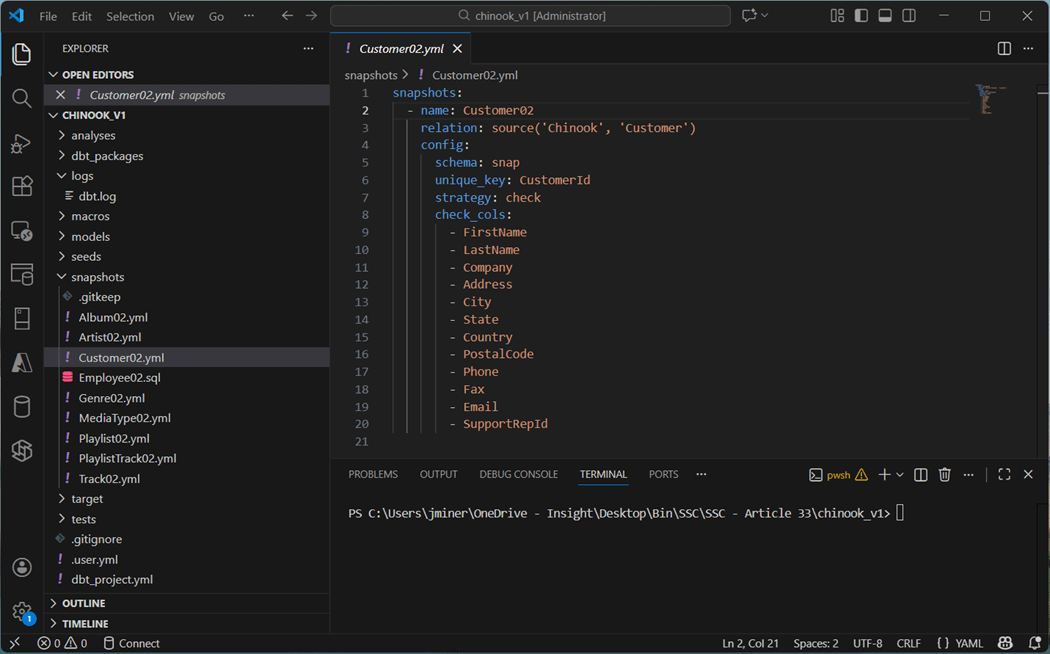
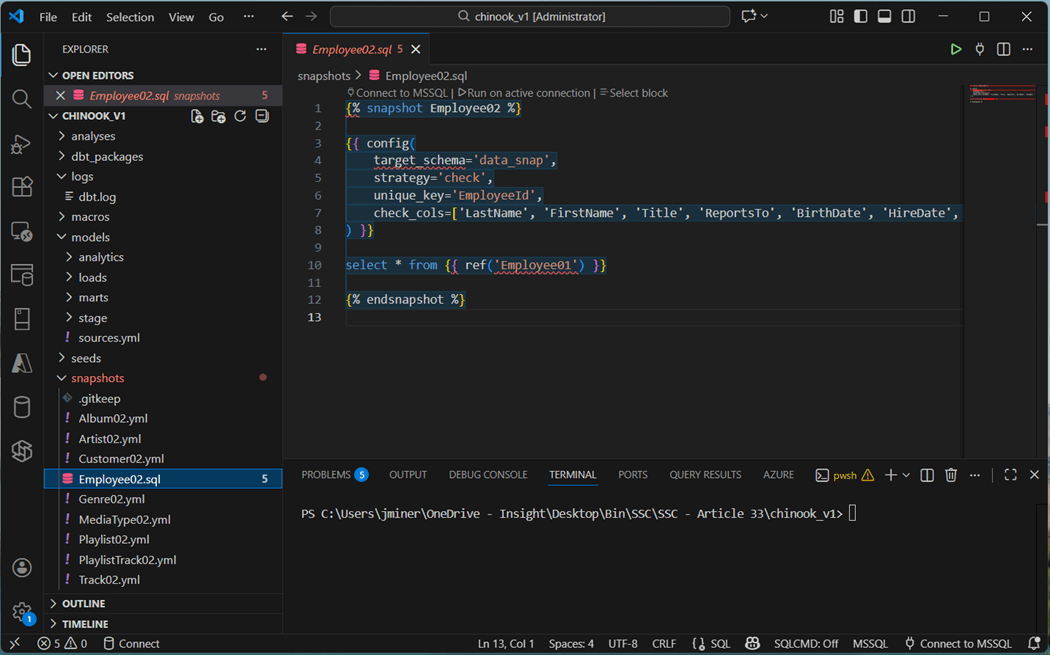
We define the name, relation, and configuration. To use a check strategy, we define a unique key as well as all the other columns that might change. Please note all but the Employee02 and Track02 tables are defined using YAML. Why do these tables use a SQL file for a definition?
We need to use the SQL syntax so we can refer to the staged view instead of the source table. Shown below is the Employee02 definition.
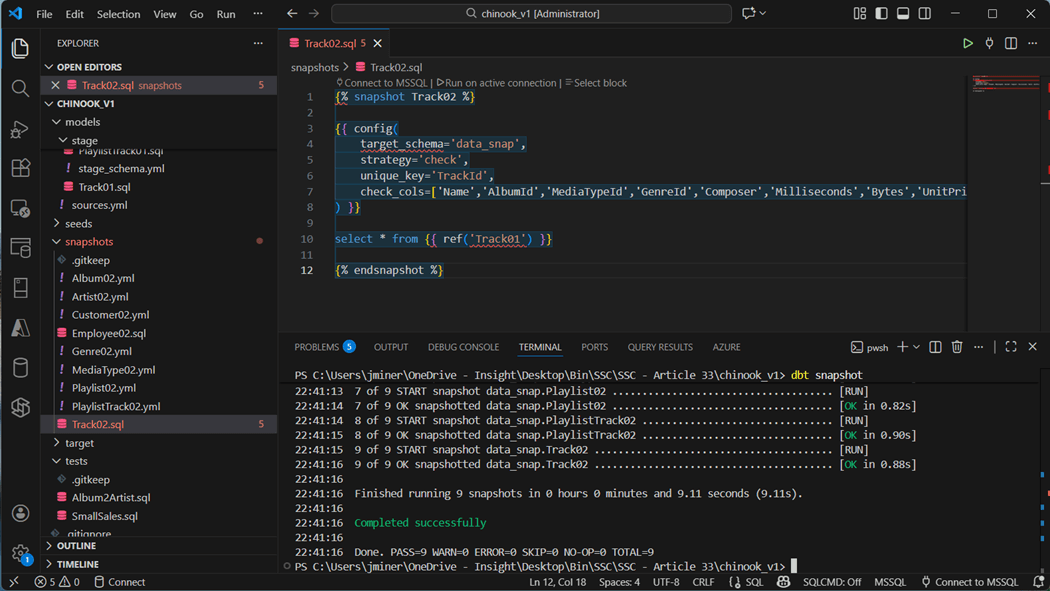
The Track02 SQL definition file is shown below. Execute the “dbt snapshots” command to build out the nine tables.
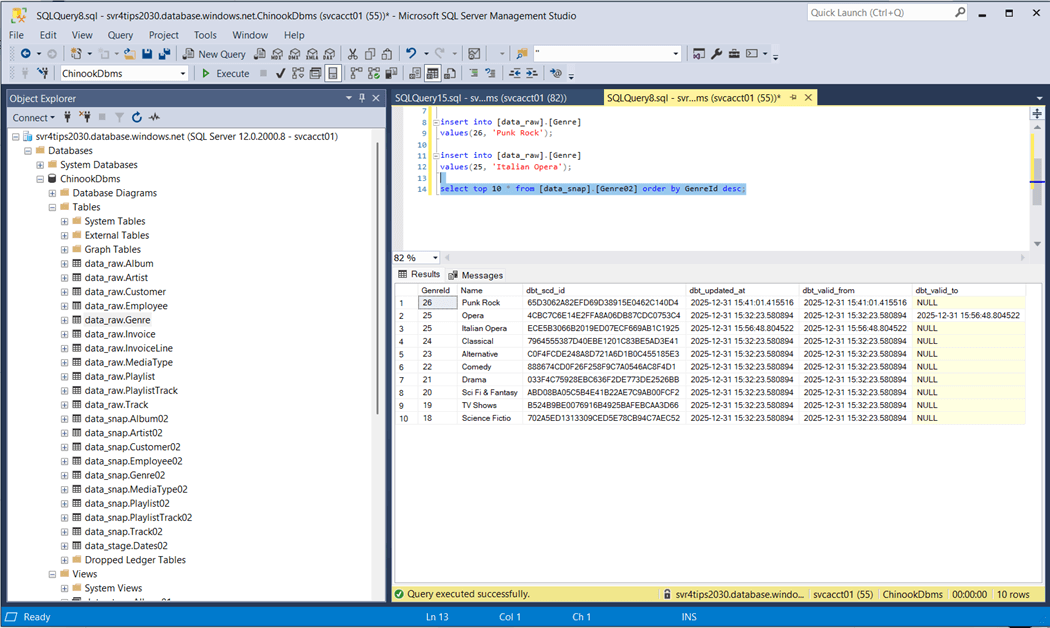
Let us take a look at two different tables: Employee02 and Genre02. First, the BirthDate and HireDate have been converted to the datetime2 data type since we are basing the snapshot off the view in stage.
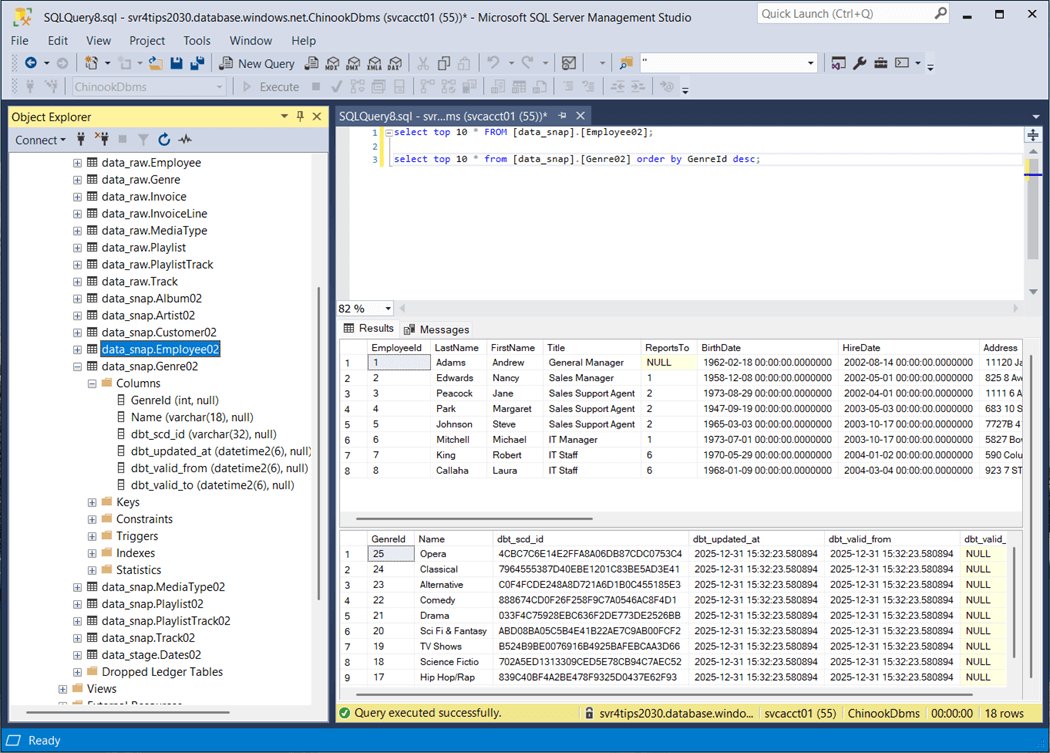
Additionally, effective dates have been added as well as a slowly changing dimension id. Does this SCD2 functionality work? The image below shows the update and insert have occurred with the Genre source table. After running the snapshot, we can see record with id twenty-five was end dated with the old value and the new value is now effective. Record with id twenty-six is brand new.
Snapshots are great for capturing slow changing dimensions. I suggest using them for your dimensional data.
Clustered Columnstore Indexes
Unfortunately, this is the default storage for all tables that are not created by a dbt seed command. Do not fret, we can fix this by telling dbt to use heap index strategy instead.
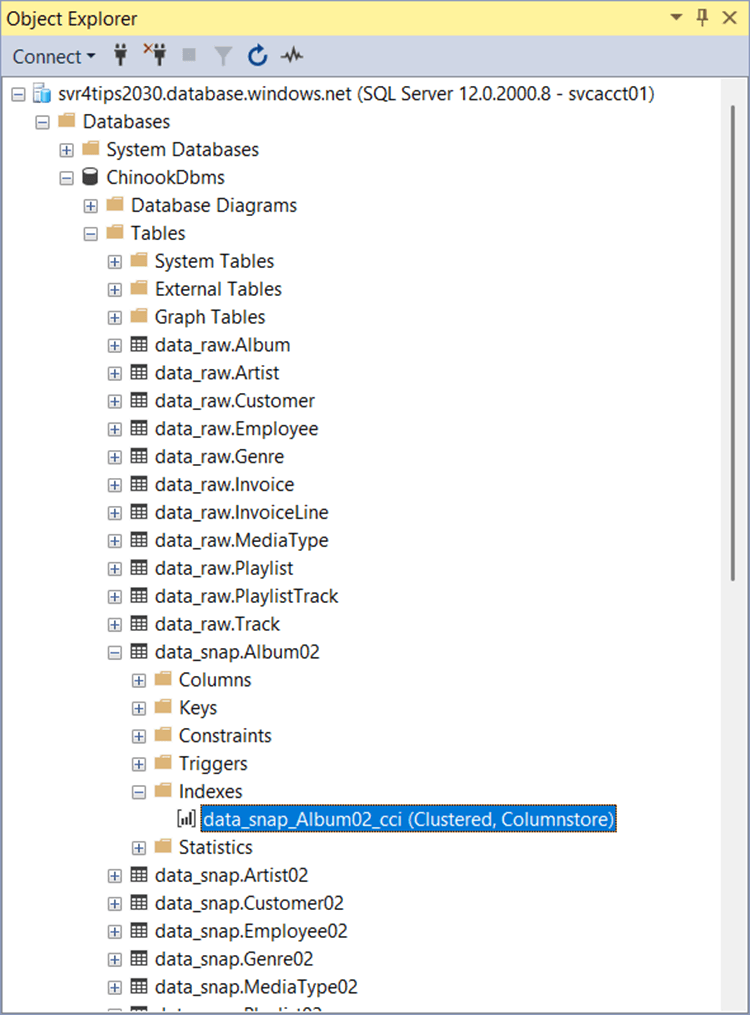
The image above shows the tables in the raw_snap schema using clustered columnstore indexes. The same can be said of the raw_stage schema.
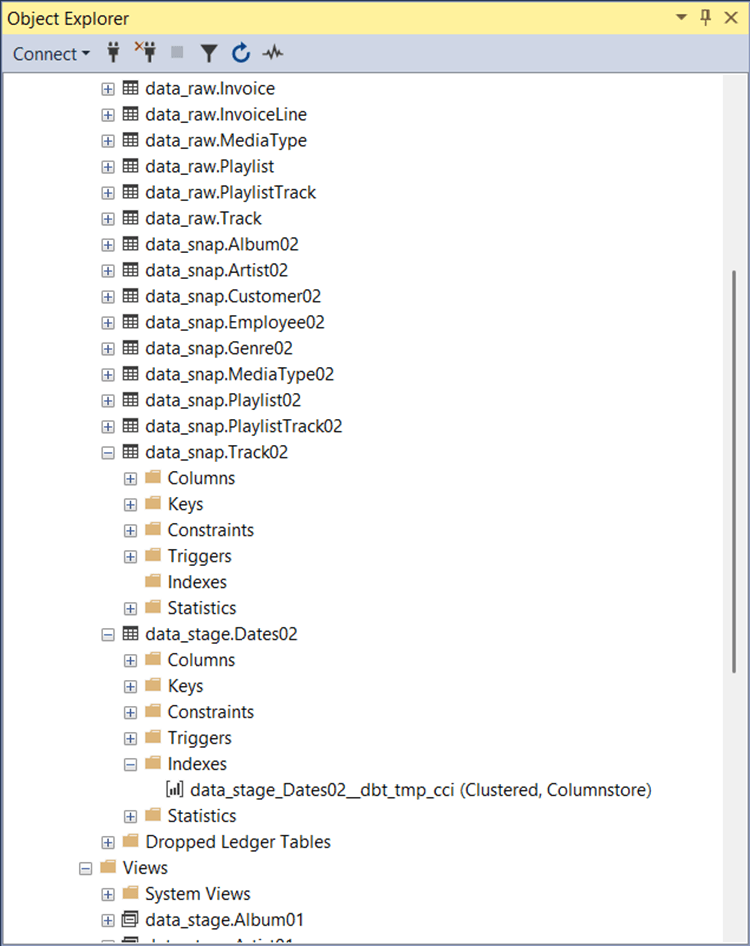
We fix this issue in the dbt_projects.yml file with the following entry “+as_columnstore: false”. This addition will be for both the snapshots and models definitions. Just rebuild the previous schemas with the correct dbt command.
Macros + Packages
The dbt designer can define macros so that SQL functions that might be database specific can be isolated. For example, date functions are usually defined differently between database systems. I suggest using your favorite Large Language Model (LLM) to define the function for you. The image below shows the cast_string_to_datetime2 macro which is defined using Jinga template language. It supports both SQL Server and Snowflake in this example.
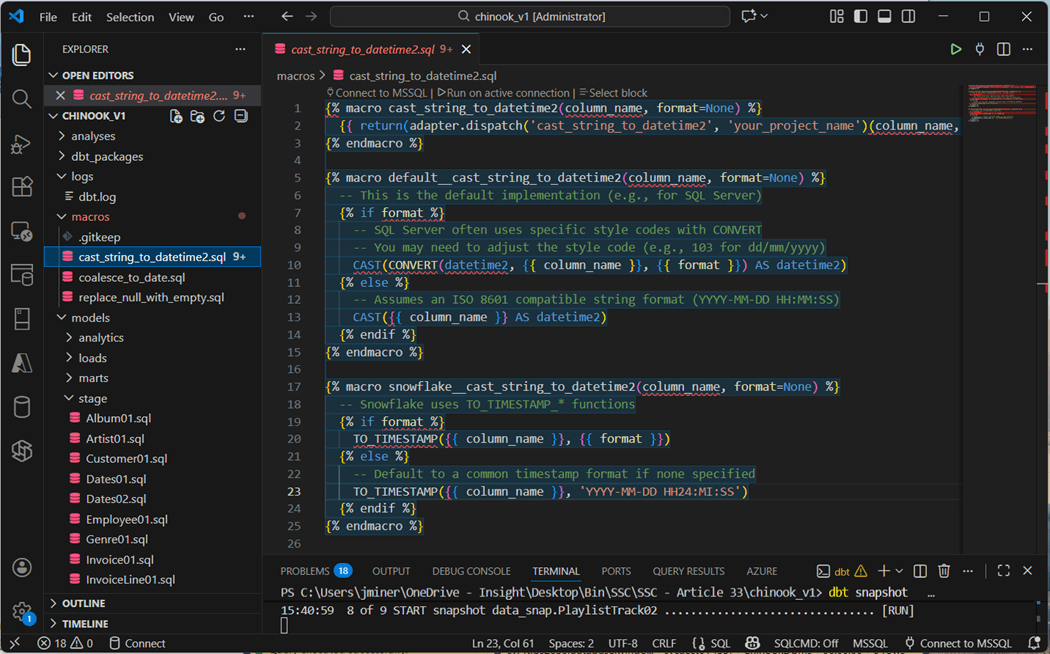
Packages allow the developer to install a bunch of routines (functions) at one time. I did try writing a recursive CTE for the Dates02.sql file. Unfortunately, dbt tries to create a view out of the SQL and views do not allow the option max recursion option. Thus, deployment of the Dates02 table failed.
The dbt_utils and dbt_date packages are used for a variety of reasons. The utils package a surrogate key generator and the date package has a date spline method. Sometimes, these packages use the wrong syntax. Therefore, it is important to install the tsql_utils package for SQL Server specific syntax.
To install the packages, we create the following packages.yml file in the root directory of the dbt project. The definition of the file is seen below.
packages:
  - package: dbt-labs/dbt_utils
    version: 1.3.3

  - package: godatadriven/dbt_date
    version: 0.17.0

  - package: dbt-msft/tsql_utils
    version: 1.2.0
Next, we have to install the packages and define the order of evaluation. Please see the complete dbt_project.yml file shown previously. The dbt deps command will install the packages listed in the YAML file. I asked my favorite LLM (“Claude 3.5 Sonnet” ) to generate the date dimension SQL statement using the date_spine macro.
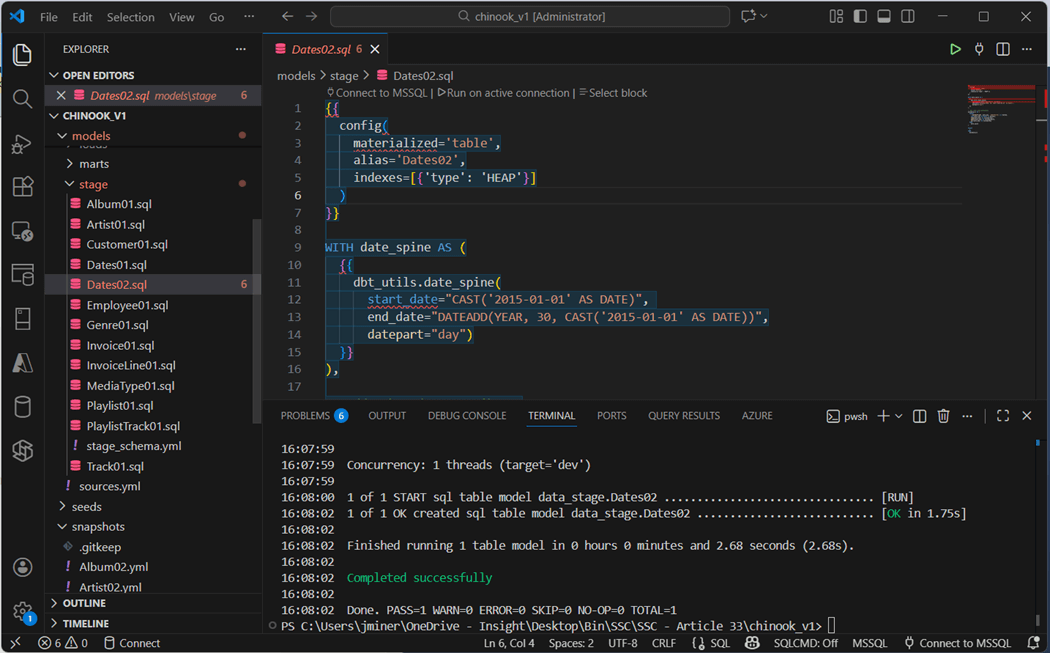
To build just this table, run the “dbt run -s Dates02” command. The next step is to examine the contents of the materialized table using SSMS.
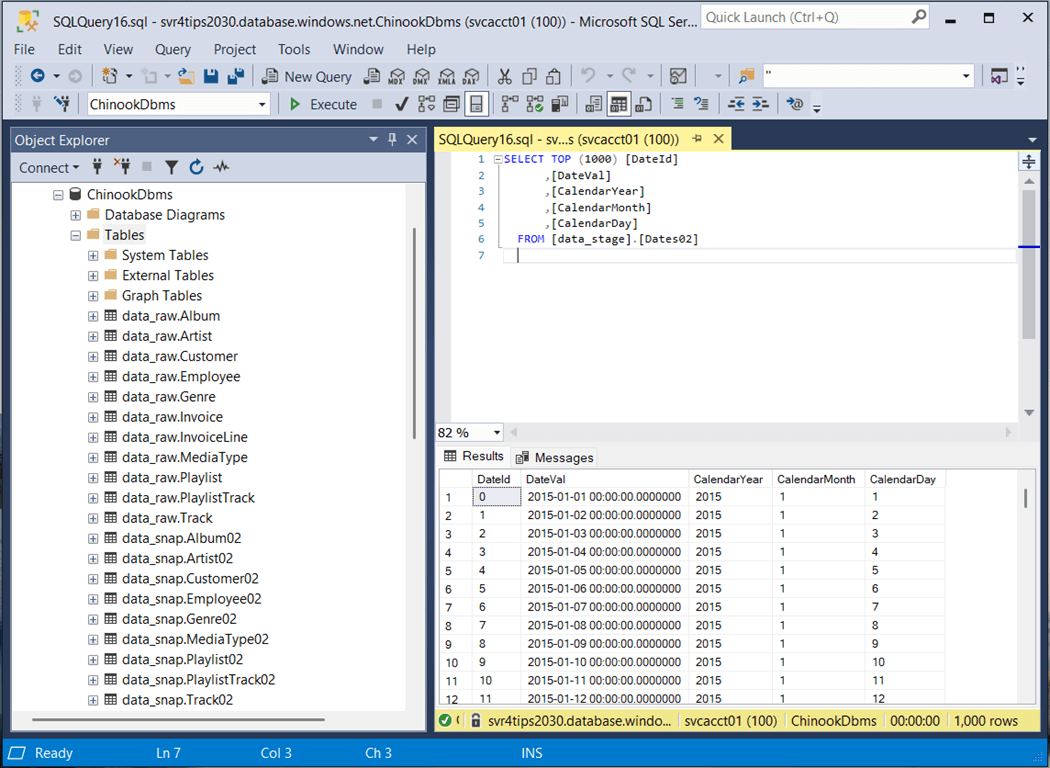
In a nutshell, macros allow additional functionality to be added to a dbt project. Using the Jinga template language, we can specific database specific syntax if needed.
Incremental Loads
Both the invoice and invoice lines are transactional tables. Therefore, these tables will be larger than the rest. In real life, these tables would use an incremental load strategy. I am going to append any records in the raw tables to the loads tables. The SQL script for Invoices02 is shown below. The dbt utility supports both appending and merging logic. See documentation for details.
{{
    config(
        materialized='incremental'
    )
}}

select *
from {{ ref('Invoice01') }}

{% if is_incremental() %}
where InvoiceDate >= (select coalesce(max(InvoiceDate),'1900-01-01') from {{ this }} )
{% endif %}
We are going to evaluate the functionality of this feature by clearing the raw table of data except for one invoice and the associated invoice lines.
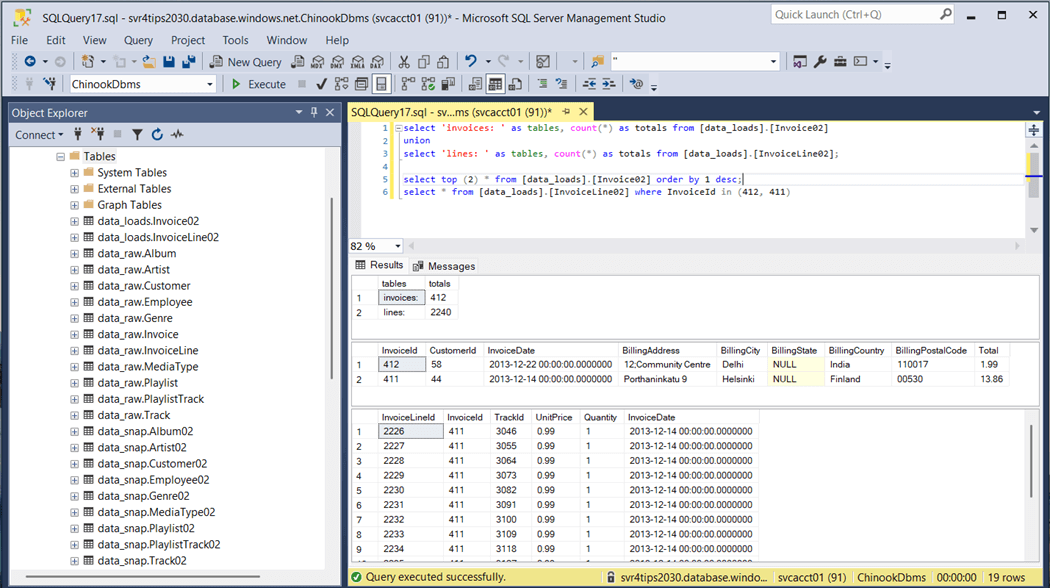
The above image shows there are 412 invoices. We want to duplicate invoice number 404. We will rekey this data with id 505 and set the invoice date to New Years Eve. Please see the image below for details.
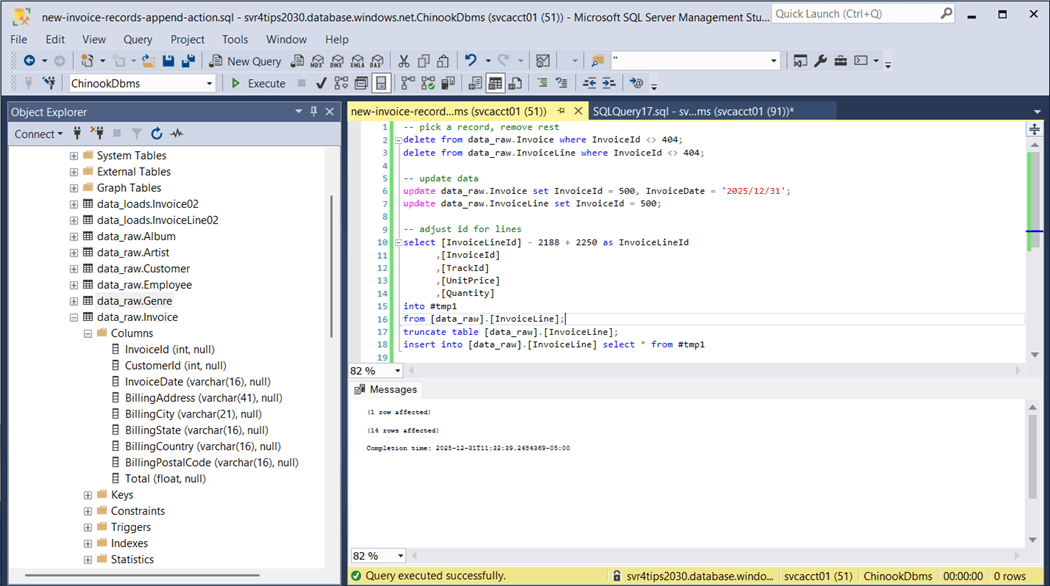
Finally, we will recount the total number of invoices and invoice lines. The totals have increased by one and fourteen as expected.
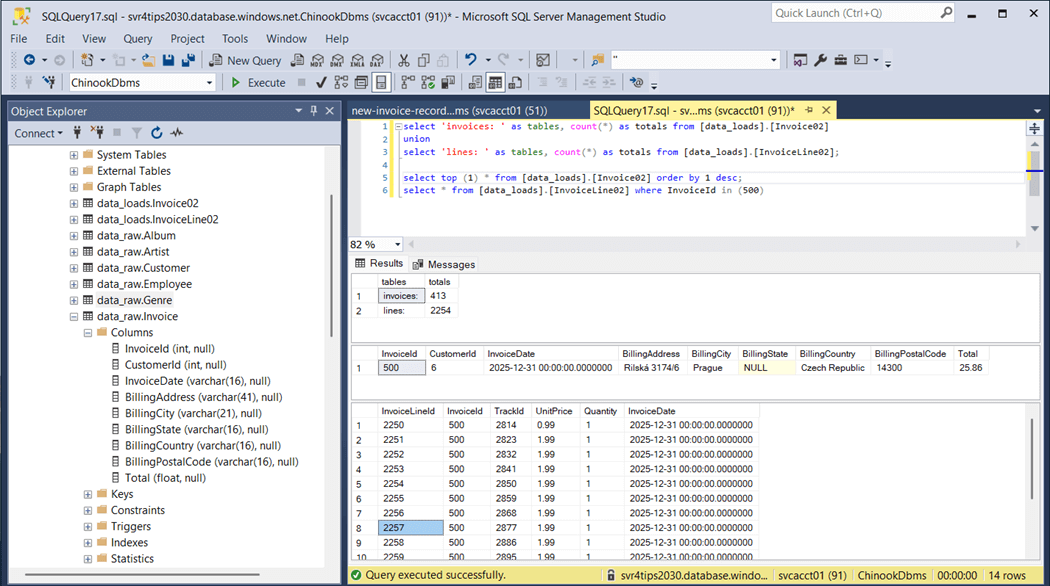
To recap, the incremental load will work with either a full or partial table. A date field is required since this is how dbt determines which source data to append and/or merge into the target.
Presentation Layers
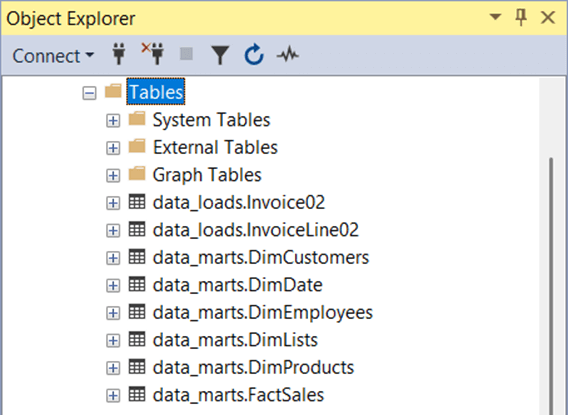
The dimensional model will be defined in the marts schema, and the analytics schema will be reserved for pre-built queries based on the dimensional model. These two schemas are what the report builders will have access to. The following table explains the objects in these schemas.
| Schema | Object | Type | Source |
| Marts | DimCustomers | Table | Customer |
| Marts | DimDate | Table | Ephemeral table. |
| Marts | DimEmployees | Table | Employee |
| Marts | DimLists | Table | Play Lists x Play Tracks |
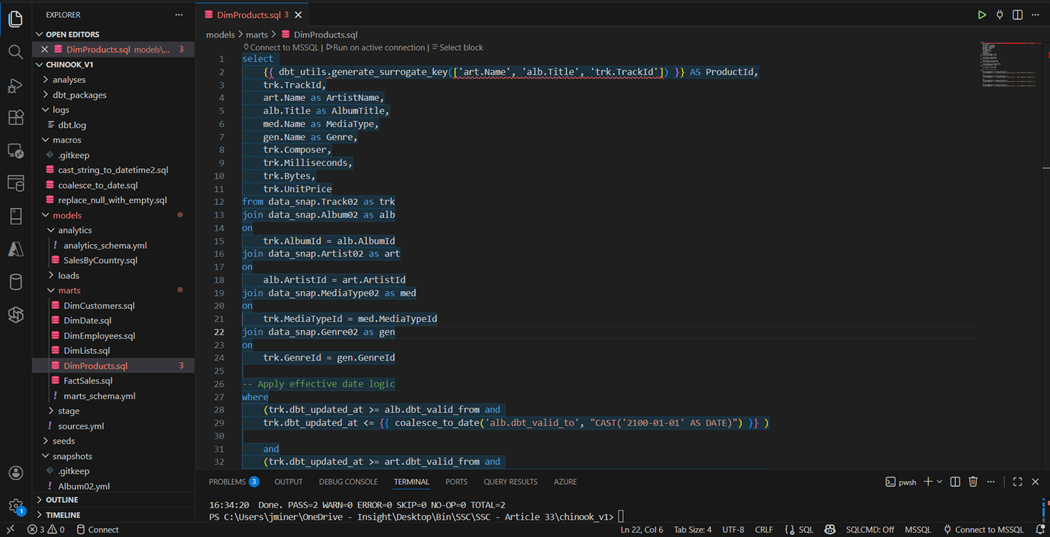
| Marts | DimProducts | Table | Tracks x Albums x Artist x MediaType x Genre |
| Marts | FactSales | Table | Invoice x Invoice Lines |
| Analytics | SalesByCountry | View | FactSales x DimCustomers x DimEmployees |
The image below shows the SQL script that creates the DimProducts table. We can see the generate_surrogate_key macro is being used to create a unique id based on artist name, album name, and track id. If we want to carry effective dating over to the lists and products dimensions, how do we do that? There are multiple dates. One way is to use the least() function for the from date and the greatest() function on the to date. I leave this as an exercise for the reader to complete.
The image below shows the dimensional model that has been materialized as tables.
The analysis directory is a place where commonly used SQL statements can be placed into source code repository. However, these objects are never deployed. How does dbt work when converting the Jinga template entries to final SQL statements?
The image below show the Sales by Employee query. It has references to nodes in the DAG.
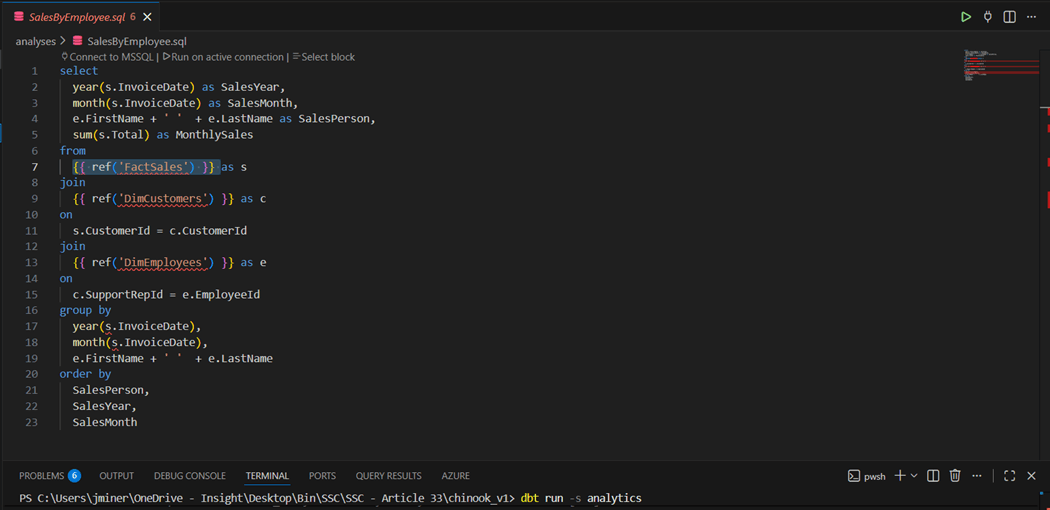
The dbt compile command converts the complete model into code and creates a manifest.json file. If we inspect the target directory, we can find the compiled version of the query with all the references in a resolved state.
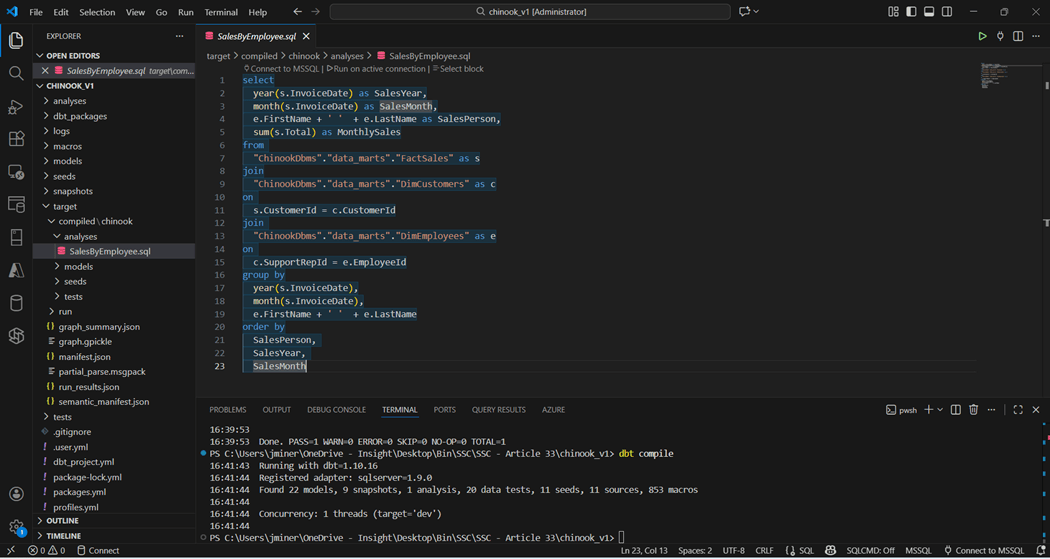
At this point, we have deployed a complete framework that transforms the OLTP schema into an OLAP schema for reporting. Two key items have not been reviewed. How do we know the data is accurate and do we have documentation to support the transformations?
Testing
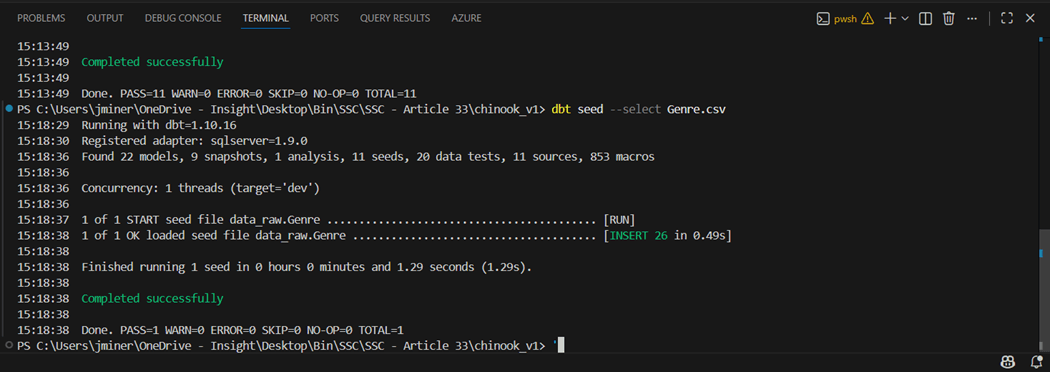
I could talk about testing for a long time. But we are going to focus on a simple unique data test and a custom data test for sales. I am going to modify the Genre.CSV file and add a new row that breaks the uniqueness of the primary id. The image below show re-seeding of the Genre table with an extra record.
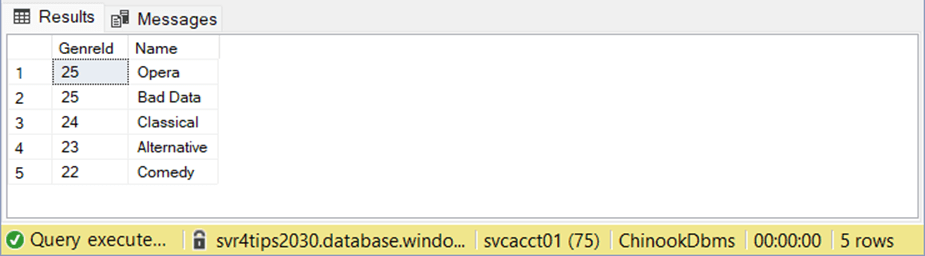
If we look at the topmost record ordered by id, we can see there is a “Bad Data” record.
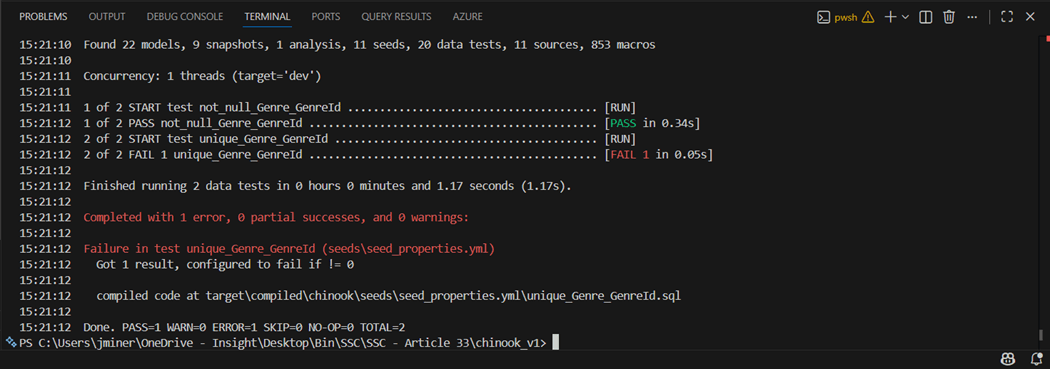
The dbt tests command runs all the tests. In this case, I used the select option to only run the data tests on the Genre table. We can see the not null test passed but the uniqueness test failed. This is an example of a data test from a YAML file.
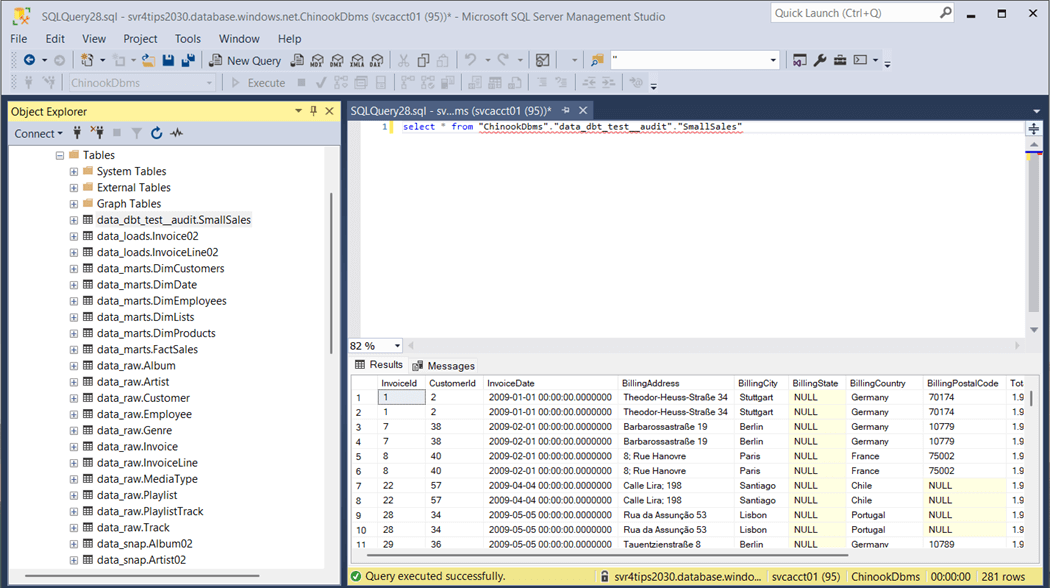
Sometimes, the business line produces tests in which the results need to be reviewed. The store failures flag saves the failures to a table. For instance, a sales manager wants to review all small sales with employees since we are trying to move from a small client to a large distributor sales model. The image below flags any sale that is less than two dollars.
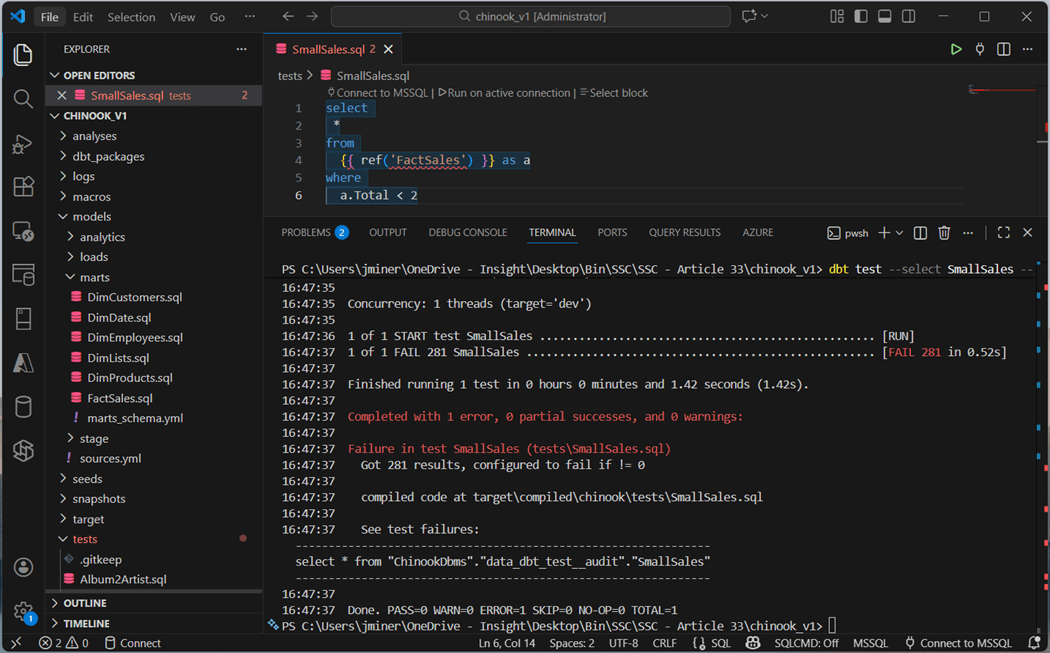
We can query the output table for the test failures. Please note, this test is stored in the test directory as a file named SmallSales.sql.
In short, tests make sure that both data integrity and/or business rules are satisfied. Clean data results in better results whether you are reporting or trying to predict events.
Documentation
Additional meta data should be added to the model using either schema or properties YAML files. This name, data type, and description adds value to the final model. Use the dbt docs generate command to generate documentation and the dbt docs serve command starts a local webserver on port 8080.
The image below shows all the directories we talked about today. If we will drill into the marts schema, we can look at the details of the FactSales table.
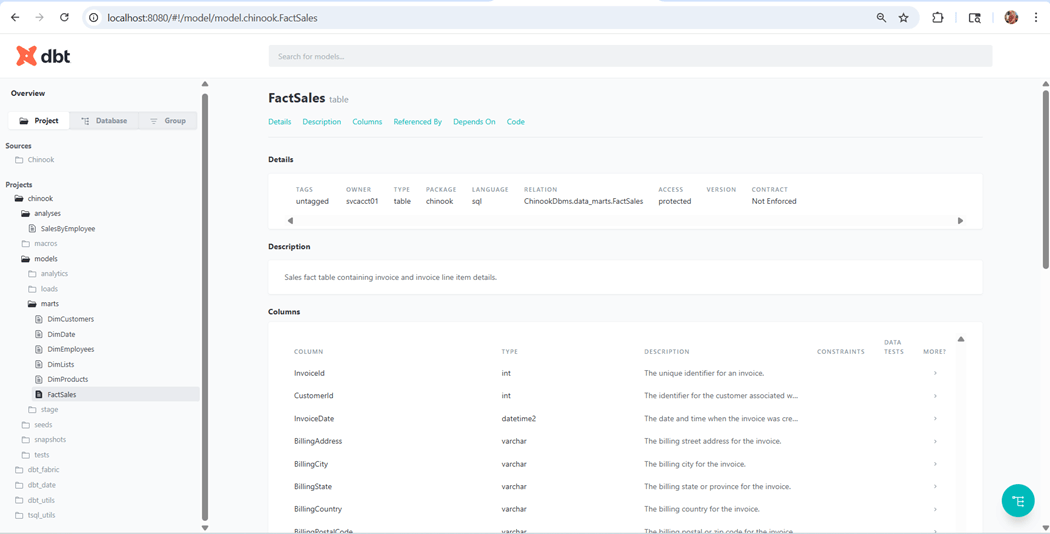
Documentation is an added bonus by using this framework.
Summary
The data build tool is an immensely powerful framework. It allows the business analysis or data engineer to transform raw data into a dimensional model ready for reporting. Many of the commands were explored today. The image below shows the commands supported by dbt.
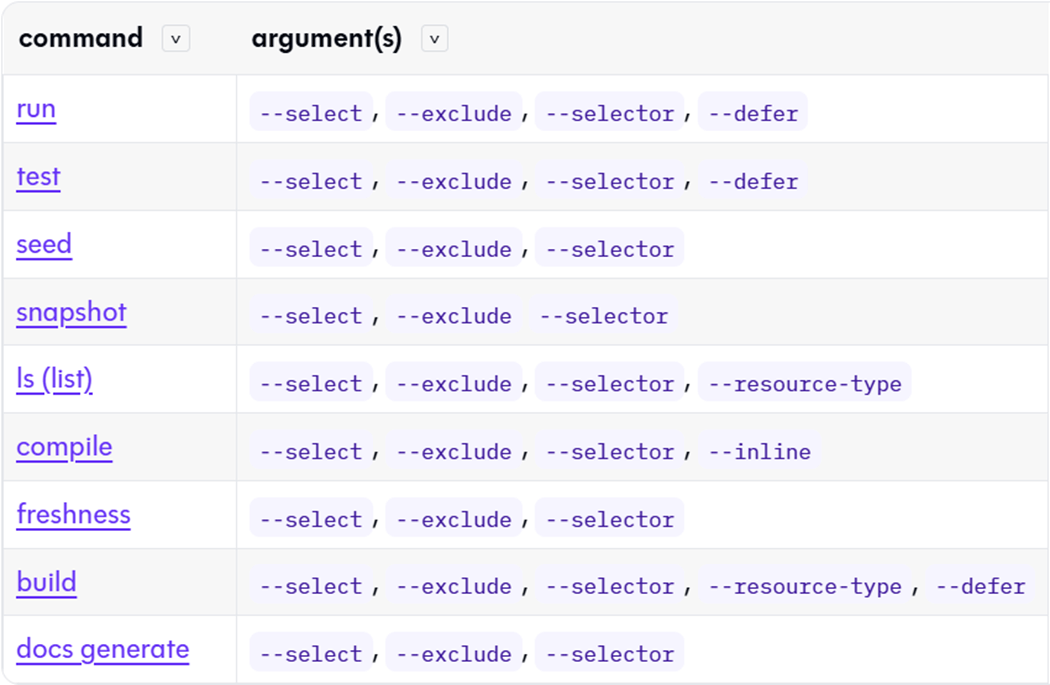
Let us talk about the two commands that were not reviewed today. The dbt source freshness command can be used to warn or error on how stale the source data is. The dbt build command will execute models, tests, snapshots, seeds, and user defined functions in DAG order. This is a full deployment of a given project. These two commands are not needed to start your first project.
There are some advance features that I will talk about in a future article. The dbt framework now supports Python models. Extraordinarily complex programming that cannot be achieved with ANSI SQL can now be done with Python. Another use case of a warehouse or database is Machine Learning. Can we integrate dbt pipelines with training and scoring of data using a Python based ML algorithm? How do we have multiple people work on the same dbt project at the same time using feature branches? How do we automate the execution of our dbt commands to load the warehouse or database at periodic times?
In summary, the dbt framework makes complex data pipeline building amazingly easy. Built in features such as slowly changing dimensions, incremental loads, unit testing, and documentation make repetitive work easy. Do not forget to use your favorite LLM to transform SQL statements into YAML nodes. This reduces the work of generating schema or property files. I hope you have discovered the power of the data build tool (dbt) framework and choose to use it with new projects in the future. The Chinook dbt sample project has been published as an open-source project. Please see my git repository for the details.