AllocationType as ROW_OVERFLOW_DATA
-
Hello,
I inherited a number of tables with like 20-30 column using nvarchar(256) in each of the tables, when, in fact, the values stored in those tables are way less than 256.
So the Actual Size of each row in those tables is way less then 500, but when I run below queries for my table it shows AllocationType(TypeDescription) as ROW_OVERFLOW_DATA. And yes, I know that I need to fix the Column sizes and the initiative is on its way.
But still, should I be worried or as long as the actual size of the rows is less then 8K, then I am good and I should ignore those queries:
Thank you very much in advance.
SELECT t.object_id AS ObjectID, OBJECT_NAME(t.object_id) AS ObjectName, SUM(u.total_pages) * 8 AS Total_Reserved_kb, SUM(u.used_pages) * 8 AS Used_Space_kb, u.type_desc AS TypeDesc, MAX(p.rows) AS RowsCount FROM sys.allocation_units AS u JOIN sys.partitions AS p ON u.container_id = p.hobt_id JOIN sys.tables AS t ON p.object_id = t.object_id GROUP BY t.object_id, OBJECT_NAME(t.object_id), u.type_desc ORDER BY Used_Space_kb DESC, ObjectName;
-
Keep in mind columns actual data consumption may vary (insert vs update), so your columns length may actually be needed during the process.
Once it uses row_overflow_data, chances are your data retrieval efforts require double i/o, so you better keep it under control.
Another thing to keep in mind: Is the Nvarchar needed ? ( is already double byte storage )
I would be concerned when many rows require row_overflow_data.
Typically some kind of split frequently used vs rarely used columns may get you out of harm
Johan
Learn to play, play to learn !Dont drive faster than your guardian angel can fly ...
but keeping both feet on the ground wont get you anywhere :w00t:- How to post Performance Problems
- How to post data and code to get the best help- How to prevent a sore throat after hours of presenting ppt
press F1 for solution, press shift+F1 for urgent solution 😀
Who am I ? Sometimes this is me but most of the time this is me
-
Thank you Johan,
Still confused.
Yes, it shows as using ROW_OVERFLOW_DATA, but the actual rowsize is way less then 8K.
I was under the impression that what matters is the actual size of the row, regardless of columns allocation, so as long the size of the row is less than 8K, I am good.
I am ignoring for a moment the bad table design, which I am planning to fix.
---------------------------------------------------------------
Those are small tables with around 1000 rows in each of the table and the actual values inserted/updates still not exceed a fraction of the sizes assigned. And there is no way each row size exceeds 1000. Actually each row size for each of the rows close to 400.
So with all that said:
There are 20 columns nvarchar(256)
Allocated KB per row=0.9
So when running below 2 queries, type_desc is showing both IN_ROW_DATA and ROW_OVERFLOW_DATA for the selected tables that have a lot of nvarchr(256)columns.
Should I be worried and how it will affect performance as each row size is still way below 8K.
SELECT t.name, au.* FROM sys.allocation_units au
INNER JOIN sys.partitions p
ON au.container_id = p.partition_id
INNER JOIN sys.tables t
ON p.object_id = t.object_id
WHERE t.name='MyTable'
ORDER BY t.name
SELECT t.name, au.* FROM sys.system_internals_allocation_units au
INNER JOIN sys.partitions p
ON au.container_id = p.partition_id
INNER JOIN sys.tables t
ON p.object_id = t.object_id
WHERE t.name='MyTable'
ORDER BY t.name
Thanks in advance
-
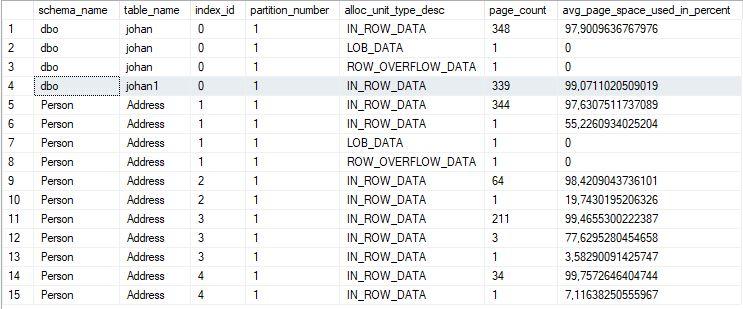
Did you check the actual consumption stats
SELECT
    OBJECT_SCHEMA_NAME(ips.object_id) AS schema_name,
    OBJECT_NAME(ips.object_id) AS table_name,
    ips.index_id,
    ips.partition_number,
    ips.alloc_unit_type_desc,
    ips.page_count,
    ips.avg_page_space_used_in_percent
FROM sys.dm_db_index_physical_stats(DB_ID(), NULL, NULL, NULL, 'DETAILED') AS ips
WHERE ips.alloc_unit_type_desc = 'ROW_OVERFLOW_DATA';
Johan
Learn to play, play to learn !Dont drive faster than your guardian angel can fly ...
but keeping both feet on the ground wont get you anywhere :w00t:- How to post Performance Problems
- How to post data and code to get the best help- How to prevent a sore throat after hours of presenting ppt
press F1 for solution, press shift+F1 for urgent solution 😀
Who am I ? Sometimes this is me but most of the time this is me
-
BTW There are 20 columns nvarchar(256) = 20 * 512bytes ! due to Nvarchar .
So max 10240 bytes + the length of the other columns + nulls indicators.
I've tested with AdvcentureWorks2019 table Person.Address which also has 72kb ROW_OVERFLOW_DATA
Scenario:
Select *
into Johan
from Person.Address
This causes the ROW_OVERFLOW_DATA to be copied too !
Scripted my Johan table and created a Johan1 table with it.
Then performed a while loop :
USE [AdventureWorks2016]
GO
truncate table [dbo].[johan1];
go
set nocount on
GO
set identity_insert [dbo].[johan1] on;

Declare @topx int  = 10000;
Declare @nrows int = @topx;
while @nrows = @topx
begin
INSERT INTO [dbo].[johan1]
           ([AddressID]
   ,[AddressLine1]
           ,[AddressLine2]
           ,[City]
           ,[StateProvinceID]
           ,[PostalCode]
           ,[SpatialLocation]
           ,[rowguid]
           ,[ModifiedDate])
Select top ( @topx ) J.[AddressID]
   , J.[AddressLine1]
           ,J.[AddressLine2]
           ,J.[City]
           ,J.[StateProvinceID]
           ,J.[PostalCode]
           ,J.[SpatialLocation]
           ,J.[rowguid]
           ,J.[ModifiedDate]
from johan J
where not exists (select *
from  johan1 J1
where J1.[AddressID] = J.[AddressID] )


Set @nrows = @@ROWCOUNT ;

end
go
set identity_insert [dbo].[johan1] off;
go
This Johan1 table no longer has active ROW_OVERFLOW_DATA data !

Maybe this can be a way of getting rid of that potential I/O overhead.
Johan
Learn to play, play to learn !Dont drive faster than your guardian angel can fly ...
but keeping both feet on the ground wont get you anywhere :w00t:- How to post Performance Problems
- How to post data and code to get the best help- How to prevent a sore throat after hours of presenting ppt
press F1 for solution, press shift+F1 for urgent solution 😀
Who am I ? Sometimes this is me but most of the time this is me
-
Thank you Johan,
I also run the following: scripted schema and data and executed the script in Dev.
1. Executed and then run Allocation units query I run earlier. It shows me ROW_OVERFLOW_DATA as expected.
2. Deleted half of the columns with nvarchar(256) , so the row size is way below 8K. Run again Allocation units query. It still shows ROW_OVERFLOW_DATA.
3. Rebuilt table(or indexes) and once completed, rerun Allocation units query. And here you go: ROW_OVERFLOW_DATA is gone and it shows IN_ROW_DATA only for that table.
-
To be honest, this all sounds like one of those developers that believes that "Knuth's Parable" about "Preoptimization is the Root of All Evel" means that you never have to "optimize" and "do it right". Do you also have a wad of DECIMAL(18) columns all over the place?
--Jeff Moden
RBAR is pronounced "ree-bar" and is a "Modenism" for Row-By-Agonizing-Row.
First step towards the paradigm shift of writing Set Based code:
________Stop thinking about what you want to do to a ROW... think, instead, of what you want to do to a COLUMN.Change is inevitable... Change for the better is not.
Helpful Links:
How to post code problems
How to Post Performance Problems
Create a Tally Function (fnTally)
Viewing 7 posts - 1 through 7 (of 7 total)
You must be logged in to reply to this topic. Login to reply