

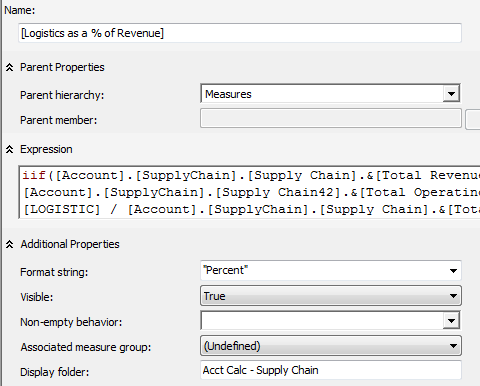
I was having a problem getting the display folder to work for a calculation in SSAS. Turns out, it will only work if you select “Measures” as the Parent hierarchy:
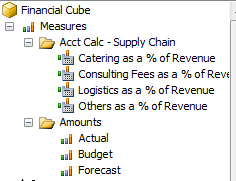
The display folder (“Acct Calc – Supply Chain”) shows up correctly when browsing the cube, under “Measures”:
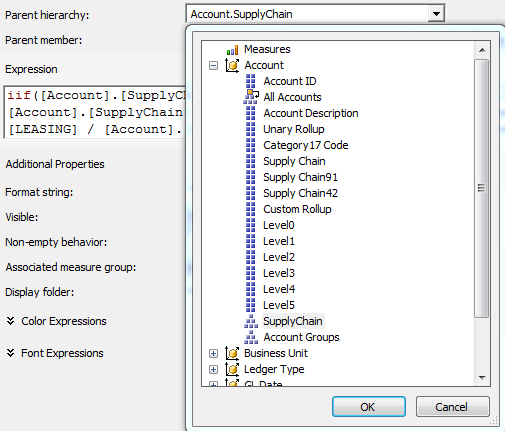
However, if you select something other than “Measures” as the Parent hierarchy, in this example the “SupplyChain” hierarchy under the “Account” dimension:
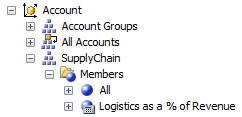
The display folder does not show up. Instead, the calculation appears under “Members” under the “SupplyChain” hierarchy under the “Account” dimension:
Of course, you should only use “Measures” as the parent hierarchy if you want to define a calculated measure. If you are creating a calculated member, then you should select a dimension and hierarchy in the selected cube for the “Parent hierarchy”. It would be nice if a future version of SSAS allowed you to create a folder for calculated members. See the discussion Display folders for calculated members for work-arounds.
Note that this applies to the following client tools: SSAS internal browser, ProClarity, and Excel. There are some client tools that may support the display folder for calculated members.

