

Previously I've posted
Partitioning Part 1 and
Partitioning Part 2 that describe the overall options when it comes to
partitioning and also looks at archiving as a closely related operation. This
time we'll take a look at partitioned views, a technique that can be applied in
SQL 2000 or SQL 2005.
The essence of partitioned views is that we create many tables from one table
and then union all the tables back together. What we're trying to do is reduce the overall number of records
that we have to seek or scan against to find our matching rows. It's important
to understand that aside from the possible benefits gained from putting the
tables on separate filegroups (increasing the available IO), partitioning will
only help queries where the query can be restricted to one of the tables in the
view.
To get it to work you have to add a check constraint to each table so that
the optimizer can recognize that the rows can only exist in one of the tables. In the examples that follow I'm
going to do it wrong to start with so you can see the results, then we'll fix
our mistakes and see the final correct results.
We'll start by creating two tables
based on the Person.Contact table, each holding about one half of the records
because we're splitting the data based on lastname. We'll also add a clustered index to each
(same clustered index that is on Person.Contact):
select * into ContactAM from Person.contact where lastname <'N'
select * into ContactNZ from Person.contact where lastname >='N'
create unique clustered index ndxContactID1 on ContactAM(ContactID)
create unique clustered index ndxContactID2 on ContactNZ(ContactID)
Now we'll create a view to make the two tables look like one when we write our
queries:
create view Contact as
select
ContactID,
NameStyle,
Title,
FirstName,
MiddleName,
LastName,
Suffix
EmailAddress,
EmailPromotion,
Phone,
PasswordHash,
PasswordSalt,
--AdditionalContactInfo] [xml] --deliberately excluded for now
rowguid,
modifieddate
from dbo.ContactAM
union
select
ContactID,
NameStyle,
Title,
FirstName,
MiddleName,
LastName,
Suffix
EmailAddress,
EmailPromotion,
Phone,
PasswordHash,
PasswordSalt,
--AdditionalContactInfo] [xml] --deliberately excluded for now
rowguid,
modifieddate
from dbo.ContactNZ
We had to comment out the XML column because no distinct operation is possible on an XML column. The distinct is required because of our UNION.
Now let's run a simple query:
select * from dbo.Contact where lastname = 'green'
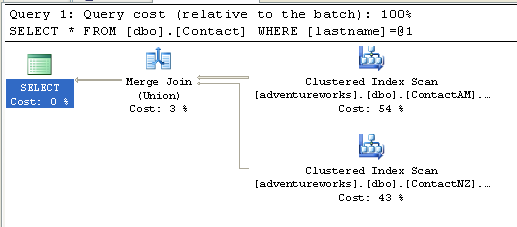
We know we're getting the clustered index scan because we have no index on last
name. We're scanning both tables because we didn't apply a check constraint that
would allow the optimizer to limit the query to one table. Let's add the
constraints now:
alter table dbo.ContactAM with check add constraint CKContactAM check ([lastname] like '[a-m]%')
alter table dbo.ContactNZ with check add constraint CKContactNZ check ([lastname] like '[n-z]%')
If we repeat the query we get the same query plan that still has two scans. What did we miss? It turns out that check constraints using LIKE don't work for partitioned views, even though they work perfectly well on the table itself. We'll drop the original constraints and add them back in slightly different form (actually the same way we executed our select * into operation):
alter table dbo.ContactAM drop constraint CKContactAM
alter table dbo.ContactNZ drop constraint CKContactNZ
alter table dbo.ContactAM with check add constraint CKContactAM check ([lastname] < 'N')
alter table dbo.ContactNZ with check add constraint CKContactNZ check ([lastname] >= 'N')
Now if we run our query again, we get a much better plan:
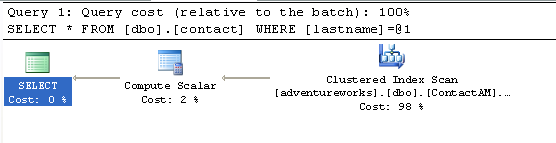
We are only scanning the ContactAM table and because we are only referencing one
table, the union operator falls out of the query plan. This reduces the query
cost by roughly 50% because we are only scanning one table.
If we replace UNION with
UNION ALL we can add back the xml column we commented out earlier:
alter view Contact as
select
ContactID,
NameStyle,
Title,
FirstName,
MiddleName,
LastName,
Suffix
EmailAddress,
EmailPromotion,
Phone,
PasswordHash,
PasswordSalt,
AdditionalContactInfo,
rowguid,
modifieddate
from dbo.ContactAM
union all
select
ContactID,
NameStyle,
Title,
FirstName,
MiddleName,
LastName,
Suffix
EmailAddress,
EmailPromotion,
Phone,
PasswordHash,
PasswordSalt,
AdditionalContactInfo
rowguid,
modifieddate
from dbo.ContactNZ
go
sp_refreshview contact
Our test query will now return the XML column as well, without any change to the
query plan. More importantly, by using UNION ALL we've taken the first step
towards making the view updateable. There are a lot of rules around when and how
you can update a partitioned view without doing extra work (See
http://msdn2.microsoft.com/en-us/library/ms187956.aspx and look at
"Conditions for Modifying Partitioned Views" to see the list). You can work
around most of these by using an instead of trigger on the view.
A few close out notes:
- Partitioned views work on all versions of SQL 2005 and they are not hard
to implement, but use them only after careful thought! Partitioning works
best when you have a very effective partitioning column that will be
included in the majority of your queries
- The example I gave here is meant to just illustrate partitioning,
clearly we could have improved performance by limiting the columns in the
select statement (or the underlying view) and by adding an index on lastname.
- A less used variation of this is the distributed partitioned view, where
the tables are spread across different (federated) servers. This definitely
adds complexity over and above standard partitioning and I suspect that it's
often more effective to just replicate slices of the data.
Next time we'll finish up by looking at partitioned tables, a feature only
available in the Enterprise Edition of SQL 2005.

