

Howdy all…as is so often the case, I’m studying something – Powershell – and I’m in need of a reference to help me in my early days of near-ignorance. So I’ve made myself a reference sheet!
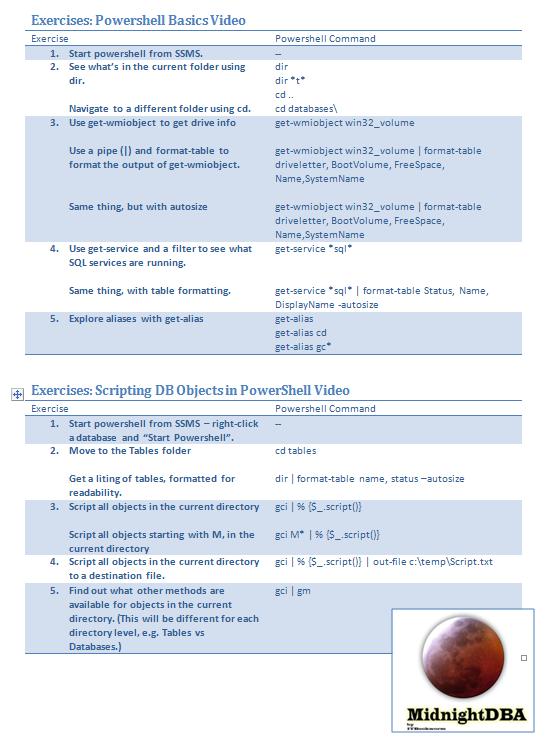
In Sean’s first two Powershell videos – Powershell Basics, and Scripting DB Objects in PowerShell - we’re introduced to a number of new commands and concepts. Here I present the MidnightDBA Powershell Companion PDF #1 for your reference and enjoyment.
Happy days,
Jen McCown
http://www.MidnightDBA.com/Jen



Subscribe to this blog
Briefcase
Print

Posted by Anonymous on 3 January 2011
Pingback from Twitter Trackbacks for SQL Server Central, Beginning Powershell Companion PDF - SQL Awesomesauce [sqlservercentral.com] on Topsy.com
Posted by paulo.morgado on 6 January 2011
"Exercises: Powershell Basics Video" -> "3." -> "Same thing, but with autosize" -> "get-wmiobject win32_volume | format-table driveletter, BootVolume, FreeSpace, Name,SystemName" is missing "-autosize"
Posted by DEK46656 on 6 January 2011
I was looking over the PDF and trying out the commands. On step 3 "gci M*" kept returning an error. I did try differnt wildcard combinations that should have returned someting from the tables.
Other than that, this was interesting to try out. I've been playing around with PowerShell a little, but not actually doing anything useful with it yet. I hadn't launched it from within SSMS, so this helped get me started there.
Thanks
Posted by Jen McCown on 6 January 2011
How odd, I'm not getting an error from the GCI M*. Could you post or email me the error? (Jen at midnightdba.com)
Thanks for your comments, and I hope you check out the videos!
-Jen
Posted by John McC on 10 January 2011
I also got an error with "gci M*". Looking at the error messsage the command was requiring the schema.name so "gci dbo.M*" worked.