

One of my favorite indicators for whether or not you have a good execution plan is when you see the “Reason for Early Termination” property in the TSQL operator like this:
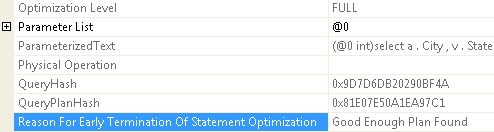
The optimizer considered this particular plan “Good Enough.” which is what you want to see. When you see “Timeout” as the reason, that’s an indication that the plan you have may be sub-optimal. The question is, can you make the optimizer spend more time on your queries. Well, actually, the question is, should you make the optimizer spend more time on queries. During my session on SQL Cruise I answered the original phrasing of that question, no. As usual when I present in front of people smarter than I am, I was wrong. Brent Ozar (blog|twitter) pointed out that there was a trace flag for forcing the optimizer to spend more time on queries, 2301.
According to Microsoft you can set this trace flag on your system or per user session. Either way, it doesn’t simply make the optimizer spend more time. In fact, what it does is turn on a whole new set of possible optimizations, which causes the optimizer to spend more time. What optimizations you ask? Here’s an excellent article by Ian Jose (blog) outlining exactly what you’re enabling by turning on this traceflag.
Do I recommend that you enable this trace flag if you’re looking at Timeout as the early terminator for your execution plan? Nope. Not at all. I recommend you spend time tuning that query. Break it down into smaller pieces. Not that I like hints, but see if a query hint will solve the issue. If none of those approaches work, I’d at least consider testing trace flag 2301. But even before you do that, I’d validate that any of the additional optimizations outlined by Ian Jose are applicable to your issue. If you are not facing those specific situations, setting this trace flag could hurt your performance.
There’s surprisingly little documentation on this out there. The one story on it I found comes from Brent (which is why he evidently knew about it). He turned it on which solved a problem and then had to turn it back off because it created others.
This particular trace flag definitely sounds like you need to apply primum non nocere as your guiding principle.

