

Sending scheduled SQL query results via HTML e-mail using SSIS
Introduction
Some time ago I was creating an SQL Server Integration Services package to pump data from one SQL system to another. One of the functions of the package was to delete records on the destination system that had changed status on the source system. This delete action was not possible if child records existed in other tables of the destination database, so I went about figuring out if it was possible to automatically notify users that these records had not been deleted via e-mail. They needed to get full details in a user-friendly format so they could take further action, so HTML mail was the desired means of delivery.
The package I came up with to achieve this can be used to mail any suitable SQL result set and proves once again the flexibility of SSIS and the different ways it can be used to solve a variety of problems beyond its everyday use as an ETL tool.
This example queries the SQL 2005 AdventureWorks database and returns sales figures for a given date in a formatted e-mail.
Requirements and working assumptions
You'll need a copy of the SQL 2005 AdventureWorks database running on a test server.
I'm assuming that you're familiar with using the SQL BI Dev Studio tools and building basic packages. If this isn't the case, I recommend working your way through the Integration Services Tutorial in SQL Books Online to become familiar with the basic concepts.
This package makes use of a basic XSL transformation to massage the SQL XML query results and transform them into a user-friendly HTML format. I'm not going to go into any detail regarding XSL, but some useful links are listed at the end of the article if you're curious to learn more.

Creating the package
- Open Visual Studio/SQL BI Development Studio and create a new SSIS package named "SSIS Mail Example".
- Create a folder on your hard drive for the files we'll be using in this example, for instance: C:\SSIS_Example.
- Download the "SQL Query for Order Totals.sql" file (see below under Resources) and save it in this folder. Create a new file connection to it (right-click in the Connection Managers pane, select "New File Connection", select "Existing File" from the drop-down and browse to the SQL file) and name it "SQL Query for Order Totals.sql".
- Download the Orders.xsl file and save it in the same folder. Create a new file connection to it and name this connection "Orders.xsl"
- Create a new empty file named "Orders.htm" in the same folder. Create a new file connection to it named "Orders.htm".
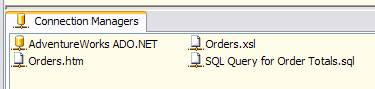
- Create an ADO.NET connection to your AdventureWorks database and name it "AdventureWorks ADO.NET". By now you should have four new connection manager objects in your package:

- Create three package-scoped variables as follows:
Name Data Type Value varSalesSummaryXML String varSalesSummaryHTML String varMailTo String (Your e-mail address) - Add an Execute SQL Task named "Get Daily Totals" to the Control Flow pane. Set the Properties in the General tab as follows:
ResultSet XML ConnectionType ADO.NET Connection AdventureWorks ADO.NET SQLSourceType File connection FileConnection SQL Query for Order Totals.sql IsQueryStoredProcedure False
declare @v_CurrentDate datetime
set @v_CurrentDate = '2003-07-17'
if exists (select 1
from Sales.SalesOrderHeader
where OrderDate = @v_CurrentDate)
begin
select top 10 oh.OrderDate,
(select round(sum(TotalDue), 2)
from Sales.SalesOrderHeader
where OrderDate = @v_CurrentDate) as DayTotal,
p.ProductID, p.Name,
round(sum(oh.TotalDue), 2) as ProductSubtotal
from Sales.SalesOrderHeader oh
join Sales.SalesOrderDetail od
on od.SalesOrderID = oh.SalesOrderID
join Production.Product p
on p.ProductID = od.ProductID
where oh.OrderDate = @v_CurrentDate
group
by oh.OrderDate, p.ProductID, p.Name
order
by 5 desc, p.ProductID asc
for xml auto, elements, type, root('Order')
end
else
select cast('<NoRecords>No sales records available for this date.</NoRecords>' as xml)The SQL query in this example uses a hard-coded date so that we get useful results from the AdventureWorks database. In a production scenario where daily or weekly results are needed on live data you'd probably use some variation of GETDATE() and/or DATEDIFF to filter the records.
The query uses an IF block to cater for the possibility that no records exist on a given date, so the query will always return an XML result set.
- On the Result Set tab, click 'Add' and select the varSalesSummaryXML variable from the list. Add 0 (number zero) as the Result Name.
- Add an XML Task to the Control Flow pane and name it "Test output to HTML file". Drag the green precedence constraint pointer to it from the "Get Daily Totals" task and set the Properties in the General tab as follows:
OperationType XSLT SourceType Variable Source User::varSalesSummaryXML SaveOperationResult True DestinationType File Connection Destination Orders.htm OverwriteDestination True SecondOperandType File connection SecondOperand Orders.xsl This task will take the XML output from the "Get Daily Totals" task and transform it into HTML using the template in the XSL file. We'll use it to verify that the query and the transformation are generating a valid local HTML file with the desired results. Once we've completed the package and our result set is being successfully mailed then we can remove this task, but for now it's handy for troubleshooting.
You should now be able to give the package a test run. Execute the package and once it has completed open the Orders.htm file you created earlier in your web browser.
Once you've confirmed that this is working correctly we can proceed with getting the result set ready for mailing.
- Add an XML Task to the Control Flow pane and name it "Reformat results for mailing". Right-click on the "Get Daily Totals" task and select "Add Precedence Constraint", then drag the new constraint pointer to the newly created XML task.
Set the Properties for "Reformat results for mailing" in the General tab as follows:
OperationType XSLT SourceType Variable Source User::varSalesSummaryXML SaveOperationResult True DestinationType Variable Destination User::varSalesSummaryHTML OverwriteDestination True SecondOperandType File connection SecondOperand Orders.xsl - Add a new Script Task to the Control Pane and drag the green precedence constraint pointer to it from the "Reformat results for mailing" task. Rename the script task to "Send the Sales details via e-mail".
We'll use a Script Task instead of a Send Mail task because the latter doesn't support HTML-formatted mail.
- On the Script tab of the Script Task Editor, enter varMailTo, varSalesSummaryHTML in the ReadOnlyVariables field.
Click “Design Script” to open the SSIS VSA editor. Replace the default (basis) code in the editor with the code listed below:
Option Strict Off
Imports System
Imports System.Data
Imports System.Math
Imports System.Net.Mail
Imports Microsoft.SqlServer.Dts.RuntimePublic Class ScriptMain
Public Sub Main()Dim varHTMLMail As MailMessage
Dim varSMTPClient As SmtpClient
Dim varMailBody As Object
Dim varAddresses As StringvarMailBody = Dts.Variables("varSalesSummaryHTML").Value
varAddresses = Dts.Variables("varMailTo").Value.ToString
varHTMLMail = New MailMessage("noreply@domain.com", varAddresses, "Daily Order Summary", varMailBody)
varHTMLMail.IsBodyHtml = True
varSMTPClient = New SmtpClient("Your_SMTP_Server_Name")
varSMTPClient.UseDefaultCredentials = True
varSMTPClient.Send(varHTMLMail)Dts.TaskResult = Dts.Results.Success
End Sub
End ClassNote the extra namespace reference to System.Net.Mail which we need in order to access the mail methods.
- Save the script, then Close and Return to your Control Flow surface. The package is now complete and can now be executed. Within minutes you should have a (fairly) neatly formatted mail in your inbox containing the sales figures for the day you specified.


Troubleshooting e-mail from SSIS
If the package runs successfully, you're finished. If it fails on the last step though you'll want to check a few things. There's no room in this article to go into the intricacies of configuring SQL to send mail, but you can at least work through the following checklist:
- Is the local HTML file (Orders.htm) output correctly? If not, you'll want to go back a step or two and make sure that you're generating valid HTML first.
- Is your SMTP server address correct?
- Can you send Database Mail from the Management Studio (Management / Database Mail / Send Test E-Mail)? This is not a dependency for mailing from SSIS, but if it works then the package mailing problem is probably not caused by your SMTP server.
- Does your firewall/virus protection software allow mails to be sent from the SQL executables? Try adding DEVENV.EXE, DTSDEBUGHOST.EXE, and SQLWB.EXE to the exclusion or exception lists of your network security software and see if this helps.
- Does your mail server block mail forwarding from unknown sources/servers?
In other words, there are a number of factors outside SSIS that can prevent you from sending mail successfully, but I'm afraid that you'll need to liaise with your network/mail administrator to solve these!
That said, this is still a simple and powerful means of mailing live data to your users. You could take it further and build your Mailing list from another SQL query, or combine multiple result sets in one mail. Deploy the package on your SSIS server, schedule it as desired and you're done.
Paul Clancy
360Data
References
- I adapted Jamie Thomson's SMTP mail script for the Script Task in this example; the original is here: http://blogs.conchango.com/jamiethomson/archive/2006/07/03/SSIS_3A00_-Sending-SMTP-mail-from-the-Script-Task.aspx
- The AdventureWorks db for SQL Server 2005 is available for download at http://www.codeplex.com/MSFTDBProdSamples/
- XSL is pretty easy to grasp if you have any experience with HTML. The example provided in this article is extremely simplistic but illustrates the point well enough. For more information I suggest having a read through these sites:
http://www.xmlfiles.com/xsl/
http://zvon.org/xxl/XSLTutorial/Output/index.html

