

Edit Plus
I'm not sure where I heard of this editor. I think it was on >Slashdot, but for whatever reason, I decided to try it out. It had a number of features that I had wanted, but are missing in different low-cost editors that I have used. Mainly, color coding of the various keywords and functions, and some flexibility!
What does that mean? Well, I program in T-SQL, HTML, ASP, VB, now starting C# and experimenting with PHP, Python, and other languages. In the past, I have used Query Analyzer for SQL, Interdev for Internet stuff and notepad for most everything else. However, I haven't been thrilled with Interdev, mainly because it is a little cumbersome and more expensive than I would like if I go somewhere else. What I really wanted was an editor that would adapt to different languages and was preparing to build my own (as a learning experience as well as a tool I would like).
Then I stumbled on EditPlus and decided to try it out. I went to the site (www.editplus.com) and downloaded it. It comes with a 30 day evaluation by default, so I installed it and started to work.
The first step was to edit some .ASP and .HTML files. I started the program, which looks as follows when you first get past the registration reminder.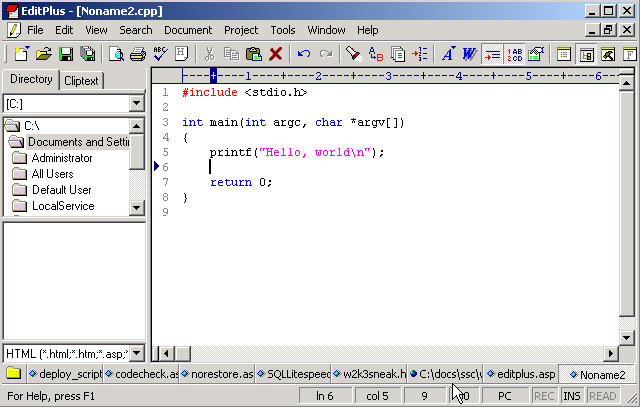
Some nice things I like.
- All the open files are listed across the bottom of window, just above the status bar. Whenever I have a "dirty" file, or one I have edited, but not saved, there is a little red diamond to the left of the file name. All saved files display a blue diamond. This looks like of like the various windows on your taskbar in Windows.
- Tab tracking. The editor remembers where I started a line and after a carriage return, it tabs to that spot. If I started with spaces, it starts the next line with spaces. I wish Query Analyzer did this. This also feels cleaner than Interdev, perhaps because of the next reason.
- The ruler. At the top of the edit window, below the toolbar, there is a ruler that shows the numeric position of the cursor as well as a mark every 10 (numeric) and 5 (+) characters. This is handy for writing code as I can easily line up opening and closing tags or operators. It also has the line numbers at the left. I really like this! I know that Query Analyzer has line numbers listed at the bottom (as does Interdev), but it's annoying to now have this at the left of each line. This also shows markers on the top and side to let you quickly determine what column and line you are working on.
- Word Wrap - I haven't figured this out in Interdev, though I haven't extensively researched it. It wasn't obvious and some casual searches haven't figured it out (if you know, let me know). But Editplus will wrap lines on the screen, but keep the line numbers correct. Here's a quick look at this article in draft:

Note the space between lines 32 and 33 where the word wraps have been inserted. Handy for writers that usually have some long lines.
- Spellchecker - Not as fancy as Word and doesn't include grammar, but it does have an external dictionary and it works well for me.
- Search and replace - Works well, can use regular expressions.
- Separate filters - There are separate filters for each type of file. So in HTML/ASP, the tags, like <p>, are color coded. However, if I write a C++ program, they are not. But the int, char, etc. keywords are. These filter files are easy to build and there are tons of user ones available for download from the site.
- I like the interface. I have a folder view (see the image above) at the left, along with a drive drop down. Below that I have a list of files that match the filter at the bottom. So I can easily find files. The tool bars are handy, lots of useful buttons. There is a special HTML toolbar that you can add to any file type. The file type extensions are customizable.
- Auto completion - You can configure this for file types by setting up a config file for each file type.
- Splitter - Like in Excel, you can split the window for editing and view two sections of the file at once.
- Open from FTP. Nice for Internet development. I can connect to a remote FTP site for editing files.
- Comments. One thing that I often do is comment or uncomment something for debugging. It would be nice to have this tool support a "select and comment" operation, similar to what I can do in Query Analyzer. I can hold down SHIFT, select a couple lines, and CTRL-SHIFT-C, and the highlighted lines are commented with a --. It's one thing I miss in Interdev and would like to see in this tool.
- It would be nice to be able to open all files meeting some criteria at once. I admit I might not often use this, but there are times when might want to open all files that contain some code and make a change, for example, when I was moving to a new object/API, like the Package2 object from the Package object. Not sure how many places I reference this, but I'd like to be able to change them all at once.
- Visual Sourcesafe or other VCS system integration. This is critical for any commercial product and the automatic integration of check out/check in would be handy.
- Search and Replace across open files - I use this rarely, but there are times when I'm refactoring code and I'd like to be able to hit a bunch of files at once.

Some things I don't like and would like to see enhanced.
When I started the program up, I was intending on replacing Interdev and notepad and doing most of my non-SQL work in this tool. Since you can create your own templates, however, I decided to create a T-SQL one as a test and see how it worked. There is a user submitted MSSQL file for SQL 7, but I thought I might create my own. I quickly found a section in the help file that described each section of the syntax file. By opening the HTML syntax file and altering to suit my needs, I was able to easily build a syntax file for SQL commands. I have included a link to a SQL syntax file here, but it is by no means complete. In fact, it is only a quick and dirty job until I determine how to submit my file to the SQL compiler.
This is a handy editor. I've seen some others and had others recommended, but I've been extremely happy with this tool and have it on all my machines. If you do other development and want an inexpensive and flexible text editor, give it a try. Especially if you write for us :).
As always I welcome feedback on this article using the "Your Opinion" button below. Please also
rate this article.
Steve Jones
©dkRanch.net May 2003