

Exotic Joins in T-SQL and How They Translate in SSIS.
While developing on a project the other day I needed to create a SSIS package that would include a range lookup. Having limited experience with SSIS I endeavored to first create the project using T-SQL and then translate the code into a SSIS package filled with wonderful components which if my plan worked would mimic my code.
While working through the T-SQL coding process of my project I had to run several lookups on the data and one of the lookups was a range lookup - What a perfect time to show off and introduce the "exotic join" although there's nothing exotic about the join (not a bronzed sun goddess on a golden beach!)It's not your simple standard join and although many developers use them they may not refer to them as "exotic". An exotic join is when you institute criteria against the join so for example, when using a select statement as a join or AND's OR's or BETWEEN statements.
I settled on using BETWEEN as I was joining onto the lookup table and doing a range lookup! Success!
This worked quite well and the data that was expected was returned.
e.g. INNER JOIN TableB b ON (a.ValueA BETWEEN b.LowRangeLimit AND

                              b.HighRangeLimit)
How would this translate in an SSIS package then?
Having some basic knowledge using BIDS (Business Intelligence Development Studio) and having done some complex queries and transformations only using the SQL Task component, I decided to tackle SSIS head on and break up my code into what it would equate to if they were run by the corresponding component in SSIS.
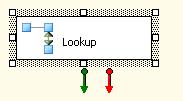 | Once reaching the range lookup, no number of books or trawling through the Internet had any decent example on how to institute a lookup and use the extended features to allow for a range lookup. Very simply, I created a lookup component. I then selected the lookup table in the reference table tab. This could either be chosen using your OLE DB Connection or using a SQL statement. |
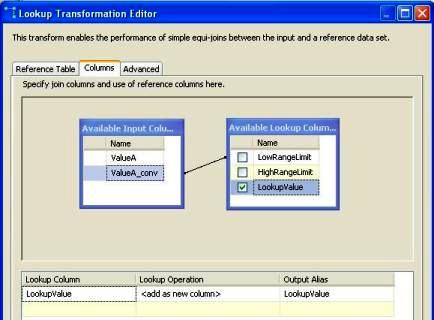
When mapping the columns, I mapped the field that needed to be checked against the lower range value field in the columns tab. (columns must be of the same data type)
 |
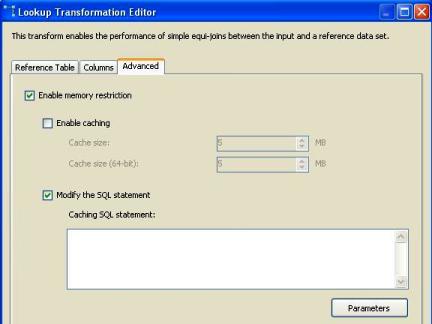
Moving on to the advanced tab, I checked the Enable Memory restriction and then checked the Modify SQL statement checkbox, this enabled me to now place a range lookup in the query by using <= or >=.Remember to click on the Parameter button and assign the parameter to a field, all the parameters (indicated by ?) were assigned the same fieldname (ValueA).
 |
e.g.:
SELECT * FROM

 (SELECT LowRangeLimit,HighRangeLimit,LookupValue
FROM LookupTable) AS refTable
WHERE([refTable].[LowRangeLimit] = ? OR [refTable].[LowRangeLimit] < ?)

 AND

 ([refTable].[HighRangeLimit] = ? OR [refTable].[HighRangeLimit] > ?)
Having done all these steps my range lookup seemed to come to life, originally processing through 9.5 million records with 2 data conversion components, a derived column componenent, 2 sort components, 1 merge component, and 1 merge join component, my processing time was approximately 23 minutes on my development machine and 19 minutes running in our production environment. Having instituted the range lookups and having had removed it as SQL code from a SQL task I decreased my processing time to 13 minutes in our production environment. This was a saving of 10 minutes in development and 6 minutes in production.
Going forward from here there are various ways to institute the range lookup, the way I have explained, is the simplest and with minimal fuss. Another way would be to reverse the way the lookup works now by making the data the lookup table and the lookup table the data, although in my situation the time SSIS took to cache the project before actually processing caused the package to run longer. If theer is enough interest in people wanting to know how the reverse process works I will hapily explain in a future article.
Nick.

