

In this article, we will leverage Extended Stored Procedures to extend the functionality of SQL Server and give a starting point to experiment with Extended Stored Procedures. Extended Stored Procedures are an extension to SQL Server that allow you to register DLLs in order to perform tasks that would otherwise not be possible with T-SQL. This article does not go into the details of creating your own Extended Stored Procedure, but introduces you to some of the tools you will need to explore existing DLLs and turn them into Extended Stored Procedures.
The need to yield
As a developer, I was used to the magic DoEvents function that allows a thread to give up some of its computing cycles to other threads (for better or for worse). Similarly, I have been looking to allow a few low-priority SQL statements to yield execution time to more important SQL statements. For instance, long running queries called by certain non-critical reports could be created in a way that would use less CPU time relative to more important queries. In my quest, I investigated the WAITFOR DELAY statement, which allows you to pause your T-SQL for a certain time. Using WAITFOR is a good option, however the pause is unconditional; it does not allow the thread to use the CPU at full capacity if no other statements are running and it does not allow you to use the CPU at all during the pause.
Using Dependency Walker
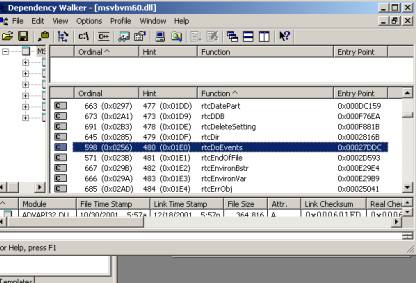 Knowing that Visual Basic provides a DoEvents function, I loaded MSVBVM60.DLL (under system32) in Dependency Walker, which you can install as a support tool and located in the Windows 2000 installation CD. Dependency Walker shows you the list of methods this DLL provides, and as you can see, rtcDoEvents is listed. It is interesting to look at this file since many more functions are available and could potentially be leveraged within SQL Server.
You can also experiment with other DLLs and see what functions may be available to you to extend SQL Server’s functionality without having to create a single line of code. In addition, these DLLs have been for the most part tested, which reduces the probability of causing SQL Server instability.
Registering and using rtcDoEvents
The next step is to register rtcDoevents. This is done within Query Analyzer with the following script. Since this script should be executed on the master database, we are using USE MASTER. This creates a stored procedure in master called rtcDoEvents, which will attempt to call a function within MSVBVM60.DLL with the same name. Thus, creating a stored procedure and calling it DoEvents would not work in this case; the names must match.
USE MASTER
GO
SET QUOTED_IDENTIFIER OFF
GO
SET ANSI_NULLS OFF
GO
exec sp_addextendedproc N'rtcDoEvents', N'MSVBVM60.dll'
GO
SET QUOTED_IDENTIFIER OFF
GO
SET ANSI_NULLS ON
GO
Finally, we are creating a completely useless T-SQL query with only one purpose in life: demonstrate what rtcDoEvents can do for you. The query has two variables: @iMAX and @iNBR_DOEVENTS. The first variable is used to control the number of loops the query will execute. We are choosing to execute one million loops, which simulates roughly eight seconds of load with a CPU locked at 100%. The second variable is used to control the number of DoEvents we will simulate. The more DoEvents are being generated, the longer the script will take to execute. Here is the script:
DECLARE @iMAX int
DECLARE @iNBR_DOEVENTS int
SET @iMAX = 1000000                     -- Number of iterations
SET @iNBR_DOEVENTS = 0           -- Number of DoEvents to generate
DECLARE @i int
SET @i=0
WHILE @i<@iMAX
BEGIN
            -- Increase the counter
            SET @i = @i + 1
            -- Should we fire DoEvents at all?
            IF @iNBR_DOEVENTS>0
                        -- If yes, is it time to fire the DoEvents?
                        if (ROUND(@i / (@iMAX/@iNBR_DOEVENTS), 10) * (@iMAX/@iNBR_DOEVENTS) = @i)
                        BEGIN
                                    Print 'DoEvent Number ' + CAST( @i / (@iMAX/@iNBR_DOEVENTS) as VARCHAR(10))
                                    -- I guess so… call it now
                                    EXEC master..rtcDoEvents
                        END
END
As you can see, there is not much going on in this query. We are calling the rtcDoEvents stored procedure in master when we need to call VB’s DoEvents. Et Voila. Next, let’s take a look at the things we can do with this.
Impact of DoEvents on SQL Server Threads
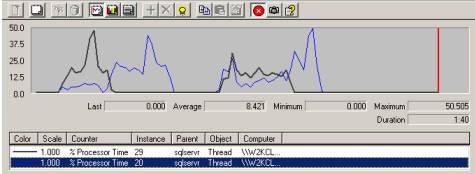
In order to see the impact DoEvents can have on my query, I opened two connections running the query listed above. I ran two tests, for which the results are shown in PerfMon. Perfmon shows the two threads of execution for our queries and displays the %CPU Time taken by each thread. The curves on the left represent Test 1 and the curves in the middle represent Test 2.
In Test 1, we set the first query to execute with @iNBR_DOEVENTS = 1000 and the second query with 0. Perfmon shows that the first query (in blue) yields most of its CPU cycle to query two (in black) as long as query two is running. Query two executes the loops faster than query 1, which was our goal.
In Test 2, we changed query one’s parameter to 100 instead of 1000. Now we can see the blue line (query 1) still yielding to query two, but to a much lesser extent. Query 2 still runs a little bit faster than query 1, but cannot obtain as much CPU time as it did in test 1.
One more important note is the impact of the DoEvents method call on the overall performance of the query. When running the query with @iNBR_DOEVENTS = 0, you execute the query with optimal performance (8 seconds on my computer). When you set this value to 100, the query will run in 15 seconds when no other queries are running. This is of course very costly from a performance standpoint. When running with another query (as shown in Test 2), it takes about 30 seconds. This demonstrates that there is a performance hit by using DoEvents, but that it allows a query to yield some of its CPU time to other queries only when necessary (unlike WAITFOR).
Conclusion
As we have seen, it may be possible to use the DoEvents provided by Visual Basic through the use of Extended Stored Procedures in SQL Server. Of course this technique is shown for demonstration purposes only and may not be suitable for certain production environments. Nevertheless, leveraging existing DLLs within SQL Server is a great way to cut down your cost of ownership and gives you a certain level of stability since these DLLs have been already tested for you. If certain DLLs offer functionality that is too complex to incorporate directly within SQL Server, you can also create a wrapper DLL that simplifies the calling mechanism. Have fun!