
Use MDX to perform sorts of datasets that override the natural orders in the cube. In this lesson, Bill Pearson continues his examination of the versatile Order() function, focusing upon its use in providing dataset sorts that reach beyond dimensional hierarchies.
In the last stairway level, we introduced the Order() function, which enables us to arrange the members of a specified set, while providing us the option of preserving or breaking the existing structural hierarchy. We then explored the use of Order() in the former, simpler scenario, to arrange sets within existing hierarchies.
In this article, we will get some exposure to using the function to order members of a set without regard to hierarchies. There are many times where it makes sense to ignore hierarchy completely in the arrangement of all members within a targeted set. An example might be the need to order the members of a product category that we sell by the total sales of each category, ignoring the “natural” sort order of the categories (say that the respective dimension design has the members ordered by name – and thus in alphabetical order).
As we noted in The Order() Function: Maintaining Cube Hierarchies , whether we set about meeting business analysis and reporting needs by ordering within existing hierarchies, or by ignoring those hierarchies to achieve differing orders, the general purpose of the Order() function is the same: to impose a sort order on a standard MDX set in a manner that allows us to list results based upon some criterion. The Order() function allows us to meet myriad common and uncommon business needs, including the obvious need to order lists of members within a set, be they employees, products, accounts, customers, months, or others; we might also wish to organize a set of members by specific attributes, such as statuses, degree of completion or readiness, and locations, to name a very few. The only difference in the use of the Order() functions to provide different types of sorts is the optional order specification at the end of the function, as we shall see.
In case you have just joined the series with this article, let’s review the basics about the Order() function, before getting into hands-on practice with the “alternative” use we have mentioned. As we discovered in the introductory comments of the last level of the series , Order() can accept either a string expression or a numeric expression as criterion for ranking. Syntactically, the sort criteria and the order specification (ASC, DESC, BASC, or BDESC) are placed within the parentheses to the right of Order(), as shown in the following illustration:
The Order() function returns hierarchized data (the focus in our last level) when the ASC or DESC order specifications are appended to the function, and nonhierarchized data (which we examine in this level of the series ) when BASC or BDESC are used. (The “B” serves as an instruction to “break,” or “ignore” the hierarchy.) ASC is the default order specification when none is specified in the function.
In the case of the non-hierarchized order option, members are ranked based solely upon a string or numeric expression we provide, disregarding the hierarchy altogether. The following example expression illustrates a use of the Order() function with the non-hierarchized order option (inherent with the use of BASC or BDESC):
[Date].[Calendar].[Month].MEMBERS,
[Measures].[Internet Sales Amount],
BASC
This expression, contained within the row specification of a proper query (assuming the specification of the Internet Sales Amount measure in the columns axis), would result in the return of the set partially depicted in Illustration 1. (The illustration shows only the portion of the dataset containing the months of 2006 and 2007.)
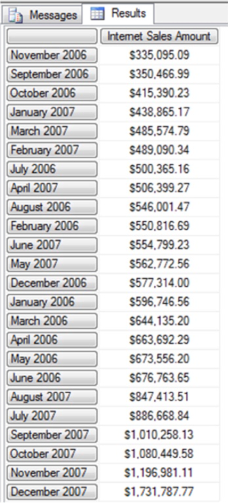
Illustration 1: Ordering of the Set, Non-hierarchized Ascending, by Internet Sales Amount
In the expression above, we use the Order() function to return the contents of the Month members of the Calendar user hierarchy, in “Break – Ascending” (BASC) order, with respect to the total Internet Sales Amount for each. Because we use BASC (and therefore the non-hierarchized option), we order without respect to the existing hierarchy, based solely upon the value of the measure Internet Sales Amount, in smallest to largest order. We obtain the Internet Sales Amount for each month, sorted in ascending order.
To further illuminate the effect that disregarding the hierarchy produces, let’s examine the dataset that would have been returned had we used the Order() function with the ASC option – that is, respecting hierarchy. Simply changing the BASC keyword to ASC in the expression above produces the results shown in Illustration 2.
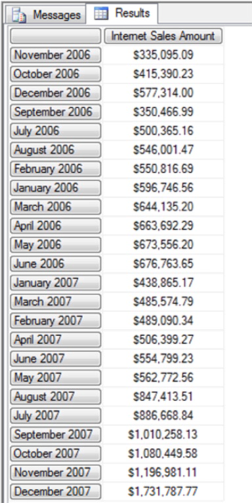
Illustration 2: The Dataset Returned Using Hierarchized Ascending, by Internet Sales Amount
A close examination of the returned data will reveal that, although it appears to generally ascend, “resets” happen at the breakpoints of the next higher level in the Calendar user hierarchy, the Quarter level, as indicated in Illustration 3.
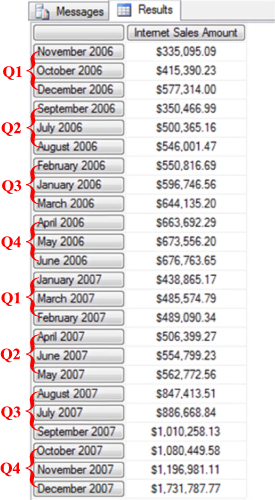
Illustration 3: The Dataset that Would Have Been Returned Using Hierarchized Ascending (ASC), by Internet Sales Amount
We note in our observation of the above the effects of enforcing the ascending sort, subject to the Calendar user hierarchy: The breakpoints occur based upon the Quarter level, the next highest up from the Month level. The sorting of Internet Sales Amount is taking place within the Quarter level, hence the “reset” with each Quarter break, as shown above.
Let’s get some hands-on exposure to non-hierarchized sorting with the Order() function. We’ll begin with a basic query, in the practice steps that follow, which orders the data it retrieves, returning it in its “natural” order. We will then have a frame of reference from which to get some practice with sorting the same data, disregarding the hierarchical structure of a representative dimension. We will then have a ready capability to compare the two result sets and reinforce our understanding about how sorting works when we override (or “break”) a user hierarchy.
Using the Order() Function to Generate Non-hierarchized Data
Let’s reinforce our understanding of the basics we have covered so far, and set up a scenario whereby we can “compare and contrast,” by using the Order() function in a manner that illustrates its operation in returning hierarchized data. As we learned in , and as we mentioned earlier, this represents one of the two general, order-type options that are available. We will rely upon the SQL Server Management Studio (“SSMS”), once again, as our tool for constructing and executing the MDX we examine, as well as for viewing the result datasets we obtain. (If you are not sure how to set up SSMS to access the Adventure Works DW 2008R2 database, then click for guidance.)
Start SSMS.
Connect with the appropriate Analysis Server, and select the Adventure Works cube within the Adventure Works DW 2008R2 database from the Object Explorer.
Click the New Query button just above the Object Explorer to open a blank Query pane, ensuring that Adventure Works appears in the Cube selector atop the Metadata pane to the right of the Object Explorer.
Beginning with a Hierarchized Sort …
-- DESC Keyword, Two Cross-joined Dims (Hierarchies left intact)
SELECT
{[Measures].[Internet Sales Amount] ,
[Measures].[Internet Order Quantity]} ON AXIS(0),
NON EMPTY
ORDER(
[Product].[Category].CHILDREN *
[Customer].[Country].CHILDREN,
[Measures].[Internet Sales Amount], DESC) ON AXIS(1)
FROM
[Adventure Works]
The Query pane appears, with our input.
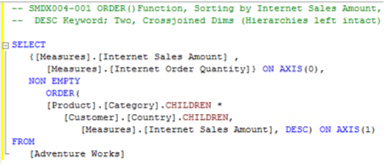
Illustration 4: Our Initial Query in the Query Pane …
The Results pane is populated by Analysis Services, and the dataset appears.
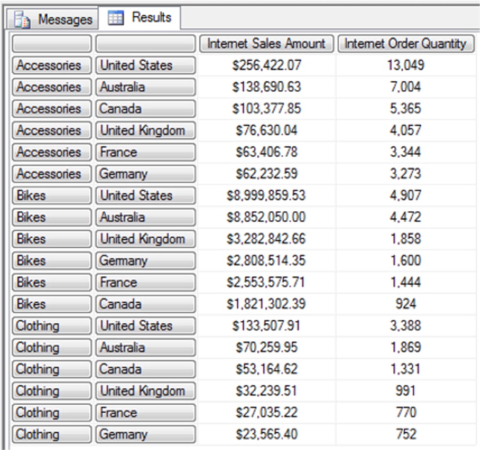
Illustration 5: Results Dataset – Hierarchized Ordering
In the returned dataset, we see that the data is ordered by the Product Category names. Within the positioning of the cross-joined Customer Country, we note that action of the hierarchized sorting is somewhat emphasized: while ordering is obviously by descending Internet Sales Amount, it’s easy to see that the sorts “restart” with each Product Category (and therefore the Customer Country children sort within the natural order of the Product Category members) , and that, while each member of the cross-joined Customer Countries is represented in each of the three sorts, these members change positions to match the ordering imposed by the Internet Sales Amount.
- Type (or cut and paste) the following query into the Query pane:
- Execute the query by clicking the Execute button in the toolbar...
- Select File -- Save MDXQuery1.mdx As …, name the file SMDX004-001, and place it in a meaningful location.
To sort solely upon Internet Sales Amount, without regard to hierarchical structure as we see here, we will need to break hierarchies, as we shall see in the next section.
Ordering without Regard to Hierarchies
Let’s say that, after performing the sort we examined above for a client, we are next asked to do something a bit more elaborate: we are asked by our colleagues to order the rows of the data set we have produced solely upon the measure Internet Sales Amount. They wish to see everything sorted by the measure from greatest to least value, without any of the ordering “resets” we saw earlier. They are therefore asking us to ignore the Product Category hierarchy altogether and to “pool” all Customer Countries for purposes of the sort.
Let’s employ Order() once again, working, as before, with the members of the Product Category and Customer Country levels of their respective dimensions, this time sorting them in truly descending order by Internet Sales Amount.
A new tab, again connected to the Adventure Works cube, appears in the Query pane.
-- BDESC Keyword to break dimension / hierarchy and
-- sort solely upon [Measures].[Internet Sales Amount]
SELECT
{[Measures].[Internet Sales Amount] ,
[Measures].[Internet Order Quantity]} ON AXIS(0),
NON EMPTY
ORDER(
[Product].[Category].CHILDREN *
[Customer].[Country].CHILDREN,
[Measures].[Internet Sales Amount], BDESC) ON ROWS
FROM
[Adventure Works]
The query recreates the same scenario we established earlier: it generates two dimensions side-by-side, the examination of the behavior of whose members will allow us to confirm our understanding of the Order() function in its non-hierarchical mode. (Note that the only difference between this query and the one previous, where we ordered with respect to hierarchies, is that we use the “BDESC” keyword, versus the “DESC” keyword.)
The Query pane appears, with our input:
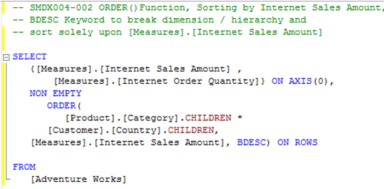
Illustration 6: Second Query: Order() Function (Descending), Breaking Hierarchy
The Results pane is populated, once more, by Analysis Services, and the dataset appears.
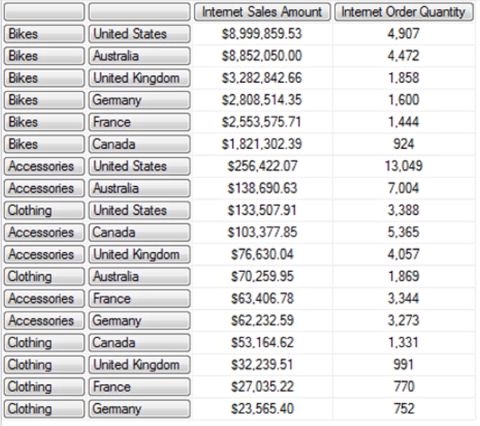
Illustration 7: Results Dataset – Order() Expression in Place, Non-Hierarchized, Descending
As expected, the Order() function sorts our Product Category and Customer Country combinations (thus we can consider the members of each dimension on a given row “pooled”) from “highest to lowest,” from the perspective of total Internet Sales Amount, irrespective of the hierarchy of either dimension in this sort.
- Select File -- New from the main menu.
- Select Query with Current Connection from the cascading menu that appears next.
- Type (or cut and paste) the following query into the Query pane:
- Execute the query by clicking the Execute button in the toolbar, once again.
- Select File -- Save MDXQuery3.mdx As …, name the file SMDX004-002.
Summary Exercise: Respect Hierarchies, then Ignore Them
Finally, let’s take look at another use of Order() wherein we ignore hierarchies. First, we’ll order a data set where hierarchies are respected, the output of which we can then compare to an identical query where we break hierarchies within the sort. Our initial query / data set pair will again provide a framework which we can easily alter to demonstrate the differences that result from a non-hierarchized sort among identical elements. It will also offer us another opportunity to use Order() in hierarchized, and then non-hierarchized, modes with multiple dimension sets.
Another new tab, again connected to the Adventure Works cube, appears in the Query pane.
First, let’s perform another sort by a measure, using the DESC keyword (and thus keep intact, once again, the hierarchies of two cross-joined dimensions).
-- DESC Keyword, Two Cross-joined Dims (respecting hierarchies)
SELECT
{[Measures].[Reseller Sales Amount]} ON AXIS(0),
{SUBSET
(ORDER
([Date].[Calendar].[Month].MEMBERS*
[Product].[Product Categories].[Category].MEMBERS
,[Measures].[Reseller Sales Amount]
,DESC
)
,0
,12
)} ON AXIS(1)
FROM
[Adventure Works]
The Query pane appears, with our input.
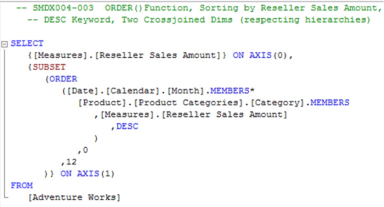
Illustration 8: Order() at Work, Again Respecting Hierarchies, in the Query Pane …
The Results pane is populated by Analysis Services, and the dataset appears.
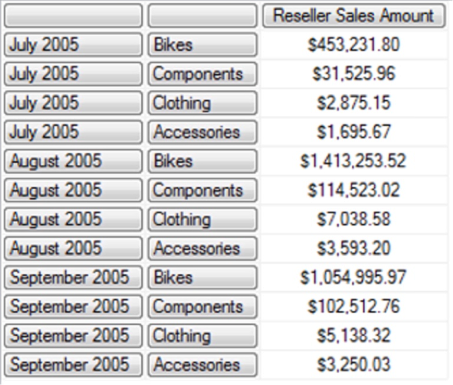
Illustration 9: Results Dataset – Hierarchized Ordering
While this query is a little more elaborate than our earlier hierarchy-respecting query, we can still see similar results with regard to the sort itself. In effect, we are returning the Reseller Sales Amount for the top twelve selling categories of products, based upon the same measure. The MDX Subset() function, which we explore in an independent Stairway to MDX article, is employed to return only the first twelve tuples in the set after the result is ordered using the Order() function.
In the returned dataset, we see that the data is ordered by the Calendar Month names. Within the positioning of the cross-joined Product Category, we note that action of the hierarchized sorting is made plain, as in our earlier example: while ordering is obviously by descending Reseller Sales Amount, we can again easily ascertain that the sorts “restart” with each Calendar Month (and therefore the Product Category children sort within the natural order of the Calendar Month members) , and that, while each member of the cross-joined Product Categories is represented in each of the three sorts, these members change positions to match the ordering imposed by the Reseller Sales Amount.
Next, we will see again that, to sort solely upon specified measure Reseller Sales Amount, without the regard to THE hierarchical structure we see in evidence here, we will once again need to break hierarchies, as we shall see in the next example. We’ll employ Order() once again, working, as before, with the members of the Calendar Month and Product Category levels of their respective dimensions, sorting them in truly descending order by the measure, Reseller Sales Amount.
Another new tab, again connected to the Adventure Works cube, appears in the Query pane.
-- BDESC Keyword, Two Cross-joined Dims (ignoring hierarchies)
SELECT
{[Measures].[Reseller Sales Amount]} ON AXIS(0),
{SUBSET
(ORDER
([Date].[Calendar].[Month].MEMBERS*
[Product].[Product Categories].[Category].MEMBERS
,[Measures].[Reseller Sales Amount]
,BDESC
)
,0
,12
)} ON AXIS(1)
FROM
[Adventure Works]
Note that the query is identical to the query we created in our last example, except for one small difference: the “DESC” keyword of the last query (which dictated that the Order() function respect hierarchies) has now become “BDESC.” Moreover, the query recreates the same scenario we established earlier: it generates two dimensions side-by-side, the examination of the behavior of whose members will allow us to confirm our understanding of the Order() function, only this time in its non-hierarchical mode.
The Query pane appears, with our input:
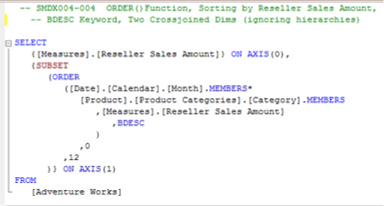
Illustration 10: Order() Function (Descending), Once Again Breaking Hierarchy …
The Results pane is populated, once more, by Analysis Services, and the dataset appears.
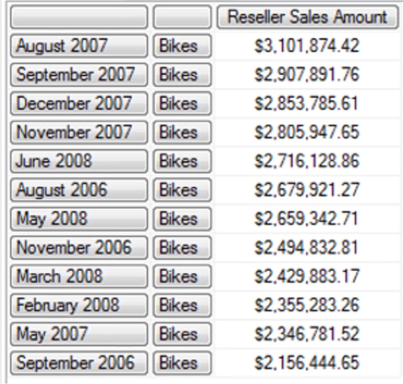
Illustration 11: Results Dataset – Order() Expression in Place, Non-Hierarchized, Descending
As expected, the Order() function sorts our Calendar Month and Product Category combinations (as if they were “pooled,” once again, from “highest to lowest,” from the perspective of total Reseller Sales Amount, completely without regard to the hierarchy of either dimension in this sort. (The Subset() function, once again, serves to deliver the Reseller Sales Amount for the top twelve selling categories of products, based upon the same measure.)
- Select File -- New from the main menu.
- Select Query with Current Connection from the cascading menu that appears next, as we did earlier.
- Type (or cut and paste) the following query into the Query pane:
- Execute the query by clicking the Execute button in the toolbar...
- Select File -- Save MDXQuery1.mdx As …, name the file SMDX004-003, and place it in a meaningful location.
- Select File -- New from the main menu, once again.
- Select Query with Current Connection from the cascading menu that appears next, as we did before.
- Type (or cut and paste) the following query into the Query pane:
- Execute the query by clicking the Execute button in the toolbar, once again.
- Select File -- Save MDXQuery3.mdx As …, naming the file SMDX004-004.
- Select File -- Exit to leave the SQL Server Management Studio, when ready.
Summary …
In this article, we further explored the MDX Order() function, which, as we noted in The Order() Function: Maintaining Cube Hierarchies, finds itself within expressions and queries that rank from the simplest to the most advanced. We learned, in general, that Order() provides sorting capabilities that allow us to reach beyond the natural cube structure, and this function is thus an important member of our analysis and reporting toolsets.
We then expanded beyond what we had learned in The Order() Function: Maintaining Cube Hierarchies , and focused upon the use of the Order() function to return non-hierarchized data via the appended BASC or BDESC order specifications, comparing the results we obtained in each of a couple of practice exercises to a those of identical queries, in each case, that respected hierarchies. Throughout the article, we examined the syntax involved with Order(), and showed some business uses for the function by generating queries that capitalized upon its capabilities.