

Recently I decided I wanted to write an article concerned with SQL Server Integration Services 2005 (SSIS) for publication on SQLServerCentral.com and was trying to decide what the content should be. Checkpoints, event handlers, the new expression language, Foreach Loop enumerators, fuzzy matching, package migration… loads of possibilities and all things that I hope to explore in the future. It occurred to me however that much of the audience for this article wouldn’t be able to relate to it because they hasn’t yet used or even seen SSIS; they would have no frame of reference.
For this reason I figured an article introducing the fundamental concept of SSIS would be more useful to existing users of Data Transformation Services (DTS), for that is the product that SSIS is replacing. There have been a few high level articles up to now about some of the new features of SSIS but I wanted this article to delve deeper into the detail and explore the fundamental differences between SSIS and DTS from an ETL developer’s perspective.
In my opinion the biggest fundamental difference between DTS and SSIS is that in the latter workflow management has been separated from data manipulation. This is a key paradigm shift and is what I want to try and illustrate here.
In DTS these 2 very different concepts of ETL were built in the same place, on the same design surface. The following screenshot illustrates this.
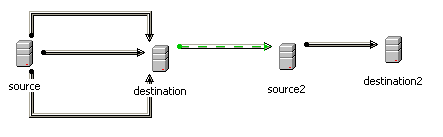
DTS users will recognize what we have here.
- 3 data pumps that move data between ‘source’ and ‘destination’. In the real world scenario I am modeling this is 3 dimension tables called DIM_PRODUCT, DIM_CUSTOMER and DIM_TIME.
- A data pump that moves data between ‘source2’ and ‘destination2’. In the real world scenario I am modeling this a fact table called FACT_SALES.
- An OnSuccess precedence constraint to ensure that the fact table population occurs after the 3 dimension table populations because the fact table requires surrogate keys from those dimension tables.
Data pumps are data manipulations and precedence constraints form the workflow of a DTS package. As stated these are both built on the same design surface.
Now let’s look at what this would look like in SSIS. Each of the data manipulations would be built separately in the data-flow designer which would, in effect, give us 4 different objects that we can place into a workflow.
N.B. SSIS data-flows are analogous to DTS data pumps
First we have a data-flow called “Load DIM_PRODUCT” that populates our DIM_PRODUCT table.
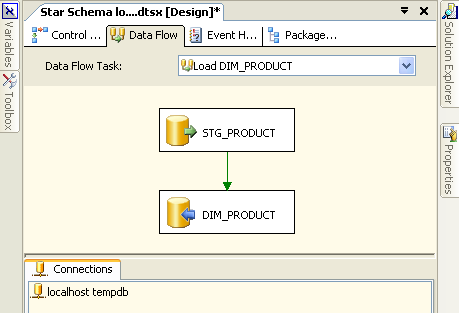
Let’s take a quick look at what we have here:
- A connection to a database server (not necessarily SQL Server) called “localhost tempdb”
- An object representing a table called STG_PRODUCT that sits on “localhost tempdb”
- An object representing a table called DIM_PRODUCT that sits on “localhost tempdb”
- A green arrow representing data flowing from STG_PRODUCT to DIM_PRODUCT
- A user-defined name for our data-flow: “Load DIM_PRODUCT”
Note that data flows between abstracted sources and destinations which do not contain connectivity information. Instead they contain a reference to a connection manager (“localhost tempdb”) that defines physically where the data sources and destinations are. In this case the source and destination are on the same server so only one connection manager is required. Compare this to the DTS package illustrated previously where, in the interests of clarity, I had to define multiple connection objects that all reference the same server.
The data-flows for populating DIM_CUSTOMER and DIM_TIME are very similar to this so I am not going to show them here.
We also need a data-flow to populate our fact table FACT_SALES.
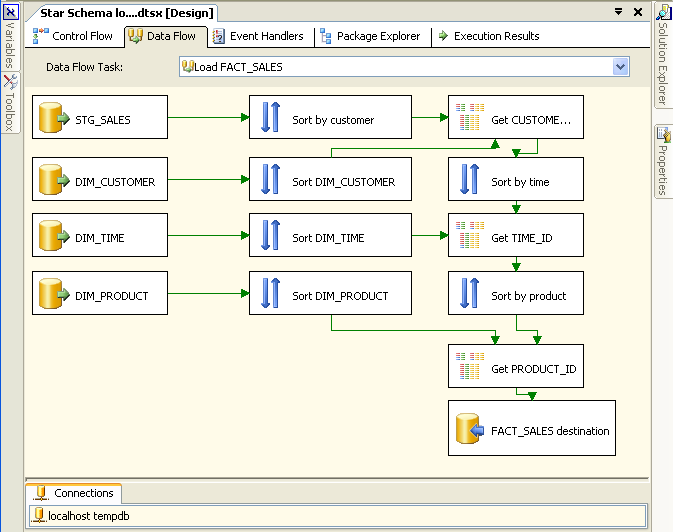
This data-flow looks a lot more complicated than it actually is. All it does is to join the fact data (in STG_SALES) to the dimension tables in order to get the surrogate keys for insertion into the fact table.
We now have 4 data-flows that we join together into a workflow. In SSIS a workflow is called a control-flow. A control-flow links together our modular data-flows as a series of operations in order to achieve a desired result. In this case our control-flow looks like this:
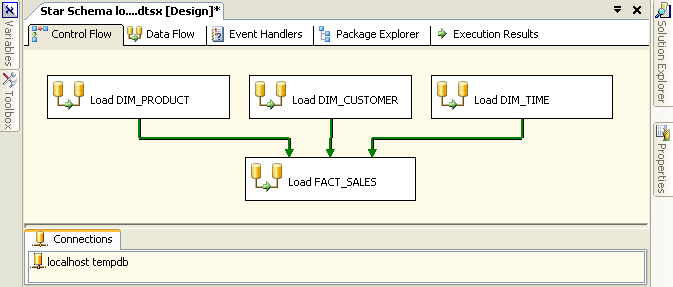
In the case of a control-flow the arrows are precedence constraints whereas in a data-flow they literally represent a flow of data. SSIS precedence constraints are just about the only objects that have been migrated from DTS in essentially the same form, although they have been improved in SSIS.
Some things to note about the control-flow:
- The same connection is used by both the control-flow and the data-flows.
- Double clicking on any of the data-flows will open up the data-flow in the data-flow
editor.
Conclusion
The aim of this article is to demonstrate how SSIS has separated data-flow from control-flow which is the most obvious change that DTS developers will encounter when they first start to build SSIS packages. It is important to understand this new ETL paradigm in order to start down the path of
being an SSIS developer.
You can download the SSIS package I have built in conjunction with this article. It should help to demo the concepts that I am talking about here. Note that this was built in a pre-RTM version of SQL Server 2005 called IDW11 which was released in December 2004.

