

I’m sure most of you have detached a database, maybe to move it to
another server, or just to move it to another drive. Did you know that if
you’ve enabled replication for the database you can no longer detach it?
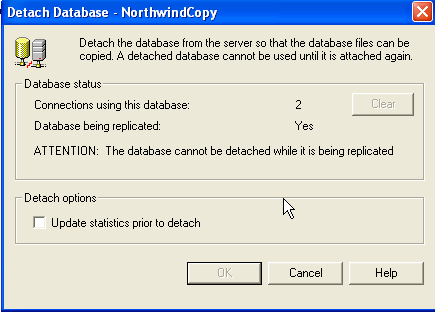
I ran into this a couple years ago. We had added disk space and I
needed to move things around, but almost every database I have is replicated.
It seemed like there should be an easier way, but sometimes you go with what
you know (and is recommended), so I scripted out all the existing publications,
removed replication, moved the database, then ran the scripts to add
replication back. It takes a good amount of time and effort if you have many
publications.
All of the following comments apply only to transactional replication,
I would expect similar behavior with merge replication but I have not tested
it.
Just in thinking about it, I saw no reason detach shouldn’t work. If
you detached the database and log file, the log file would contain any
committed transaction that had not yet been picked up by the log reader.
Provided you reattached the same files back to the same server it seemed like
everything would pick up right where it left off.
To start testing I set up a copy of Northwind, enabled transactional
replication, and created a publication containing only the category table, and
then created a subscription to a new database called NorthwindCopy2. After
verifying that replication was working, I went back to make sure I was sure
about the detach behavior. I tried three separate methods and all returned the
same result – failure. Those methods were:
- Detaching via Enterprise Manager
- Running sp_detachdb from Query Analyzer
- Running DBCC Detachdb which is what really does the
work
Clearly it was able to discern that the database was published. I
remembered seeing an sp_dboption switch, so I started there. Syntax is
straightforward:
Sp_dboption ‘NorthwindCopy’, ‘published’, false
Running it successfully changed the publication status, it also wiped out the publication! Obviously someone is serious about not letting mortals detach a replicated database.
So, time for some deeper study. Assuming the info about replication is
probably tied to the database, I query sysdatabases. Nothing obvious, so I jump
to BOL. Sure enough, the category column contains a flag for replication and my
test environment confirms the settings show below.

Because I needed to modify a system table, I needed a couple extra
steps before I could try the detach again:
sp_configure 'allow updates', 1
reconfigure with override
update sysdatabases set category=0 where name='northwindcopy'
At this point if you refresh Enterprise Manager the database no longer appears to be published and the publication folder is gone. Detaching the database works without an error as expected.
The first difference I noticed from the early sp_dboption attempt is
that the replication jobs were still present. A good cleanup would have removed
them. The log reader job had failed indicating it could not run sp_replcmds,
which makes sense since the database has been detached!
Before I tried to put things back I wanted to rule out one area of
concern I had – what if the database id changed? In my test case the removed
database had been 9. I ran a create database statement to create a placeholder
database and verified it had been assigned 9, assuring that when I reattached
my original database it would get a new id.
I reattached using Enterprise Manager, and then ran the opposite script
from earlier:
update sysdatabases set category=1 where name='northwindcopy'
Refreshing Enterprise Manager showed the database as published, the
publication was present again, and when I restarted the logreader job it ran
without error. I was able to successfully apply transactions to my subscriber
database.
Caveats? A few!
- This is only going to work if you reattach to the same server AND you don’t change anything else related to replication (distribution database, jobs, etc)
- You’re making a change to a system table. Not a reason to shiver in fear, but exercise caution, and be sure to reset allow updates back to false when you’re done
- I have not tested this with merge replication
- It’s probably not going to be supported if something goes wrong – have a backup and a script of your publications
It’s not a technique you’ll use often, but maybe one day it will save you some time.

