

Automating DTS execution
We use extensively DTS technology to move and transform data in our BI Application; we had to find an acceptable solution to re-link the packages on Production server after moving them from the development and QA environments. This article presents a solution to the time consuming job of manually linking 50+ DTS packages after importing them on a new SQL box.
The Problem
We create parent packages that use the Execute Package task to call a child package. By default the Execute Package Task will use the PackageID (a GUID) to load and execute a package. The PackageID is assigned when you save a new package together with a VersionID and a timestamp of creation time.
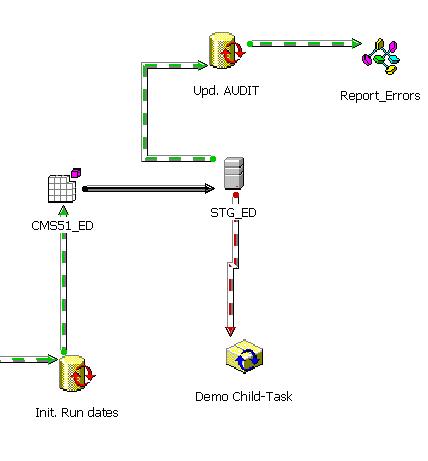
Figure 1
A simple way to illustrate this is to open a package and then use 'Save As' option, giving the package a new name. Then in the Initial package create an ‘Execute Package Task’ and establish a dependency between the Master package and a Child package by linking (STG_ED) connector to the Child package (Demo Child-Task) like in Figure 1.
If you were to replace the Child package for some reason, like saving it after making changes, this would create a completely new VersionID, with a new time stamp and a new ProgramID! And this would break the linkage between packages, as the VersionID is pointing to an old VersionID with the same name. The PackageID {543E….184} in the background of Figure 2 is obsolete, and the execution will fail!

Figure 2
Our Solution
We removed the dependency on the PackageID/VersionID, by blanking out the PackageID property of the ExecutePackageTask. By doing this, this will cause another property, the PackageName property, to be used. You can test this easily via the Disconnected Edit feature. This is available on the Package menu, right click the blank space of the package and select "Disconnected Edit". But for our run-time environment this is not enough.
Our solution was to add a Dynamic Properties Task to perform the NULL assignment for dependent Child packages at run-time. This task will form the basis for our process along with a blank Global Variable, which will be assigned to all PackageID properties. The execution of the child package will then use the name of the package instead of the PackageID. The steps in the process are as follows:
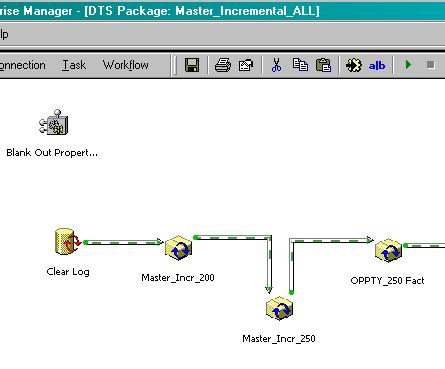
Figure 3
Create a Dynamic Property Task, named Blank out PropertyID in the picture 3 above. Click on Edit button; the next dialog will be like the one in Fig 4.

Figure 4

Figure 5
This brings up the Package Properties dialog. For every task in the left side ( DTSTask_DTSExecutePackageTask_1, 2, etc) edit the PackageID and Click on Set button (as in Figure 5).

Figure 6
Next, you’ll create and Assign a Global variable (or reuse an existing one). If you create a new Global variable DO NOT assign any value to it. This will be translated to a NULL value at run-time; you can reuse it repeatedly for the entire Task list.
To insure the portability between servers, please do the following:
- make sure that the SQL Server you’re using for packaging the DTSs, is registered as a (LOCAL)(Windows NT) like in the Figure 7.
- ensure all inner packages use the (local) SQL reference server, no hard coded server name.
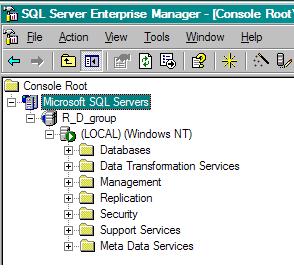
Figure 7.
In a future document we’ll show how to implement a DTS packages distribution and activation on a new SQL box.