

I personally believe that no matter how much you are knowledgeable in the technical arena, if you are not adopting best practices you will be lost in one day. We as IT professionals best practices have become order of the day. To achieve this, there are many tools around us which will reduce the inconsistency. Today I will discuss about the practices tool for SQL Server professionals. That tool is SQL Best Practices Analyzer.
Introduction
Shown above is the best practice Analyzer icon and the About information dialog, which prevents me from having to write 5 lines of specs.
What it Does ?
In simple terms what it does is give you the warnings for the best practices that can be adopted if you are not following them. It has divided the best practices into 10 categories, shown below in the table. For each category there are the specific best practices or rules which you can select to analyze.
| Group | Best Practices (Rules) |
| Backup & Recovery | Database Backups Failed Backup Events Master and MSDB Backup NO_LOG log backups Recovery Model Usage Reuse of back file |
| Configuration options | Affinity Mask Allow Updates Enabled Fiber Mode Max Server Memory Priority Boost Enabled Recovery Interval Set Working set size disabled |
| Database Design | Tables without Primary Keys or Unique Constraints User Object Naming |
| Database Administration | Auto Creation of Statistics Database Compatibility Level Database Disk Space Database File Compression Database File Placement Database SQL Options Index Fragmentation Log file Growth Virtual File Growth |
| Deprecation | CREATE DATABASE with FOR LOAD Defaults and Rules Deprecated Builtin Functions Non-Ansi Outer Joins SETUSER usage String = Expression Aliasing Use of sp_dboption |
| Full-Text | Duplicate Full-Text predicates Full-Text Change Tracking Enabled Full-Text Background Services Optimized Full Text BLOB Extension Type Full Text Catalog Count Full Text Catalog Placement Full Text Property Store Size MSSearch Service Account Timestamp Column for Full-Text |
| General Administration | AVs and Severe Errors Error Log Size NULL @@servername 'tempdb' Current Size Unexpected Shutdowns User Objects in Master |
| Generic | Object Prefixes Object Suffixes |
| T-SQL | Cursor FOR UPDATE column list Cursor Usage Explicit Index Creation INSERT Column List Nested Triggers Configuration NOCOUNT Option in Triggers NULL Comparisons Results in Triggers Scoping of Transactions SELECT * SET Options Temp Table Usage TOP without ORDER BY Use of Schema Qualified Tables/Views |
| SQL Server 2005 readiness | Invalid User Tables Obsolete DBCC Commands Obsolete sp_configure Commands Obsolete Stored Procedures Obsolete System Tables ORDER BY with constants 'Sys' User Schema WITH Hint Specification |
Installation
You can download this free tool from
Microsoft. It will create a database called sqlbpa in your SQL Server while installing the tool. This database will be used to save the configurations of your best practices.
Creating a Best Practice Group
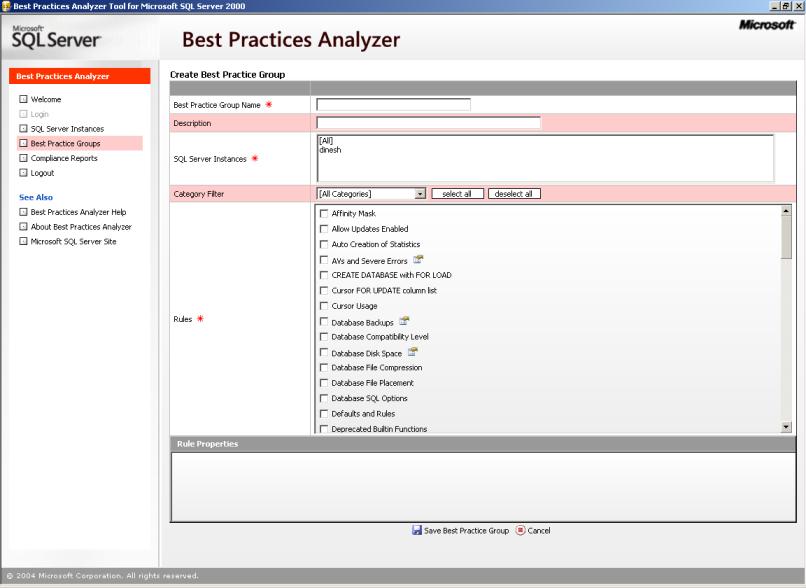
Above is the screen in which you create a best practices (BP) group. You can create BP for the all the servers which are registered on your PC. For one BP group, many rules can be selected from one or more categories. Just clicking the rule will take you to the description relevant to that rule.
Executing the Group
You can execute one or more groups at once. After creating BP groups you will be taken to the list of BP groups. You have an option of filtering them according to your requirements. Then select the groups that you want to execute by double clicking on them.
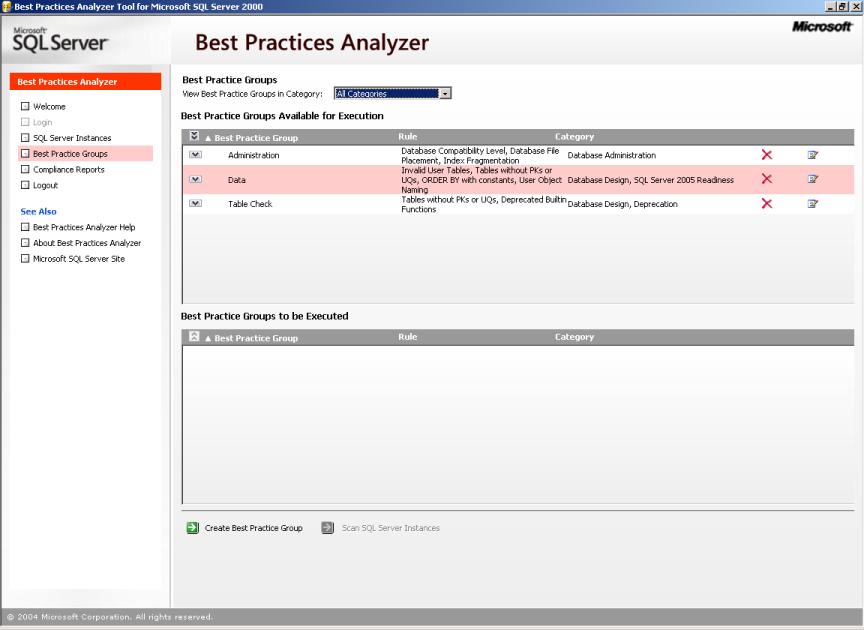
After selecting the BP groups Scan SQL Server Instances will allow you to execute the groups by means of a wizard and will give you an output something like this.

I don't think you will need an explanation after this. It is so simple.
Conclusion
Definitely this is a simple and handy tool to have in your toolkit. However as always the case, use this tool as a slave but not as a master. Any warnings should be taken into consideration before jumping into change them.
I didn't go into deep to discuss each an every rule which is available in the tool. Nevertheless, If you need me to discuss some more about some specific rule drop me an email to dineshasanka@ieee.org .
