SSRS Report on Local Server works fine but not through Remote server
-
Hi,
I deployed a SSRS (2005) report on my Report Server and is working fine, but when tried through Remote Server then received the error as:
"Cannot create a connection to data source 'abc'. (rsErrorOpeningConnection)
For more information about this error navigate to the report server on the local server machine, or enable remote errors"
I searched for this issue but no luck to resolve this so far. I'm using Windows Credentials to access this report and having a Sysadmin permissions. I even permit myself as LOG on LOCALLY on the server.
Could someone please share any idea on resolving this issue.
Thanks
Shishir
-
can you post the errors on remote access??
[font="Times New Roman"]rfr.ferrari[/font]
DBA - SQL Server 2008
MCITP | MCTS remember is live or suffer twice!
the period you fastest growing is the most difficult period of your life! -
Did you set up the authentication for the data source on the report server or just in your project?
-
Thanks, the error is:
----------------
[font="Arial"]An error has occurred during report processing. (rsProcessingAborted)
Cannot create a connection to data source 'abc'. (rsErrorOpeningConnection)
For more information about this error navigate to the report server on the local server machine, or enable remote errors.[/font]
-----------------------------
I'm deploying the report and the Data Source is using Windows Credentials to access this report. When I tried to run the report on local (Srv01) server (http://Srv01\Reports\pages\report.aspx), it works fine but when trying from other server, it gave me this error.
-
in Management Studio, you must be logon on instance of report server and enable the property EnableRemoteErrors to see more details that error.
follow this -> Management Studio -> in screen: Connect to Server, server type: Reporting Services -> locate the server instance in Server Name; after connected, in Object Explorer, right-click in server instance -> properties -> advanced tab -> EnableRemoteErrors set property like TRUE and restart internet browser.
after this procedure, post again the errors.
[font="Times New Roman"]rfr.ferrari[/font]
DBA - SQL Server 2008
MCITP | MCTS remember is live or suffer twice!
the period you fastest growing is the most difficult period of your life! -
I have created ssrs report using vs 2008.
I deployed it. It works fine locally. when i try to access from remote machine its is asking for credentials & not showing the report. Please give your suggestion on this.
-
Just to note,
I was recently having a similar issue. The test database I was working on gets restored from back up periodically from another machine. So that breaks the Sql Server user on the database mapping to the login on server. Thus I need to re-create the test user account (that I employ on the database ) to match to that of the login on this test server. As an additional step, since I call stored procedure in my reports, I also have to grant the execute permission to that user in that database. So depending on your circumstance you may need to allow access to views and tables if the account you use to connect with in ssrs does not already have read access on the database. Just thought I'd share.
----------------------------------------------------
-
I am having the same issue...I tried to enable remote errors but unfortunately I do not see enable remote errors under Advanced options tab under management studio.
Filestream
Miscelleneous
Network
Parallelism
These are the only options which I see listed under Advanced.
-
rfr.ferrari (5/17/2011)
in Management Studio, you must be logon on instance of report server and enable the property EnableRemoteErrors to see more details that error.follow this -> Management Studio -> in screen: Connect to Server, server type: Reporting Services -> locate the server instance in Server Name; after connected, in Object Explorer, right-click in server instance -> properties -> advanced tab -> EnableRemoteErrors set property like TRUE and restart internet browser.
after this procedure, post again the errors.
I am having the same issue...I tried to enable remote errors but unfortunately I do not see enable remote errors under Advanced options tab under management studio.
Filestream
Miscelleneous
Network
Parallelism
These are the only options which I see listed under Advanced.
- arunak.raghunam - Thursday, March 31, 2016 6:36 AM
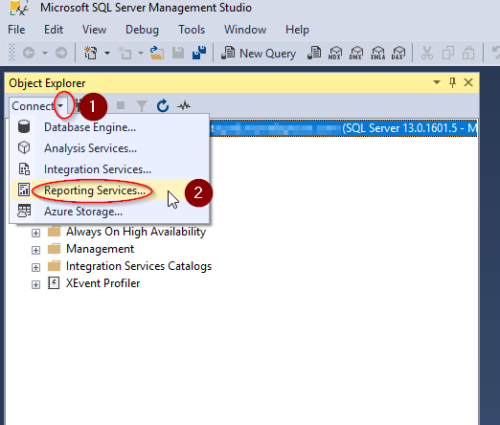
The reason that you are not seeing the advanced tab is that you are not connected to the ReportServer in the Object Explorer. To connect to the Report Server you need to:
1. Select the Reporting Services option from the drop down list exposed when you click the connect arrow in the SSMS menu.
2. Once connected then you can follow the instructions regarding selecting the properties/advanced and then Enabling the Remote Errors.
Viewing 10 posts - 1 through 9 (of 9 total)
You must be logged in to reply to this topic. Login to reply